Custom Toolbar Buttons v2

AnkiWeb addon 583648253

Adds a + button to the card-editing toolbar for creating custom buttons that insert content at the cursor or around selected text, with custom shortcuts and dark-mode support.
AI-generated summary; may contain mistakes.

card-creationformattingshortcutsfork-or-reupload

Open on AnkiWeb GitHub Find alternatives

AnkiWeb

Votes
2 (👍 2 · 👎 0)
Updated
2026-08-11
Anki versions
25.09.5~
License
Not found (this does not mean that the addon has no license)
Virus scan
No ClamAV match A match does not prove malware. No match does not prove that the code is safe.
Languages
Python, JavaScript, JSON
Description language
en

Maintenance

active

  • Last update or commit: 2026-08-11 (82 days before the snapshot).
  • Commits in the last year: 18.
  • Issues: 0 open, 0 closed.
  • Pull requests: 0 open, 0 merged.

Will it work on my Anki?

Version branches
Min AnkiMax AnkiUpdated
2.1.525.09.5+2026-08-11
History across monthly snapshots

Loading…

Similar addons

custom toolbar buttons

Adds a + button to the card editor toolbar for creating custom buttons that insert specified text at the cursor or around selected text.

formatting

1 votes 21% approval 👍 1 · 👎 0 Anki 25.02.5~ Updated 2026-08-26
Shuffled List

Creates unordered lists whose items display in random order on each front-side review, using a toolbar button or Ctrl+Shift+U on highlighted text.

formattingshortcutsquiz

4 votes 30% approval 👍 3 · 👎 1 ⭐ 0 Anki 2.1.54~ Updated 2022-09-26
Image Search v3 fork

Searches multiple image providers using note fields or selected text and inserts chosen images into a configured field, with browsing, per-note-type settings, and smart replacement.

card-creationfork-or-reupload

3 votes 21% approval 👍 2 · 👎 1 ⭐ 2 Anki 26.05~ Updated 2026-10-16
anki_ruby_support

Adds customizable ruby annotations (furigana/pinyin) to selected card text via toolbar button or shortcut key, with adjustable font size, text color, and error logging.

formattingshortcuts

1 votes 21% approval 👍 1 · 👎 0 Anki 2.1.1~ Updated 2025-01-14

Description

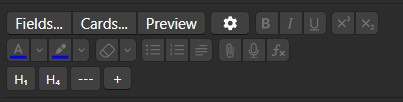
This Add-on adds a + button to the toolbar on the card editing page. Click it to insert a custom button to its left. Available button functions: For Example, this User added an H₁, H₄, and a --- Button:

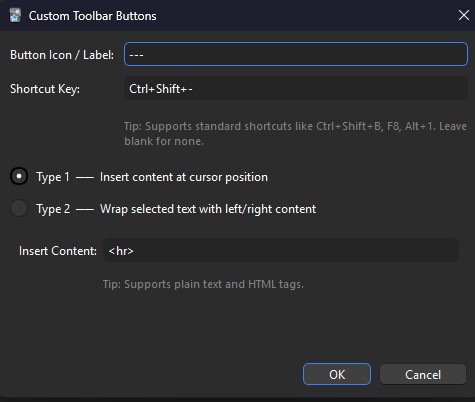
  • Insert specified content at the cursor position For example for a line (horizontal rule):

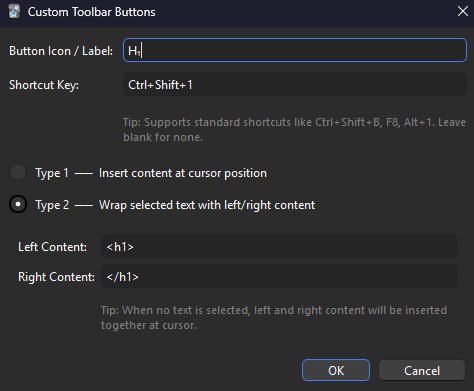
  • Insert content to the left and right of selected text For example for a H₁-Button:

Also added support for custom shortcuts.

Note: this is a fixed version of 457467704 on ankiweb.net, in addition I translated the add-on text to English and added support for dark-mode on anki. I also added a shortcut option.

README

Custom-Toolbar-Buttons-Anki

This Add-on adds a + button to the toolbar on the card editing page. Click it to insert a custom button to its left.

For Example, this User added an H₁, H₄, and a --- Button

image

Available button functions:

  • Insert specified content at the cursor position

    For example for a line (horizontal rule):

    image

  • Insert content to the left and right of selected text

    For example for a H₁-Button:

    image

Also added support for custom shortcuts.

Note: this is a fixed version of 457467704 on ankiweb.net, in addition I translated the add-on text to english and added support for darkmode on anki. I also added a shortcut option.