Frosted Glass: Anki Aesthetic Overhaul
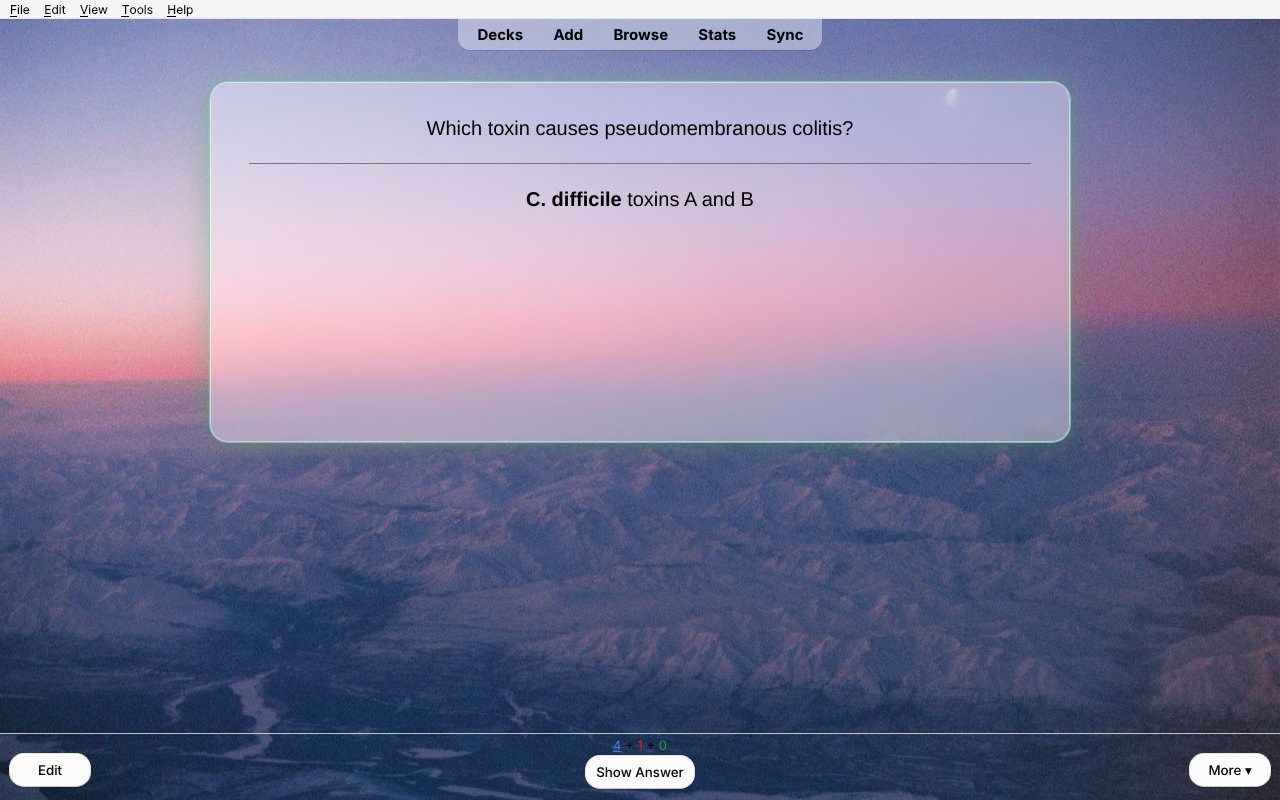
A calm, good-looking Anki. Your cards sit on a pane of frosted glass over a wallpaper that runs behind every screen, and each answer gets a soft glow and a quiet piano note.

Features
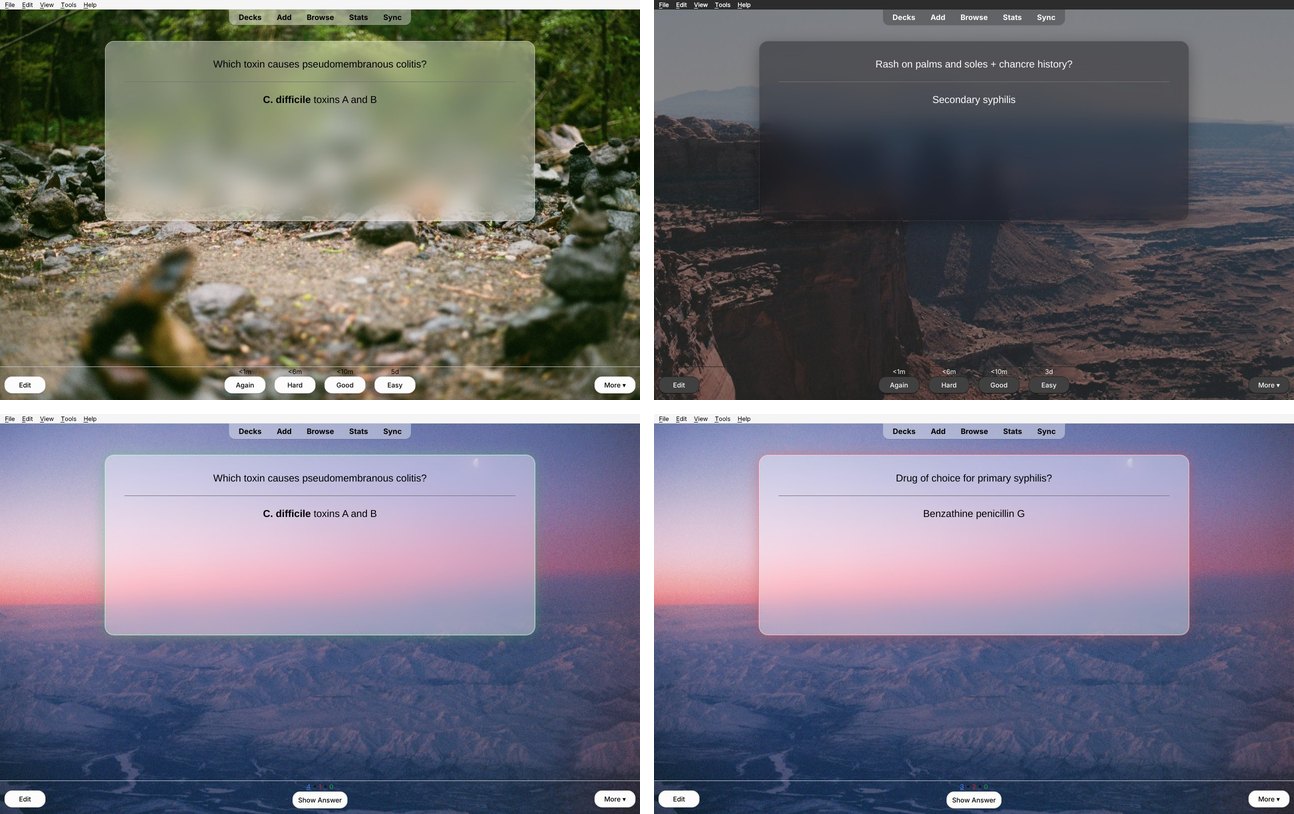
- Wallpaper behind every screen: the deck list, deck overview, review screen and the top and bottom bars. The picture lines up seamlessly across all three areas, in light and dark mode.
- New wallpapers every day, in the style you choose:
- Professional photos from Wallhaven's General category (no anime, no people), on the topics Nature, Architecture and Landscape, plus any tags you type in yourself.
- Anime art from Konachan and Wallhaven, safe-rated pictures only.
- Or turn downloads off and keep one picture forever. Four built-in wallpapers are included, and you can add your own.
- Frosted-glass card with adjustable opacity, blur, width, height and corner roundness. Cards keep a steady size, and longer cards grow smoothly.
- Answer feedback: a soft glow in the answer's color, plus a short piano note (Again, Hard, Good and Easy each have their own). You can adjust the volume or turn either off, and use your own sounds if you like.
- Card text size slider. It changes only the size; bold, colors and links stay as they are.
- New wallpaper button on the deck list, and Ctrl+Shift+W anywhere.
- Custom deck gear icons (optional).
- One Settings window. Every change shows up live without reloading.
| Light mode |
Dark mode |
 |
 |
| Glow on Good |
Glow on Again |
|
 |
Install
From AnkiWeb (recommended): in Anki, go to Tools → Add-ons → Get Add-ons… and paste the code from the AnkiWeb page. Then restart Anki.
From a file: download frosted_glass_theme.ankiaddon from the latest release. Then go to Tools → Add-ons → Install from File… and restart Anki.
Updating keeps your settings and pictures. If you switch between installing from a file and installing from AnkiWeb, the copy you install last brings over everything from the other one and turns the other one off. You can then delete the old copy from Tools → Add-ons.
It needs Anki 2.1.50 or newer and works on Windows, macOS and Linux.
Using it
Open Tools → Frosted Glass → Settings….
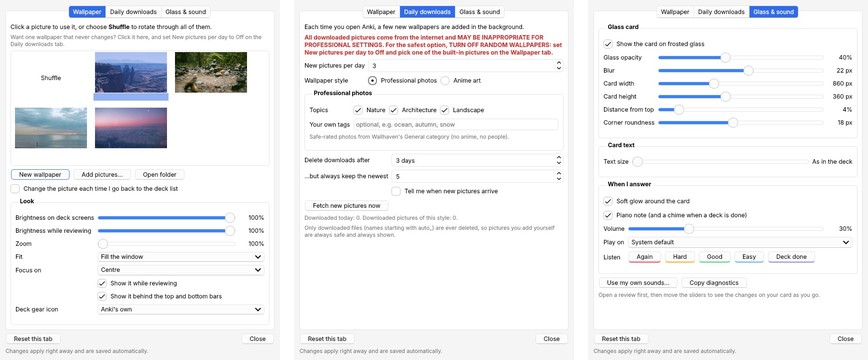
| Wallpaper |
Daily downloads |
Glass & sound |
 |
 |
 |
- Wallpaper: click a picture to keep it, or choose Shuffle. Add pictures… copies your own pictures in. You can also adjust brightness, zoom and fit here.
- Daily downloads: choose how many new pictures you get each day (or Off), the style (Professional or Anime), and which topics or sites to use. Downloads are deleted after a few days, but the newest few are always kept. Pictures you add yourself are never deleted.
- Glass & sound: the glass card, text size, glow, piano note and volume.
Want a wallpaper that never changes? Click it on the Wallpaper tab, then set New pictures per day to Off.
⚠️ About downloaded pictures
All downloaded pictures come from the internet and MAY BE INAPPROPRIATE FOR PROFESSIONAL SETTINGS. Only pictures rated "safe" are downloaded, but that rating depends on how each uploader labeled their picture. For the safest option, TURN OFF RANDOM WALLPAPERS: set New pictures per day to Off and pick one of the built-in pictures. The Settings window always shows this warning.
Coming from other add-ons
On first launch, it imports your pictures, gear icons and settings from Custom Background Image and Gear Icon (AnKing). It then turns that add-on off so the two don't both draw backgrounds. The old add-on's folder stays in place, so you can remove it from Tools → Add-ons.
Your files
Everything you add or change lives in the add-on's user_files folder (Tools → Frosted Glass → Open add-on files folder) and is kept across updates:
background/: wallpapers. Drop in any .jpg, .png or .webp.gear/: deck gear icons.glass_sounds/: put again.wav, hard.wav, good.wav or easy.wav here to use your own sounds.css/custom_*.css: extra CSS for each screen, if you want to go further.
Building from source
python build.py
This writes dist/frosted_glass_theme.ankiaddon from src/frosted_glass_theme. To try changes, copy or link src/frosted_glass_theme into Anki's addons21 folder and restart Anki.
Credits and license
Also by me: Card Read Aloud 🎧
Want your cards read to you? Card Read Aloud reads your reviews aloud in a natural, gentle voice (Kokoro). It runs offline on your own computer and is made for med students: it says "I V", not "Roman four", and knows 1,400+ medical pronunciations.
📷 Photo credit for the built-in wallpapers: Aidan S.