Anki-Translator (Forked and updated to Anki 2.1)

AnkiWeb addon 702944768

Adds a translate button to Anki's editor that fetches vocabulary translations from PONS, letting users choose languages and insert selected translations into flashcards.
AI-generated summary; may contain mistakes.

card-creationdictionaryfork-or-reupload

Open on AnkiWeb GitHub Find alternatives

AnkiWeb

Votes
7 (πŸ‘ 4 Β· πŸ‘Ž 3)
Updated
2020-02-13
Anki versions
2.1.15~
License
GPL-3.0 (from the license file in the package)
Virus scan
No ClamAV match A match does not prove malware. No match does not prove that the code is safe.
Languages
Python, XML
Description language
en

Maintenance

abandoned

  • Last update or commit: 2020-02-13 (2453 days before the snapshot).
  • Commits in the last year: 0.
  • Issues are turned off.
  • Pull requests: 0 open, 0 merged.

Will it work on my Anki?

Version branches
Min AnkiMax AnkiUpdated
2.1.02.1.15+2020-02-13
History across monthly snapshots

Loading…

Similar addons

Duolingo Dictionary

Provides a searchable Duolingo dictionary interface in the editor and card browser, letting users find translations and paste usage examples, though example sentences currently cannot be fetched.

card-creationdictionaryobsoletebeta

2 votes 9% approval πŸ‘ 1 Β· πŸ‘Ž 1 ⭐ 3 Anki 2.1.49~ Updated 2022-05-10
Chinese Vocabulary Generator

Generates Chinese vocabulary notes with simplified and traditional characters, pinyin, meanings, audio, and example sentences fetched online, adding them to selected Anki decks.

card-creationcard-templatesdictionary

5 votes 38% approval πŸ‘ 4 Β· πŸ‘Ž 1 ⭐ 3 Anki 2.1.40~ Updated 2021-02-24

Description

Anki-Translator (Forked and updated to Anki 2.1) This Add on is forked from https://github.com/jannewulf/Anki-Translator To view the source go to https://github.com/XKainz/Anki-Translator Anki-Translator is a Add-On for the flashcard program Anki. This Add-On translates vocabularies for you. So if you want to add a new flashcard to your deck you can open this Add-On and let it find translations for you from the web. All the Translations come from PONS. Available Languages (Not all combinations): Arabic Chinese Dutch English French German Greek Italian Latin Polish Portuguese Russian Slovenian Spanish Turkish Czech Danish Hungarian Norwegian Swedish Elvish Usage Just click this translate button in Anki's Editor. A new window opens where you choose the source and target languages and if you want grammar infos (like grammatical gender, etc.). After you entered the vocable and clicked on 'Translate' the translations get loaded. You mark the checkboxes of the translations you want to have on your flashcard and leave the window with a click on 'OK'. The chosen translations get copied on your flashcard. Default Values You can change the default values for source and target language and also for the grammar infos. Just change the values of the variables in the file '__init__.py'. You can find the file in the Add-Ons Folder of your Anki Installation. Installation This Add-On is also posted on the [Anki Add-Ons Website]. You can use the Add-On Installer, which is integrated into Anki, to install the Translator.

README

Anki-Translator (Forked and updated to Anki 2.1)

######v1.1 Anki-Translator is a Add-On for the flashcard program Anki.

This Add-On translates vocabularies for you. So if you want to add a new flashcard to your deck you can open this Add-On and let it find translations for you from the web.

All the Translations come from PONS.

Available Languages (Not all combinations):

  • Arabic
  • Chinese
  • Dutch
  • English
  • French
  • German
  • Greek
  • Italian
  • Latin
  • Polish
  • Portuguese
  • Russian
  • Slovenian
  • Spanish
  • Turkish
  • Czech
  • Danish
  • Hungarian
  • Norwegian
  • Swedish
  • Elvish

Usage

alt tag

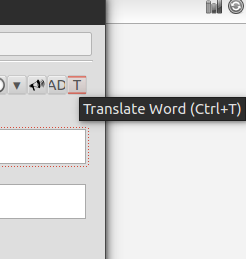
Just click this translate button in Anki's Editor.

alt tag

A new window opens where you choose the source and target languages and if you want grammar infos (like grammatical gender, etc.).

After you entered the vocable and clicked on 'Translate' the translations get loaded. You mark the checkboxes of the translations you want to have on your flashcard and leave the window with a click on 'OK'.

The chosen translations get copied on your flashcard.

Default Values

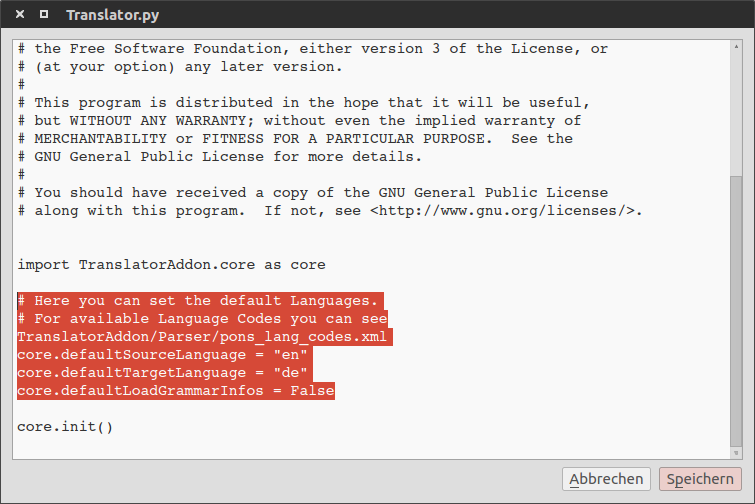
You can change the default values for source and target language and also for the grammar infos. Just change the values of the variables in the file 'init.py'. You can find the file in the Add-Ons Folder of your Anki Installation.
alt tag

(See the highlighted lines.)

Installation

This Add-On is also posted on the [Anki Add-Ons Website]. You can use the Add-On Installer, which is integrated into Anki, to install the Translator.

Or you can download this project as a zip and uncompress the folder into your Anki Addon folder (../addons21/Anki-Translator-master).