πŸ€– Anki LM Studio Integration

AnkiWeb addon 777816304

Connects Anki to local LM Studio models for AI-powered card generation and enhancement, with field templating, batch processing, customizable prompts, temperature control, and configurable output fields.
AI-generated summary; may contain mistakes.

card-creationaisync-integration

Open on AnkiWeb GitHub Find alternatives

AnkiWeb

Votes
0 (πŸ‘ 0 Β· πŸ‘Ž 0)
Updated
2025-07-22
Anki versions
25.07.2~
License
Not found (this does not mean that the addon has no license)
Virus scan
No ClamAV match A match does not prove malware. No match does not prove that the code is safe.
Languages
Python, JSON
Description language
en

Maintenance

stale

  • Last update or commit: 2025-07-22 (467 days before the snapshot).
  • Commits in the last year: 0.
  • Issues: 1 open, 0 closed.
  • Pull requests: 2 open, 0 merged.

Will it work on my Anki?

Version branches
Min AnkiMax AnkiUpdated
2.1.125.07.2+2025-07-22
History across monthly snapshots

Loading…

Similar addons

OmniPrompt-Anki

Generates AI-powered flashcard content such as definitions, translations, and explanations from multiple cloud or local providers, with reusable prompts, batch processing, and multi-field output.

card-creationainote-managementformattingshortcuts

7 votes 65% approval πŸ‘ 7 Β· πŸ‘Ž 0 ⭐ 9 Anki 2.1.66~ Updated 2026-04-23
AI Language Explainer

Generates contextual written explanations and spoken audio for target words in sentence cards using OpenAI models and selectable TTS engines, with one-click or batch processing.

card-creationaisync-integrationdictionary

10 votes 72% approval πŸ‘ 10 Β· πŸ‘Ž 0 ⭐ 9 Anki 2.1.66~ Updated 2025-10-07
Gemini Speak

Uses Google Gemini AI to rewrite selected Anki text for natural speech, then generates audio with voice, model and processing-mode controls, smart caching and no external dependencies.

card-creationai

13 votes 58% approval πŸ‘ 11 Β· πŸ‘Ž 2 ⭐ 0 Anki 2.1.66~ Updated 2025-06-11

Description

Connect Anki to local AI models for intelligent card generation and enhancement ⚑

Overview: This addon bridges Anki with LM Studio, enabling you to use local AI models to process and generate flashcard content. Perfect for language learning, studying, and content creation without relying on cloud services.

Requirements

Anki (any recent version) LM Studio installed with a chat model Command line access for server startup Recommended: 4B+ parameter models for quality results

✨ Key Features Local AI Processing - Uses LM Studio's local models (no internet required) Field Templating - Reference any card field using {{field_name}} syntax Batch Processing - Process multiple selected cards simultaneously Customizable Prompts - Separate system and user prompts for fine control Temperature Control - Adjust AI creativity/randomness Open Source - Both Anki and LM Studio are free tools

πŸ’‘ Common Use Cases Generate example sentences for vocabulary cards Create mnemonics for memory palace techniques Translate content between languages Generate questions from study material Enhance existing cards with additional context

Please go to the Github so you can understand the instalation process: GitHub Repository: https://github.com/DaniloJendick/Anki_StudioLM_Integration Support: Report issues on GitHub or contact developer
README

Anki LM Studio Integration

Connect Anki to LM Studio for seamless AI-powered card generation and processing.

Features

  • Integrates two open-source tools: Anki + LM Studio
  • Customizable system and user prompts
  • Field-based templating with {{field_name}} syntax
  • Batch processing of selected cards

Prerequisites

  • Anki installed
  • Command line access (required for server startup)

Note: Results depend on model quality and prompt engineering. Larger models typically produce better outputs.


Quick Setup

Step 1: Install & Configure LM Studio

  1. Download LM Studio

    • Get it from: https://lmstudio.ai/
  2. Download a Model

    • Go to Discovery β†’ Model Search
    • Download any chat model (recommended: llama-3.2 or similar)
    • (I did not have great success with DeepSeek but you can try, I usually use the gemma-3, it also seems that less than 4B gives horrible results)
  3. Load the Model

    • Navigate to Chat tab
    • Click "Select a model to load"
    • Choose your downloaded model
    • Wait for "Model loaded" confirmation

Step 2: Start Local Server

  1. Enable LLM Service

    • Go to Discovery β†’ App Settings β†’ Developer
    • Check "Enable Local LLM Service"
  2. Start Server via Command Line

    Linux/Mac:

    # First time only (bootstrap)
    ~/.lmstudio/bin/lms bootstrap
    
    # Start server
    lms server start
    

    Windows:

    lms server start
    

Step 3: Install Anki Addon

  1. Open Anki
  2. Go to Tools β†’ Add-ons β†’ Get Add-ons
  3. Enter addon code: 777816304
  4. Restart Anki

Step 4: Test Connection

  1. Open Anki Browser
  2. Click LM Studio dropdown β†’ Test Connection
  3. Troubleshoot if errors occur (retry previous steps or contact developer)

Step 5: Configure Output Field

  1. LM Studio dropdown β†’ Configure Fields
  2. Set Target Field to the note field that will receive AI output
  3. Click Save Configuration
  4. Optional: Test Preferred Model and Load Model functions

Step 6: Setup Prompts

  1. LM Studio dropdown β†’ Prompt Configuration

  2. System Prompt: Define AI behavior, constraints, and response style

  3. User Prompt: Your actual request/question

    • Use {{field_name}} to reference Anki fields
    • Example: {{Front}}, {{English}}, {{Definition}}
    • Works with text fields only (no image/audio support)
  4. Temperature: Set randomness level (lower = more deterministic)

  5. Click Save Configuration

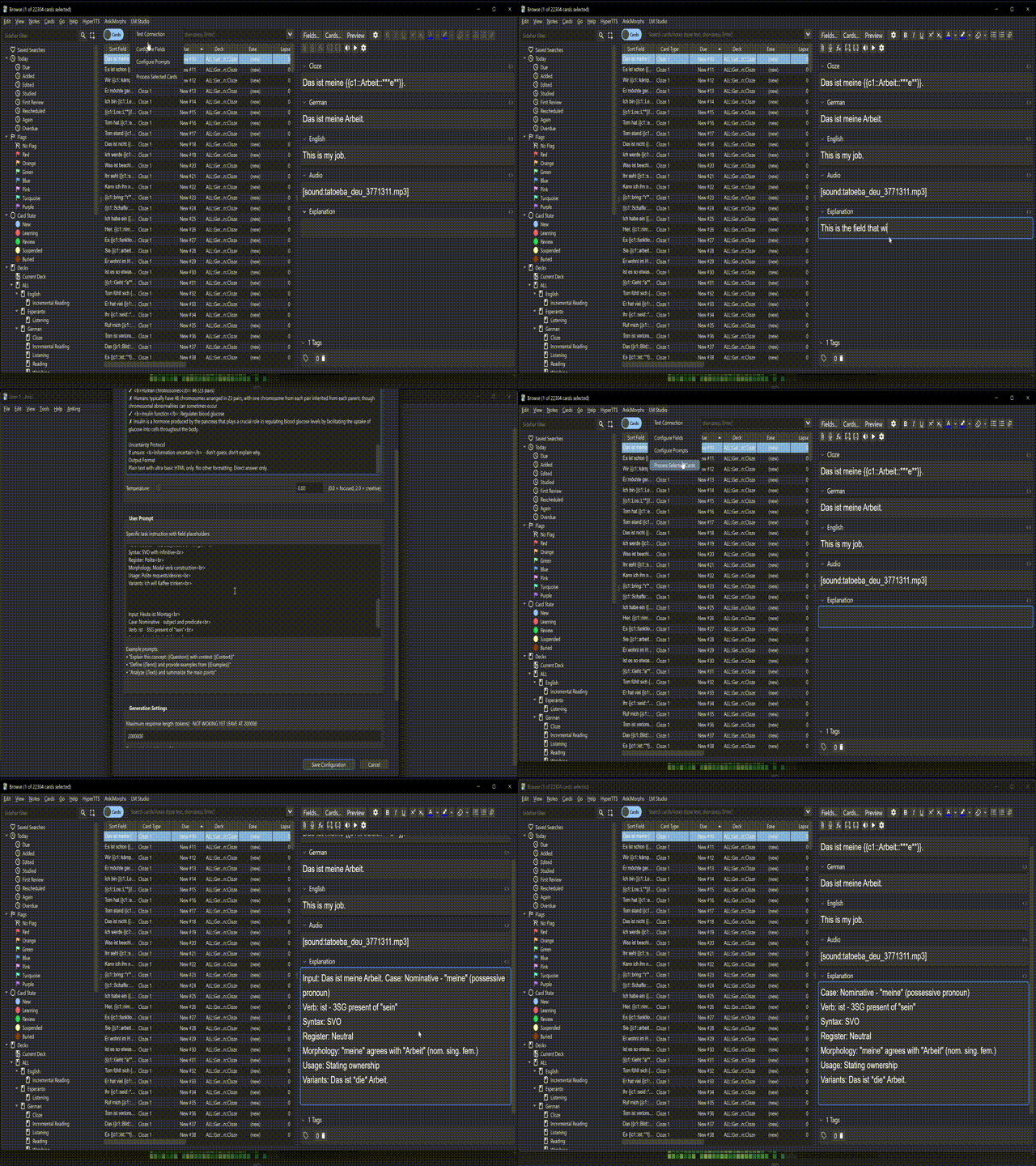
Step 7: Process Cards

  1. Select cards in Anki Browser
  2. LM Studio dropdown β†’ Process Selected Notes
  3. Wait for completion

Field Templating

Reference any text field in your prompts using double braces:

  • {{Front}} - Front field content
  • {{Back}} - Back field content
  • {{Custom_Field}} - Any custom field name

Limitations: Image and audio fields not supported.

Example Prompts

See included files for reference:

  • SystemPromptExample.txt - Sample system prompt configurations
  • UserPromptExample.txt - Sample user prompt templates

Use these as starting points for your own prompt engineering.

Troubleshooting

  • Connection Issues: Verify LM Studio server is running
  • Poor Results: Try larger models or improve prompt engineering
  • Field Errors: Check field names match exactly (case-sensitive)

Demo

  • Alt text