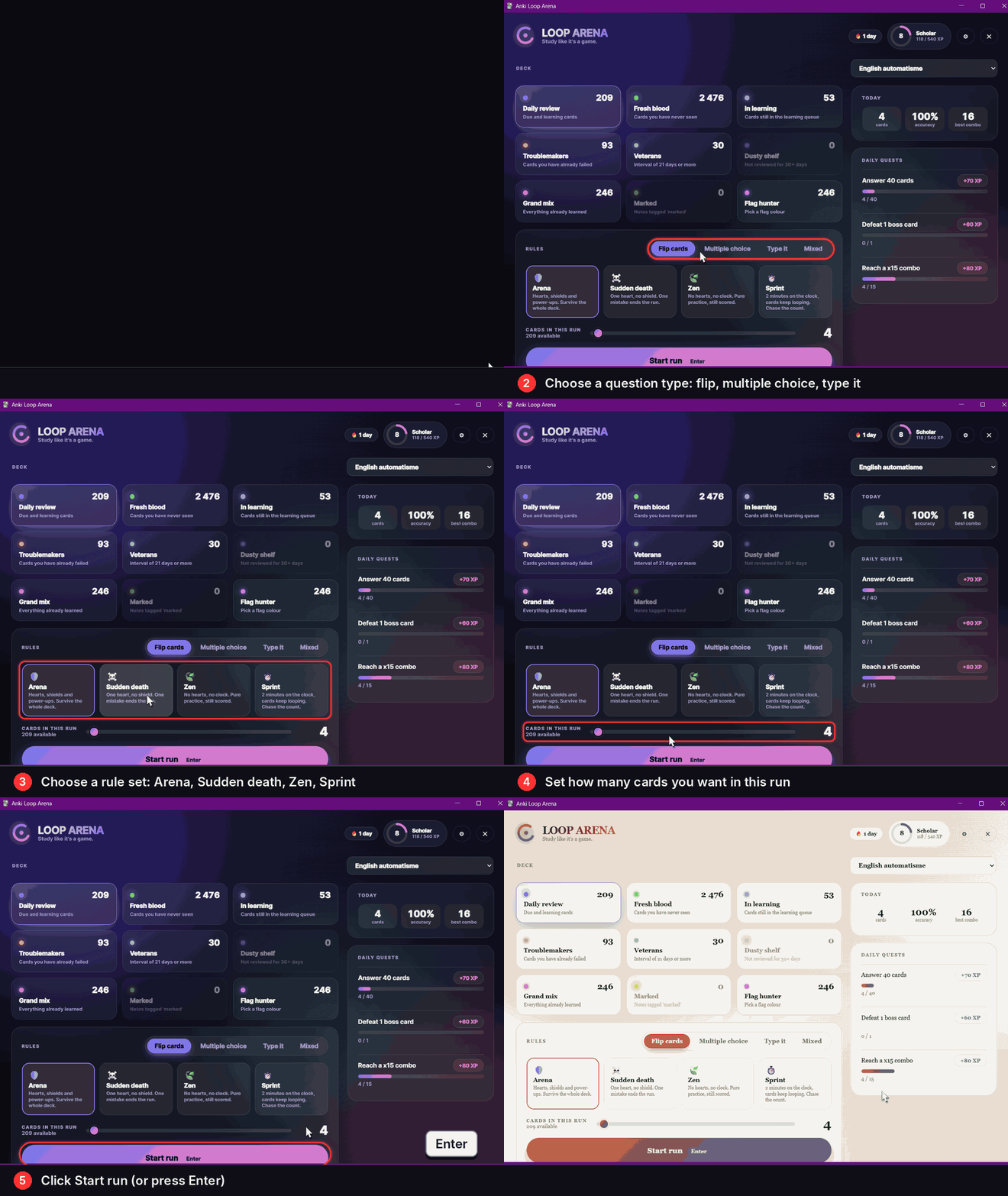
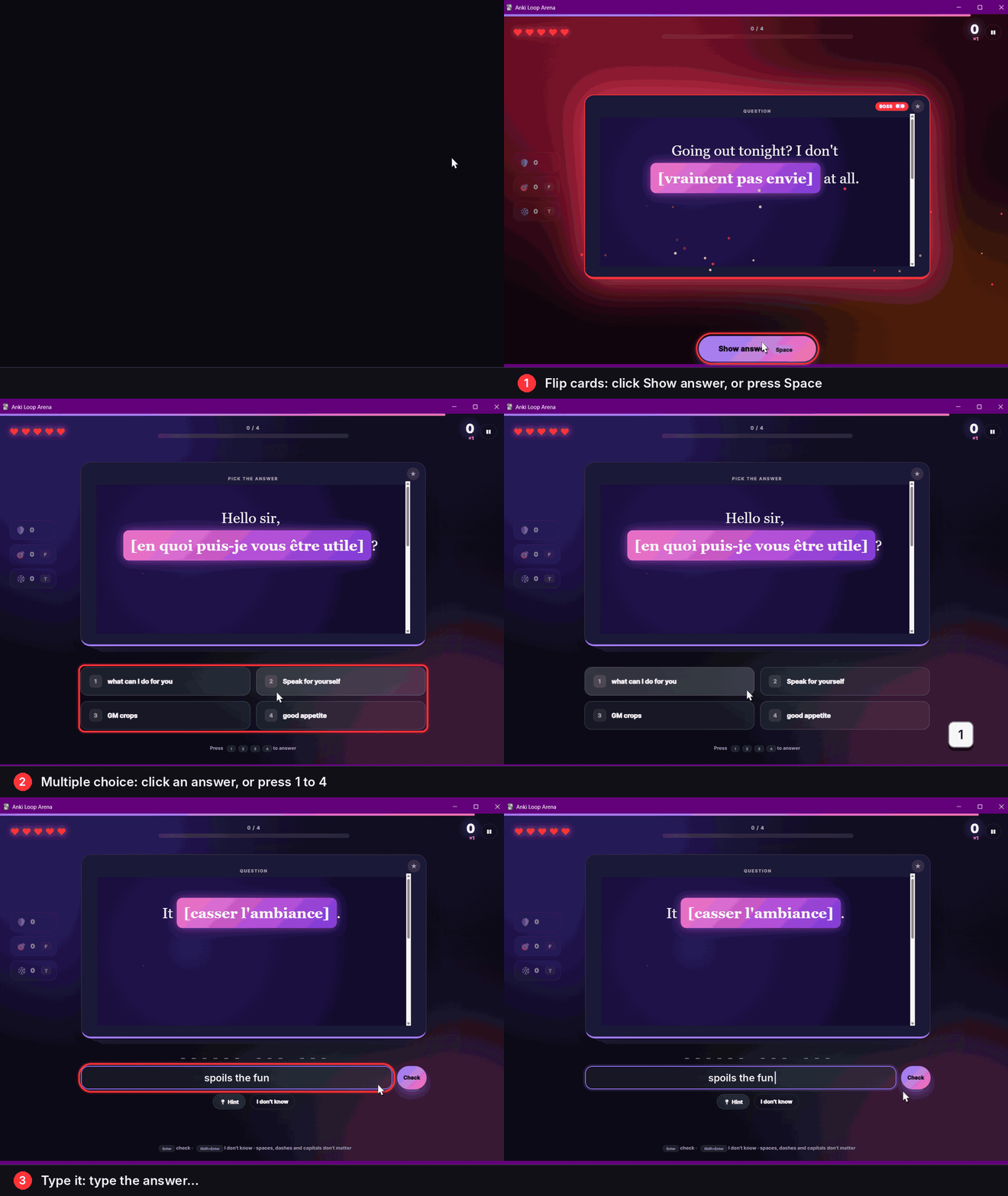
Demo GIFs: real screenshots of the add-on, with pointer, click effects, red frames, keys and captions added on top. They are not a live screen recording.
Anki Loop Arena
Turn your Anki reviews into a game. Pick a deck, pick the cards, pick the rules, and play a run: hearts, shields, combos, boss cards, XP and daily quests.
How to start
- Open Tools > Loop Arena (shortcut Ctrl+Shift+L), or right-click in the Browser and choose Loop Arena to play the cards you selected.
- Choose a deck and a card source (due cards, new cards, failed cards, flags...).
- Choose how to answer and the rules, set how many cards, then click Start run (or press Enter).
Features
- Card sources: Daily review, Fresh blood (new), In learning, Troublemakers (failed before), Veterans (21+ day interval), Dusty shelf (30+ days), Grand mix, Marked, Flag hunter, and your Browser selection.
- Question types: Flip cards, Multiple choice, Type it, or Mixed. Multiple choice and Type it are used when the answer is short text; other cards fall back to flipping.
- Rules: Arena (hearts, shields, power-ups), Sudden death (one mistake ends the run), Zen (no hearts, no clock), Sprint (2 minutes, cards keep looping).
- Power-ups: shield, 50/50, freeze the card timer.
- Boss cards: cards you failed 3+ times (or tagged leech) fight back: 2 hits, triple points.
- Progress: combo multiplier, score, XP and levels, daily quests, achievements, day streak, a 14-week activity map and a leaderboard per deck and rules.
- Look and feel: 4 themes (Nebula, Sunset, Terminal, Paper), adjustable text size, sound effects, and a "Reduce motion" option. It also follows the system animation setting.
- Optional: write your answers to Anki's real scheduler (Again / Hard / Good / Easy). This is off by default: runs are practice only.
Shortcuts
- Flip cards: Space / Enter to flip, 1-4 for Again / Hard / Good / Easy, arrow keys, or drag the card.
- Quiz: 1-4 to pick, F = 50/50, T = freeze timer.
- M = mark note, Esc or P = pause, F11 = fullscreen.
Languages
English, French, Spanish, German, Italian, Portuguese, Dutch, Russian, Japanese and Chinese. The add-on follows Anki's language (or set language in the add-on config). English and French are written by the author; the other translations are machine-quality (AI written), so corrections are welcome. Right-to-left languages are not supported yet (English is used instead).
Privacy
Everything stays on your computer. The add-on sends no data over the internet. Your profile, settings and scores are stored in the add-on's user_files folder. The "Buy me a coffee" link only opens in your browser when you click it.
Support the project
This add-on is free and made by one person. If it helps you study, you can buy me a coffee. A small invitation appears once per new version; turn it off with show_update_banner in the add-on config, or click "Don't show again".

Created by Habib Lamine Ouattara. Questions and bug reports: GitHub page.