AnkiMaps: Mind Maps inside Anki

AnkiWeb addon 817937364

Turns Anki notes into interactive mind maps with customizable connections, minimap navigation, rich content rendering, and in-context review.
AI-generated summary; may contain mistakes.

exportreview-flownote-managementformattingappearance

Open on AnkiWeb GitHub Find alternatives

AnkiWeb

Votes
2 (👍 2 · 👎 0)
Updated
2026-10-12
Anki versions
2.1.1~
License
MIT (from the license file in the package)
Virus scan
No ClamAV match A match does not prove malware. No match does not prove that the code is safe.
Languages
JavaScript, Python, CSV, JSON
Description language
en

Maintenance

active

  • Last update or commit: 2026-10-12 (20 days before the snapshot).
  • Test files: 4.
  • GitHub Actions workflows: 1.
  • Commits in the last year: 42.
  • Issues: 0 open, 2 closed.
  • Pull requests: 0 open, 4 merged.
  • Median first response: 341 hours (1 answered issues and pull requests).

Will it work on my Anki?

Version branches
Min AnkiMax AnkiUpdated
2.1.1+2026-10-12
History across monthly snapshots

Loading…

Similar addons

Anki X Markdown X MindMap

Supports writing Markdown and previewing it as an interactive zoomable mind map, with customizable icons, fonts, styles, and question, answer, detail, and code fields.

formattingappearancecard-templates

36 votes 90% approval 👍 36 · 👎 0 ⭐ 27 Updated 2022-07-09
Gamepad/Controller Mapper

Adds native gamepad support to Anki, mapping controller buttons and analog sticks to keyboard shortcuts, card actions, and smooth scrolling, with multi-profile detection, a modifier layer, and press-to-bind setup.

review-flowshortcutsaccessibility

3 votes 44% approval 👍 3 · 👎 0 Anki 2.1.1~ Updated 2026-10-04

Description

Turn your Anki notes into visual mind maps.

AnkiMaps helps you connect related ideas, see the structure behind what you are learning, and review cards directly from the context of a map. It works inside Anki and uses your existing notes.
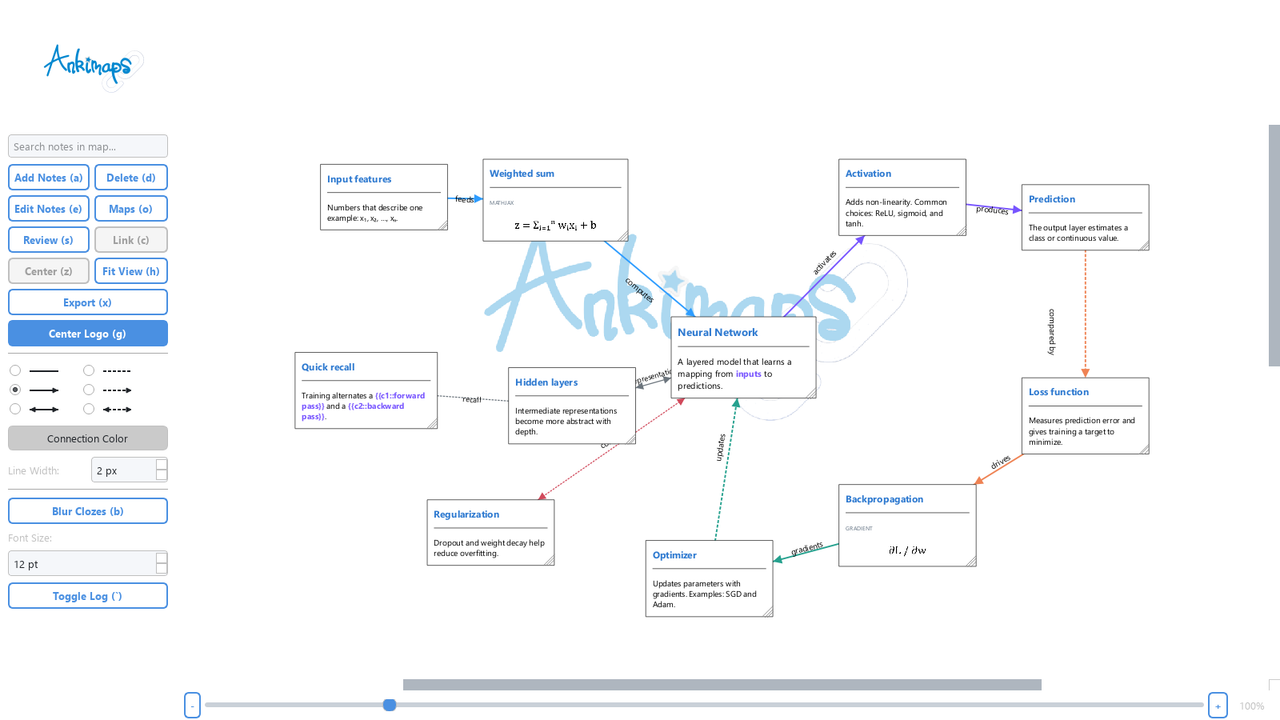
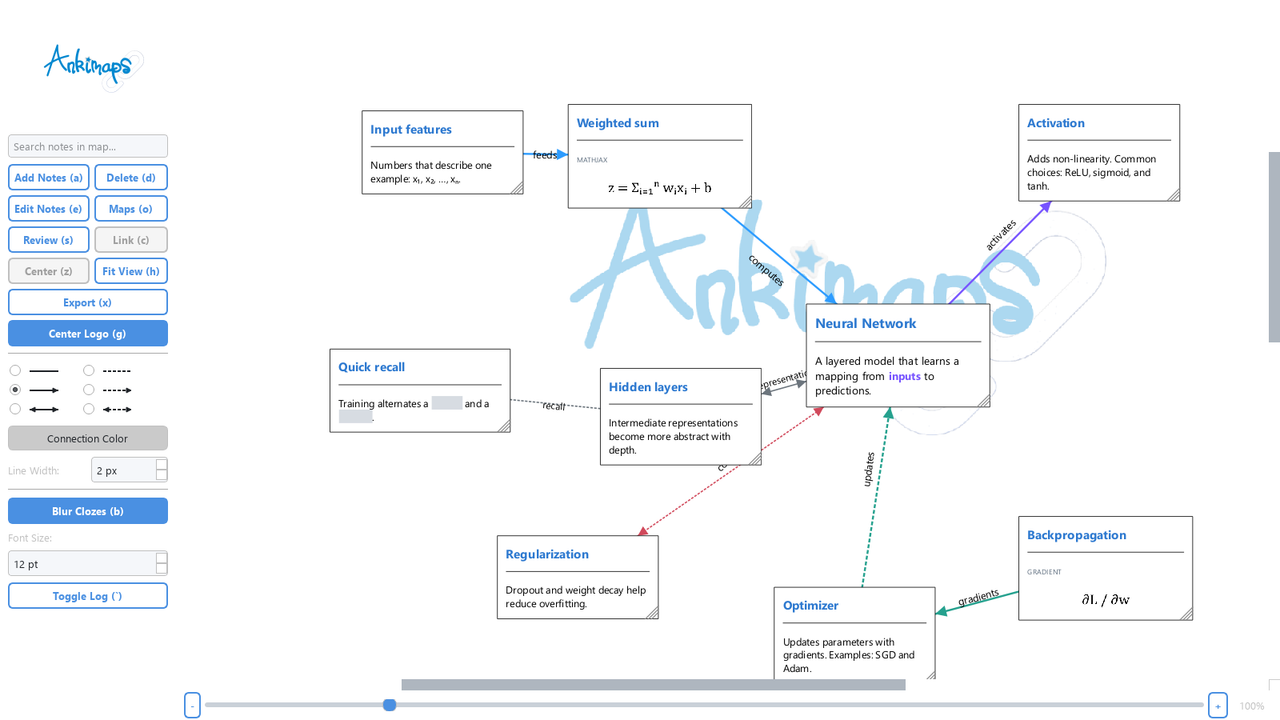
AnkiMaps editor with a neural-network mind map

What's new in v2.8.0

  • Minimap navigation: see all notes and connections in a compact overview, including notes outside the main viewport.
  • Click or drag to explore: move around large maps without changing the zoom level.
  • Show or hide the overview: use the Minimap button beside the zoom controls.
  • Light and dark themes: the minimap follows the map's theme and stays in place when you pan, zoom, or resize.

Recent additions also include MathJax in map notes, undoable node removal, release notes inside AnkiMaps, clearer review errors, cloze-answer masking, persistent dark mode, a redesigned map library, and portable map bundles.
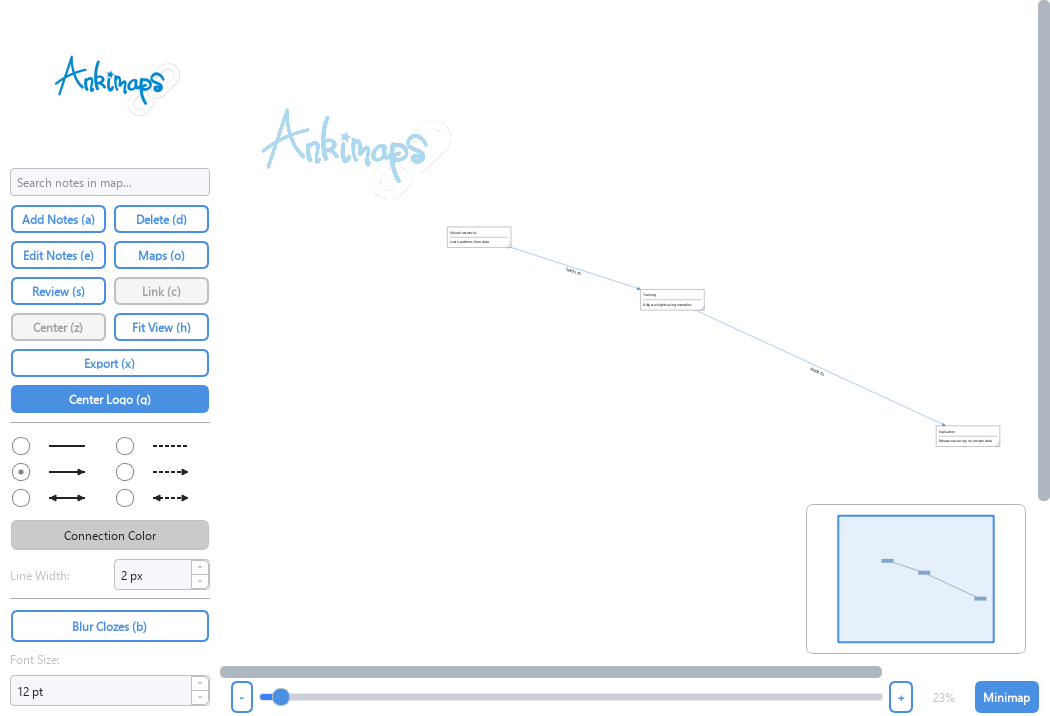
AnkiMaps minimap showing all notes and connections

Build and organize

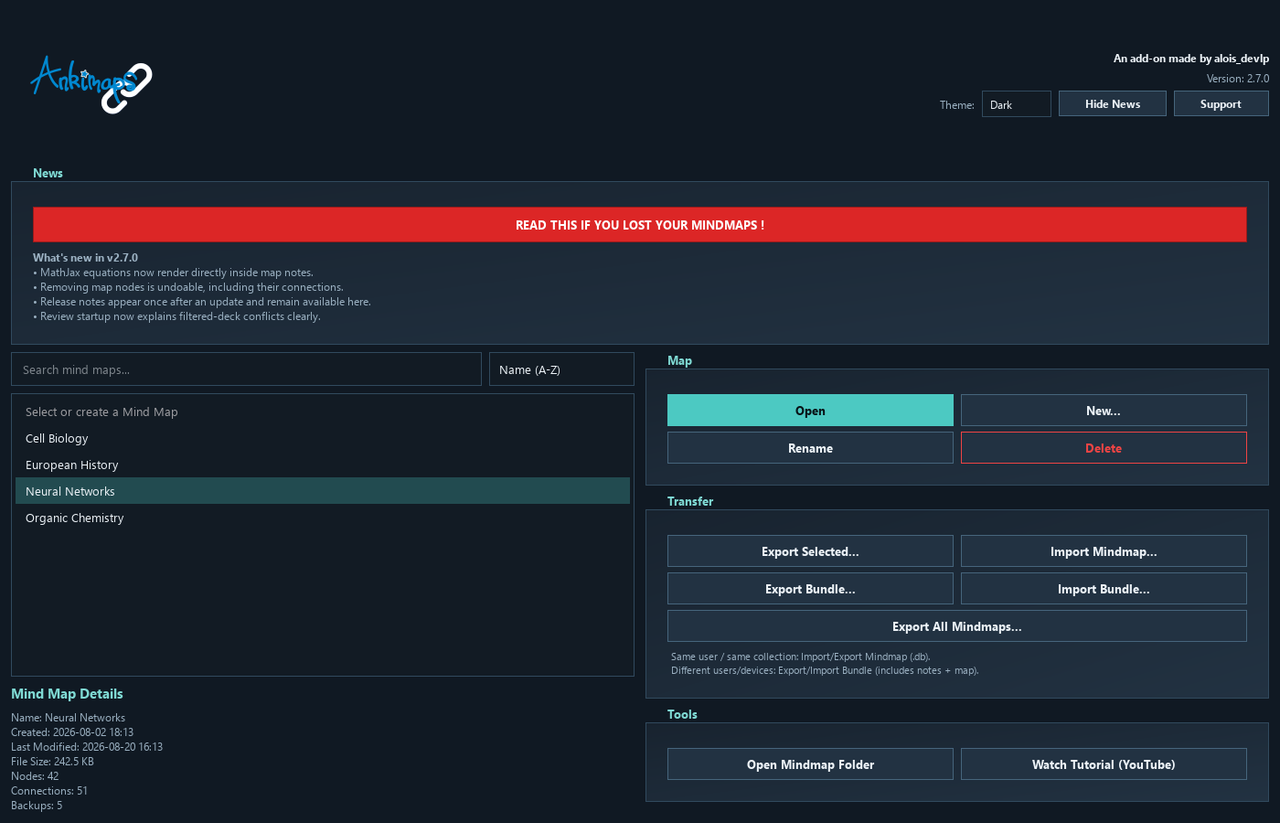
  • Create, open, rename, search, and sort multiple mind maps.
  • See map statistics: nodes, connections, file size, timestamps, and available backups.
  • Add notes from Anki's Browser and edit the original notes without leaving your workflow.
  • Choose which fields appear, resize note cards, and adjust their font size.
  • Search inside an open map and jump to matching notes.
  • Navigate large maps with a minimap showing every note and connection.
  • Use light or dark mode.

AnkiMaps map library in dark mode with v2.7 release notes

Connect and customize ideas

  • Link notes with solid or dotted connections.
  • Use undirected, directed, or bidirectional arrows.
  • Customize connection color, width, and labels.
  • Drag one or many notes, pan, zoom, center a selection, or fit the whole map.
  • Undo and redo movements, links, unlinks, connection changes, and node removal.

Review in context

  • Start a focused review session from the current map.
  • Keep the active note highlighted while surrounding notes are softly blurred.
  • Track how many cards remain and hold Peek to reveal nearby context temporarily.
  • Hide cloze answers on the map with the Blur Clozes toggle.
  • Suspended cards and cards already used by another filtered deck are skipped safely.
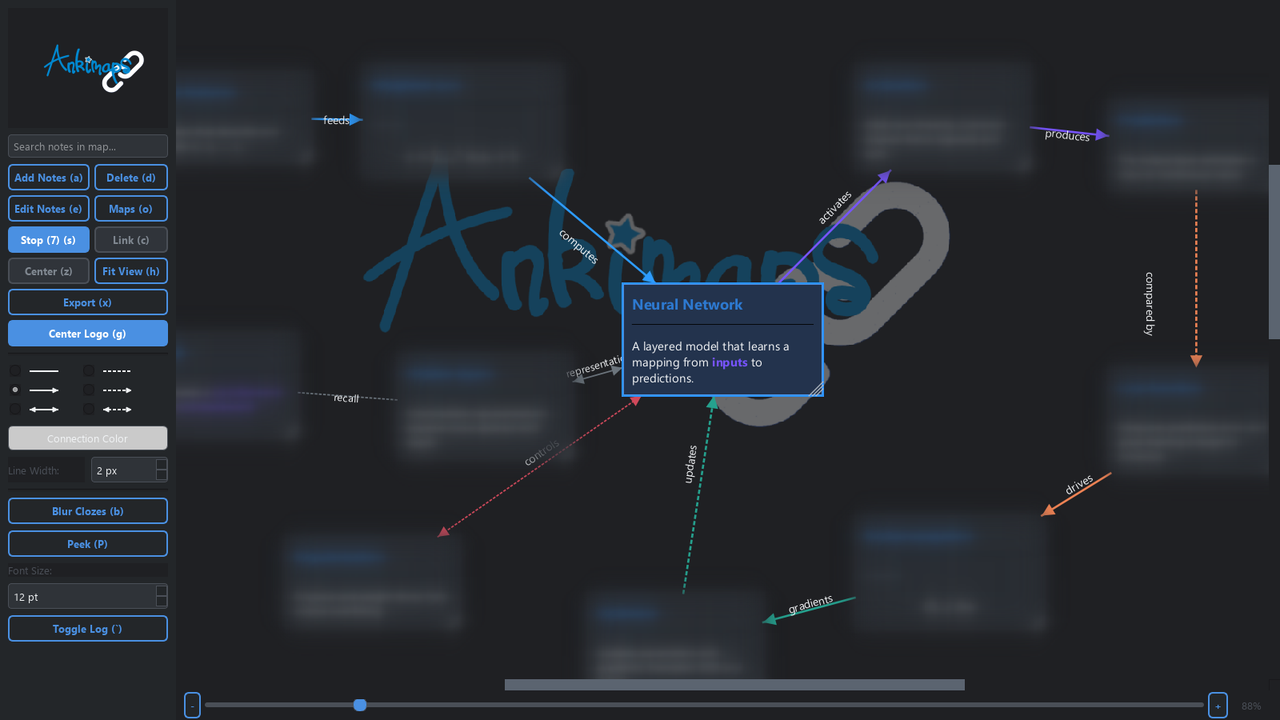
AnkiMaps focused review mode with the active card highlighted

Math, media, and rich notes

  • Render MathJax written with Anki's formula format, \(...\), or \[...\].
  • Display your note styling, images, media, and tables directly on the map.
  • Resize cards while formulas and rich content adapt to the available width.
AnkiMaps rendering MathJax formulas and masked cloze answers

Export, transfer, and protect your maps

  • Export a visual map as PNG, JPEG, or PDF.
  • Import or export a map database for the same Anki collection.
  • Move a map to another user or device with an .ankimapsbundle containing the map, referenced notes, and media.
  • Export all map databases at once.
  • Create automatic timestamped backups when maps are opened and closed; AnkiMaps keeps the five most recent backups per map.

Compatibility and installation

  • Desktop only.
  • Requires Anki 24.06 or newer.
  • Install with add-on code 817937364.
  • Open from Tools -> AnkiMaps or press Ctrl+Shift+M.

Useful shortcuts include A to add notes, D to remove selected nodes, E to edit, C to link, S to review, B to blur clozes, H to fit the map, X to export, and Ctrl+Z / Ctrl+Y for undo and redo.

Data and sync

Mind maps and backups are stored locally in AnkiMaps' user_files folder and are not synced by AnkiWeb. Use an AnkiMaps bundle when moving a map between users, devices, or different Anki collections.

Lost a mind map after updating?

Your map may still be in an older add-on folder or in your Recycle Bin / Trash.

  1. In AnkiMaps, click Open Mindmap Folder and keep that folder open.
  2. Check older AnkiMaps/user_files/mindmaps folders in your Anki add-ons directory.
  3. Also check the Recycle Bin / Trash for an AnkiMaps folder.
  4. Copy any recovered .db files into the folder opened in step 1, then restart Anki.

Free and open source

Source code and bug reports: GitHub
Release history: GitHub Releases
Website: aloisthibert.dev
Tutorials: YouTube
Support development: Patreon or Buy Me a Coffee

README

AnkiMaps

AnkiMaps logo

AnkiMaps brings mind maps directly into Anki so you can visualize concepts, connect ideas, and review with better context.

What You Can Do

  • Build and organize mind maps around your Anki notes.
  • Create visual links between notes with styled connections and labels.
  • Start focused review sessions from the current map only.
  • Keep context during review with map-level highlighting.
  • Customize note display, connection style, and layout behavior.
  • Navigate large maps with the minimap: click or drag to move around, and use the Minimap button beside the zoom controls to show or hide it.

First Installation

  1. Download the .ankiaddon package.
  2. In Anki, open Tools -> Add-ons.
  3. Drag and drop the .ankiaddon file into the Add-ons window.
  4. Restart Anki.

Data Storage

AnkiMaps stores persistent data inside the add-on directory:

  • addons21/AnkiMaps/user_files/mindmaps/*.db
  • addons21/AnkiMaps/user_files/backups/...

It does not store app data in the Anki profile directory.

Development Packaging

Build a local package with:

python package.py

Output artifact:

  • dist/AnkiMaps_<version>.ankiaddon

Package notes:

  • No top-level wrapper folder in the archive.
  • __pycache__, *.pyc, and *.pyo are excluded from packaging.

Release Automation

Releases are automated on pushes to main through .github/workflows/release.yml. python-semantic-release computes the version, builds the .ankiaddon, and uploads assets to the GitHub release.

Use conventional commits so semantic-release can version correctly, for example:

  • fix: ...
  • feat: ...
  • docs: ...

License

AnkiMaps is free and open-source software under the MIT license. See LICENSE.txt for the full text.

Support

For support, bug reports, or feature requests, please contact: alois [dot] devlp [at] gmail [dot] com

Author