Tarkib: AI German, English & Spanish flashcards for Anki with audio and images

AnkiWeb addon 83323714

Generates complete Anki flashcards for German, English and Spanish from a single typed word, including translations, example sentences, grammar, images, audio and optional cloze cards.
AI-generated summary; may contain mistakes.

card-creationaiclozemobile-compatible

Open on AnkiWeb GitHub Find alternatives

AnkiWeb

Votes
2 (πŸ‘ 2 Β· πŸ‘Ž 0)
Updated
2026-10-28
Anki versions
26.05~
License
MIT (from the license file in the package)
Virus scan
No ClamAV match A match does not prove malware. No match does not prove that the code is safe.
Languages
Python, JSON
Description language
en

Maintenance

active

  • Last update or commit: 2026-10-30 (2 days before the snapshot).
  • Test files: 9.
  • Commits in the last year: 14.
  • Issues: 0 open, 0 closed.
  • Pull requests: 0 open, 0 merged.

GitHub

Repository
saadel123/tarkib Β· more by saadel123
Stars
⭐ 2 · forks 0 · open issues 0
Last commit
2026-10-30
License
A license file that GitHub does not recognize
Languages
Python
Tests
9

Will it work on my Anki?

Version branches
Min AnkiMax AnkiUpdated
23.1026.05+2026-10-28
History across monthly snapshots

Loading…

Similar addons

MnemoMaker: Language Learning Accelerator

Automatically creates formatted vocabulary flashcards with Cambridge Dictionary definitions, examples, translations, pronunciation, and AI-generated mnemonics in multiple language pairs.

card-creationaidictionary

6 votes 19% approval πŸ‘ 3 Β· πŸ‘Ž 3 ⭐ 2 Anki 25.02.5~ Updated 2025-08-15
Vocabulary En-Ar Flashcards Generator

Generates complete Anki flashcards from a single word, filling fields with dictionary definitions, pronunciation, synonyms, examples, English-Arabic translation, and images without AI.

card-creationdictionary

1 votes 21% approval πŸ‘ 1 Β· πŸ‘Ž 0 Anki 2.1.1~ Updated 2026-03-30

Description

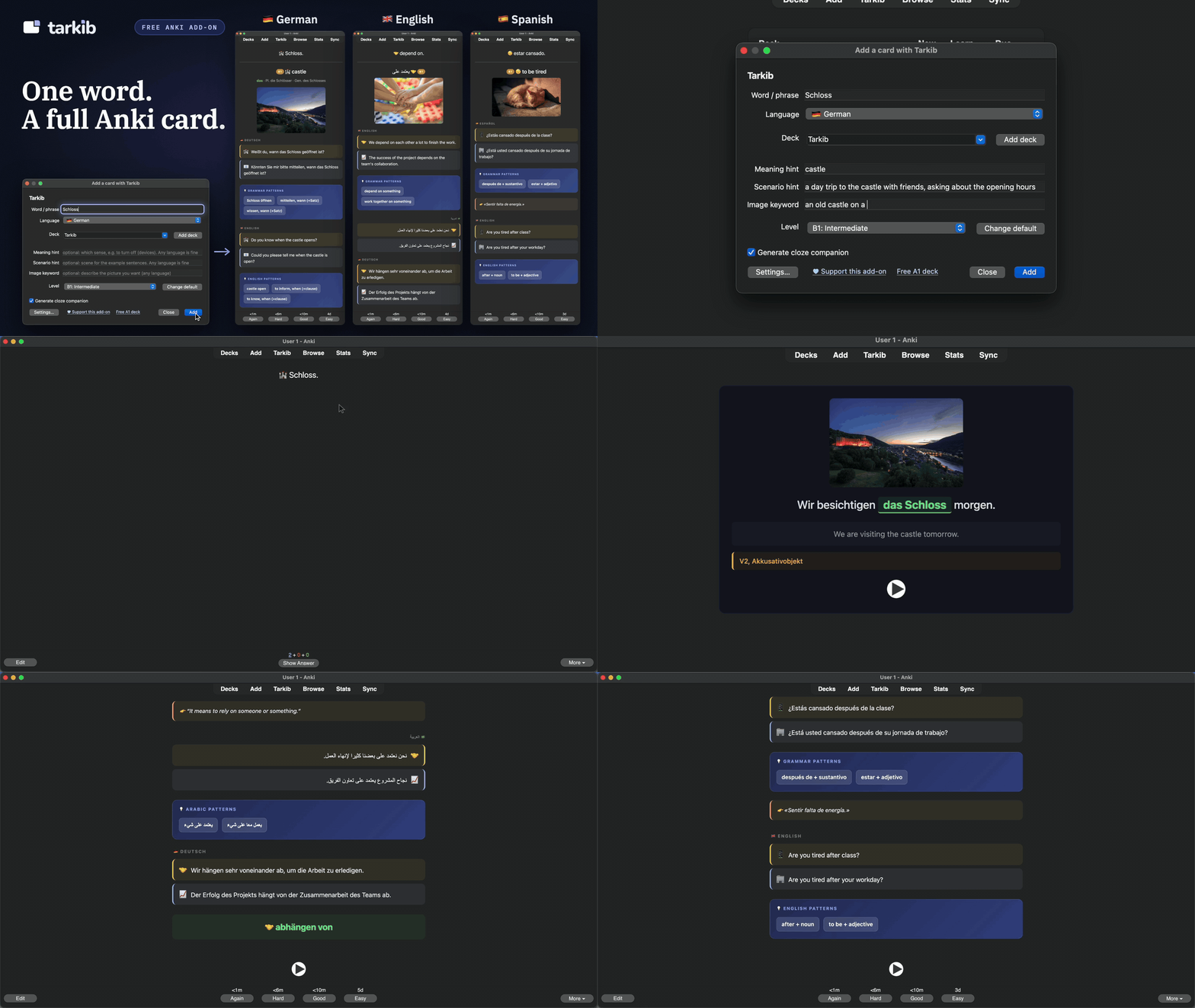
Tarkib demo: type one word in German, English or Spanish, click Add, and study the finished card with its photo, sentences, grammar and audio

Tarkib is a free, open-source Anki add-on and AI flashcard generator for German, English and Spanish. Type one word and you get a full card with the translation, example sentences, grammar, a photo and audio.

It runs on your own API key. The default is Groq, which is free and needs no credit card, so for most people Tarkib costs nothing.

Why I made it

I've been using Anki for a few years to learn languages. Making one card by hand took me ten to fifteen minutes: I typed everything, made the audio with a separate TTS tool, found and uploaded an image, then asked an AI if my example sentence was even correct. As a developer, I built this add-on to do those slow parts for me. Now I type one word, pick the language, the level and the translation language (or two), and Tarkib builds the whole card, plus a cloze card if I want one.
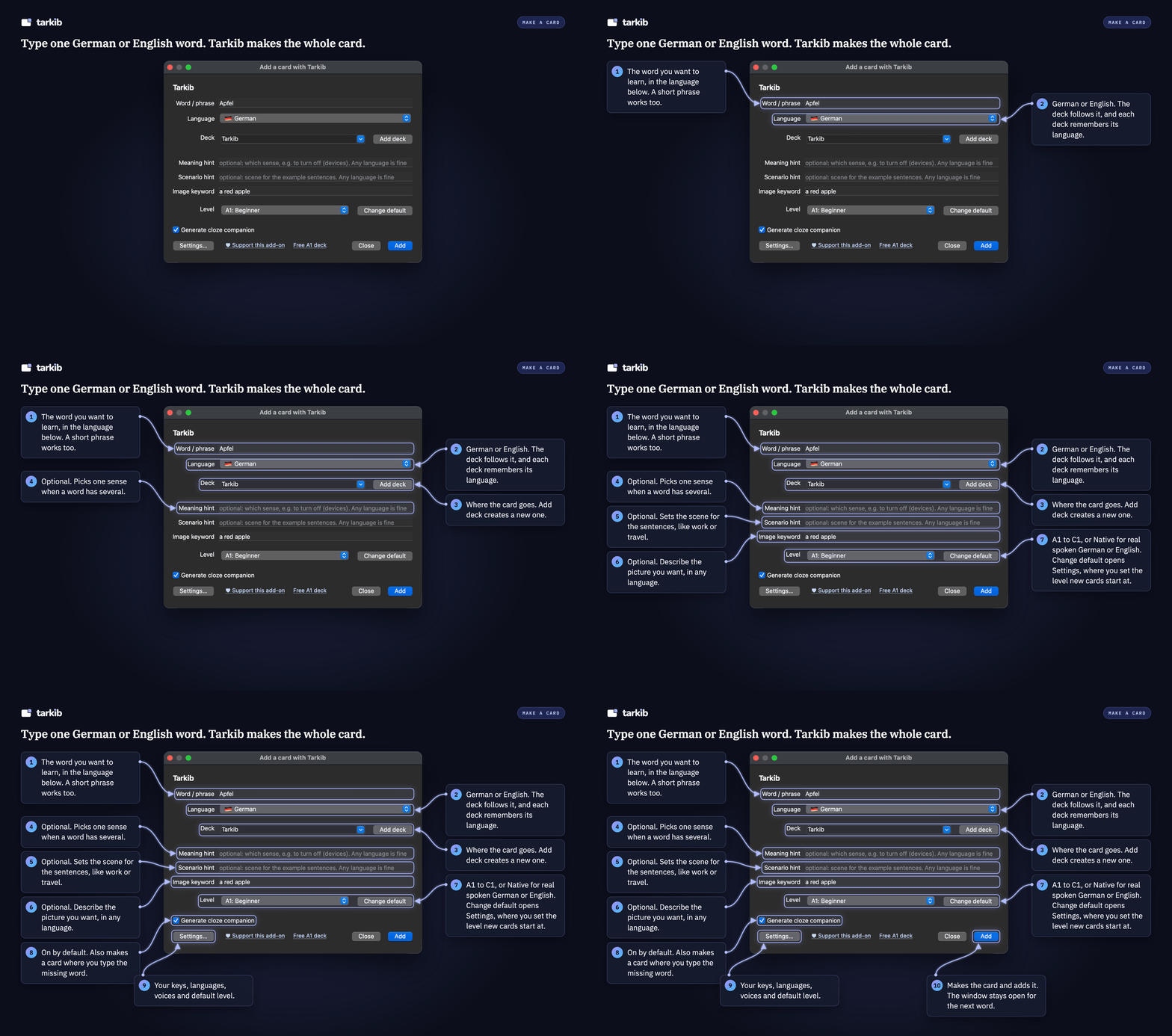
The Tarkib window: type one word, pick the language you learn, a deck and a level, add optional hints, and click Add

What you get on one card

On a German card:

  • The meaning, translated into your language.
  • A casual sentence (usually with du) and a formal one (usually with Sie), both translated, so you learn when to use the word.
  • Article, plural and genitive (from B1) for nouns. Present, past and perfect for verbs, with the real past form of strong verbs.
  • When a sentence uses a preposition, it comes with its case, like warten auf (+Akk) or Angst vor (+Dat), at every level, A1 too. A grammar pattern is only kept if it really appears in your sentences.
  • A photo, a couple of emojis, and German audio. The translations are read aloud only if you turn on their voices in Settings, Languages.
  • An optional cloze card where you type the missing word, in a Cloze subdeck.

On an English card, the sentences contrast everyday words and contractions with formal words (get and receive), the patterns are the ones English learners need (depend on, interested in, look forward to + -ing, phrasal verbs), and the word line shows only what has to be learned: irregular verbs and plurals, uncountable nouns.

On a Spanish card, the casual sentence uses tΓΊ and the formal one usted, the patterns are the ones Spanish learners need (pensar en, depender de, tener que + infinitivo, es importante que + subjuntivo), and the word line shows a noun with its article and plural, or a verb with its yo form, preterite and participle, irregular ones included (tener, tengo, tuvo, tenido). The cloze card can drill ser and estar, or por and para.

English and Spanish cards get their audio, photo and cloze card as German cards do. Tarkib also asks "Did you mean ...?" when you mistype, and warns you before you add a word that is already in the deck.

German, English and Spanish

Pick the language of the card in the Language row, above the deck. English cards go to their own deck, "Tarkib English", and Spanish cards to "Tarkib Spanish", unless you pick another, and every deck remembers the language of its cards. English cards use American spelling, or British spelling when a British voice reads them. Spanish cards use the Spanish of Spain, or Latin American Spanish when a Latin American voice reads them.

Levels and languages

Pick A1 to C1, where the language stays clean and fits your level (in German: Besprechung, not Meeting), or Native for how people really talk, Denglisch included in German. The translation can be in any of 24 languages, plus an optional second one. German and Spanish cards start in English. English cards cannot be translated into English, so their list has German instead: they use your German cards' translation language until you pick their own, and if that is English, the Tarkib window asks you to pick one. Each language keeps its own voice and translation languages in Settings, and you can play a sample of every voice first. Arabic translations use Modern Standard Arabic.

The free Microsoft Edge voices need no key. You can also let Azure AI Speech, ElevenLabs, OpenAI, Google Cloud or Gemini read your cards with your own key, with the free voices as the backup. In Settings, Voice, the speech speed can be slower, about 20 percent, at A1 and A2 or at every level, for the language you learn. The translations keep the normal speed.

Your style

In Settings, Cards, you can write a few wishes in any language: the topics, names, tone or length you want, for example "examples about cooking and travel, short sentences". While "Use my style" is ticked in the Tarkib window, Tarkib sends them with every card, in every language. The level and the card's rules stay as they are.

Ready-made German decks (A1 is free)
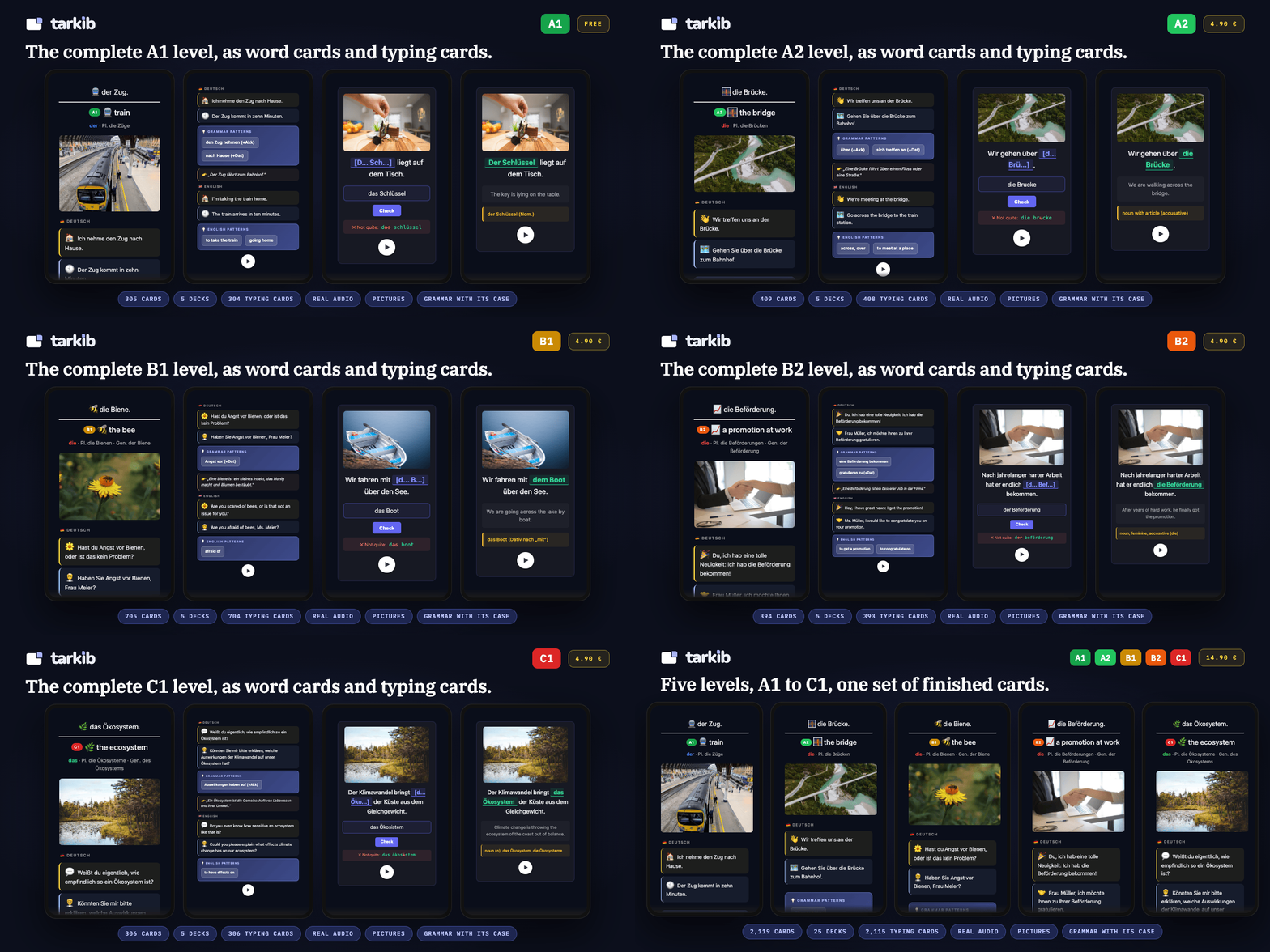
Tarkib German decks, A1 to C1: word cards and typing cards

Rather not make your German cards yourself? I also made German vocabulary decks, A1 to C1, in the same card format: a picture, German audio, casual and formal sentences, the grammar pattern with its case when the sentence has one, and a typing card. Meanings in English or Arabic. The cards were made with Claude, Anthropic's AI, then reviewed and fixed by a person, card by card, over several rounds. The audio comes from a licensed voice service, and the pictures are licensed too.

Get the whole A1 level for free (305 word cards plus 304 typing cards). The English edition is also on AnkiWeb Shared Decks. The other levels are in my Ko-fi shop. You could build them yourself with Tarkib, but A2 to C1 is 1,814 word cards: on the free Groq plan, which allows a few dozen cards a day, that takes well over a month, and every card still needs checking. The paid levels are those cards already made and reviewed. The add-on itself stays free.

Set up your free keys (about 5 minutes)

There is no paid version, no account with me and no server of mine in between. The code is MIT licensed, except one small file from edge-tts, which stays LGPL-3.0. You use your own keys, and the two below are free.

The setup guide on the Tarkib website shows every step with screenshots, from installing the add-on to your first card. The short version:

Groq, the AI that writes your cards (required)

  1. Go to console.groq.com/keys and sign in with Google, GitHub or your email. No credit card is needed.
  2. Click Create API Key, type any name (for example Anki) and click Submit.
  3. Click Copy. The key starts with gsk_ and is shown only once.
  4. In Anki: Tools, "Add a card with Tarkib", click Settings, paste the key into API key and press Save. If it says it is loading models, wait for the list, then press Save once more.

Pixabay, photos for your cards (optional, recommended)

  1. Make a free account at pixabay.com (with Google, Facebook or your email) and log in.
  2. Open pixabay.com/api/docs. Your key is in the key (required) row under Search Images.
  3. Copy it. In Tarkib's Settings, open the Images tab, paste it into Pixabay key and press Save.

Then click Test keys once, type a word and press Add. Next time, Ctrl+Shift+G (Cmd+Shift+G on a Mac) opens Tarkib directly.

Without a photo key, cards try a free keyless source that often finds nothing. Pexels has paused new API keys: a Pexels key you already have still works, in the Pexels key field.

The free Groq key has a daily limit, enough for a few dozen cards a day. Tarkib tells you when you reach it, and you can wait until the next day or pick another model in Settings.

If you already have a key for OpenAI, Google Gemini, Anthropic's Claude, Mistral or OpenRouter, or you run Ollama on your own computer, you can use that instead. A ChatGPT subscription does not include API use. The OpenAI API is billed separately.

What is sent where

Your word, any hints, your style wishes when "Use my style" is ticked, the deck name and the prompt go to the AI provider you chose, with your key. The keys stay on your computer in Anki's add-on config, are never synced, and each one only goes to its own service. Image search words go to the photo sites you have keys for, and to Openverse as a last resort. The words you learn go to the voice service that reads them, Microsoft's Edge read-aloud service by default, and a translation does too when its voice is on. The Edge service is not an official API, so if it changes, cards are still made, Tarkib tells you why one has no sound, and a voice service with your own key can take over. Nothing is sent to me.

Phones and tablets

Add-ons only run on Anki for desktop, so you make the cards there, but they sync and study normally on AnkiDroid and AnkiMobile. On AnkiDroid, if the typing box on the cloze card gets no keyboard, turn on Settings, Advanced, "Type answer into the card" and restart AnkiDroid.

Please check your cards

The cards are written by a language model, so they are sometimes wrong, mostly with rare words. Look over each card after it is added and edit it like any other note. One Undo removes a card and its cloze card together. I still check each card myself.

Requirements

Anki 23.10 or newer on Windows, macOS or Linux, and an internet connection. Nothing else to install.

Tarkib adds two note types, "Tarkib" and "Tarkib Cloze". If you already have note types with those names, please rename yours first.

Source code and support

Source code, bugs and questions: github.com/saadel123/tarkib

Tarkib is free and stays free. If it saves you time, you can leave a tip at ko-fi.com/tarkib. The Tarkib window has a small support link and a link to the free A1 deck at the bottom, which points to all levels once you have one of the decks. After your fifth card a short note about the decks appears a few times inside the window, and its x hides it for good. One line at the bottom of the Settings "Cards" tab points to the decks. While no AI key is set, the setup message also says that the free A1 deck needs no key. The decks teach German, so these deck pointers show only while the window or Settings is on German. A short thank-you appears at 50, 200 and 500 cards, and you can turn it off.

README

Tarkib: AI German, English and Spanish flashcards for Anki

One German, English or Spanish word. A complete, well-structured Anki card.

A free, open-source Anki add-on that turns one typed word into a full language card: meaning and a natural translation, a related image, memory emojis, audio, a casual and a formal example sentence, and the grammar that actually matters.

AnkiWeb: 83323714 License: MIT Anki Support me on Ko-fi Free A1 German deck

Tarkib demo: type one word in German, English or Spanish, click Add, and study the finished card with its photo, sentences, grammar and audio

The story

I've been using Anki for a few years to learn languages. I found a card format that works for me. Front: the word. Back: the meaning, a related image, a couple of emojis that help me remember it, audio, and two example sentences, one casual and one formal. Verbs always come with their preposition and case, like "warten auf" with the Akkusativ, because that is what you need when you speak.

The problem was making those cards. I typed everything in by hand, made the audio with a separate TTS tool, searched for an image and uploaded it, then asked an AI if my example sentence was even correct. One card took me ten to fifteen minutes.

As a developer, I wanted to use that skill to build something that helps me with this. So I started planning and thinking about a tool that could do the slow parts for me, and after a while it turned into this add-on.

Now I type one word, pick the level (A1 to C1, or Native for real spoken German) and the language I want for the translation on the back, even a second one if I like. Tarkib builds the whole card with the image, audio, example sentences and grammar, plus a cloze card where I type the missing word, if I want one. I still check each card myself.

How it works

The Tarkib window: type one word, pick the language, a deck and a level, and click Add

  1. Install it from AnkiWeb: in Anki, Tools β†’ Add-ons β†’ Get Add-ons, paste the code 83323714 and restart Anki.
  2. Add your free keys in Settings: a Groq key writes the cards (free, no credit card), and a Pixabay key adds the photos (free, optional, but without one many cards get no photo). The setup guide shows every step with screenshots, about five minutes.
  3. Open Tarkib with Tools β†’ "Add a card with Tarkib", Ctrl+Shift+G, or the Tarkib button in the editor, the Decks screen or the top toolbar. Type one word or phrase, pick German, English or Spanish, a deck and a level, and click Add. About 15 to 20 seconds later the card (and the optional cloze companion) is in your collection, with image and audio.

Create on the desktop, study anywhere: the cards are normal Anki notes and media, so they sync and study fully on AnkiDroid and iOS like any other deck. The generator runs on Anki Desktop only (the mobile apps do not run add-ons).

What you get

A finished Tarkib card with its parts numbered and explained: the word, the meaning and level, article and plural, a photo, two example sentences, the grammar patterns, a short explanation and the translation

Type one word, get a full card:

  • Meaning and a natural translation, in your helper language.
  • A casual and a formal example sentence, each translated, so you learn when to use the word, not just what it means.
  • The grammar learners actually trip on: in German, article, plural, and (from B1) genitive for nouns, the correct past forms of strong verbs, and for verbs the preposition with its case, like warten auf with Akkusativ. In English, irregular verbs and plurals, uncountable nouns, and the patterns that come with a word, like depend on, interested in or look forward to + -ing. In Spanish, a noun with its article and plural, a verb with its yo form, preterite and participle, irregular ones included (tener, tengo, tuvo, tenido), and patterns like pensar en, tener que + infinitivo or es importante que + subjuntivo.
  • A real image and a couple of memory emojis tied to the word, so it has something to hook onto.
  • Audio in the language you learn, so you hear how the word and the sentences sound. The translations are read aloud only if you turn on their voices in Settings, Languages.
  • An optional fill-in-the-blank (cloze) companion card, to practice producing the word, not just recognizing it.
  • Sentences that match your level: A1 to C1, plus a "Native" style for real spoken German, English or Spanish.

German, English and Spanish

Pick the language of the card in the Language row, above the deck. English cards go to their own deck, "Tarkib English", and Spanish cards to "Tarkib Spanish", unless you pick another, and every deck remembers the language of its cards: pick a deck where you made English cards, and the window switches to English. The window opens where you made your last card.

English cards contrast everyday words and contractions with formal words (get and receive), since English has one "you". They use American spelling, or British spelling when a British voice reads them. Spanish cards contrast tΓΊ with usted, and use the Spanish of Spain, or Latin American Spanish when a Latin American voice reads them. The cloze card can drill ser and estar, or por and para. In Settings, Languages, pick the language you learn first: its voice, its translation language and its second translation are kept separately, so German cards can stay in English while English cards come in Arabic.

Translation languages

The translation under the word can be any of 24 languages. German and Spanish cards start in English. English cards cannot be translated into English, so their list has German instead: they use your German cards' translation language until you pick their own, and if that is English, the window asks you to pick one. Optionally add a second language on every card, for example English plus Arabic for a bilingual learner.

Every language has a natural Microsoft voice. The translations stay silent until you pick their voices in Settings, Languages. Press β–Ά next to a voice to hear a sample sentence before you decide.

The Microsoft Edge voices are free and need no key. If you prefer, Settings, Voice lets Azure AI Speech, ElevenLabs, OpenAI, Google Cloud or Gemini read your cards instead, with your own key, and each has a Test button. If your voice service fails, Tarkib tries your other services, then the free Edge voices, and tells you which one read the card.

In Settings, Voice, the speech speed can be slower, about 20 percent, at A1 and A2 or at every level. Only the language you learn is slowed, on new cards. The translations keep the normal speed.

Your style

In Settings, Cards, you can write a few wishes in any language: the topics, names, tone or length you want, for example "examples about cooking and travel, short sentences". While Use my style is ticked in the Tarkib window, Tarkib sends them with every card, in every language. The level and the card's rules stay as they are.

Ready-made German decks (A1 is free)

Tarkib German decks, A1 to C1: word cards and typing cards

Rather not make the cards yourself? I made German decks, A1 to C1, in the same card format. Every word has a picture, German audio, casual and formal sentences, and the grammar pattern with its case when the sentence has one, like fahren mit (+Dat). Nouns come with their article, and the plural when there is one. Nearly every word also has a typing card checked letter by letter. Meanings in English or Arabic. The cards were made with Claude, Anthropic's AI, then reviewed and fixed by a person, card by card, over several rounds. The audio comes from a licensed voice service, and the pictures are licensed too.

Get the whole A1 level for free (305 word cards plus 304 typing cards). The English edition is also on AnkiWeb Shared Decks. Other levels are in my Ko-fi shop. You could build them yourself with Tarkib, but A2 to C1 is 1,814 word cards: on the free Groq plan, which allows a few dozen cards a day, that takes well over a month, and every card still needs checking. The paid levels are those cards already made and reviewed.

Cost, keys and privacy

Tarkib is free and open source, with no account and no server of mine in between. It runs on your own key. The default is a free model on Groq, enough for a few dozen cards a day, and OpenAI, Google Gemini, Anthropic, Mistral, OpenRouter or a local Ollama model work too.

Your keys stay on your computer, are never synced, and each one goes only to its own service. The words you learn, and a translation only when its voice is on, go to the voice service that reads them: Microsoft's Edge read-aloud service by default, or the one you set up in Settings, Voice. Nothing is sent to me. The Edge read-aloud service is not an official API, so it can change without notice. If it does, the card is still made, Tarkib tells you why it has no sound, and a voice service with your own key can take over.

A note on quality

The cards are written by a language model, so they are occasionally wrong, mostly with rarer words. Treat each card as a draft you approve: look it over after it is added and edit it like any other note. That takes seconds. Building the card by hand took ten to fifteen minutes.

Contributing

Contributions are welcome, especially improving the cards for more languages and CEFR levels. See CONTRIBUTING.md for the dev setup and where the prompt and level rules live (pipeline/prompts.py). Version history is in CHANGELOG.md, and what is planned next in ROADMAP.md. The code was built with a lot of help from Claude, Anthropic's AI.

Support

This add-on is free and stays free. If it saves you time, you can support its development:

β™₯ Support me on Ko-fi

Buying one of the ready-made decks helps too.

Inside the add-on there is a small "β™₯ Support this add-on" link and a quiet "Free A1 deck" link in the window footer, which becomes "A1 to C1 decks" once you have one of the decks. A short thank-you appears three times, at 50, 200 and 500 cards, with a permanent "Don't show this again". After your fifth card, a short note about the ready-made decks appears inside the window on up to three openings, and its x hides it for good. At the bottom of the Settings "Cards" tab, one line points to the ready-made decks. While no AI key is set, the setup message also says that the free A1 deck needs no key. The decks teach German, so these deck pointers show only while the window or Settings is on German.

License

MIT Β© 2026 saadel123. Free to use, modify, and share. One file is not MIT: pipeline/edge_drm.py, the token for the free Edge voices, comes from edge-tts and stays under the LGPL-3.0 (see licenses).


