Daily AI Reading Reinforcement

AnkiWeb addon 842038474

Ranks today’s reviewed Anki cards to generate level-appropriate reading articles and supports AI-reviewed back-translation practice with feedback, revision, and pasted-text exercises.
AI-generated summary; may contain mistakes.

card-creationaiexportstatistics

Open on AnkiWeb GitHub Find alternatives

AnkiWeb

Votes
0 (👍 0 · 👎 0)
Updated
2026-07-17
Anki versions
25.09~
License
AGPL-3.0 (from the GitHub repository)
Virus scan
No ClamAV match A match does not prove malware. No match does not prove that the code is safe.
Languages
Python, JavaScript, CSS, HTML, JSON
Description language
ja

Maintenance

active

  • Last update or commit: 2026-07-21 (103 days before the snapshot).
  • Test files: 53.
  • GitHub Actions workflows: 1.
  • Commits in the last year: 215.
  • Issues: 1 open, 0 closed.
  • Pull requests: 0 open, 2 merged.
  • Outside pull requests: 0% of 1 merged.

Will it work on my Anki?

Version branches
Min AnkiMax AnkiUpdated
2.1.5025.09+2026-07-17
History across monthly snapshots

Loading…

Similar addons

Chinese Prestudy

Generates Anki flashcards from the vocabulary in Chinese texts, such as books, articles, or subtitle files, so learners can study words before reading.

card-creation

23 votes 68% approval 👍 20 · 👎 3 ⭐ 59 Updated 2024-01-05

Description

Daily AI Reading Reinforcement

Turn recognition into production with AI-reviewed back-translation.

DAIRR turns the cards you studied today into level-appropriate reading material, then helps you move beyond passive recognition through the classic back-translation exercise: hide the original article, reconstruct it from its translation, receive detailed AI feedback, revise your work, and submit it again.

You can also paste any diary entry, news article, notes, or other text and turn it into structured translation practice—no DAIRR-generated article or Anki review history required.


[English]

From reading to active production

  • AI-reviewed back-translation: Open a saved DAIRR article, hide the original target-language text, reconstruct it from its translation, and receive detailed feedback before revising and resubmitting.
  • Translation practice from any text: Paste a diary entry, news article, study note, or any other source text. DAIRR can segment it automatically, or you can edit, split, merge, and reorder the segments before practising.
  • No single “correct” wording required: AI review focuses on whether your translation preserves the intended meaning and sounds appropriate, rather than demanding a word-for-word reproduction of the original.
  • Six-dimensional AI review: Receive separate feedback on meaning preservation, omissions and unsupported additions, grammar, vocabulary, naturalness, and register or style.
  • Reference-free review: Translation attempts can still be reviewed when no reference translation exists. When a reference is available, it is treated as useful context rather than the only acceptable answer.
  • Revision-based practice: Keep separate attempts, revise your translation after receiving feedback, and submit it again to see what improved.

Transparent reinforcement targeting

  • Configurable card scoring: Rank the cards reviewed during the current Anki day using signals such as Again, Hard, Good, and Easy answers, repeated same-day reviews, recovery after failures, FSRS difficulty, stability and retrievability, duplicate or sibling cards, and recent use in generated articles.
  • Simple and Advanced modes: Use a recommended preset or individually enable, disable, weight, transform, and limit scoring signals.
  • No fabricated scheduling data: If FSRS values or review-history evidence are unavailable, DAIRR marks the signal as unavailable and gives it zero contribution instead of guessing.
  • Explainable ranking: Inspect each card’s total score, the contribution of every signal, and why it ranked higher or lower than other candidates.
  • Manual target planning: Include or exclude individual cards and classify them as Required, Preferred, Optional, or Excluded before generation.
  • Target-aware generation: Required and preferred targets receive priority, optional targets may be omitted when necessary, and excluded targets are guarded against.

Reading, generation, and customization

  • Contextual reinforcement: Turn the vocabulary and concepts you studied today into one coherent article instead of reviewing them only as isolated cards.
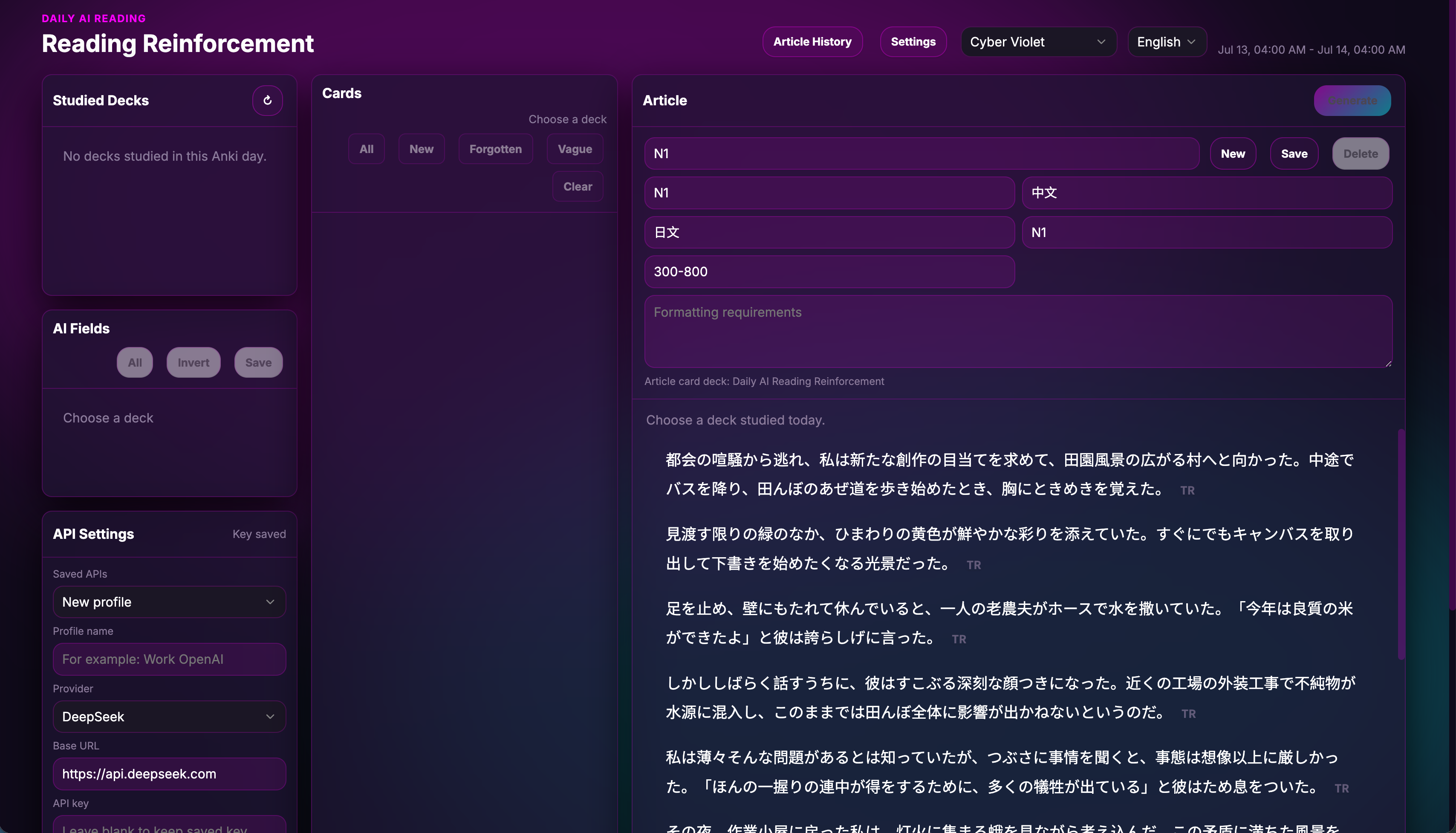
  • Flexible article generation: Choose the article language, reader’s native language, difficulty, length, card fields, generation preset, and additional instructions.
  • Custom prompt workshop: Edit prompts for article generation, translation review, back-translation review, text segmentation, preprocessing, and target validation. Preview the exact rendered request before sending it.
  • OpenAI-compatible providers: Save multiple API profiles, fetch supported model lists, test configurations, and configure supported reasoning controls in the interface.
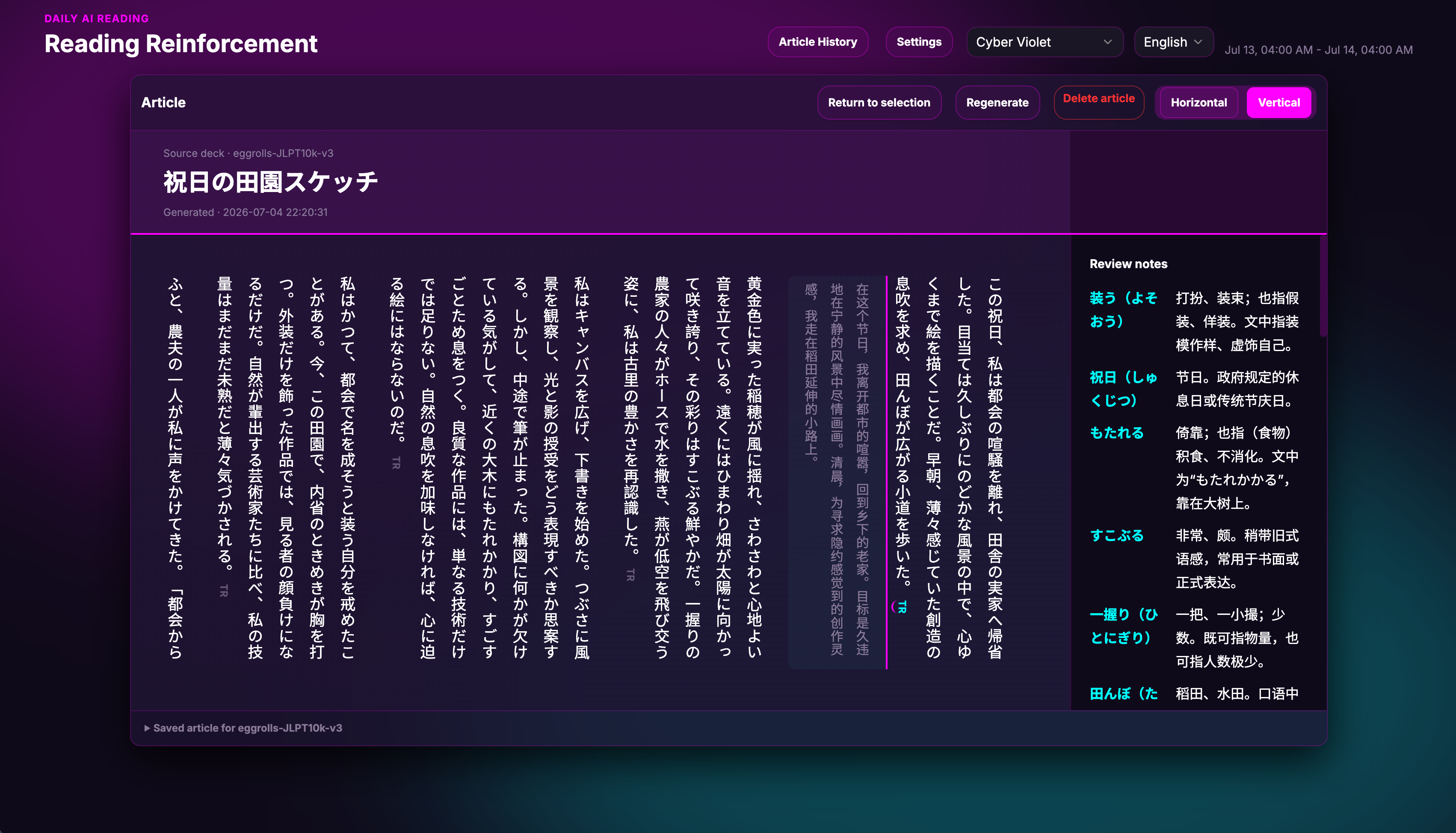
  • Focused reading: Read horizontally or in a Japanese-style vertical layout and reveal translations one paragraph at a time.
  • History and review: Reopen saved articles and translation-practice sessions. Browse article activity through the 52-week heatmap.
  • Closed-loop learning: Save generated articles back to Anki as suspended reading cards for later review.
  • Personalized interface: Chinese, English, and Japanese interface translations with multiple visual themes.


[中文] AI 每日阅读强化

通过 AI 审阅的回译练习,把“能够认出”推进到“能够主动表达”。

DAIRR 会将您今天学习的卡片转化为难度合适的阅读材料,并通过经典的回译练习进一步强化主动输出:隐藏目标语言原文,只根据译文重新表达,再接受 AI 的详细审阅,修改后重新提交。

您也可以粘贴日记、新闻、笔记或任何其他文本,将其转化为结构化翻译练习,无需使用 DAIRR 生成的文章,也不依赖当天的 Anki 复习记录。

从阅读理解走向主动表达

  • AI 审阅的回译练习:打开一篇已保存的 DAIRR 文章,隐藏目标语言原文,只根据译文重新构建文章,再接受 AI 审阅、修改并重新提交。
  • 任意文本翻译练习:可粘贴日记、新闻、学习笔记或任何其他源文。DAIRR 可以自动分段,也可以在练习前手动编辑、拆分、合并和调整段落顺序。
  • 不要求逐字复原:AI 主要判断译文是否准确保留原意、表达是否自然得体,而不是强制要求与原文逐字一致。
  • 六维 AI 审阅:分别评价意义保留、遗漏与无依据添加、语法、词汇、自然度,以及语域与风格。
  • 无参考译文也能审阅:即使不存在标准译文,也可以根据源文和您的译文进行评价。存在参考译文时,它只作为辅助信息,而不是唯一正确答案。
  • 以修改为核心的练习:保存不同尝试,根据反馈修改译文并重新提交,直观看到自己的表达如何改善。

透明的强化目标选择

  • 可配置的卡片评分:根据当前 Anki 学习日中的 Again、Hard、Good、Easy 作答、同日重复复习次数、遗忘后的恢复情况、FSRS 难度、稳定性和可提取性、重复卡与兄弟卡,以及近期文章使用记录等信号对卡片排序。
  • 简单模式与高级模式:既可以直接使用推荐配置,也可以单独启用或关闭各项信号,并调整权重、变换方式和上下限。
  • 不伪造调度数据:当 FSRS 数值或复习历史证据不可用时,DAIRR 会明确标记为 unavailable,并将其贡献设为零,而不会猜测或虚构数据。
  • 可解释的卡片排名:可以查看每张卡片的总分、每项信号的具体贡献,以及它为什么比其他候选卡片排名更高或更低。
  • 手动目标规划:可手动纳入或排除卡片,并将其设置为 Required、Preferred、Optional 或 Excluded 四个等级。
  • 目标感知的文章生成:优先使用必需和优先目标,在必要时允许省略可选目标,并尽量避免使用被排除的目标。

阅读、生成与个性化设置

  • 语境强化:将今天学习的词汇和概念组织成一篇连贯文章,而不是只在相互孤立的卡片中反复识别。
  • 灵活生成文章:可设置文章语言、阅读者母语、难度、长度、卡片字段、生成预设和附加要求。
  • 自定义提示词:可分别编辑文章生成、翻译审阅、回译审阅、文本分段、预处理和目标验证提示词,并在发送前预览实际请求内容。
  • 兼容多种 AI 服务:支持保存多个 API 配置、获取模型列表、测试连接,并在服务支持时设置推理强度。
  • 专注阅读:支持横排和日式竖排,翻译可按段落独立展开。
  • 历史记录与复习:可重新打开已保存的文章和翻译练习,并通过 52 周活动热力图浏览文章记录。
  • 闭环学习:可将生成的文章保存回 Anki,作为暂停状态的阅读卡片。
  • 个性化界面:提供中文、英文和日文界面以及多套视觉主题。


[日本語] AI 毎日の読解強化

AI 添削付きの逆翻訳で、「読める」を「自分で表現できる」へ。

DAIRR は今日学習したカードから、レベルに合った読解文章を生成します。さらに、昔から使われてきた逆翻訳練習によって、受動的な理解を能動的な表現へつなげます。目標言語の原文を隠し、翻訳文だけを見て文章を再構成し、AI の詳細な添削を受けて修正・再提出できます。

日記、ニュース、ノートなど、任意の文章を貼り付けて翻訳練習を作成することもできます。DAIRR が生成した記事や、その日の Anki 復習履歴は必要ありません。

読解から能動的なアウトプットへ

  • AI 添削付き逆翻訳:保存済みの DAIRR 記事を開き、目標言語の原文を隠して、翻訳文だけを手掛かりに文章を再構成します。AI の添削後に修正し、再提出できます。
  • 任意の文章から翻訳練習:日記、ニュース、学習ノートなど、好きな原文を貼り付けられます。自動分割に加え、練習前にセグメントの編集・分割・結合・並べ替えが可能です。
  • 逐語的な再現は不要:AI は原文と一字一句同じであるかではなく、意味が保たれているか、自然で適切な表現になっているかを中心に評価します。
  • 6 項目の AI 添削:意味の保持、訳抜けと根拠のない追加、文法、語彙、自然さ、レジスターと文体の観点から評価します。
  • 参照訳がなくても添削可能:標準訳が存在しない文章でも、原文と学習者の訳文から評価できます。参照訳がある場合も、唯一の正解ではなく補助情報として扱います。
  • 修正を中心とした練習:複数の試行を保存し、フィードバックを基に訳文を改善して再提出できます。

透明な強化ターゲット選択

  • 設定可能なカードスコア:現在の Anki 学習日の Again、Hard、Good、Easy、同日中の再学習回数、失敗後の回復、FSRS の難易度・安定性・想起可能性、重複カードや兄弟カード、生成記事での最近の使用履歴などを利用してカードを順位付けします。
  • シンプル表示と詳細表示:推奨プリセットをそのまま使用することも、各シグナルの有効・無効、重み、変換方法、上限・下限を個別に調整することもできます。
  • 存在しないデータを推測しない:FSRS の値や復習履歴を取得できない場合は unavailable と明示し、推測値を作らずスコアへの寄与をゼロにします。
  • 説明可能なランキング:各カードの合計スコア、各シグナルの寄与、他の候補より順位が高い、または低い理由を確認できます。
  • 手動でのターゲット調整:カードを手動で追加・除外し、Required、Preferred、Optional、Excluded の4段階に分類できます。
  • ターゲットを考慮した文章生成:Required と Preferred を優先し、必要に応じて Optional を省略し、Excluded の使用を避けます。

読解・生成・カスタマイズ

  • 文脈による定着:今日学習した語彙や概念を、孤立したカードとしてだけでなく、一つの自然な文章の中で復習できます。
  • 柔軟な文章生成:文章の言語、読者の母語、難易度、長さ、カードフィールド、生成プリセット、追加指示を設定できます。
  • カスタムプロンプト:文章生成、翻訳添削、逆翻訳添削、文章分割、前処理、ターゲット検証のプロンプトを編集し、送信前に実際のリクエストを確認できます。
  • OpenAI 互換プロバイダー:複数の API プロファイルを保存し、モデル一覧の取得、接続テスト、対応プロバイダーでの推論設定を画面上から行えます。
  • 読みやすい表示:横書きと日本語向けの縦書きに対応し、翻訳を段落ごとに表示できます。
  • 履歴と復習:保存済みの記事や翻訳練習を再度開くことができ、記事履歴は52週間のアクティビティヒートマップから確認できます。
  • 学習のループ:生成した文章を一時停止状態の読解カードとして Anki に保存できます。
  • カスタマイズ可能な画面:中国語・英語・日本語の UI と複数のテーマを利用できます。


How to use / 如何使用 / 使い方

  1. Install the add-on and restart Anki.
    安装插件并重新启动 Anki。
    アドオンをインストールし、Anki を再起動します。
  2. Open the add-on configuration and enter an API key, Base URL, and model for a supported provider.
    打开插件配置,填写受支持服务的 API Key、Base URL 和模型名称。
    アドオン設定を開き、対応プロバイダーの API キー、Base URL、モデルを入力します。
  3. Open AI Reading Reinforcement from Anki’s Tools menu.
    从 Anki 的“工具”菜单打开 AI Reading Reinforcement。
    Anki の「ツール」メニューから AI Reading Reinforcement を開きます。
  4. For article generation, select a studied deck, preview the ranked candidates, adjust the target plan, and click Generate.
    生成文章时,选择已学习的牌组,预览评分后的候选卡片,调整目标计划并点击生成。
    文章を生成する場合は、学習済みデッキを選択し、候補カードの順位を確認してターゲットを調整した後、生成を実行します。
  5. For back-translation practice, open a saved article, hide the original text, and reconstruct it from the displayed translation.
    进行回译练习时,打开已保存的文章,隐藏原文,并根据显示的译文重新表达。
    逆翻訳練習では、保存済みの記事を開き、原文を隠して表示された翻訳文から文章を再構成します。
  6. For free translation practice, paste your own source text, prepare the segments, and begin translating.
    进行自由翻译练习时,粘贴自己的源文,调整分段后开始翻译。
    自由翻訳練習では、任意の原文を貼り付け、セグメントを調整してから翻訳を開始します。

Requires your own supported AI provider or OpenAI-compatible API configuration. Text is sent to the endpoint you configure only when you submit an AI operation. API keys, configuration, articles, translations, and practice history are stored locally.

需要自行配置受支持的 AI 服务或 OpenAI 兼容 API。只有在主动提交 AI 操作时,相关文本才会发送至您配置的服务端点。API 密钥、配置、文章、翻译和练习历史均保存在本地。

対応する AI プロバイダー、または OpenAI 互換 API の設定が必要です。AI 操作を実行した場合にのみ、対象の文章が設定済みエンドポイントへ送信されます。API キー、設定、記事、翻訳、練習履歴はローカルに保存されます。

Free and open source.
Source code, documentation, standalone desktop application, and support:
https://github.com/stors789/Daily-AI-Reading-Reinforcement

README

Daily AI Reading Reinforcement

Turn today’s flashcards—and any text you care about—into deliberate reading and translation practice.

DAIRR is a shared learning workbench delivered as an Anki add-on and a standalone desktop app. It can rank cards reviewed during the current Anki day, turn selected targets into a natural reading article, and review translations from either saved DAIRR articles or arbitrary pasted prose. The same core scoring, practice, prompt, provider, parsing, and persistence logic serves both hosts; each host reports unavailable capabilities instead of inventing data.

DAIRR generation workspace using the Cyber Violet theme

Highlights

  • Two practice paths: open a saved DAIRR article or paste up to 50,000 characters of your own text. Work one segment at a time or on the complete text, reveal a reference when one exists, and revise after AI feedback.
  • Transparent reinforcement priority: rank candidates with configurable answer, lapse, scheduling, duplicate, sibling, and recent-reuse signals. Every signal is applied, disabled, or explicitly unavailable; unavailable evidence contributes zero.
  • Editable target plan: preview candidates, inspect contribution counts, include or exclude cards, and classify targets as Required, Preferred, Optional, or Excluded before generation.
  • Natural target-aware generation: required and preferred targets receive priority, optional targets may be omitted, excluded targets are guarded against, and structured response failures are recovered defensively where possible.
  • Visible AI contracts: edit the system prompt, user template, response mode, and response contract for article generation, translation review, back-translation review, target validation, segmentation, and preprocessing. Preview the exact rendered messages before sending.
  • Provider-aware reasoning: choose Disabled, Provider default, or a capability-validated explicit effort/budget. Disabled sends no reasoning or thinking parameter.
  • Reading and history: keep horizontal and Japanese vertical reading, paragraph-by-paragraph translation reveal, article export, activity history, and suspended Anki reading-card creation.
  • Offline from Anki: pasted-text drafting, segmentation, local history, and prompt/scoring configuration remain usable when Anki or AnkiConnect is unavailable. AI review still requires a configured model provider and network access unless the provider is local.

Product surfaces

Capability Standalone desktop Anki add-on Android
Pasted-text practice Yes; no Anki required Yes; no collection data required Offline create/edit/segment/save/reopen/delete
Saved-article practice and history Local desktop app-data Add-on user_files Pasted sessions only; article history unavailable
Anki data Standard AnkiConnect only Supported in-process Anki APIs Unavailable in this release
Ordered current-day review evidence Limited; only when a standard action and authoritative Anki-day bounds are available Yes while a profile/collection is open Unavailable in this release
FSRS values Not exposed by standard cardsInfo; shown unavailable Used only when supported values are present Unavailable in this release
Save suspended reading cards Through AnkiConnect when connected/configured Through Anki APIs Unavailable in this release
Prompt customization, AI review, generation, reasoning Yes Yes No Android provider adapter in this release
Cancellation Cooperative; an active network call may finish at its timeout Cooperative and lifecycle-aware Local I/O is lifecycle-cancelled; no provider operation exists

The standalone application never imports Anki’s internal Python or Qt objects. AnkiConnect failure reduces only Anki-backed features; it does not disable pasted-text practice.

Install

Anki add-on

From AnkiWeb:

  1. In Anki, choose Tools → Add-ons → Get Add-ons….
  2. Enter 842038474.
  3. Restart Anki.
  4. Choose Tools → Add-ons, select DAIRR, and open Config to set an OpenAI-compatible API key, base URL, and model.
  5. Open Tools → AI Reading Reinforcement.

For a local build, run python3 package_addon.py, then install dist/daily_ai_reading_reinforcement.ankiaddon with Tools → Add-ons → Install from file…. The package builder strips credentials and private practice/history data.

Standalone macOS and Windows

Use a matching asset from the project’s GitHub Releases page only when one is published for your platform:

  • macOS: open the .dmg, drag DAIRR to Applications, then launch DAIRR.
  • Windows: run the published installer and launch DAIRR from the Start menu.

Public signing/notarization has not been proven merely by the presence of packaging code. An unsigned development build can trigger macOS Gatekeeper or Windows SmartScreen; do not bypass an unexpected warning unless you built the artifact yourself or verified its release provenance.

To use Anki-backed features, install AnkiConnect (2055492159), restart Anki, and leave Anki running. The default endpoint is http://127.0.0.1:8765.

For development instead of a published installer:

# Browser fallback
python3 desktop_app.py --provider mock
python3 desktop_app.py --provider ankiconnect

# Preferred native development shell
cd apps/desktop
npm install
npm run dev

See the user guide for full installation, AnkiConnect troubleshooting, practice/scoring/prompt/reasoning instructions, capability differences, privacy, and backup/recovery.

The Android project now provides app-private offline pasted-text sessions, but no published production APK, AI provider, article history, Anki adapter, scoring, prompt workshop, or reasoning control. Developers can validate it with python3 apps/android/tests/validate_scaffold.py; see apps/android/README.md for the target build instructions.

First run

  1. Open API / Reasoning → Edit API profile and configure the provider, base URL, model, and local API key.
  2. Choose Disabled or Provider default reasoning unless the capability badge offers a validated explicit control.
  3. For Anki-backed generation, start Anki and select a deck in Generate. Open Scoring, choose Preview candidates, adjust the target categories, then choose Use target plan.
  4. For Anki-independent practice, open Practice → Pasted text, enter a target language, and choose Create practice.

Documentation

Development and checks

Python 3.11 or newer is recommended.

python3 -m unittest discover -s tests
python3 -m compileall .
python3 package_addon.py
python3 package_desktop.py --entry browser --dry-run
python3 package_desktop.py --entry native --dry-run
python3 package_tauri_sidecar.py --dry-run
python3 apps/android/tests/validate_scaffold.py
python3 scripts/desktop_release.py pre-publish

pre-publish is the credential-free consolidated release gate. It covers metadata/secret checks, compile/import, the full unit suite, add-on privacy, portable UI/JavaScript checks, Android static validation, desktop dry-runs, Tauri environment info, and locked Rust compilation. Build commands still validate only the environment in which they run: a macOS build does not prove Windows packaging, and an unsigned bundle does not prove distribution signing.

The canonical shared package is packages/dairr_core/src/dairr_core/. The Anki wrapper is isolated under addon/daily_ai_reading_reinforcement/; the standalone bridge and adapters are under desktop_mock/; the portable UI is under addon/daily_ai_reading_reinforcement/web/.

Privacy and issue reports

DAIRR stores configuration and history locally. Text is sent to the AI endpoint you configure only when an AI operation is submitted. API keys, pasted text, translations, prompts, private articles, and raw provider responses are excluded from normal diagnostics and bridge errors; local files are not encrypted by DAIRR, so protect your operating-system account and backups.

When reporting a provider issue, share effective non-secret settings and public error codes—not configuration files, practice-session JSON, raw prompts, tokens, or private text.