Custom Stats Range

AnkiWeb addon 84374528

Enables entering custom start and end dates in Anki's old Stats window to analyze statistics over arbitrary date ranges.
AI-generated summary; may contain mistakes.

statistics

Open on AnkiWeb GitHub Find alternatives

AnkiWeb

Votes
0 (πŸ‘ 0 Β· πŸ‘Ž 0)
Updated
2023-12-06
Anki versions
23.10.1~
License
Not found (this does not mean that the addon has no license)
Virus scan
No ClamAV match A match does not prove malware. No match does not prove that the code is safe.
Languages
Python, JSON
Description language
en

Maintenance

abandoned

  • Last update or commit: 2023-12-06 (1061 days before the snapshot).
  • Commits in the last year: 0.
  • Issues: 2 open, 1 closed.
  • Pull requests: 0 open, 0 merged.
  • Median first response: 80 hours (1 answered issues and pull requests).

Will it work on my Anki?

Version branches
Min AnkiMax AnkiUpdated
2.1.023.10.1+2023-12-06
History across monthly snapshots

Loading…

Similar addons

LLM Review Stats Exporter

Exports Anki review history to CSV or JSONL for use with LLMs, with deck, time, tag, interval, and field filters plus optional summary files.

exportstatistics

5 votes 57% approval πŸ‘ 5 Β· πŸ‘Ž 0 ⭐ 5 Anki 2.1.66~ Updated 2026-07-22
Studylitics - Advanced Anki Analytics Dashboard

Provides a detailed analytics dashboard for Anki review history, including heatmaps, retention, consistency, efficiency scores, trends, session and lapse analysis, and time-range filters.

statistics

1 votes 21% approval πŸ‘ 1 Β· πŸ‘Ž 0 Anki 2.1.1~ Updated 2026-04-01
Study Time Stats

Displays customizable study time and review statistics on Anki's main window, with configurable styles, columns, ranges, deck exclusions, time formats, and text macros.

statistics

99 votes 90% approval πŸ‘ 95 Β· πŸ‘Ž 4 ⭐ 33 Anki 23.12.1~ Updated 2024-02-24
AnkiCram

Creates filtered cram decks with infinite retry loops, tag filtering, and live session statistics, letting you repeatedly review decks without affecting long-term spaced repetition scheduling.

review-flowstatisticsfiltered-decks

10 votes 40% approval πŸ‘ 7 Β· πŸ‘Ž 3 ⭐ 7 Anki 2.1.51~ Updated 2026-03-16

Description

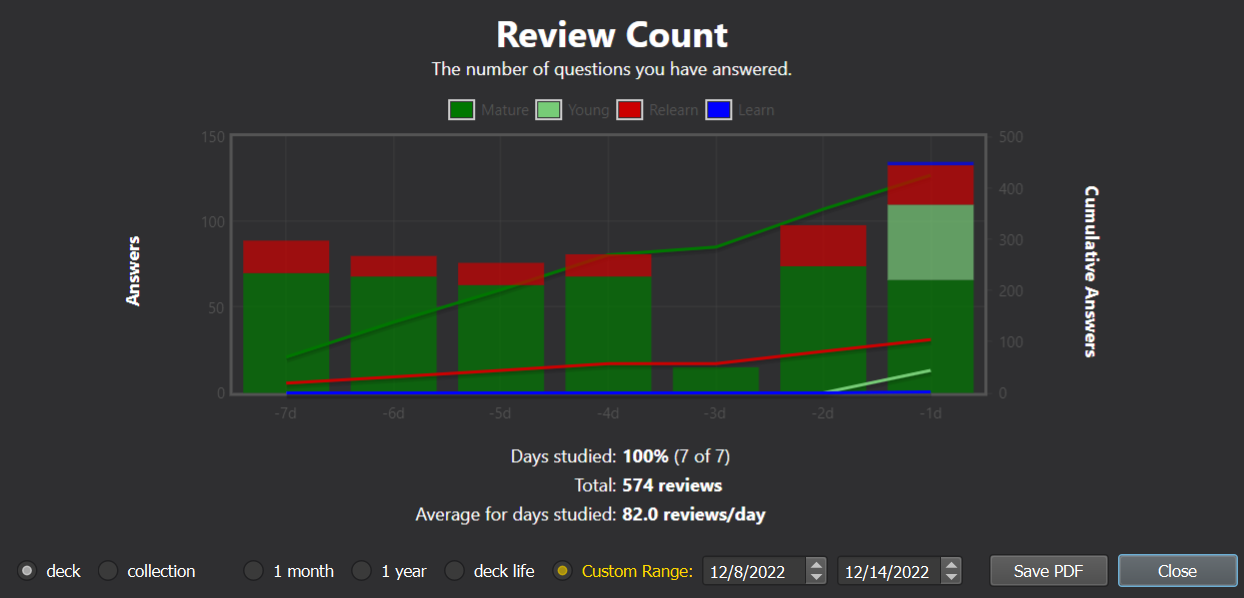
Custom Stats Range (CSR) is an Anki add-on that lets the user supply a custom date range for the Stats window. Enter any start & end date instead of being confined to the default "1 month," "1 year," and "deck life."

View the source code and leave suggestions or bug reports on GitHub.

Screenshots

Custom Range option
7-day range
Important: **you must use the old Stats window, by shift-clicking the Stats button.** The new Stats window (added in 2.1.28) is written with a different framework which is much harder to modify as it requires complex & undocumented JavaScript injections.

Features

  • Better fine-tuning over which statistics you want to see
  • Compare your performance over time ("this week vs. last week", "this month vs. last month", etc.)
  • Make ranges as large or as small as you like

Compatibility

I have tested on the following Anki versions:

  • 2.1.54, Qt6 build
  • 23.10.1, Qt5 build
  • 23.10.1, Qt6 build

It'll probably work on older versions too, but I can't make any guarantees -- it's a lot of work to test multiple versions. In fact, I can't even get the old Stats window (shift + click) to show any graphs on 2.1.55 through 2.1.66.

If the add-on is broken in a recent version of Anki, open an issue with debug info and I'll see if I can fix it.

Notes

  • Compatibility with other add-ons: This may break other add-ons that modify the Stats window. Anki does not provide an API, and the logic for the default options ("1 month," "3 month") has been baked deep into the source code. Thus, I've had to overwrite and patch many of the functions that calculate and display statistics. If other add-ons are trying to patch those same functions, one of them will suffer. So far I have made this compatible with Review Heatmap and True Retention, but I haven't tested alongside many other add-ons.

  • The Forecast and Intervals graphs are hidden when CSR is on. This is because they usually do not show any relevant information for the custom range.

README

Custom Stats Range

Custom Stats Range (CSR) is an Anki add-on that lets the user supply a custom date range for the Stats window. Enter any start & end date instead of being confined to the default "1 month," "1 year," and "deck life."

Screenshots

Custom Range option

7-day range

Installation

To install, see the add-on's page on AnkiWeb.

Important: you must use the old Stats window, by shift-clicking the Stats button. The new Stats window (added in 2.1.28) is written with a different framework which is much harder to modify as it requires complex & undocumented JavaScript injections.

Changelog

For recent changes, check out the changelog.

Features

  • Better fine-tuning over which statistics you want to see
  • Compare your performance over time ("this week vs. last week", "this month vs. last month", etc.)
  • Make ranges as large or as small as you like

Compatibility

I have tested on the following Anki versions:

  • 2.1.54, Qt6 build
  • 23.10.1, Qt5 build
  • 23.10.1, Qt6 build

It'll probably work on older versions too, but I can't make any guarantees -- it's a lot of work to test multiple versions. In fact, I can't even get the old Stats window (shift + click) to show any graphs on 2.1.55 through 2.1.66.

If the add-on is broken in a recent version of Anki, open an issue with debug info and I'll see if I can fix it.

Notes

  • Compatibility with other add-ons: This may break other add-ons that modify the Stats window. Anki does not provide an API, and the logic for the default options ("1 month," "3 month") has been baked deep into the source code. Thus, I've had to overwrite and patch many of the functions that calculate and display statistics. If other add-ons are trying to patch those same functions, one of them will suffer. So far I have made this compatible with Review Heatmap and True Retention, but I haven't tested alongside many other add-ons.

  • The Forecast and Intervals graphs are hidden when CSR is on. This is because they usually do not show any relevant information for the custom range.