Anki LLM Review Stats Exporter
Export Anki review history to CSV or JSONL files.
Use the files with ChatGPT, Claude, a local LLM etc.
The add-on does not use an API. It does not send data to a network.
Features
- CSV is the default format.
- The add-on writes one row for each review.
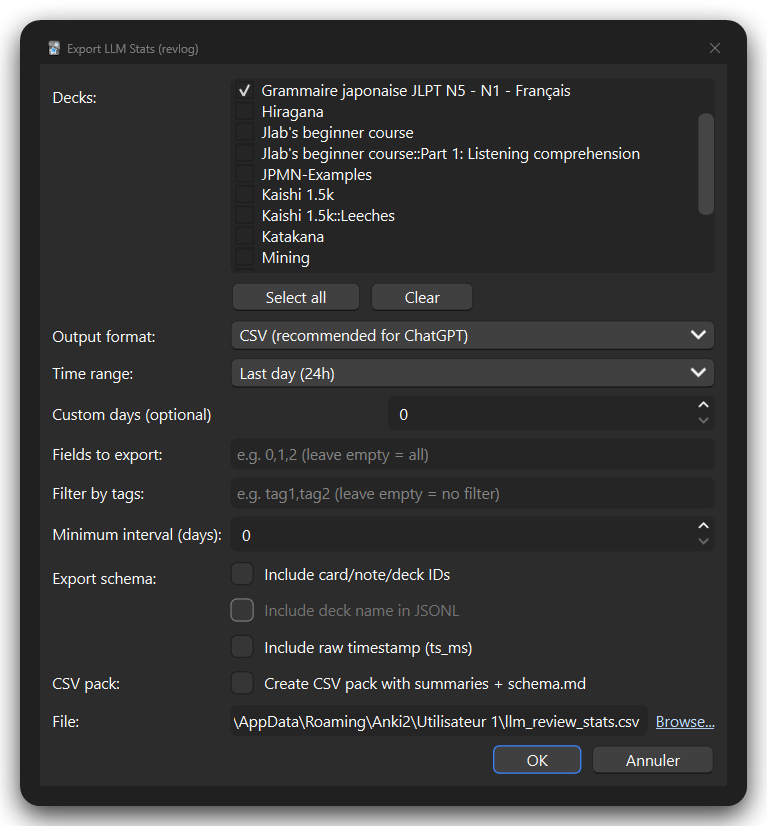
- You can select one or more decks.
- Subdecks are included automatically.
- You can filter by time range, tags, and minimum interval.
- You can select note fields.
- You can create a CSV pack with summary files.
- JSONL verbose and compact formats are also available.
Example
This example uses the Kaishi 1.5k deck.
The screenshot also shows decks such as Grammaire japonaise JLPT N5 - N1 - Français.
JSONL verbose
{"ts_iso":"2025-11-05T18:48:34Z","ease":3,"interval":1,"last_interval":-600,"factor":1089,"review_time_ms":9519,"review_type":2,"fields":["事実","じじつ"]}
JSONL compact
{"t":"2025-11-05T18:48:34Z","rt":2,"e":3,"i":1,"li":-600,"f":1089,"ms":9519,"flds":["事実","じじつ"]}
ChatGPT example
This is the original shared ChatGPT analysis:
https://chatgpt.com/share/6932fed8-c6a8-8000-8477-1049d95cb85e
Requirements
- Anki 2.1 or later
- Qt6 version of Anki
Install
- Open Anki.
- Select Tools > Add-ons > Get Add-ons.
- Enter
700044641.
- Restart Anki.
Use
- Open Anki.
- Select Tools > Export LLM Stats.
- Select at least one deck.
- Select a time range and optional filters.
- Select an output format and file location.
- Select Export.
The default file is llm_review_stats.csv in your Anki profile folder.
Options
Decks
Select one or more root decks. The add-on includes their subdecks.
Time range
Select a preset range or enter a custom number of days.
Use 0 for the custom value to use the selected preset.
Fields
Enter field indexes such as 0,1,2.
Leave the field list empty to export all note fields.
The add-on removes sound tags, image tags, HTML tags, and extra whitespace.
This cleaning does not remove private text.
Filters
- Tags: Enter comma-separated tags. A note must have one selected tag.
- Minimum interval: Enter days. Use
0 to disable this filter.
Output formats
- CSV: Default format. It includes
deck_name.
- JSONL verbose: Full field names.
- JSONL compact: Short field names. It omits IDs and deck names.
CSV files use UTF-8 with BOM. This helps Excel display non-ASCII text.
Optional data
- IDs: Add card, note, and deck IDs.
- Raw timestamp: Add the Unix timestamp in milliseconds.
- Deck name in JSONL: Add the Anki deck name to verbose JSONL files.
CSV pack
Select Create CSV pack with summaries + schema.md to create a folder next to the CSV file.
The folder contains:
reviews.csv: One row for each review.daily_summary.csv: One row for each review date.deck_summary.csv: One row for each deck.card_summary.csv: One row for each card.leech_candidates.csv: Cards that meet the difficulty rule.schema.md: File and column descriptions.
A card is a leech candidate when all of these conditions are true:
- At least 8 reviews.
- At least 3 Again answers.
- Again rate of at least 25%.
- Latest interval of 21 days or less.
Main columns
Read https://github.com/jaybird1291/anki-llm-review-stats-exporter README.md please.
JSONL compact keys
Read https://github.com/jaybird1291/anki-llm-review-stats-exporter README.md please
Limits
- Large collections can create large files.
- Use filters to reduce file size.
