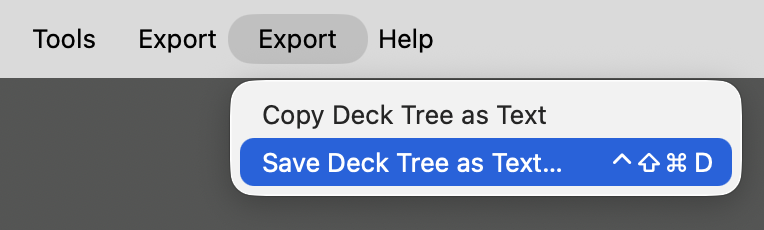
Export Deck Tree as Text
In more systematically organized collections, deck placement usually carries semantic information. A full deck path such as 2.HEL::2.GRC::2.EPC::2.ORI::1.Hom.¹ specifies context that need not be repeated in the prompt itself — especially when the deck name is displayed on the card. For an LLM, knowledge of the deck hierarchy is therefore essential for judging what information the prompt must contain and for choosing tags that complement, rather than duplicate, the information already encoded by deck placement.
This add-on exports the collection’s hierarchy of normal decks as Markdown, either to the clipboard or to a file. Each deck is written as its full path in Anki’s :: notation, making its position in the hierarchy explicit. The resulting export is easy to inspect, search, compare over time, or supply to an LLM as collection-level context. It is also useful for examining the collection’s architecture: naming and numbering conventions, nesting, parallel branches, inconsistent abbreviations, redundant categories, and structural drift.
Export Deck Tree as Text complements Export Deck Guide as Text, Export Field and Tag Legend as Text, Export Note Types as Text, and Export Tags as Text. Together, these five add-ons provide collection-level context. In the Browser, Selected Notes to Structured Text supplies the selected notes to which that context can be applied, whether for assessment or as exemplars for note generation.
¹ Hellenic Languages → Ancient Greek → Epic Greek → Orientalizing Period → Homeric Epics.
Installation
Install Export Deck Tree as Text from AnkiWeb using add-on code 1358364553.
Usage

Choose either of the following menu items:
- Export → Copy Deck Tree as Text
- Export → Save Deck Tree as Text…
Both commands export the same Markdown text: Copy Deck Tree as Text places it on the clipboard; Save Deck Tree as Text… writes it to a UTF-8 text file, by default named anki-deck-tree-YYYY-MM-DD.txt.
The export contains normal decks only: filtered decks are excluded; Anki’s unused Default deck is omitted; empty normal decks are retained. Decks remain in Anki’s ordering.
Configuration
The keyboard shortcuts can be changed in the add-on’s configuration dialog:
Tools → Add-ons → 𝕾 Export Deck Tree as Text → Config
The default configuration is:
{
    "shortcut_copy": "",
    "shortcut_save": "Meta+Ctrl+Shift+D"
}
shortcut_copy is disabled by default.
On macOS, Qt interprets Meta as Control (⌃), Ctrl as Command (⌘), Alt as Option (⌥), and Shift as Shift (⇧). The default shortcut for Save Deck Tree as Text… is therefore ⌃⇧⌘D.
No restart is required.
Format
The export begins with the number of normal decks, followed by one Markdown list item per deck. Each item contains the full deck path exactly as stored by Anki. Blank lines separate top-level branches.
An abbreviated example:
# ANKI DECK TREE

Number of normal decks: 10

- `1.PIE`

- `2.HEL`
- `2.HEL::0.PHG`
- `2.HEL::1.MYC`
- `2.HEL::2.GRC`
- `2.HEL::2.GRC::2.EPC`
- `2.HEL::2.GRC::2.EPC::2.ORI`
- `2.HEL::2.GRC::2.EPC::2.ORI::1.Hom.`
- `2.HEL::2.GRC::2.EPC::2.ORI::2.Hes.`
- `2.HEL::2.GRC::2.EPC::3.ARC`
The add-on does not modify the collection.
Compatibility
Tested with Anki 26.08 on macOS Tahoe 26. Windows and Linux have not yet been tested.
This add-on supersedes Number of Decks; every export includes the number of normal decks.
License
Licensed under the GNU AGPL v3 or later.