𝕾 Export Tags as Text (for LLMs)

AnkiWeb addon 550673409

Exports a collection's complete sorted tag list as plain text to the clipboard or a UTF-8 file, preserving hierarchical tags, with customizable keyboard shortcuts.
AI-generated summary; may contain mistakes.

export

Open on AnkiWeb GitHub Find alternatives

AnkiWeb

Votes
2 (👍 2 · 👎 0)
Updated
2026-08-23
Anki versions
26.09~
License
AGPL-3.0 (from the license file in the package)
Virus scan
No ClamAV match A match does not prove malware. No match does not prove that the code is safe.
Languages
Python, JSON
Description language
en

Maintenance

active

  • Last update or commit: 2026-08-31 (62 days before the snapshot).
  • Commits in the last year: 18.
  • Issues: 1 open, 0 closed.
  • Pull requests: 0 open, 1 merged.

Will it work on my Anki?

Version branches
Min AnkiMax AnkiUpdated
26.0126.09+2026-08-23
History across monthly snapshots

Loading…

Similar addons

𝕾 Export Deck Tree as Text (for LLMs)

Exports the collection’s normal deck hierarchy as Markdown full paths, copied to the clipboard or saved as a UTF-8 file for use as LLM context or structural review.

exportdeck-management

4 votes 51% approval 👍 4 · 👎 0 ⭐ 3 Anki 26.09~ Updated 2026-08-23
𝕾 Selected Notes to Structured Text (for LLMs)

Exports selected Anki notes as LLM-friendly structured text—copyable or saved—preserving field contents unchanged while including note type, deck path, and optionally tags.

export

2 votes 34% approval 👍 2 · 👎 0 ⭐ 3 Anki 26.09~ Updated 2026-08-24
𝕾 Export Deck Guide as Text (for LLMs)

Exports non-empty deck descriptions, with full deck paths and Markdown/HTML format markers, to the clipboard or a UTF-8 file for inspection and LLM context.

export

2 votes 34% approval 👍 2 · 👎 0 ⭐ 3 Anki 26.09~ Updated 2026-08-28
LLM Review Stats Exporter

Exports Anki review history to CSV or JSONL for use with LLMs, with deck, time, tag, interval, and field filters plus optional summary files.

exportstatistics

5 votes 57% approval 👍 5 · 👎 0 ⭐ 5 Anki 2.1.66~ Updated 2026-07-22

Description

Tags provide a many-to-many classification of the notes in an Anki collection: a note may carry several tags, and a tag may apply to many notes. In collections whose tags encode subject matter, the tag system can function as a lightweight ontology: top-level tags can identify domains, while hierarchical tags use :: to represent subdivisions within those domains.

This add-on exports the complete tag list as sorted plain text to the clipboard or to a file, for inspection, comparison, or use with an LLM.

Export Tags as Text complements Export Deck Guide as Text, Export Deck Tree as Text, Export Field and Tag Legend as Text, and Export Note Types as Text. Together, these five add-ons provide collection-level context. In the Browser, Selected Notes to Structured Text supplies the selected notes to which that context can be applied, whether for assessment or as exemplars for note generation.

Usage

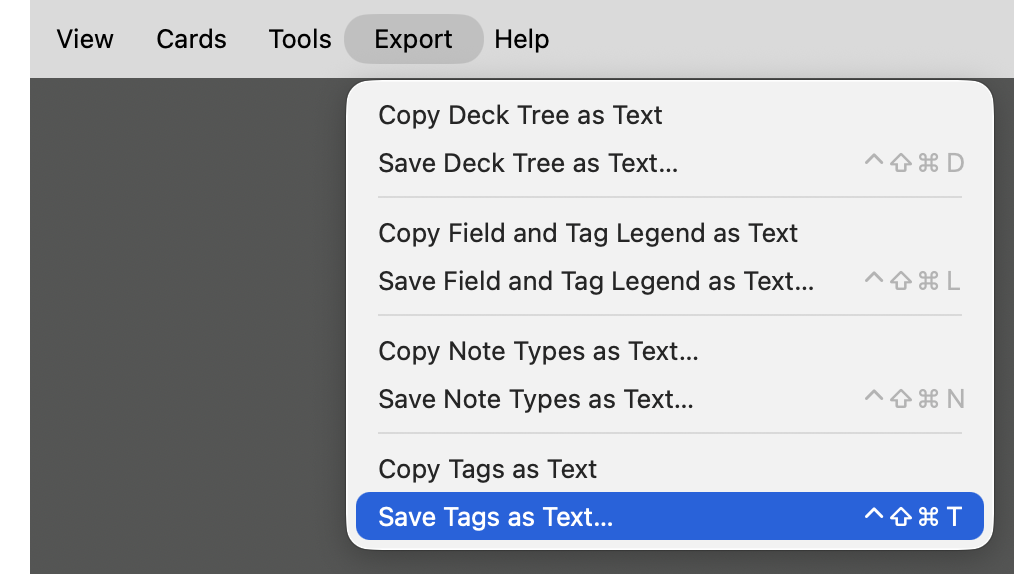
Choose either of the following menu items:

  • Export → Copy Tags as Text
  • Export → Save Tags as Text…

Both commands export the same tag list: Copy Tags as Text places it on the clipboard; Save Tags as Text… writes it to a UTF-8 text file, by default named anki-tags-YYYY-MM-DD.txt. After copying or saving, Anki reports the total number of tags and the number of top-level tags.

Before exporting, you may wish to run Tools → Check Database. Anki retains unused tags in its tag list until that list is rebuilt; Check Database removes such entries.

Configuration

The keyboard shortcuts can be changed under Tools → Add-ons → 𝕾 Export Tags as Text → Config. The default configuration is:

{
    "shortcut_copy": "",
    "shortcut_save": "Meta+Ctrl+Shift+T"
}

Copy Tags as Text has no assigned shortcut. Save Tags as Text… uses Meta+Ctrl+Shift+T (⌃⇧⌘T). No restart is required.

Format

Each tag is written exactly as stored by Anki, one per line. Hierarchical tags retain Anki’s :: separator. An example:

HTML
HTML::charref
HTML::charref::named
HTML::charref::numeric

The add-on exports Anki’s registered tag list, which may include unused tags. It does not modify the collection.

Compatibility

Tested with Anki 26.08 on macOS Tahoe 26. Windows and Linux have not yet been tested.

Suggestions and bug reports are welcome. Please open an issue on GitHub.

README

Export Tags as Text

Tags provide a many-to-many classification of the notes in an Anki collection: a note may carry several tags, and a tag may apply to many notes. In collections whose tags encode subject matter, the tag system can function as a lightweight ontology: top-level tags can identify domains, while hierarchical tags use :: to represent subdivisions within those domains.

This add-on exports the complete tag list as sorted plain text, either to the clipboard or to a file, for inspection, comparison, or use with an LLM.

Export Tags as Text complements Export Deck Guide as Text, Export Deck Tree as Text, Export Field and Tag Legend as Text, and Export Note Types as Text. Together, these five add-ons provide collection-level context. In the Browser, Selected Notes to Structured Text supplies selected notes for assessment or as exemplars for note generation.

Installation

Install Export Tags as Text from AnkiWeb using add-on code 550673409.

Usage

Export menu with Tags as Text commands

Choose either of the following menu items:

  • Export → Copy Tags as Text
  • Export → Save Tags as Text…

Both commands export the same tag list: Copy Tags as Text places it on the clipboard; Save Tags as Text… writes it to a UTF-8 text file, by default named anki-tags-YYYY-MM-DD.txt.

After copying or saving, Anki reports the total number of tags and the number of top-level tags.

Before exporting, you may wish to run Tools → Check Database. Anki retains unused tags in its tag list until that list is rebuilt; Check Database removes such entries.

Configuration

The keyboard shortcuts can be changed in the add-on’s configuration dialog:

Tools → Add-ons → 𝕾 Export Tags as Text → Config

The default configuration is:

{
    "shortcut_copy": "",
    "shortcut_save": "Meta+Ctrl+Shift+T"
}

shortcut_copy is disabled by default.

On macOS, Qt interprets Meta as Control (⌃), Ctrl as Command (⌘), Alt as Option (⌥), and Shift as Shift (⇧). The default shortcut for Save Tags as Text… is therefore ⌃⇧⌘T.

No restart is required.

Format

Each tag is written exactly as stored by Anki, one per line. Hierarchical tags retain Anki’s :: separator. An example:

HTML
HTML::charref
HTML::charref::named
HTML::charref::numeric

The add-on exports Anki’s registered tag list, which may include unused tags. It does not modify the collection.

Compatibility

Tested with Anki 26.08 on macOS Tahoe 26. Windows and Linux have not yet been tested.

Suggestions and bug reports are welcome. Please open an issue on GitHub.

License

Licensed under the GNU AGPL v3 or later.