Export Note Types as Text
Anki note types define much of the structure and behavior of a collection—which fields a note contains, which field is used for sorting, which card types are defined, under what conditions cards are generated, and how those cards are rendered. In larger or more specialized collections, these definitions often encode conventions that are difficult to reconstruct from individual notes alone.
This add-on exports selected note types as structured Markdown for inspection by the user or an LLM. The export is intended to capture the aspects of the selected note-type and card-type definitions that matter most for understanding their structure and behavior, without attempting to serialize the whole collection or reproduce every rendering detail.
Export Note Types as Text complements Export Deck Guide as Text, Export Deck Tree as Text, Export Field and Tag Legend as Text, and Export Tags as Text. Together, these five add-ons provide collection-level context. In the Browser, Selected Notes to Structured Text supplies the selected notes to which that context can be applied, whether for assessment or as exemplars for note generation.
Installation
Install Export Note Types as Text from AnkiWeb using add-on code 1033830704.
Usage

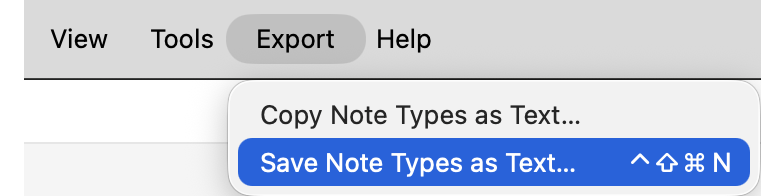
Choose either of the following menu items:
- Export → Copy Note Types as Text…
- Export → Save Note Types as Text…
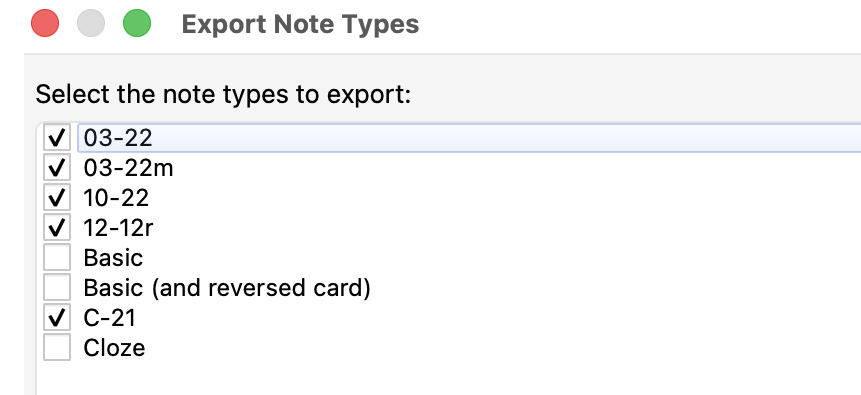
Both commands open the same selection dialog. Select the note types to export, then choose OK.

Copy Note Types as Text… places the resulting Markdown on the clipboard. Save Note Types as Text… writes it to a UTF-8 text file, by default named anki-note-types-YYYY-MM-DD.txt.
The add-on only reads note-type definitions; it does not modify the collection.
Configuration
The initial note-type selection and keyboard shortcuts can be changed in the add-on’s configuration dialog:
Tools → Add-ons → 𝕾 Export Note Types as Text → Config
By default, all note types are selected. Note types can also be specified to start unchecked when the Export Note Types dialog opens; they can still be selected manually for any individual export.
Copy Note Types as Text… has no assigned shortcut, whereas Save Note Types as Text… uses Meta+Ctrl+Shift+N (⌃⇧⌘N).
Format
The export is deterministic Markdown intended to be readable both by humans and by LLMs.
It begins with a summary giving the number and names of the exported note types. For each note type, it then records:
- note-type name and kind;
- sort field;
- fields in their Anki display order;
- card-generation requirements expressed in terms of field names;
- card types in their stored order;
- front and back templates.
An example:
# ANKI NOTE TYPES

Exported note types (1): `Basic`.

## Basic

- kind: standard
- sort field: `Front`

### Fields

1. `Front`
2. `Back`

### Card-generation requirements

- Card 1 (`Card 1`) requires any non-empty field among: `Front`

### Card types

#### Card 1: Card 1

Front template:

```html
{{Front}}
```

Back template:

```html
{{FrontSide}}

<hr id=answer>

{{Back}}
```
Note types are sorted case-insensitively by name. Field and card-type order is preserved.
HTML comments are removed from front and back templates before export; otherwise the template text is preserved. This prevents large hidden comments, such as embedded collection documentation, from being included in the note-type export.
Styling, Browser Appearance, deck overrides, LaTeX configuration, internal IDs, and similar note-type metadata are intentionally omitted because they are usually less relevant to assessing or creating notes and would substantially increase the size of the export. External resources referenced by templates, such as CSS or JavaScript files, are likewise not embedded.
Compatibility
Tested with Anki 26.08 on macOS Tahoe 26. Windows and Linux have not yet been tested.
Suggestions and bug reports are welcome. Please open an issue on GitHub.
License
Licensed under the GNU AGPL v3 or later.