𝕾 Export Deck Guide as Text (for LLMs)

AnkiWeb addon 1938515620

Exports non-empty deck descriptions, with full deck paths and Markdown/HTML format markers, to the clipboard or a UTF-8 file for inspection and LLM context.
AI-generated summary; may contain mistakes.

export

Open on AnkiWeb GitHub Find alternatives

AnkiWeb

Votes
2 (👍 2 · 👎 0)
Updated
2026-08-28
Anki versions
26.09~
License
AGPL-3.0 (from the license file in the package)
Virus scan
No ClamAV match A match does not prove malware. No match does not prove that the code is safe.
Languages
Python, JSON
Description language
en

Maintenance

active

  • Last update or commit: 2026-08-31 (62 days before the snapshot).
  • Commits in the last year: 6.
  • Issues: 0 open, 0 closed.
  • Pull requests: 0 open, 1 merged.

Will it work on my Anki?

Version branches
Min AnkiMax AnkiUpdated
26.0126.09+2026-08-28
History across monthly snapshots

Loading…

Similar addons

𝕾 Export Deck Tree as Text (for LLMs)

Exports the collection’s normal deck hierarchy as Markdown full paths, copied to the clipboard or saved as a UTF-8 file for use as LLM context or structural review.

exportdeck-management

4 votes 51% approval 👍 4 · 👎 0 ⭐ 3 Anki 26.09~ Updated 2026-08-23
𝕾 Selected Notes to Structured Text (for LLMs)

Exports selected Anki notes as LLM-friendly structured text—copyable or saved—preserving field contents unchanged while including note type, deck path, and optionally tags.

export

2 votes 34% approval 👍 2 · 👎 0 ⭐ 3 Anki 26.09~ Updated 2026-08-24
𝕾 Export Tags as Text (for LLMs)

Exports a collection's complete sorted tag list as plain text to the clipboard or a UTF-8 file, preserving hierarchical tags, with customizable keyboard shortcuts.

export

2 votes 34% approval 👍 2 · 👎 0 ⭐ 3 Anki 26.09~ Updated 2026-08-23
LLM Review Stats Exporter

Exports Anki review history to CSV or JSONL for use with LLMs, with deck, time, tag, interval, and field filters plus optional summary files.

exportstatistics

5 votes 57% approval 👍 5 · 👎 0 ⭐ 5 Anki 2.1.66~ Updated 2026-07-22
Anki Dictionary Add-on

Provides an in-Anki dictionary window for searching installed Yomichan/Migaku dictionaries, generating LLM definitions, fetching images and audio, and exporting results to note fields or cards.

card-creationaiexportappearancedictionary

4 votes 15% approval 👍 2 · 👎 2 ⭐ 13 Anki 25.09.2~ Updated 2026-04-11

Description

Systematically organized Anki collections often encode substantial information in their deck names and hierarchies. However, a deck path such as 2.HEL::2.GRC::4.CAT::2.PRO::1.PHS::2.Ar. is difficult to interpret without knowing what the abbreviations stand for, why the decks are arranged as they are, and what each branch is meant to contain. The deck Description provides a natural place for such documentation: it belongs to the deck it describes, can be read and edited within Anki, and remains with the collection.

This add-on exports all non-empty descriptions as structured text, either to the clipboard or to a file. For each entry, it records the deck’s full path and indicates whether Anki treats the description as Markdown or HTML. The resulting export can serve as a guide to the collection’s organization, useful for inspection and—above all—as context for an LLM.

Export Deck Guide as Text complements Export Deck Tree as Text, Export Field and Tag Legend as Text, Export Note Types as Text, and Export Tags as Text. Together, these five add-ons provide collection-level context. In the Browser, Selected Notes to Structured Text makes the selected notes available for assessment in that context or as exemplars for note generation.

Usage

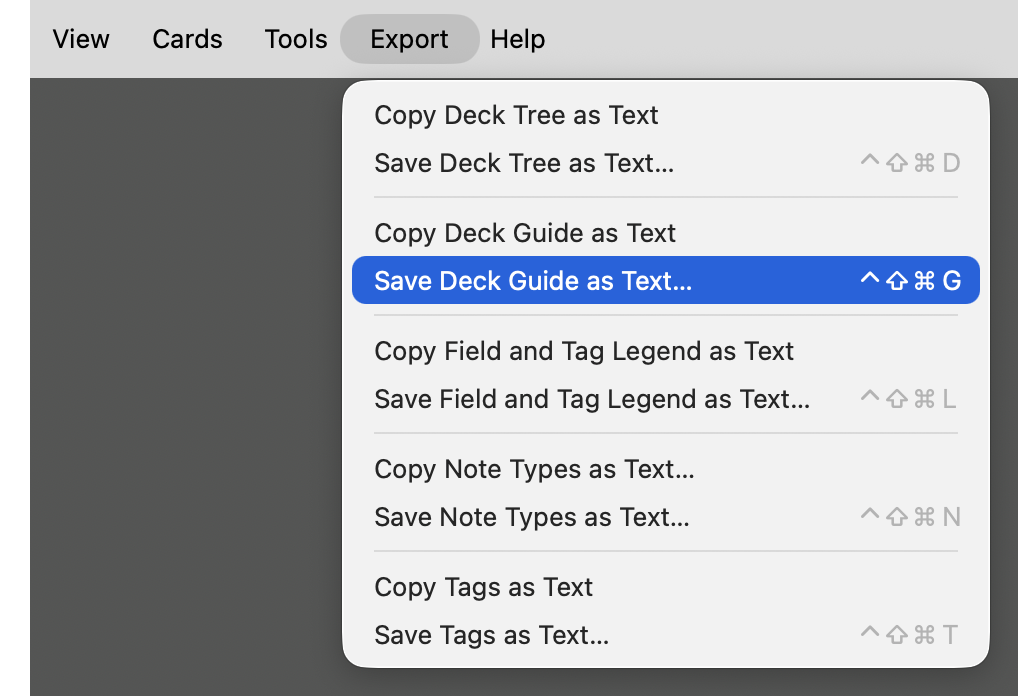
Export menu with Deck Guide as Text commands

Choose either of the following menu items:

  • Export → Copy Deck Guide as Text
  • Export → Save Deck Guide as Text…

Both commands export the same collection-wide deck guide: Copy Deck Guide as Text places it on the clipboard; Save Deck Guide as Text… writes it to a UTF-8 text file, by default named anki-deck-guide-YYYY-MM-DD.txt.

The export contains normal decks only: filtered decks are excluded, and decks with empty descriptions are omitted. Descriptions are exported in Anki’s deck order.

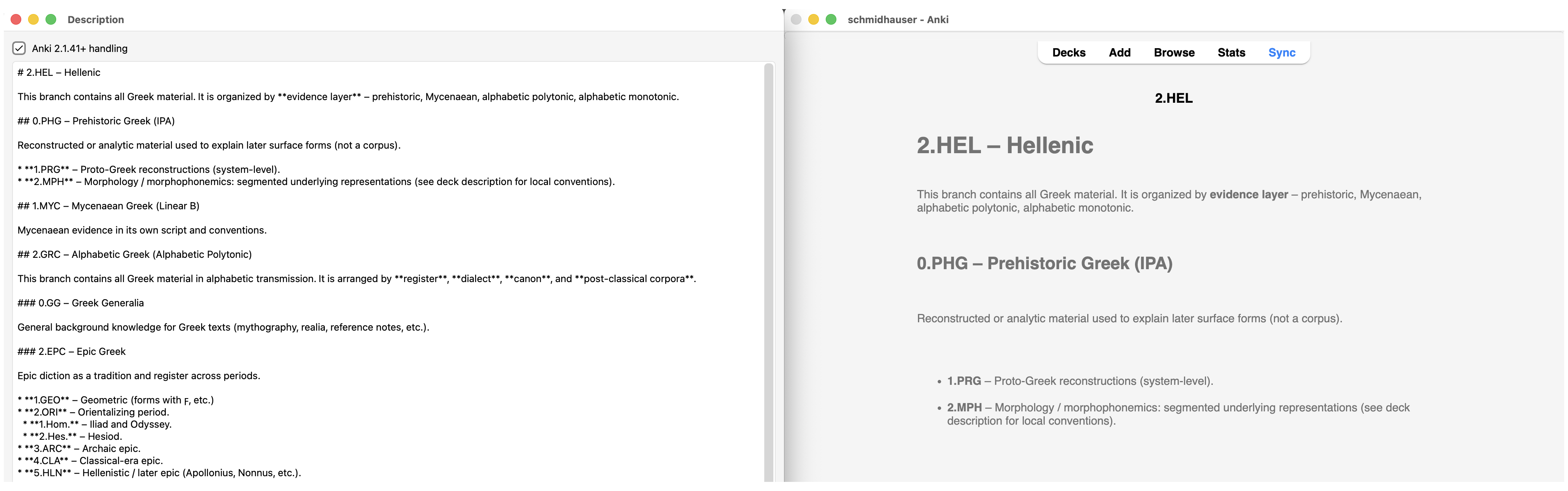
Deck descriptions can be edited in Anki’s Description window. With Markdown enabled, the description is stored as Markdown and rendered by Anki accordingly.

Markdown deck description and its rendered Anki display

The add-on only reads deck metadata; it does not modify the collection.

Configuration

The keyboard shortcuts can be changed under Tools → Add-ons → 𝕾 Export Deck Guide as Text → Config. The default configuration is:

{
    "shortcut_copy": "",
    "shortcut_save": "Meta+Ctrl+Shift+G"
}

Copy Deck Guide as Text has no assigned shortcut. Save Deck Guide as Text… uses Meta+Ctrl+Shift+G (⌃⇧⌘G). No restart is required.

Format

The export begins with the number of deck descriptions exported and a short explanation of the format. Each description is then represented by an anki-deck block containing the deck’s full path and an anki-description block containing the description itself. An example:

# ANKI DECK GUIDE

Deck descriptions exported: 2

Each `<@anki-deck>` block contains the description stored for one normal
Anki deck with a non-empty description, with leading and trailing whitespace
removed. The `format` attribute records whether Anki uses Markdown or HTML
for that description.

<@anki-deck name="2.HEL"@>
<@anki-description format="markdown"@>
# 2.HEL – Hellenic

This branch contains all Greek material. It is organized by **evidence layer**
– prehistoric, Mycenaean, alphabetic polytonic, alphabetic monotonic…
</@anki-description@>
</@anki-deck@>

<@anki-deck name="2.HEL::0.PHG"@>
<@anki-description format="markdown"@>
# 0.PHG – PREHISTORIC GREEK

`0.PHG` contains **reconstructed** material used…
</@anki-description@>
</@anki-deck@>

The name attribute records the deck’s full path as identified by Anki. The format attribute is markdown when Markdown is enabled for that description and html otherwise.

Leading and trailing whitespace is removed from each description; internal whitespace, Markdown, HTML, links, Unicode characters, and other content are otherwise preserved.

The <@…@> delimiters make deck and description boundaries explicit without requiring the description contents themselves to be transformed. The format is intended to be straightforward for humans to inspect and for LLMs to parse.

Compatibility

Tested with Anki 26.08 on macOS Tahoe 26. Windows and Linux have not yet been tested.

Suggestions and bug reports are welcome. Please open an issue on GitHub.

README

Export Deck Guide as Text

Systematically organized Anki collections often encode substantial information in their deck names and hierarchies. However, a deck path such as 2.HEL::2.GRC::4.CAT::2.PRO::1.PHS::2.Ar. is difficult to interpret without knowing what the abbreviations stand for, why the decks are arranged as they are, and what each branch is meant to contain. The deck Description provides a natural place for such documentation: it belongs to the deck it describes, can be read and edited within Anki, and remains with the collection.

This add-on exports all non-empty descriptions as structured text, either to the clipboard or to a file. For each entry, it records the deck’s full path and indicates whether Anki treats the description as Markdown or HTML. The resulting export can serve as a guide to the collection’s organization, useful for inspection and—above all—as context for an LLM.

Export Deck Guide as Text complements Export Deck Tree as Text, Export Field and Tag Legend as Text, Export Note Types as Text, and Export Tags as Text. Together, these five add-ons provide collection-level context. In the Browser, Selected Notes to Structured Text makes the selected notes available for assessment in that context or as exemplars for note generation.

Installation

Install Export Deck Guide as Text from AnkiWeb using add-on code 1938515620.

Usage

Export menu with Deck Guide as Text commands

Choose either of the following menu items:

  • Export → Copy Deck Guide as Text
  • Export → Save Deck Guide as Text…

Both commands export the same collection-wide deck guide: Copy Deck Guide as Text places it on the clipboard; Save Deck Guide as Text… writes it to a UTF-8 text file, by default named anki-deck-guide-YYYY-MM-DD.txt.

The export contains normal decks only: filtered decks are excluded, and decks with empty descriptions are omitted. Descriptions are exported in Anki’s deck order.

Deck descriptions can be edited in Anki’s Description window. With Markdown enabled, the description is stored as Markdown and rendered by Anki accordingly.

Markdown deck description and its rendered Anki display

The add-on only reads deck metadata; it does not modify the collection.

Configuration

The keyboard shortcuts can be changed in the add-on’s configuration dialog:

Tools → Add-ons → 𝕾 Export Deck Guide as Text → Config

The default configuration is:

{
    "shortcut_copy": "",
    "shortcut_save": "Meta+Ctrl+Shift+G"
}

shortcut_copy is disabled by default.

On macOS, Qt interprets Meta as Control (⌃), Ctrl as Command (⌘), Alt as Option (⌥), and Shift as Shift (⇧). The default shortcut for Save Deck Guide as Text… is therefore ⌃⇧⌘G.

No restart is required.

Format

The export begins with the number of deck descriptions exported and a short explanation of the format. Each description is then represented by an anki-deck block containing the deck’s full path and an anki-description block containing the description itself. An example:

# ANKI DECK GUIDE

Deck descriptions exported: 2

Each `<@anki-deck>` block contains the description stored for one normal
Anki deck with a non-empty description, with leading and trailing whitespace
removed. The `format` attribute records whether Anki uses Markdown or
HTML for that description.

<@anki-deck name="2.HEL"@>
<@anki-description format="markdown"@>
# 2.HEL – Hellenic

This branch contains all Greek material. It is organized by **evidence layer**
– prehistoric, Mycenaean, alphabetic polytonic, alphabetic monotonic…
</@anki-description@>
</@anki-deck@>

<@anki-deck name="2.HEL::0.PHG"@>
<@anki-description format="markdown"@>
# 0.PHG – PREHISTORIC GREEK

`0.PHG` contains **reconstructed** material used…
</@anki-description@>
</@anki-deck@>

The name attribute records the deck’s full path as stored by Anki. The format attribute is markdown when Markdown is enabled for that description and html otherwise.

Leading and trailing whitespace is removed from each description; internal whitespace, Markdown, HTML, links, Unicode characters, and other content are otherwise preserved.

The <@…@> delimiters make deck and description boundaries explicit without requiring the description contents themselves to be transformed. The format is intended to be straightforward for humans to inspect and for LLMs to parse.

Compatibility

Tested with Anki 26.08 on macOS Tahoe 26. Windows and Linux have not yet been tested.

Suggestions and bug reports are welcome. Please open an issue on GitHub.

License

Licensed under the GNU AGPL v3 or later.