Exam Pace Planner calculates how many new cards to study each day before an exam, lets you set your own daily new-card goal, includes reviews due today, can use your recent Anki review speed to estimate study time, tracks whether you are ahead or behind pace, and displays customizable statistics directly under your deck names.
🏁 Exam Pace Planner 🏁
Plan your daily Anki workload around an exam date.
Features
- Calculates recommended new cards per day
- Set your own daily new-card goal
- Adjusts your projected finish date based on your chosen pace
- Includes reviews due today
- Can use your recent 7-day Anki speed
- Estimates your daily study time
- Tracks whether you are ahead or behind pace
- Shows customizable stats under your deck name
- Custom accent color
- Reset pace or delete a saved plan
Study Plan Calculator
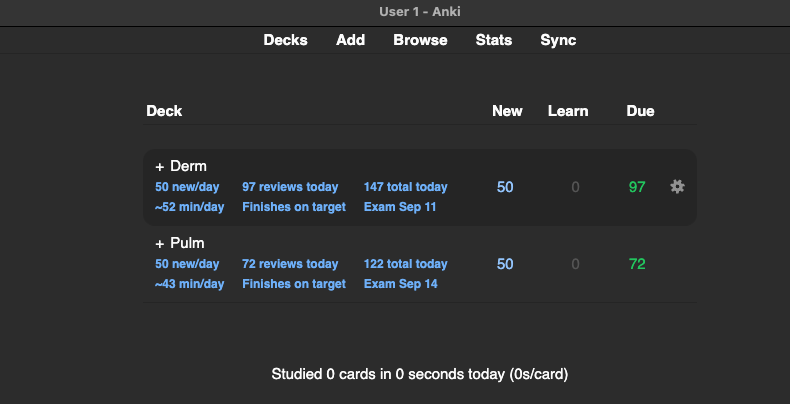
Decks Screen
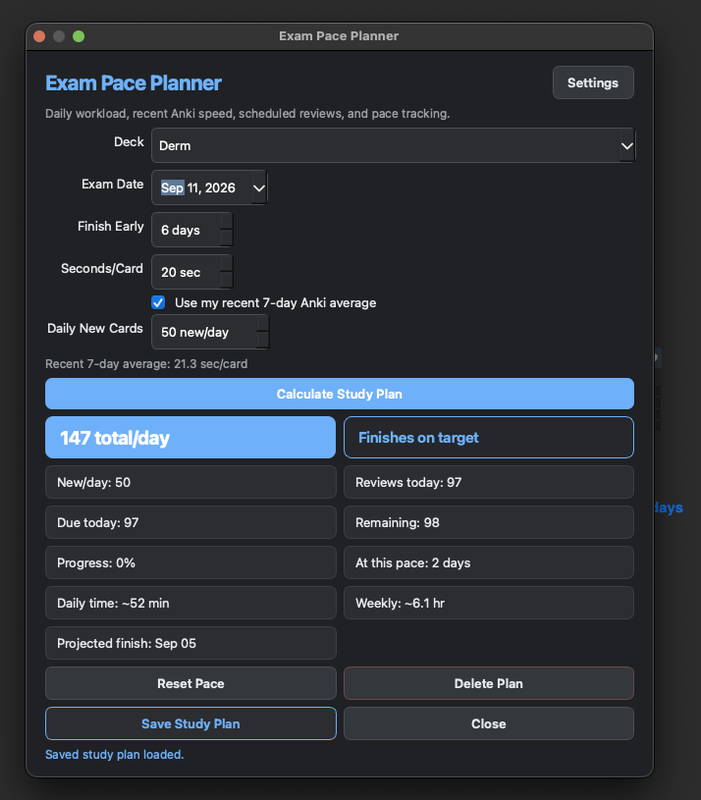
How to Use
- Open Exam Pace Planner.
- Select your deck.
- Enter your exam date.
- Choose your finish-early buffer.
- Use the automatic daily card target or enter your own new cards per day.
- Set your study speed or use your recent Anki average.
- Click Calculate Study Plan.
- Click Save Study Plan.
Your daily targets and estimated study time will appear beneath the deck name on the main Anki screen.
Custom Daily Pace
Want to limit how many new cards you do each day? Enter your own daily target, such as 50 new cards per day, and Race Pace will adjust your projected finish date and study plan around that number.
Daily Study Time
Race Pace estimates your daily workload using your new-card target plus the reviews currently due for that deck. It can then use your recent 7-day Anki review speed to estimate how much time you should expect to spend studying.
Customization
Choose your accent color and which stats appear under each deck.
Notes
Review counts and study-time values are estimates and may change as Anki reschedules cards.