Advanced Browser

AnkiWeb addon 874215009

1 other version of this addon exists. Compare versions ↓

Adds customizable, sortable browser columns for note fields, card statistics, review data, and internal database values, plus optional selectable or editable table content.
AI-generated summary; may contain mistakes.

statisticsnote-managementsearchdeveloper-tools

Open on AnkiWeb GitHub Find alternatives

AnkiWeb

Votes
302 (πŸ‘ 281 Β· πŸ‘Ž 21)
Updated
2024-10-27
Anki versions
23.10~
License
GPL-3.0 (from the GitHub repository)
Virus scan
No ClamAV match A match does not prove malware. No match does not prove that the code is safe.
Languages
Python, JSON
Description language
en

Maintenance

abandoned

  • Last update or commit: 2024-10-27 (735 days before the snapshot).
  • GitHub Actions workflows: 2.
  • Commits in the last year: 0.
  • Issues: 16 open, 137 closed.
  • Pull requests: 1 open, 25 merged.
  • Median first response: 50 hours (95 answered issues and pull requests).
  • Outside pull requests: 76% of 25 merged.
  • Forks that may still be maintained: "Advanced Browser - mod kaiu 2026" (1334324384).

Will it work on my Anki?

Version branches
Min AnkiMax AnkiUpdated
2.1.02.1.222020-02-20
2.1.242.1.342022-09-27
2.1.352.1.402022-09-27
2.1.412.1.442022-09-27
2.1.452.1.662023-07-01
23.10+2024-10-27
History across monthly snapshots

Loading…

Compare versions

The original addon and its forks. The best value in each column is in bold.

VersionWorks on Anki 26.09.3MaintenanceLast activity VotesApprovalGitHub starsNotes
Advanced Browser this addon original supported abandoned 27 Oct 2024 πŸ‘ 281 Β· πŸ‘Ž 21 90% 66
↳ Advanced Browser - mod kaiu 2026 (AI-detected; may be wrong) supported active 29 Oct 2026 πŸ‘ 4 Β· πŸ‘Ž 0 51% 1 beta

Forks can add features or work in a different way. Read the description before you change to another version. Fork detection is incomplete, so other versions can exist.

Similar addons

Study Time Stats

Displays customizable study time and review statistics on Anki's main window, with configurable styles, columns, ranges, deck exclusions, time formats, and text macros.

statistics

99 votes 90% approval πŸ‘ 95 Β· πŸ‘Ž 4 ⭐ 33 Anki 23.12.1~ Updated 2024-02-24

Description

Advanced Browser is an Anki add-on that adds more features to the browser. It allows you to add a variety of new, sortable columns to the card browser. These columns range from:

  • Fields from your note types
  • Additional statistics about the cards like first or latest review date, the answer time, the overdue interval
  • Internal database values (if you're a developer; off by default)

# Fields from your note types as columns You can add any field from your notes as a column that you can display and sort. This means you can have more than just Sort Field as a usable column. You must right-click on the column bar to get a list of columns to add. If you prefer to see every field in a single context menu instead of grouping fields by note type, you can toggle the behaviour by editing the configuration item Use a single list for fields using Anki's add-on manager and setting it to true.

# Bugs, Issues, Problems If you would like to report an issue, discuss the add-on, or offer contributions, please open a new issue on the add-on's github page.. We are not notified about reviews on this page. Troubleshooting a problem sometimes requires multiple questions and answers. The review section is not suited to this.

# Changelog 4.4:

  • fix for Anki v23.10 or later (Thanks to khonkhortisan and abdnh) 4.3a (2023-07-01):
  • fix labels for Card Queue and Card Type column, Anki 2.1.45 or later 4.3 (2022-09-27):
  • Fix bug when sorting by overdue interval, for Anki 2.1.24+ (Thanks to abdnh) 4.2:
  • Add column alignment option and minor script changes (Thanks to vwkd) 4.1:
  • Updated for 2.1.50, including PyQt6 support. Better build script and defaults (Thanks to ijgnd) 4.0:
  • Updated for 2.1.45 (Thanks to Rumo!) 3.9:
  • Fixed clearing initial state on browser open (e.g. didn't start on current card) 3.8 (Anki 2.1.41+ only)
  • Upgraded to support browser changes in Anki
  • Some errors will show "{error}" in the column instead of crashing the browser 3.7:
  • Fixed internal fields not sorting
  • Fix sorting of 'Ease' and 'Original Deck' 3.6 (Anki 2.1.35+ only):
  • Fixed advanced columns not sorting due to changes in Anki's internals
  • Advanced columns with no value no longer show a string like "0%" or "0 seconds". They are blank and will always sort below rows with any value. 3.5.1:
  • Reverted change causing errors. 3.5:
  • Fixed ability to copy internal fields 3.4:
  • Added column for card created date/time (to distinguish from note created date/time)
  • Provide separate columns for date-only and date time, to suit your preference 3.3:
  • Fixed a potential error when searching right after showing context menu
  • Fixed some console warnings from deprecated usage (Thanks Arthur) 3.2:
  • More compatibility fixes for 2.1.24.
  • The Flags column is now available as an advanced column (instead of hidden behind setting) 3.0:
  • Some major changes to keep the add-on working with the different internals of Anki 2.1.24. Let me know if anything behaves differently.
  • Thanks to Arthur, you can now copy the content of the current table cell (with Ctrl+C). There is also the option to allow inline editing of note data from within the browser results as well. That feature must be turned on in the settings. Please read the documentation if you do as it could be dangerous to use. 2.7:
  • Fix opening browser from reviewer while using note-mode not showing same card as reviewer (thanks Arthur) 2.6:
  • Allow sorting by more Anki-provided fields like deck names
  • Better handling of media in fields
  • Configurable shortcut for note-mode 2.5.1:
  • Fix issue with <br> in fields looking off 2.5:
  • Fixed issue where no results would appear in the browser on Mac (when sorting by column with non-alphanumeric characters) (thanks lin onetwo for helping me debug this)
  • Added new column: created (differs from built-in version by showing the created time as well)
  • Internal fields extension is now configurable instead of requiring code changes to enable (thanks Arthur Milchior) 2.4:
  • Fixed error when opening menu after adding a new field
  • Added configuration option to show all fields in one list instead of sub-menus (thanks Arthur Milchior) 2.3:
  • Fix display of RTL fields (render the text as RTL instead of just the visual direction)
  • Fix note-mode toggle shortcut (Ctrl+Alt+N) 2.2:
  • Note browser mode (1 row per note) (thanks Arthur Milchior)
  • Fix handling of media fields (some media-only fields were treated as empty) 2.1.2:
  • Fix sorting by Tags 2.0.0:
  • Added support for Anki 2.1. This add-on will no longer be updated for Anki 2.0.x.

This add-on is now managed under the AnKing VIP Add-ons Github Organization in order to keep it better up to date for everyone!

Check out our Anki Mastery Course!

README

note to future maintainers

To build an .ankiaddon file that's suitable for uploading to ankiweb run python3 release.py.

On Ankiweb in 2023-10 there are 6 different versions of the Advanced Browser add-on for different Anki versions:

Ankiweb version corresponding branch in this repo
2.1.0-2.1.22 maintenance_for_00-22
2.1.24-2.1.34 maintenance_for_24-34
2.1.35-2.1.40 maintenance_for_35-40
2.1.41-2.1.44 maintenance_for_41-44
2.1.45-2.1.66 maintenance_for_45-66
23.10 or newer master

Up to 2022-09 this repo only used the master branch for fixing bugs in AB and adjustments to newer Anki versions. This made it hard to fix bugs in AB for older Anki versions. So ijgnd created the branches outlined in the table above in 2022-09. In each branch there's the file release.py to create an .ankiaddon file.


Advanced Browser

Link to add-on on AnkiWeb.

Advanced Browser is an Anki add-on that adds more features to the browser. It allows you to add a variety of new, sortable columns to the card browser. These columns range from:

  • Fields from your note types
  • Additional statistics about the cards
  • Internal database values (if you're a developer; off by default)

Note fields

Feature notice

The note browser mode (show a single card per note) for Anki versions 2.1.24-2.1.44 has been moved to a separate add-on maintained by another developer (@Arthur-Milchior). If you rely on this feature, you can download the add-on Browser have one line by note from ankiweb (GitHub: anki-browser-for-note). A "notes only" mode is built into Anki 2.1.45 or newer.

How to use

Right click on any of the currently visible columns and a menu will appear. Some new menu items will now appear in the list.

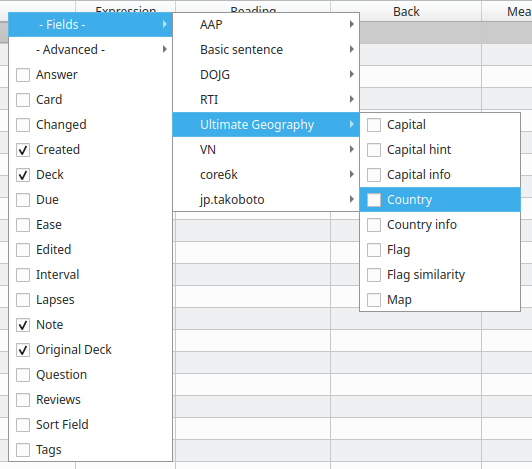
  • The - Fields - menu item contains a list of your note types. Each note type reveals a sub-menu with each of its fields that can be enabled as columns. If a field name exists in another note type, it will be enable as well, and sorting by this column will consider all of the note types together as one:
    Useful columns

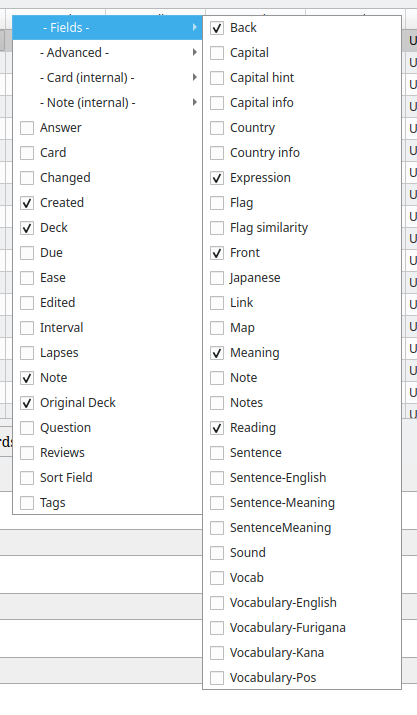
  • If you prefer to see every field in a single list instead of grouping fields by note type, you can toggle the behaviour by editing the configuration item Use a single list for fields using Anki's add-on manager and setting it to true:
    Useful columns

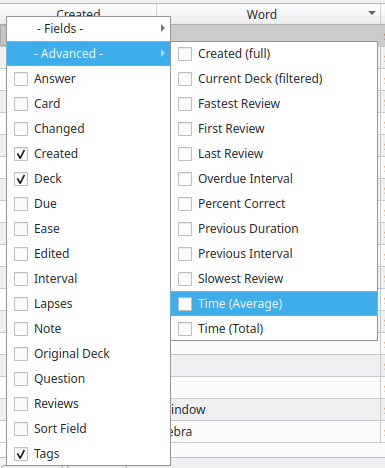
  • The - Advanced - menu item offers some columns with interesting statistics about each card.
    Useful columns

Copying table content

By setting "Table content" to "Selectable", you'll be able to select table content by double clicking on it. This way, you can copy it. Note that editing the content has no effect.

Editing the table

By setting "Table content" to "Editable" you can edit the content of some elements of the tables. You need to activate this feature in the configuration before being able to use it. It can be dangerous if you don't really know what you're doing and this feature is not widely used and tested. Please see the document [edition in table](edition in table.md) to see what editing each column does.

Internal fields

You can also show some fields used internally by Anki but probably aren't very useful for the typical user. These are disabled by default, but you can enable them in the add-on config by setting "Show internal fields" to true.

Help and suggestions

New column?

If you have a good idea for a new column, please open a new issue on GitHub. If you are a developer and would like to add it yourself, please see advanced_fields.py as it's the most likely place you'd want to put it. Contributions are more than welcome!

Add-on author?

If you are an add-on author and would like to add a new column in your own add-on, then doing so is easy through Advanced Browser. Advanced Browser is designed to let add-ons add their own columns through a standard Anki hook. In fact, Advanced Browser uses this same hook to offer its own columns, so you already have a working example to look at. Your own add-on can easily add its own columns provided your user also has Advanced Browser installed.