🔍 How It Works
This add-on simulates an image search on Microsoft Bing, working just like searching for pictures directly inside the Microsoft Edge browser. The image results added to your cards match the exact accuracy and clarity you would see when searching on Edge:
- Browser-grade search accuracy: Finds crisp, relevant images matching your terms and context, exactly like typing by hand in Microsoft Edge.
- Cross-platform reliability: Runs smoothly and stably on both Windows and Linux, automatically cleaning up background browser processes with zero lingering clutter.
- Zero Anki freezes: High-performance asynchronous architecture guarantees Anki remains responsive at all times, with instant cancellation in under 500ms.
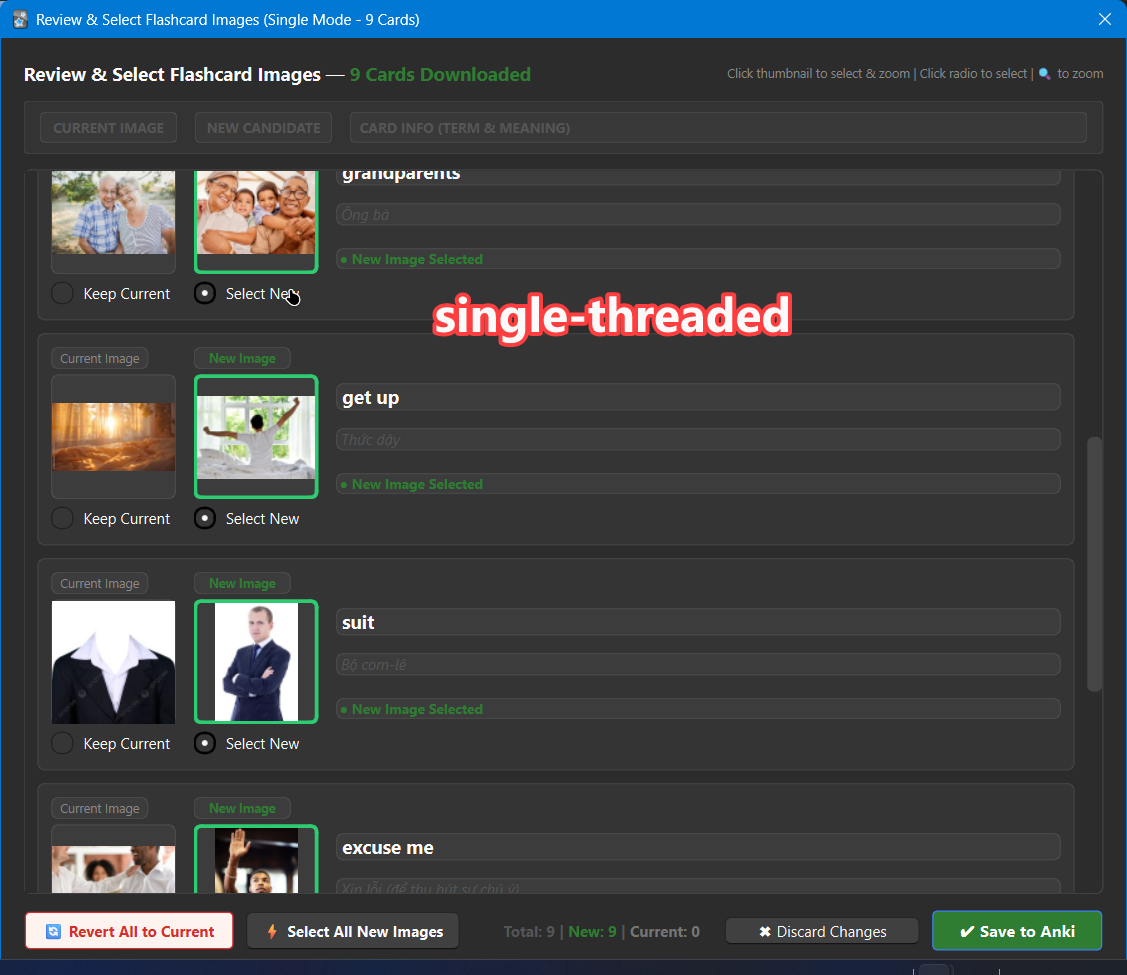
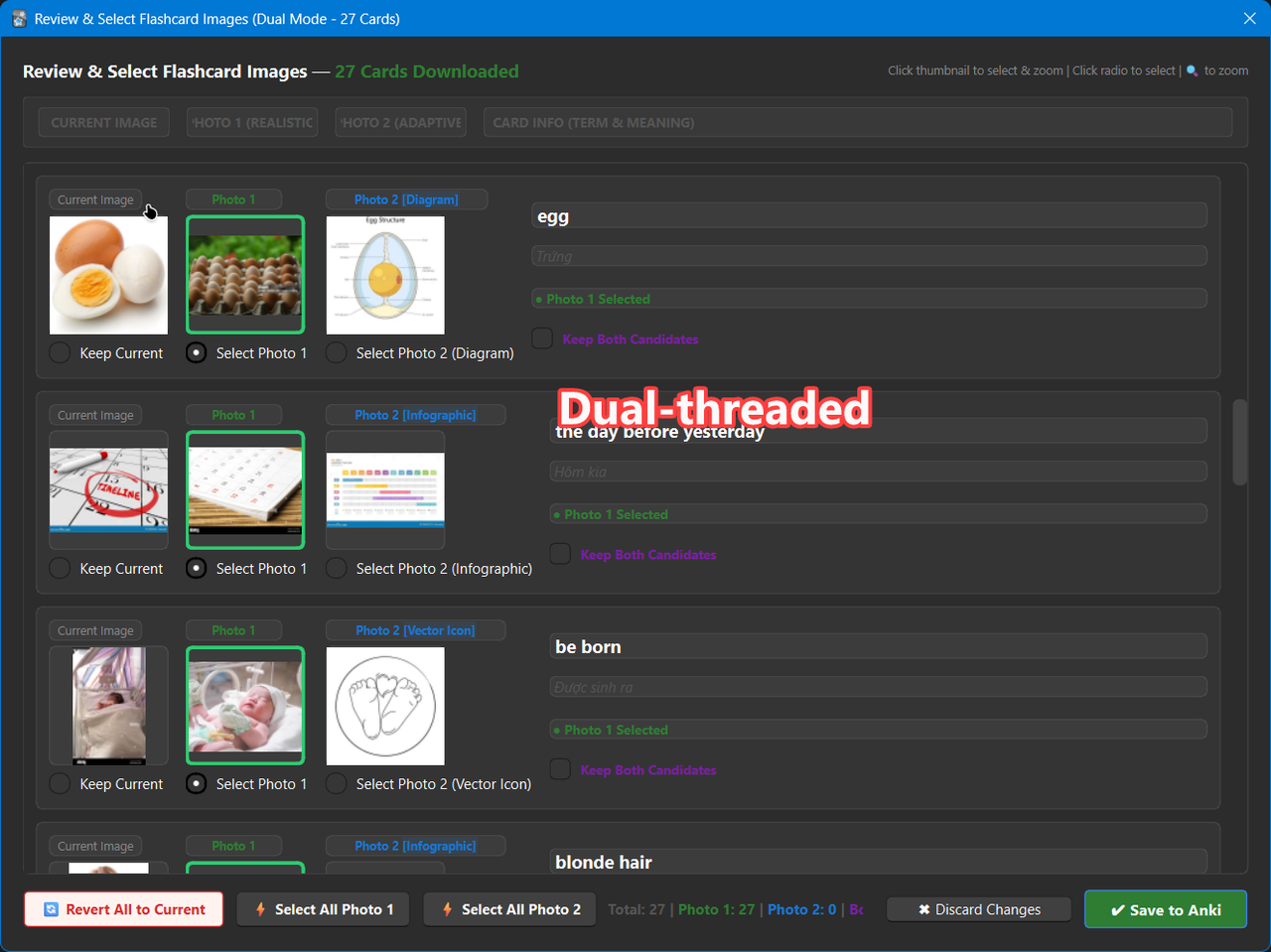
- Completely safe & non-destructive: Never overwrites your existing images without your explicit consent. You can preview all pictures side-by-side and undo changes with a single click.
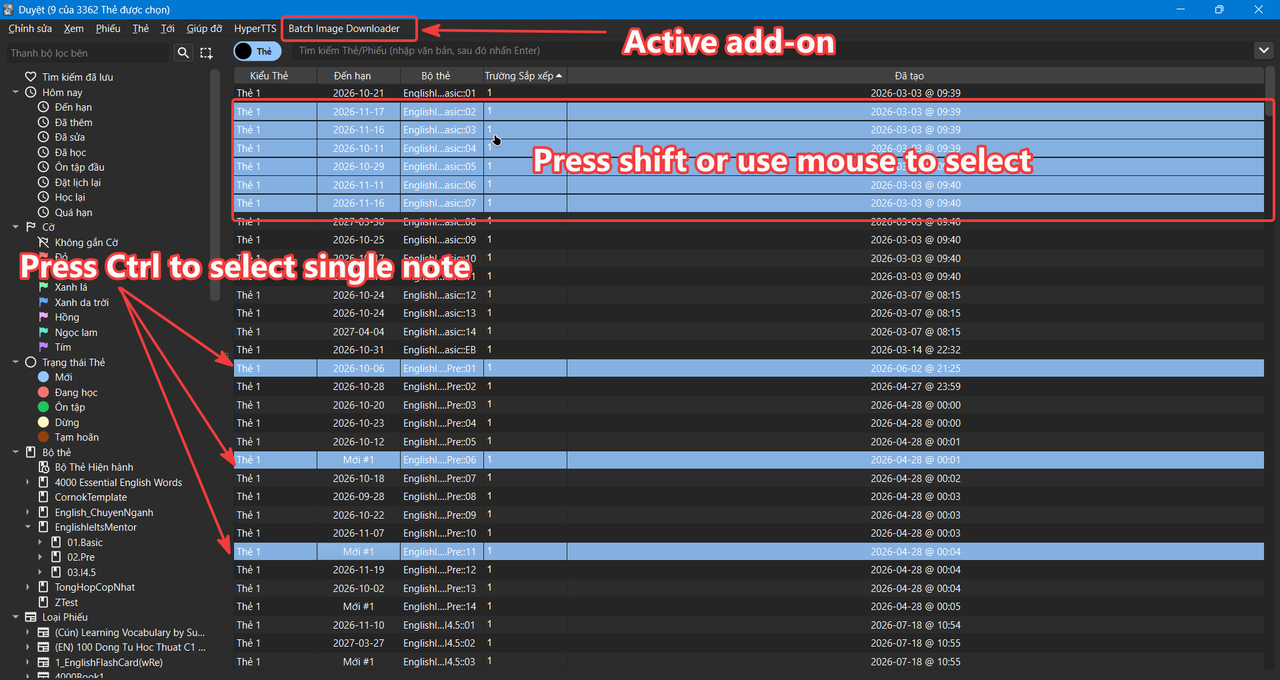
- Flexible workflows: Download images in bulk for hundreds of cards in seconds, or process individual cards as you create new notes.
🌟 Key Features
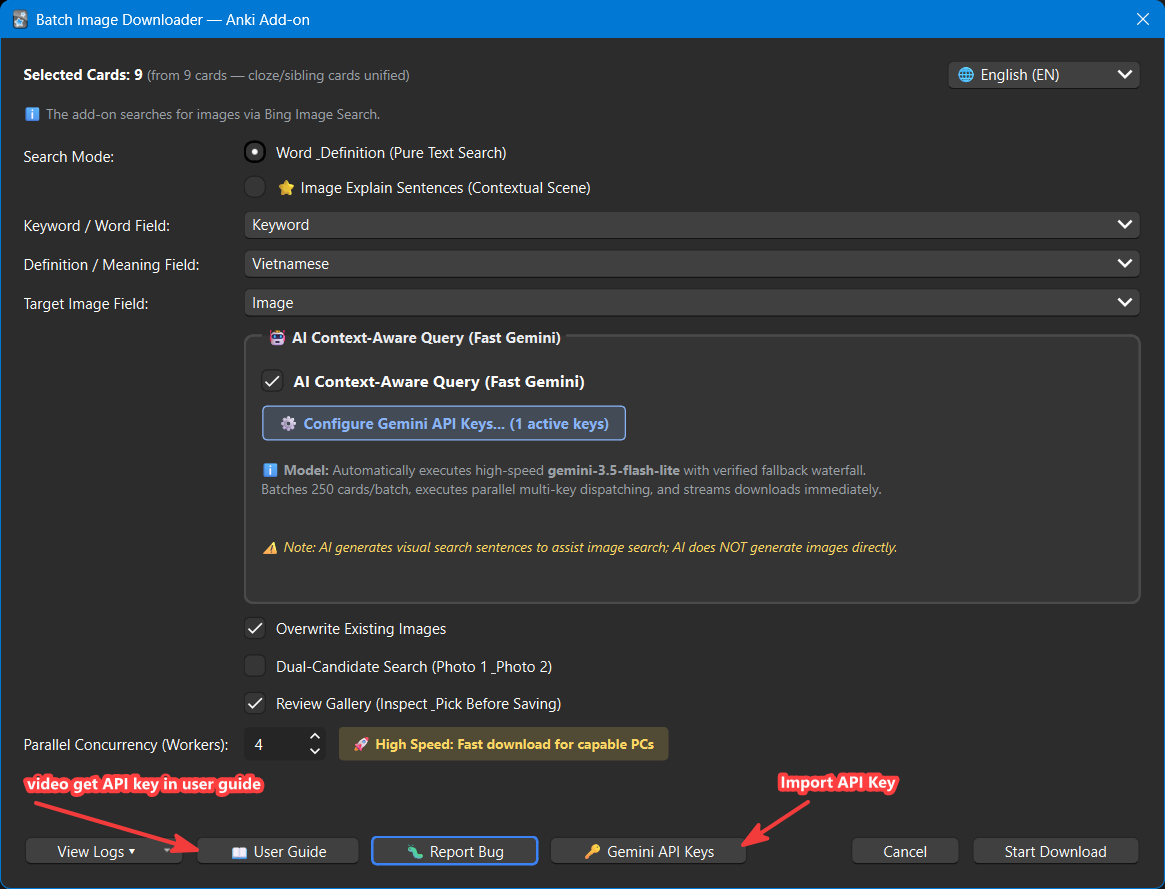
- Built-in Google Gemini AI Assistant: Automatically converts dictionary definitions into vivid real-world scenes right inside Anki — no external copy-pasting required! Supports free Google Gemini API keys with multi-key auto-rotation.
- Smart Single & Dual-Candidate Search:
- Word Mode (Dual-Candidate Search): Choose between a standalone object on a clean background and an authentic real-life contextual scene. Review both candidates side-by-side in the gallery before saving.
- Sentence Mode (Optimized Single Search): Uses your card's pre-written visual description sentences with a streamlined single-thread pipeline for maximum focus and speed.
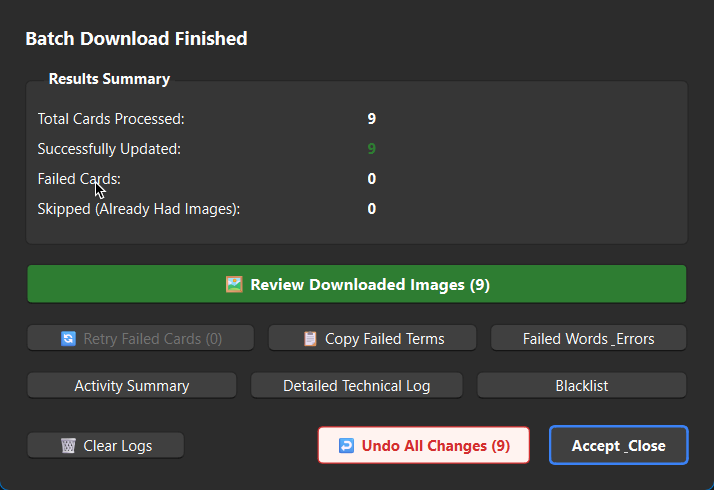
- Explicit 1-Click Undo: Not satisfied with the new pictures? Click ↩️ Undo All Changes in the summary window or gallery to restore all cards instantly, or revert individual cards with one click.
- High-Speed Parallel Multi-Threading: Download 2 to 8 cards simultaneously with pure in-memory (RAM) processing and zero temporary disk clutter.
- Global Multilingual System (6 Languages): Built-in support for English (default), Tiếng Việt (Vietnamese), 中文 (Chinese), Русский (Russian), Español (Spanish), and Português (Portuguese). Instant switching in under 2ms, paired with an intelligent 4-tier collision-free field auto-detection matrix across all 6 languages.
- Visual Modality Ontology & Context Matching: Automatically classifies vocabulary to find optimal visual styles (photos for real concepts, diagrams for abstract terms) while eliminating text-heavy worksheets.
- Strict Tab Isolation & Thread Safety: Each parallel worker operates in a dedicated browser tab to prevent race conditions and cross-card confusion.
- Direct Bug Report Button: Click the 🐛 Report Bug button directly on the download dialog to open our dedicated Facebook Support Page for instant assistance.
- Modern & Spacious UI (930px): Clean visual layout with high-contrast elements and 6 neatly organized footer action buttons aligned in a single row.
- Dark Mode Friendly (Zero Black Boxes): Transparent PNG images are automatically composited onto a clean white background before saving, preventing ugly black backgrounds in Anki Dark Mode.
- Family-Friendly Safety Shield: Enforces Bing server-side Strict SafeSearch alongside adult domain blocklists to protect everyday study.
🎛️ Dialog Controls & How to Use
The dialog features a spacious 930px layout designed for clarity and speed:
📊 Comparison of Search Methods
-
Method 1: Word & Definition (Traditional)
- How it works: Searches using your vocabulary word combined with the raw dictionary definition.
- Image quality: Basic text-relevance match. Search engines may occasionally return textbook diagrams, abstract icons, or dictionary screenshots because dictionary definitions contain abstract words.
-
Method 2: Word & Definition with AI Context (Gemini AI Powered)
- How it works: Built-in Gemini AI analyzes the definition and automatically translates the abstract meaning into a concrete, visual real-life scene (
meaning ~ explain sentence).
- Image quality: Contextually accurate real-life photographs illustrating the concept in action. Delivers high visual accuracy comparable to handcrafted scene descriptions, completely automated without manual prompt engineering!
-
Method 3: Image Explain Sentences (Pre-written Visual Scenes)
- How it works: Searches directly using a pre-written visual scene description field on your cards (e.g., a short visual prompt).
- Image quality: Authentic photography and clear visual focus, eliminating ambiguity and irrelevant clipart. Delivers high visual accuracy comparable to AI context understanding, with an optimized single-thread pipeline.
⚠️ Note: Both Method 2 (AI Context) and Method 3 (Ready-made Scene) achieve comparable high accuracy, significantly outperforming pure keyword matching.
💡 Pro Tip: Maximize Your Free Gemini Quota with Batching
The add-on automatically packages up to 250–300 cards into a single API request:
- Processing 1 card = 1 API request
- Processing 10 cards = 1 API request
- Processing 250 cards = 1 API request!
Recommendation:
To get the most out of Google Gemini's free daily quota and avoid hitting rate limits (RPM / RPD), batch your cards together (e.g., 200–300 cards in a single batch) before running the AI visual assistant, rather than running cards individually. For optimal performance, execute batch AI downloads on a stable internet connection.
📦 Ready-to-Test Sample Deck (EN - VI)
Want to try the add-on immediately without creating your own deck? Download our pre-configured English - Vietnamese test deck featuring vocabulary words, dictionary definitions, and visual scene description fields:
🔑 Free Google Gemini API Key Setup
To use Method 2 (AI Context Understanding), simply obtain a free API key from Google AI Studio:
- 📺 Watch Step-by-Step Video Guide: Google API Key Video Tutorial
- In Anki, click ⚙️ Gemini Keys on the dialog or go to Tools → Batch Image Downloader → Configure Gemini AI... to paste your key.
- You can add up to 10 free keys for automatic round-robin rotation and higher daily limits.
💬 Community & Direct Support
Have questions, suggestions, or encountered a bug?
- 🐛 Direct In-App Bug Report: Click the 🐛 Report Bug button at the bottom of the download dialog.
- 🌐 Facebook Support: Connect on Facebook Support
- Click the View Logs ▾ button at the bottom of the add-on dialog to inspect progress or troubleshoot.