Anki Image Picker

AnkiWeb addon 647779979

Lets you search multiple providers and interactively choose thumbnails before inserting images into selected Anki notes, with batch processing and session controls.
AI-generated summary; may contain mistakes.

card-creationnote-managementshortcuts

Open on AnkiWeb GitHub Find alternatives

AnkiWeb

Votes
5 (πŸ‘ 5 Β· πŸ‘Ž 0)
Updated
2026-04-03
Anki versions
26.12~
License
MIT (from the README)
Virus scan
No ClamAV match A match does not prove malware. No match does not prove that the code is safe.
Languages
Python, JSON
Description language
en

Maintenance

stale

  • Last update or commit: 2026-04-03 (212 days before the snapshot).
  • Test files: 6.
  • Commits in the last year: 73.
  • Issues: 0 open, 0 closed.
  • Pull requests: 0 open, 0 merged.

Will it work on my Anki?

Version branches
Min AnkiMax AnkiUpdated
23.1026.12+2026-04-03
History across monthly snapshots

Loading…

Similar addons

Image Search v3 fork

Searches multiple image providers using note fields or selected text and inserts chosen images into a configured field, with browsing, per-note-type settings, and smart replacement.

card-creationfork-or-reupload

3 votes 21% approval πŸ‘ 2 Β· πŸ‘Ž 1 ⭐ 2 Anki 26.05~ Updated 2026-10-16
Cambridge/Wiktionary fetcher

Fills Anki notes with dictionary dataβ€”definitions, examples, synonyms, part of speech, IPA, audio, and imagesβ€”from Cambridge and Wiktionary sources, using configurable field mapping and typo suggestions.

card-creationdictionary

2 votes 34% approval πŸ‘ 2 Β· πŸ‘Ž 0 ⭐ 1 Anki 2.1.1~ Updated 2026-03-23
πŸ–Ό Bing Image Picker

Adds a πŸ–Ό editor button that searches Bing Images and inserts a chosen image from a 3Γ—3 grid into a note field, with per-note-type field mapping and SafeSearch options.

card-creation

1 votes 21% approval πŸ‘ 1 Β· πŸ‘Ž 0 ⭐ 0 Anki 26.05~ Updated 2026-06-23

Description

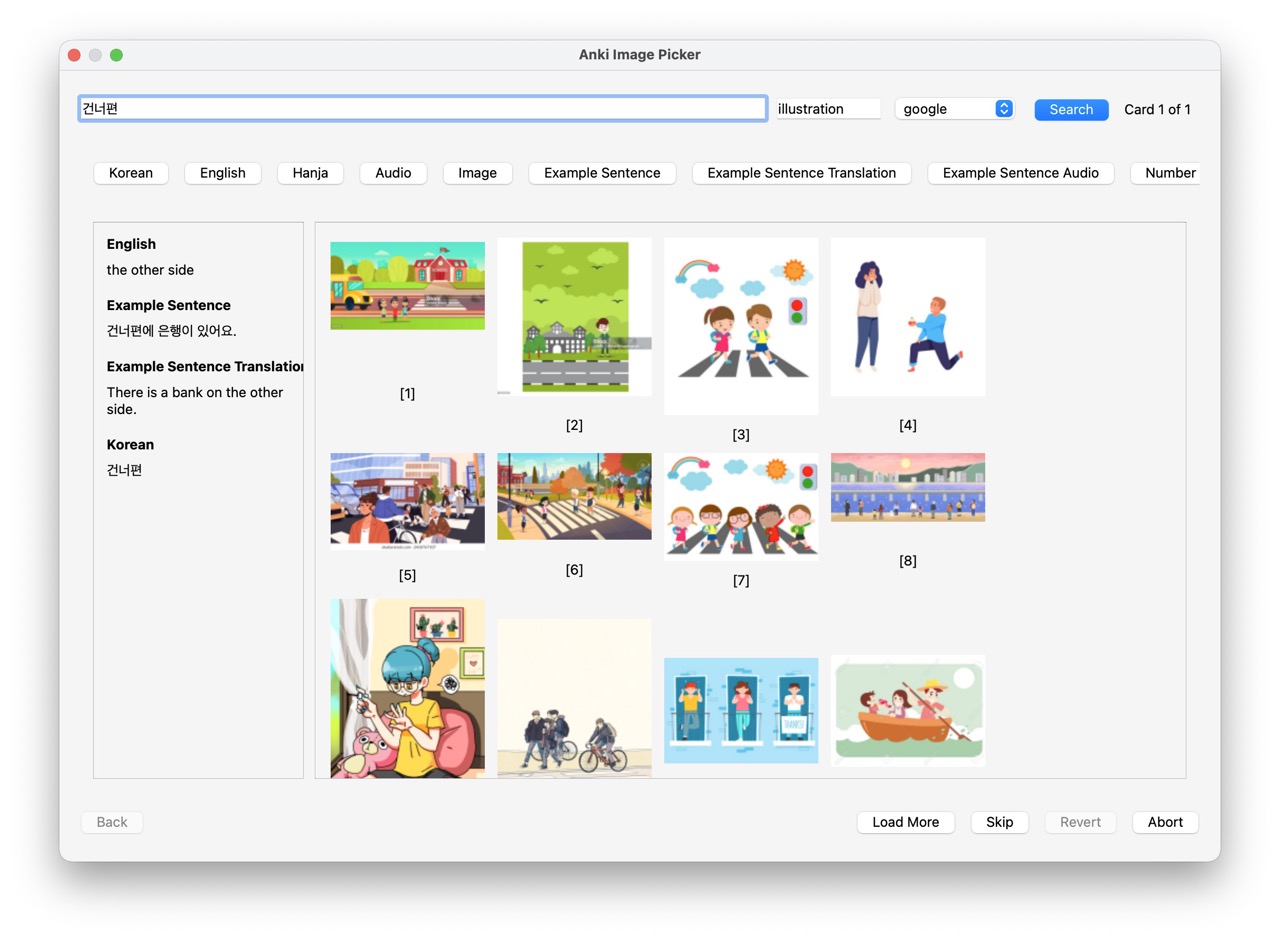
Quickly add images from web search to your Anki flashcards. Unlike batch downloaders, this add-on lets you see and choose from multiple image candidates before inserting.

Picker Dialog

Features

  • Interactive selection - See thumbnails before adding, pick with a click or keyboard (1-8)
  • Batch processing - Select multiple notes, process them one by one
  • Multiple search providers - Bing, DuckDuckGo, or Google Images via API (bring your own key from SerpApi or Serper.dev)
  • Smart search - Auto-strips HTML and cloze markers from search terms
  • Field context - Use other fields to refine searches on the fly
  • Session control - Go back, skip, abort, or revert all changes

Usage

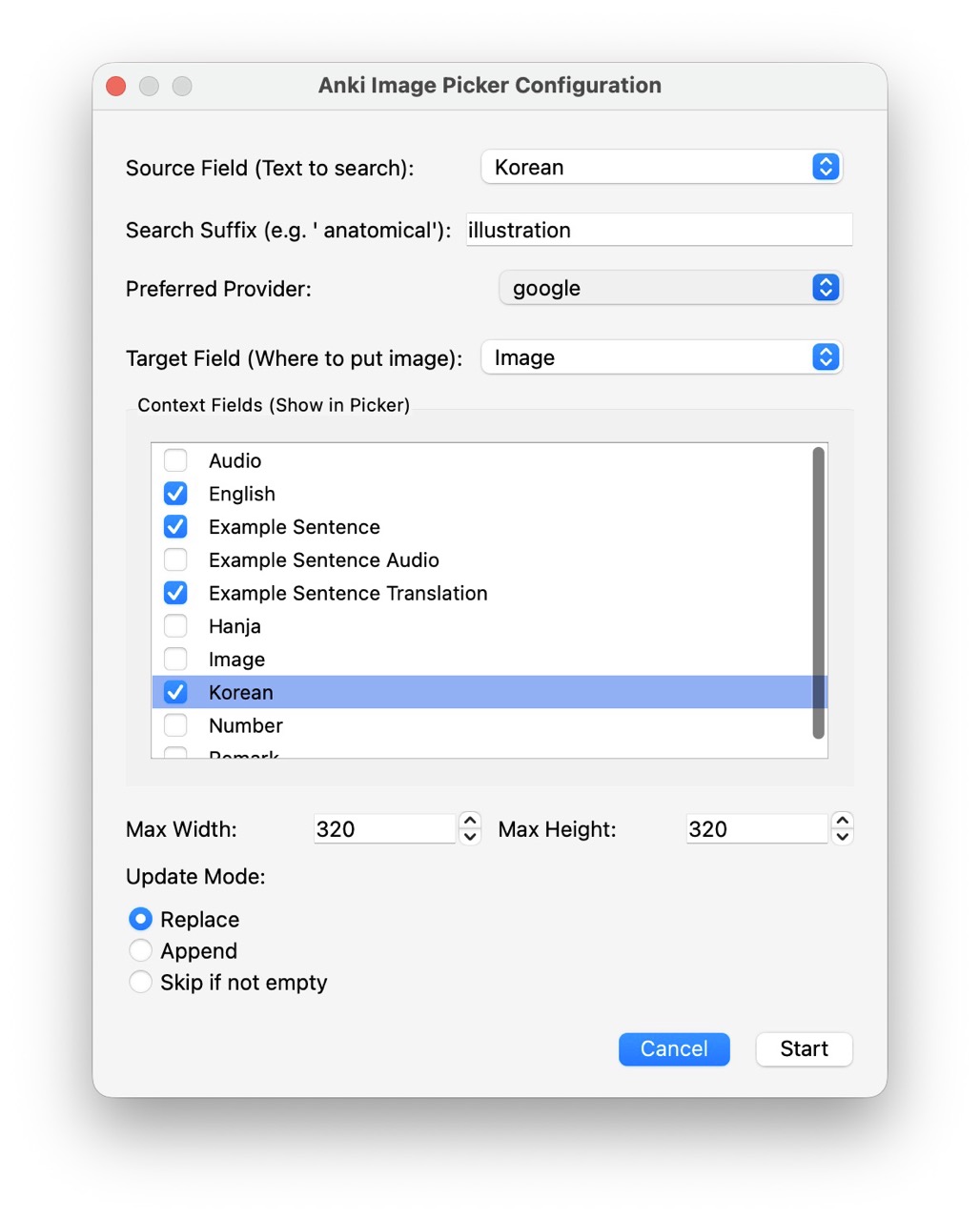
  1. In the Browser, select one or more notes
  2. Right-click β†’ "Anki Image Picker..."
  3. Configure source field (search term) and target field (image destination)
Configuration Dialog
  1. Click an image or press 1-8 to select and advance

Settings are remembered per note type.

Google Images (Optional)

To use Google Images, get a free API key from SerpApi or Serper.dev, then add it in Tools β†’ Add-ons β†’ Config. The provider will appear in the dropdown once a key is set. No key needed for Bing/DuckDuckGo.

Requirements

Anki 2.1.54+ (Qt6)

Source Code

https://github.com/liyb-gz/anki-image-picker

README

Anki Image Picker

Quickly add images from web search to your Anki flashcards. Select multiple notes, pick images interactively from a grid, and move on - no blind batch downloads.

Picker Dialog

Features

  • Interactive selection - See thumbnails before adding, pick with a click or keyboard (1-8)
  • Batch processing - Select multiple notes, process them one by one
  • Multiple search providers - Bing, DuckDuckGo, or Google Images via API (bring your own key)
  • Smart search - Auto-strips HTML and cloze markers from search terms
  • Field context - Use other fields to refine searches on the fly
  • Session control - Go back, skip, abort, or revert all changes

Note on Google Images: Direct scraping of Google Images is no longer possible (Google now requires full client-side JavaScript rendering). However, you can still search Google Images by providing your own API key from SerpApi or Serper.dev. See Google Images via API below.

Installation

From AnkiWeb (Recommended)

  1. Open Anki β†’ Tools β†’ Add-ons β†’ Get Add-ons...
  2. Enter code: 647779979
  3. Restart Anki

Manual Installation (to be added)

  1. Download the latest release from GitHub Releases
  2. Extract to your Anki add-ons folder
  3. Restart Anki

Usage

  1. In the Browser, select one or more notes
  2. Right-click β†’ Anki Image Picker...
  3. Configure:
    • Source field - Field containing search terms (e.g., "Word")
    • Target field - Where images will be added (e.g., "Picture")
    • Mode - Replace, Append, or Skip existing images

Configuration Dialog

  1. Click an image or press 1-8 to select and advance
  2. Use Skip to skip a card, Back to revisit previous cards

Settings are remembered per note type, so you only need to configure once.

Google Images via API

Google Images can be used through a paid API service. Both SerpApi and Serper.dev offer free tiers, so you can try them without paying.

Setup

  1. Sign up for an API key:
    • SerpApi β€” serpapi.com (100 free searches/month)
    • Serper.dev β€” serper.dev (2,500 free queries on signup)
  2. In Anki, go to Tools β†’ Add-ons, select Anki Image Picker, and click Config
  3. Add your API key(s) to the JSON config:
    {
        "serpapi_key": "your_serpapi_key_here",
        "serper_key": "your_serper_key_here"
    }
    
  4. Restart Anki. The new provider(s) will appear in the provider dropdown β€” only when a key is configured.

You can set up one or both services. If you don't add any API keys, everything works as before with Bing and DuckDuckGo.

Keyboard Shortcuts

Key Action
1-8 Select image
Enter Confirm selection
Esc Skip current card

Requirements

  • Anki 2.1.54 or later (Qt6)

See Also

Other image add-ons for Anki:

How is this different? The add-ons above download images automatically based on search terms. Anki Image Picker lets you see and choose from multiple candidates before inserting - no blind downloads.

License

MIT