🌐 Web Browser in Add Dialog (Beta)

AnkiWeb addon 918010938

1 other version of this addon exists. Compare versions ↓

Embeds a multi-tab web browser with a search-enabled URL bar and keyboard shortcuts into Anki's Add Card dialog, letting users browse or search while creating and editing cards.
AI-generated summary; may contain mistakes.

shortcutsbeta

Open on AnkiWeb GitHub Find alternatives

AnkiWeb

Votes
9 (πŸ‘ 9 Β· πŸ‘Ž 0)
Updated
2024-12-11
Anki versions
24.11~
License
GPL-3.0 (from the license file in the package)
Virus scan
No ClamAV match A match does not prove malware. No match does not prove that the code is safe.
Languages
Python, JSON
Description language
en

Maintenance

stale

  • Last update or commit: 2024-12-26 (675 days before the snapshot).
  • Commits in the last year: 0.
  • Issues: 0 open, 2 closed.
  • Pull requests: 0 open, 1 merged.
  • Median first response: 1 hour (1 answered issues and pull requests).
  • Forks that may still be maintained: "πŸ”Ž AnkiVN - Better Web Browser" (931808492).

Will it work on my Anki?

Version branches
Min AnkiMax AnkiUpdated
2.1.5024.11+2024-12-11
History across monthly snapshots

Loading…

Compare versions

The original addon and its forks. The best value in each column is in bold.

VersionWorks on Anki 26.09.3MaintenanceLast activity VotesApprovalGitHub starsNotes
🌐 Web Browser in Add Dialog (Beta) this addon original likely stale 26 Dec 2024 πŸ‘ 9 Β· πŸ‘Ž 0 70% 0 beta
↳ πŸ”Ž AnkiVN - Better Web Browser (AI-detected; may be wrong) supported stale 6 Jun 2025 πŸ‘ 0 Β· πŸ‘Ž 0 – –

Forks can add features or work in a different way. Read the description before you change to another version. Fork detection is incomplete, so other versions can exist.

Similar addons

Sidecar AI

Embeds an AI tutor and study dashboard into Anki's review screen, generating explanations, quizzes, comparisons, and study guides from cards and uploaded files.

aisync-integrationreview-flowshortcutsquiz

1 votes 21% approval πŸ‘ 1 Β· πŸ‘Ž 0 Anki 24.04~ Updated 2026-10-23
AnkiVec

Generates local Ollama vector embeddings for Anki cards, stored in ChromaDB, enabling semantic natural-language searches via "vec:" queries that can combine with keyword filters.

aisearch

1 votes 21% approval πŸ‘ 1 Β· πŸ‘Ž 0 ⭐ 0 Anki 23.09~ Updated 2025-11-20
BetterSearch

Adds browser search filter dialogs for tags, decks, note and card types, fields, flags, and saved searches, plus absolute-date filtering and keyboard shortcuts.

searchfiltered-decksshortcuts

61 votes 87% approval πŸ‘ 58 Β· πŸ‘Ž 3 ⭐ 12 Anki 25.09.2~ Updated 2026-03-03
Duolingo Dictionary

Provides a searchable Duolingo dictionary interface in the editor and card browser, letting users find translations and paste usage examples, though example sentences currently cannot be fetched.

card-creationdictionaryobsoletebeta
2 votes 9% approval πŸ‘ 1 Β· πŸ‘Ž 1 ⭐ 3 Anki 2.1.49~ Updated 2022-05-10

Description

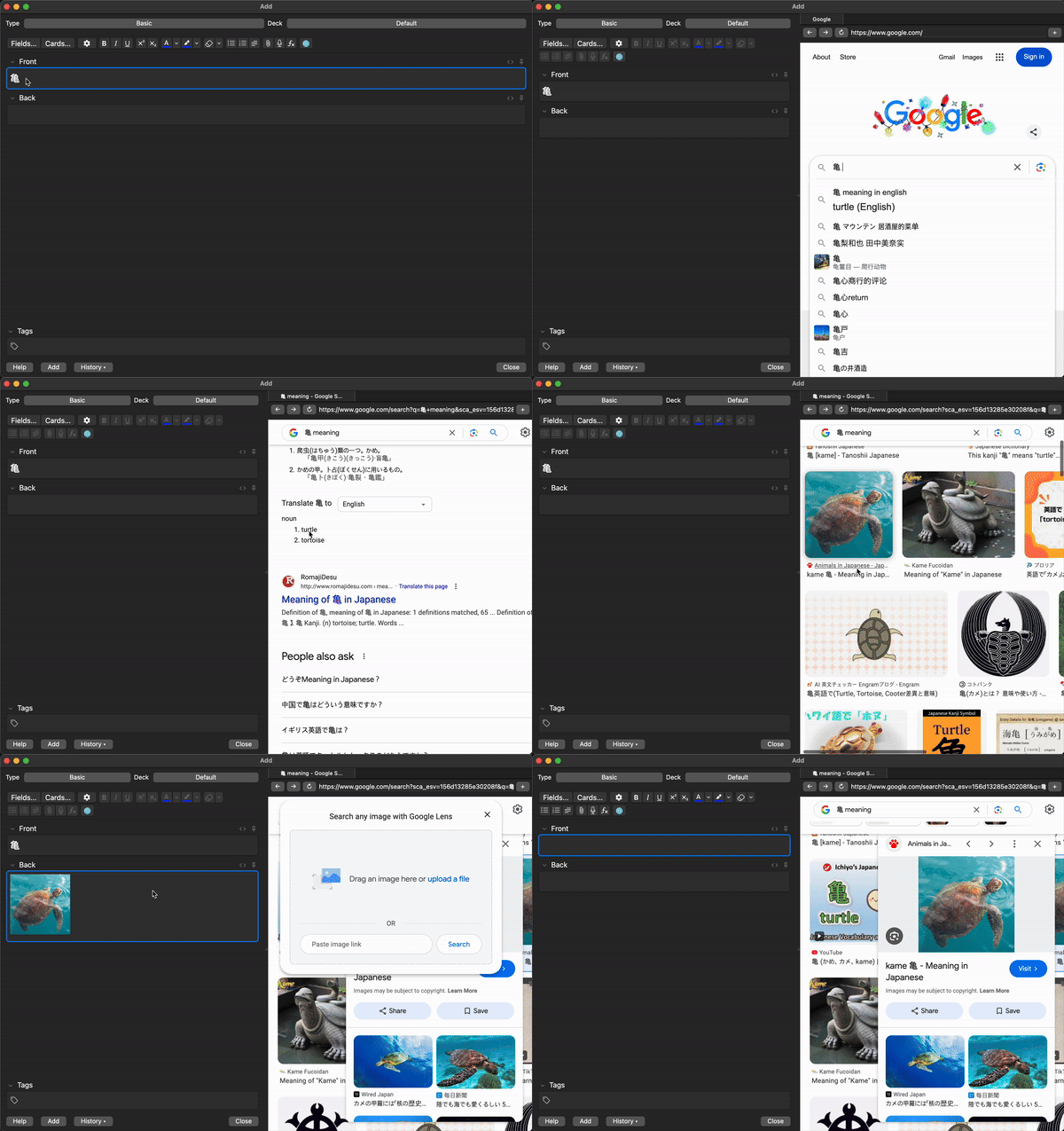
A simple web browser for Anki's Add Card dialog, allowing you to browse the web while creating or editing cards.

Demo

πŸ“ Important Note

This add-on is in beta and may contain bugs. Instead of downvoting, please report bugs via GitHub issues so they can be addressed quickly.

This add-on has been tested on macOS Sequoia, Windows 11, and Ubuntu. If you encounter any issues, please share your feedback here.

Features

  • Integrated Web Browser: Browse websites directly in Anki's Add Card dialog
  • Search-enabled URL Bar: Quickly navigate to websites or search Google directly
  • Multi-tab Support: Open and manage multiple tabs.
  • Keyboard Shortcuts:
    • Ctrl+Shift+L: Open/close browser
    • Ctrl+T: Open a new tab
    • Ctrl+W: Close current tab
    • Ctrl+L: Focus on the URL bar
    • Ctrl+R: Reload the current page
    • Ctrl+[: Navigate back
    • Ctrl+]: Navigate forward

How to use

  1. Open the Add Card dialog in Anki
  2. Click the 🌐 button or press Ctrl+Shift+L to open the browser
  3. Use the URL bar to enter a website or search Google
  4. Navigate efficiently with keyboard shortcuts

Configuration

Set your preferred start page in Tools > Add Dialog Web Browser

Requirements

Anki 2.1.50 or later (includes Qt 6)

README

Web Browser in Add Dialog

A simple web browser for Anki's Add Card dialog, allowing you to browse the web while creating or editing cards.

Demo

Features

  • Integrated Web Browser: Browse websites directly within Anki's Add Card dialog
  • Search-supported URL Bar: Enter URLs or search Google directly
  • Multi-tab Support: Open multiple websites via tabs
  • Keyboard Shortcuts:
    • Ctrl+Shift+L: Open browser
    • Ctrl+T: New tab
    • Ctrl+W: Close current tab
    • Ctrl+L: Focus URL bar
    • Ctrl+R: Reload current page
    • Ctrl+[: Go back
    • Ctrl+]: Go forward

How to use

  1. Open Anki's Add Card dialog
  2. Click the 🌐 button or press Ctrl+Shift+L to toggle the browser
  3. Enter URLs in the address bar or type terms to search Google
  4. Use keyboard shortcuts for quick navigation

Configuration

Set your preferred start page in Tools > Add Dialog Web Browser

Requirements

Anki 2.1.50 or later (includes Qt 6)

License

Licensed under GNU General Public License v3.0 or later (GNU GPL v3+). See the LICENSE file for details.