This add-on offers multiple search-related enhancements. This description only refers to the latest version of the add-on.
Check out these TheAnKing Videos: Anki: Better Searching Tools and Anki: How to Find Cards and Tags in the Browser. Note that since the video was made the default shortcuts have changed from Ctrl+ to Alt+(Option+ on Mac).
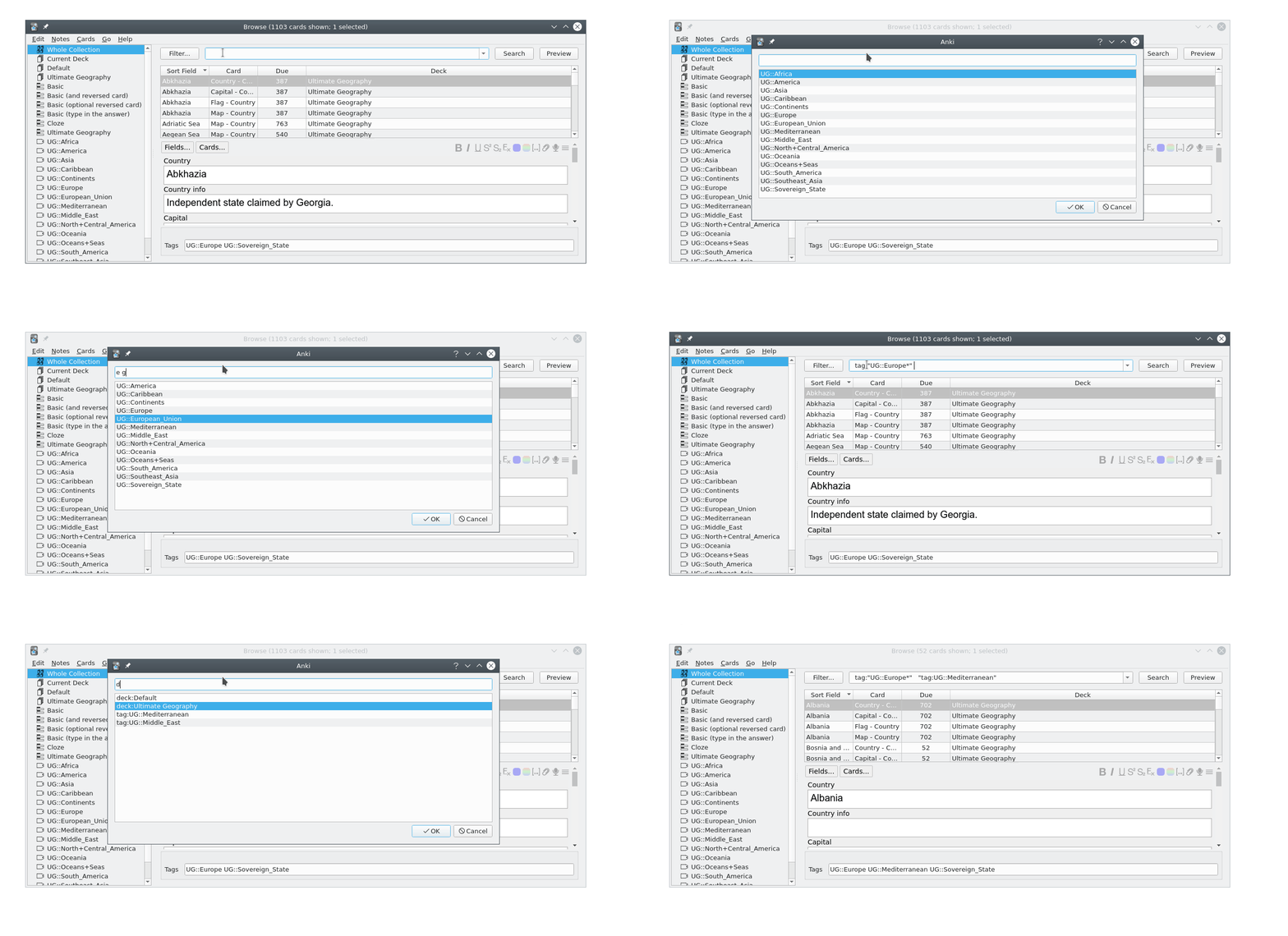
1. additional filter dialogs
With this add-on when you type "tag:", "deck:", "note:", or "card:", etc. into the browser search bar a dialog opens that allows you to filter and insert a matching tag, deck, notetype, cardtype, etc. into the search bar. See the gif above. Some sort of fuzzy search is supported: E.g. typing in "b c o" (note the spaces between the characters) will match "vocabulary".
2. extra dialog to narrow your search by date added/rated/edited
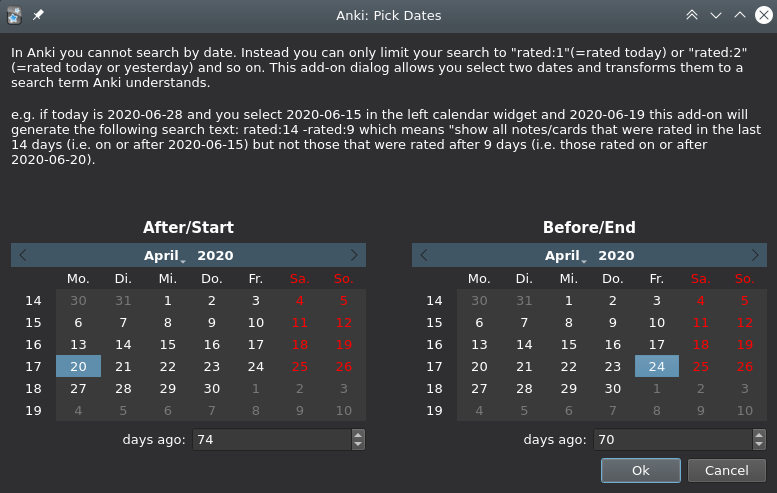
There's also a custom dialog to make it easier to narrow your searches by date. In Anki you can limit your search by "date added" and "date rated" and since 2.1.28 by "date edited" and since 2.1.45 by "date introduced [=first learned]". But you can only search relative to today's date, e.g. to find cards rated on or after yesterday you would type in "rated:2". This gets less useful if you e.g. want so search for notes added during the first week of the semester which was from April, 15th to April, 19th ... For these cases this add-on offers a dialog where you can select absolute dates (like April, 15th) and the add-on will transform them so that Anki understands them.
For older Anki versions (2.1.40 from 2021-02 or older) you could also adjust the position in the of the search bar in the browser and which buttons were shown around it. Anki 2.1.41 removed all buttons around the searchbar so my functionality is not really needed anymore.
other add-ons
The add-on Extended Tag Add/Edit Dialog lets you use filter dialogs (as shown in the first screencast on top of this page) to insert tags into a note in the editor (in the Add Window, at the bottom of the Browser or in the Edit Current window).
Details
The default shortcut to open the multi-line dialog is "Alt+t, s" (on MacOS it's ""Option+t, s"). You press "Alt+t" (Option+t on MacOS), then release both keys and then press "s". My mnemonic is "to search". You can adjust the shortcuts in the addon settings in the addon config window.
BetterSearch also adds some special filter dialogs:
- If you type in "all:" or "xx" a dialog opens that contains tags and decknames in one selection dialog. This might might be useful if you have many tags and many subdecks. This is inspired by the search on ankimobile.
- if you type in "cfn:" a dialog opens where you can select a card of a certain note type so that you'll e.g. get
("card:Card 2" and "note:Basic (optional reversed card)"). "cfn" stands for "card from note".
- there's a similar "ffn" (field from note) dialog.
There are also shortcuts that open the filter dialogs directly (that you can adjust in the config), e.g. "Ctrl+H, T" opens the tag filer dialog in the browser even if the focus is not in the search box.
By default a filter dialog that was opened by a shortcut runs the search. You can adjust this in the config and temporarily override this by pressing shift when you close the filter dialog.
In the dialog you can go down with the down arrow or Ctrl+N and go up with the up arrow or Ctrl+H or Ctrl+P.
This addon also works in the "Create Filtered Decks" window.
acknowledgements
TheAnKing has helped with testing, ideas, and a fix for MacOS. The new name of this add-on was inspired by glutanimate's great add-on BetterTags.
bugs, feedback
Use this version at your own risk. Please do not use reviews for bug reports or support requests. Properly troubleshooting an issue through reviews is nearly impossible because formatting is limited and I can't reply multiple times. If you find a bug let me know in the official anki support forum or on github.
Versions
- 2026-03-03 (25.02 or later only) disable highlighting for matches due to problems on MacOS, add keycombo to filter saved searches (default is qq, can be adjusted in the addon settings), more props, fix field name search, fix MacOS filtered deck dialog, dialog for flags: no flag or any flags
- 2025-05-05 bug fixes for this year's releases, ctrl+enter to run search
- 2025-05-03 filter dialog for saved searches
- 2025-03-30 workaround for macos browser full screen bug, misc smaller changes
- 2025-03-23 add shortcuts for my multi-line filter box to filtered deck dialog, work around problems when updating/switching configs.
- 2025-03-21 version from 2025-03-17 also for some older anki versions (inserting an additional branch for older versions also required updating the version from 2025-03-17)
- 2025-03-17 (only 25.02 or later): gui config dialog, fix many smaller bugs
- 2024-03-06: fix prior update, remember each dialog size, ..
- 2024-02-26: fix compatibility ao anking addon (better match search operators), fix handling of some tags, improve when searches decks, fields etc are quoted, ...
- 2023-06-15 2.1.50 or later: change default shortcuts to Alt+ so that the latex shortcuts in the editor in Anki 2.1.50+ are no longer broken and there's no conflict with the macos built-in command Cmd+h, add shortcuts to multiline window, fix buttons in multiline window when configuration changed (anking problem), bundle most recent manual part about search and add option to search it, fix bug that inserted a linebreak into tags containing (), separate menu in browser, ...
- 2023-06-12 2.1.50 or later: open the filter dialog much faster when there are many tags or deck names (by limiting the number of lies show to (by default) 500). The dialog still processes all of your tags or deck names. It just doesn't show all of them so the dialog is more useful if you have narrowed your search by typing in some characters. To restore the old behavior set the new setting "lines shown in filter dialog": to 10000.
- 2023-03-20 2.1.50 or later: add filter dialog for flag colors
...
- 2020-01-11 initial release