Countdown To Events and Exams (fixed by Jippt)

AnkiWeb addon 995038373

Fork of Countdown To Events and Exams (AI-detected; may be wrong)

1 other version of this addon exists. Compare versions ↓

Adds a customizable event countdown to the main window with calendar picker, scroll navigation, urgency color-coding and Today/Tomorrow labels, auto-sorting and deleting past events.
AI-generated summary; may contain mistakes.

progress-trackingfork-or-reupload

Open on AnkiWeb Find alternatives

AnkiWeb

Votes
0 (πŸ‘ 0 Β· πŸ‘Ž 0)
Updated
2026-08-01
Anki versions
26.05~
License
Not found (this does not mean that the addon has no license)
Virus scan
No ClamAV match A match does not prove malware. No match does not prove that the code is safe.
Languages
Python, CSS, JSON
Description language
en

Maintenance

active

  • Last update or commit: 2026-08-01 (92 days before the snapshot).

GitHub

No GitHub repository linked.

Will it work on my Anki?

Version branches
Min AnkiMax AnkiUpdated
2.1.2226.05+2026-08-01
History across monthly snapshots

Loading…

Compare versions

The original addon and its forks. The best value in each column is in bold.

VersionWorks on Anki 26.09.3MaintenanceLast activity VotesApprovalGitHub starsNotes
Countdown To Events and Exams original likely abandoned 21 Jul 2022 πŸ‘ 79 Β· πŸ‘Ž 6 85% 7
↳ Countdown To Events and Exams (fixed by Jippt) this addon (AI-detected; may be wrong) likely active 1 Aug 2026 πŸ‘ 0 Β· πŸ‘Ž 0 – –

Forks can add features or work in a different way. Read the description before you change to another version. Fork detection is incomplete, so other versions can exist.

Similar addons

The Widget Addon

Transforms Anki's home screen into a customizable study dashboard with 34+ coordinated light/dark scenes, drag-and-drop widgets, progress stats, a review calendar heatmap, and countdown timers.

statisticsprogress-trackingappearance

1 votes 21% approval πŸ‘ 1 Β· πŸ‘Ž 0 Anki 2.1.1~ Updated 2026-10-29
JLPT Tracker Dashboard

Displays a customizable real-time dashboard in Anki tracking vocabulary and grammar progress across JLPT levels N5–N1, with study-pace completion estimates, exam countdown, and separate metrics.

progress-tracking

9 votes 70% approval πŸ‘ 9 Β· πŸ‘Ž 0 ⭐ 2 Anki 2.1.3~ Updated 2026-06-08
Awesome Dashboard

Replaces Anki's deck and review screens with a customizable widget dashboard featuring activity heatmaps, Pomodoro timer, habit tracking, exam countdowns, Quizlet-style study modes, card previews, six themes, and four languages.

review-flowstatisticsprogress-trackingtimerquiz
5 votes 57% approval πŸ‘ 5 Β· πŸ‘Ž 0 ⭐ 2 Anki 26.09.2~ Updated 2026-10-04

Description

This is an updated and improved version of the original Countdown To Events and Exams addon.

What's New:

  • Scroll Wheel Support: Added scroll wheel functionality to easily navigate, edit, and delete events when you have multiple of them.
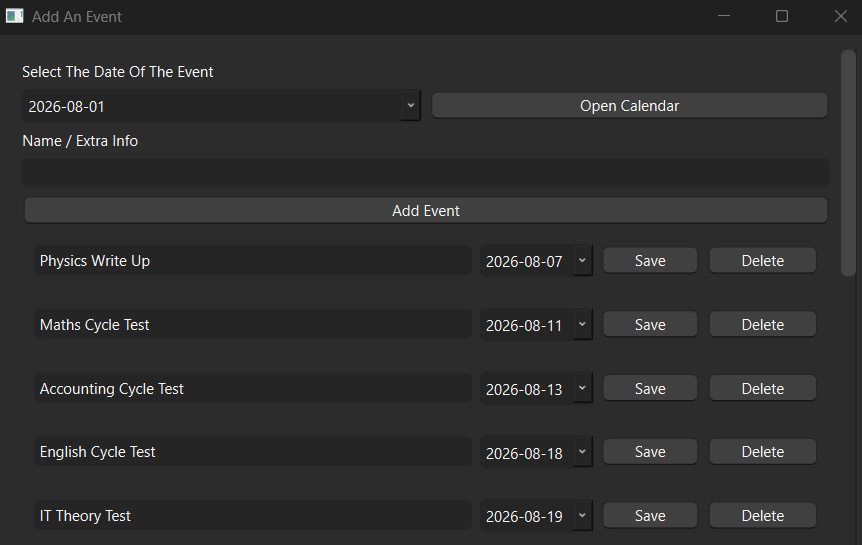
  • Integrated Calendar: You can now navigate through a built-in calendar and simply click on a date to add or modify an event.
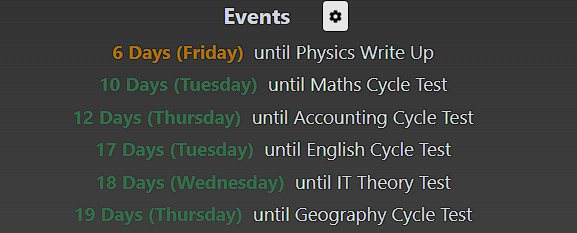
  • Color-Coded Urgency: Event text now changes color based on how soon the event is:
    • πŸ”΄ Red: Very soon events (3 days or less)
    • 🟠 Orange: Soon events (less than 7 days)
    • 🟒 Green: Events further than 7 days away
    (Both the colors and the day thresholds can be fully customized in the addon's config section.)
  • Smart Countdown Display: Instead of showing "0 days" or "1 day", the addon will now intelligently display "Today" or "Tomorrow". This can be toggled in the config under countdown_display_mode. The default "today_tomorrow" shows the friendly text, while the "full_days" option always shows the exact number of days.

Screenshots:

Edit Events with Calendar Integration:

Edit Events Dialog with Calendar

Color-Coded Event Display:

Main Events Display with Color Coding

Core Features:

  • Adds a clean, motivating event countdown section directly to the main Anki window.
  • Perfect for keeping track of exams, assignment deadlines, or any important events related to your studies.
  • Easily add, edit, and delete events via the intuitive settings menu and new calendar picker.
  • Events are automatically sorted by date (soonest first) and automatically deleted once they pass their due date.
  • Highly customizable via the built-in configuration menu (adjust colors, thresholds, and display modes to your liking).