This modifies Anki's duplicate checking in the editor so that multiple fields are used in the check instead of just the
first one. If you experience a problem, please open an issue at the Issues page
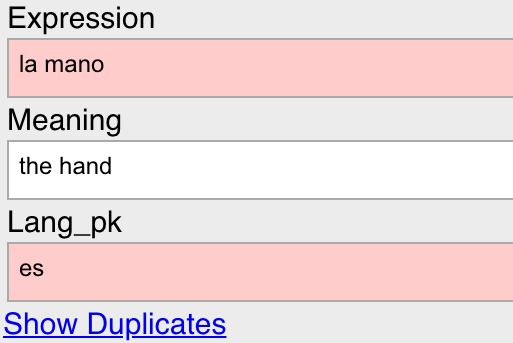
How to use it: Simply append _pk to any fields besides the first one that you want to be included in
the duplicate check.
Why?
Anki's editor notifies you when one or more existing notes share the same value for the first field. When a duplicate is
detected, it highlights the first field in red and provides a link that takes you to a search that returns the duplicate
notes.
Usually, this works great. But, sometimes you want to use the same note type in multiple decks and this system can lead
to false positives. For example, suppose you are learning Spanish and Italian and you have a single note type that they
share. If you have any vocabulary that are expressed the same way in both languages, they will be flagged as duplicates.
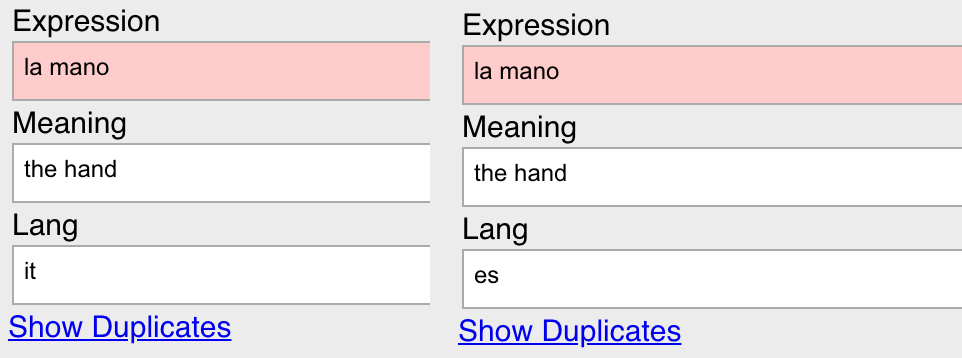
Anki doesn't prevent you from creating the note. But still, it can be annoying to see the field highlighted when it
technically shouldn't be a duplicate. It also means you can miss true duplicates.
One solution is to clone the note type and have a note type per language. The problem here is that it makes it more
difficult to maintain these templates. If you like consistency, then if you change one template you need to change all
the others.
Wouldn't it be great if you could consider the Lang field in duplicate detection?
How It Works
Append _pk to the name of any fields besides the first field that you want to be considered in duplicate
detection. For a note to be a duplicate, the first field and all other fields ending in _pk must match. For
example, below the primary key for detecting duplicates is (Expression, Lang_pk). While the
Expression matches, Lang_pk does not.
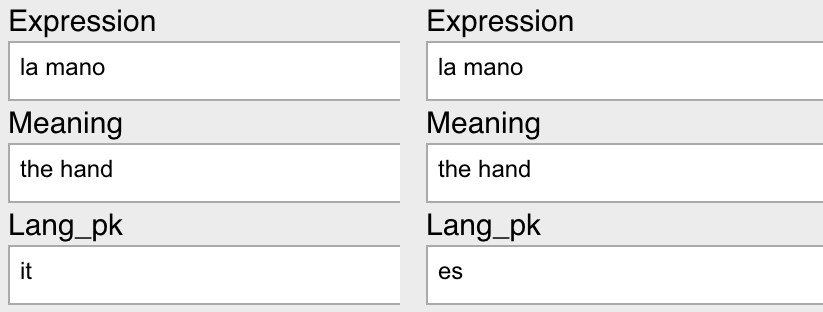
When using this plugin, Anki will perform the same checks it is already doing on the first field. But it filters the
duplicates flagged by this check based on whether the additional _pk fields match. All of these fields must
match for the note to be a duplicate.
When there is a duplicate, the fields used as the primary key will be highlighted red.
The Show Duplicates link has been updated to search for the additional fields as well. So clicking on the
link in the example above would produce a search like the following.
"dupe:1576694022466,la mano" Lang_pk:"es"
What It Does Not Do
Does Not Modify Importing
This does not modify how importing works, which uses a different duplicate detection method. When importing a CSV for
example, you have the option of having Anki ignore a note being imported that has the same first field (in the CSV) as
another note. This is not necessarily the same as the first field of the note type, which is used for duplicate
detection in the editor.
Modifying this import code would not really make sense, because the duplicate detection is so different. So you could
still run into problems when importing notes from multiple languages, for example, into the same note type. The good
news is you don't need a plugin to solve this problem. You can make a unique key by stitching together other keys and
make this the first field in the CSV. For example, taking my earlier example for la mano in language
es, you could make a key la mano [es] as the first field in the CSV and assign this to an
ImportKey field in the note. The ImportKey field would only be used during the import process.
Does Not Modify Anki Mobile
This plugin is for Anki Desktop, so it will not impact the editor in Anki Mobile. There should be no issue with using
these notes in Anki Mobile. It's just that when you try to edit them some could be flagged as duplicates because Anki
Mobile will only consider the first field for detection.
Alternatives Considered
You might be wondering why the duplicate detection does not consider the deck that the note/cards are in and only flag
duplicates that are in the same deck. There are two problems with this:
- Notes are not tied to decks; cards are. Duplicate detection happens on notes. The cards associated with a note can
be in separate decks. It's not really clear what the right logic would be.
- It's not clear at what granularity duplicate detection within decks should happen given that you can have
subdecks. What if you have a
Spanish deck where la mano appears in subdecks
Spanish::Vocab and Spanish::General? It's not clear under what conditions it should be
flagged.
Support
If you experience a problem or have any comments/ideas, please open an issue at the Issues page for the project on Github.
Version History
- 0.1: Initial Release
- 0.2: Fix field highlighting not working for recent Anki releases
- 0.3: Fix whatever was breaking this, wtf is this nightmare API
License
Copyright 2019-2020 Matthew Hayes
This program is free software: you can redistribute it and/or modify
it under the terms of the GNU Affero General Public License as published by
the Free Software Foundation, either version 3 of the License, or
(at your option) any later version.
This program is distributed in the hope that it will be useful,
but WITHOUT ANY WARRANTY; without even the implied warranty of
MERCHANTABILITY or FITNESS FOR A PARTICULAR PURPOSE. See the
GNU Affero General Public License for more details.
You should have received a copy of the GNU Affero General Public License
along with this program. If not, see http://www.gnu.org/licenses/.