RevAI - AI Buttons for Anki Review
Add custom AI buttons directly to your review screen. One click reads your card fields, runs your prompt, and writes the AI response back into your card - permanently.
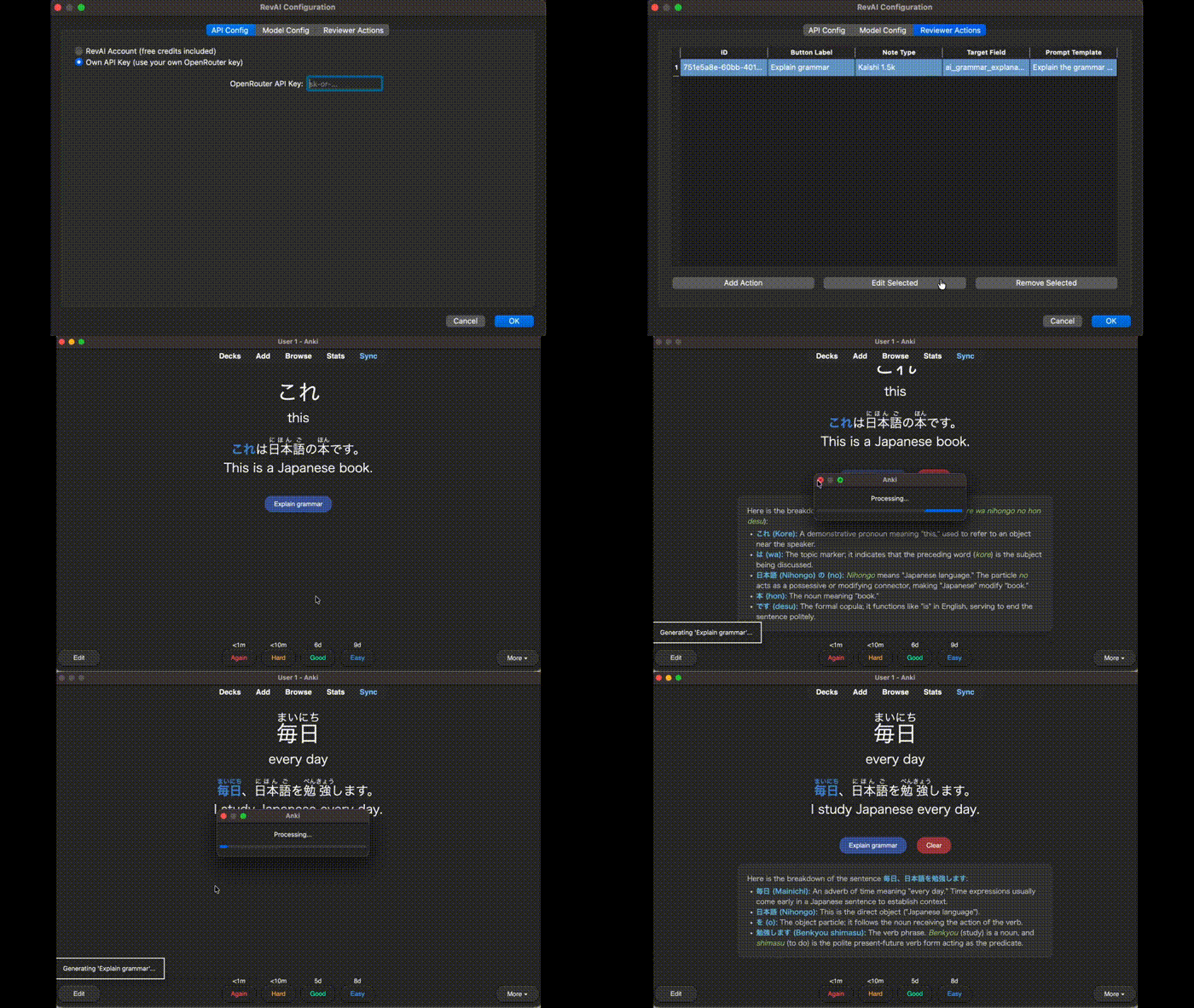
How it works
- Define a prompt like
Explain the grammar in {{Sentence}} using the word {{Word}}
- Add it as a button - choose which note type, which target field
- Click during review - the AI generates content and saves it to your card
No editor, no sidebar, no copy-pasting. The AI is right there on the card.
Features
- AI buttons during review - appear automatically on the answer side
- Custom prompts with {{FieldName}} variables - reference any field on your card
- Writes back permanently - AI response saved to a target field, visible on every future review
- Any AI model - hundreds of models via OpenRouter (GPT-4o, Claude, Gemini, DeepSeek, Llama, Mistral...)
- Per-note-type actions - different note types get different buttons
- Smart placement - buttons auto-appear at the bottom, or place them exactly where you want with
<div id="ai-reviewer-buttons"></div>
- Clear and regenerate - don't like the response? Clear it or click again
Getting started
- Install this addon and restart Anki
- Go to Tools > RevAI Config and create an account (300 free AI generations per month, no credit card)
- Add a target field to your note type (e.g.
ai_grammar_explanation)
- Create an action: pick note type, target field, and write your prompt
- Start reviewing - buttons appear automatically
Full setup guide with screenshots: https://ankirevai.netlify.app
Example prompts
Grammar explanation (language learning):
Explain the grammar in: {{Sentence}}
Word: {{Word}} ({{Reading}}), meaning: {{Meaning}}
Break down the grammar points in 4-6 lines.
Mnemonic:
Create a short mnemonic for {{Word}} ({{Reading}}).
Meaning: {{Meaning}}
Use a sound-alike or visual memory trick. 2-3 sentences max.
Medical explanation:
Explain the pathophysiology of {{Concept}} in 3-4 sentences.
Include the key clinical pearl.
Two ways to use
- RevAI Account - create a free account, get 300 AI generations per month. No API key needed.
- Own API Key - plug in your own OpenRouter API key for unlimited use. A typical request costs ~$0.000243.
Supported Anki versions
Anki 24.06 and newer (macOS, Windows, Linux). AI-generated content syncs to mobile via AnkiWeb - buttons only appear on desktop.
Support
Questions, feedback, or coupon requests? Visit https://ankirevai.netlify.app or use the contact form on the website.
Want more free credits? Just ask - we're happy to share coupon codes with active users.