Fatigue Alert

AnkiWeb addon 1071808091

Detects mental fatigue during reviews by monitoring response speed and error rates against your personal baseline, then shows a non-intrusive floating break suggestion that adapts to your feedback.
AI-generated summary; may contain mistakes.

review-flowmotivation

Open on AnkiWeb GitHub Find alternatives

AnkiWeb

Votes
0 (πŸ‘ 0 Β· πŸ‘Ž 0)
Updated
2026-10-11
Anki versions
26.08.1~
License
CC0-1.0 (from the GitHub repository)
Virus scan
No ClamAV match A match does not prove malware. No match does not prove that the code is safe.
Languages
Python, JavaScript, JSON
Description language
en

Maintenance

active

  • Last update or commit: 2026-10-20 (12 days before the snapshot).
  • Commits in the last year: 10.
  • Issues: 0 open, 0 closed.
  • Pull requests: 0 open, 0 merged.

Will it work on my Anki?

Version branches
Min AnkiMax AnkiUpdated
2.1.126.08.1+2026-10-11
History across monthly snapshots

Loading…

Similar addons

Anki Speed Limit

Alerts users with an optional sound and pop-up when they review cards too quickly for each ease, showing elapsed time and advice to slow down, with configurable thresholds and messages.

review-flowmotivation

5 votes 38% approval πŸ‘ 4 Β· πŸ‘Ž 1 ⭐ 3 Anki 2.1.35~ Updated 2021-03-23
Daily Study Planner

Estimates daily review time by deck, adjusts for fatigue and retention, splits sessions into 30-minute morning, afternoon and evening blocks, simulates faster speeds, and allows excluding decks.

review-flowprogress-tracking

2 votes 34% approval πŸ‘ 2 Β· πŸ‘Ž 0 Anki 23.09~ Updated 2026-08-17
auto rate typed answer has 1 fork β†’

Automatically rates typed answers as hard, good, or easy based on configurable response-time thresholds, with options for handling mismatches, multiple answer fields, and confirming ratings.

schedulingreview-flowquiz

16 votes 81% approval πŸ‘ 16 Β· πŸ‘Ž 0 Anki 2.1.50~ Updated 2021-12-06

Description

🧠 Fatigue Alert β€” Smart Real-Time Fatigue Detector for Anki

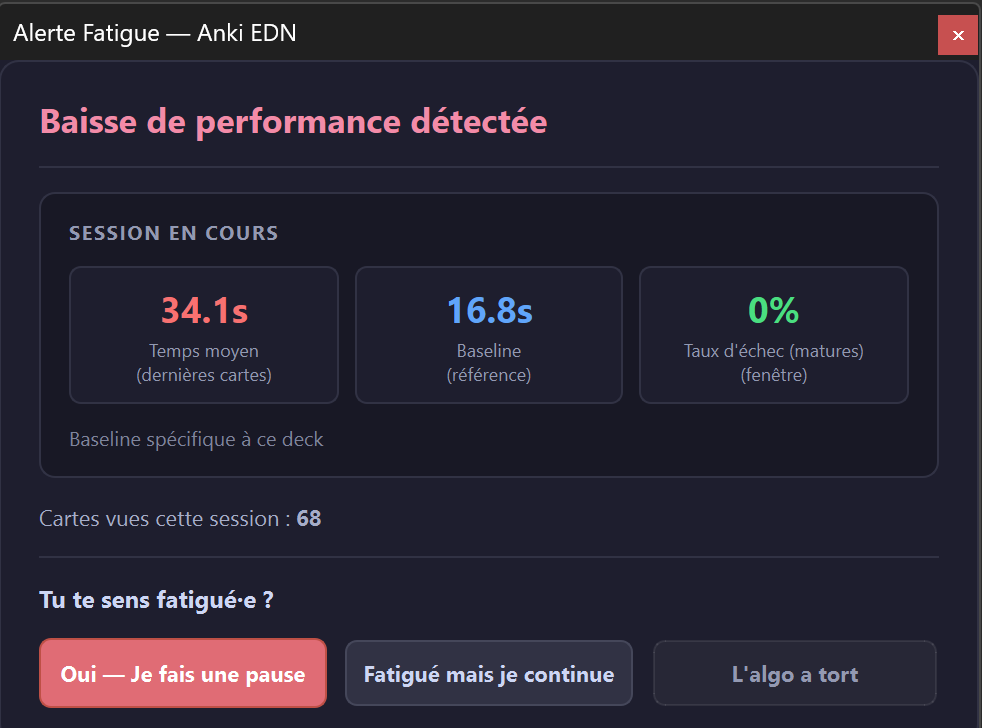
Fatigue Alert is an intelligent, non-intrusive add-on designed to detect mental fatigue and drop in review efficiency in real time. It monitors your response speed and error rate against your personal baseline, gently suggesting a break when your retention begins to decline.

Fatigue Alert Preview

✨ Key Features

  • ⚑ Real-Time Pace & Error Monitoring: Detects significant slowdowns (e.g. 1.8Γ— longer than baseline) or sudden bursts of failed reviews (e.g. 60%+ errors).
  • 🎯 Non-Intrusive Floating Alert: Appears unobtrusively in the top-right corner without stealing focus or blocking keyboard review shortcuts.
  • 🧬 Self-Calibrating & Adaptive: Learns from your feedback ("Yes β€” Take a Break", "Fatigued, but Continuing", "Algorithm is Wrong") to adjust sensitivity per deck.
  • πŸ›‘οΈ Smart Cooldown & Pause Tolerance: Avoids alert spam with minimum card/time intervals (e.g. 15 min / 20 cards) and preserves session state over brief pauses.
  • 🌍 17+ Languages Supported: Automatic detection (FR, EN, ES, DE, IT, PT, RU, JA, ZH, KO, AR, PL, TR, NL, SV, UK, CS).

βš™οΈ How to Use

  • Tools > Fatigue Alert > Settings...: Customize sliding window sizes, trigger ratios, cooldowns, and revlog history depth.
  • Tools > Fatigue Alert > Enable Fatigue Detection: One-click menu toggle.
  • Tools > Fatigue Alert > Report: Stopped Due to Fatigue: Manually log that your session ended due to fatigue to calibrate thresholds.

πŸ’¬ Support & Source Code

Found a bug or have a suggestion? Visit the GitHub repository or leave feedback in the AnkiWeb comments!

README

🧠 Fatigue Alert for Anki (Alerte Fatigue)

Anki License: MIT Multi-language

Fatigue Alert is an intelligent, non-intrusive Anki add-on designed to detect cognitive fatigue and declining review efficiency in real time. It monitors your response speed and error rates against your personal baseline, gently advising you when it is time to take a break.


πŸ“Έ Overview & Screenshots

Fatigue Alert Popup

✨ Features

  • ⚑ Real-Time Fatigue Detection:
    • Compares your current pace (sliding window) against your historical baseline (revlog or early-session reference).
    • Triggers an alert if you experience a sharp slowdown (e.g. 1.8Γ— baseline) or a sudden spike in failed reviews (e.g. 60%+ errors).
  • 🎯 Non-Intrusive & Floating Alert:
    • Displays a clean floating alert in the top-right corner without blocking keyboard shortcuts or interrupting your study flow.
  • 🧬 Self-Calibrating & Adaptive:
    • "Yes β€” Take a Break": Confirms fatigue and pauses the session.
    • "Fatigued, but Continuing": Confirms fatigue while letting you keep reviewing.
    • "Algorithm is Wrong": Dynamically lowers sensitivity to prevent false positives.
    • "Report: Stopped Due to Fatigue": Explicitly log a fatigue stop from the Tools menu to adapt thresholds per deck.
  • πŸ›‘οΈ Anti-Spam & Cooldown:
    • Minimum delays (e.g. 15 minutes / 20 cards) between alerts.
    • Pause tolerance (e.g. 2 min) keeps your session alive if you briefly step away.
  • 🎨 Native Light & Dark Themes:
    • Automatically matches Anki's Night Mode and UI styling.
  • 🌍 Full Multilingual Support (i18n):
    • 17+ languages fully translated and automatically detected from Anki preferences.

πŸš€ Installation

Via AnkiWeb (Recommended)

  1. In Anki, go to Tools > Add-ons > Get Add-ons...
  2. Enter the Add-on Code: 1071808091
  3. Restart Anki.

Manual Installation (.ankiaddon / Source)

  1. Download the .ankiaddon file from the Releases tab or clone this repository.
  2. In Anki, open Tools > Add-ons > Install from file... and select Anki_EDN_Fatigue_Alert.ankiaddon.
  3. Alternatively, copy the Anki_EDN_Fatigue_Alert folder directly into your Anki addons21/ directory.

βš™οΈ Configuration & Usage

Access options directly through:

  • Tools > Fatigue Alert > Settings...
  • Tools > Fatigue Alert > Enable Fatigue Detection (quick toggle checkable directly in menu)
  • Tools > Fatigue Alert > Report: Stopped Due to Fatigue

Config Parameters (config.json)

Parameter Default Description
enabled true Enable or disable fatigue detection.
window_size 5 Number of recent cards analyzed in the sliding window.
baseline_cards 10 Initial session cards used as baseline if no history is present.
min_cards_before_alert 19 Minimum number of cards before allowing the first alert.
time_ratio_threshold 1.8 Slowdown ratio triggering an alert (1.8Γ— = 80% slower than baseline).
error_rate_threshold 0.6 Error rate ratio triggering an alert (0.6 = 60% failures in window).
cooldown_minutes 15 Minimum cooldown in minutes between two consecutive alerts.
cooldown_cards 20 Minimum cards reviewed between two consecutive alerts.
pause_tolerance_minutes 2 Time window within which resuming reviews continues the same session.
use_revlog_baseline true Analyze Anki's past revlog review history for baseline pace.
revlog_baseline_days 30 Number of past days analyzed for the revlog baseline.

πŸ› οΈ Project Structure

Anki-Fatigue-Alert/
β”œβ”€β”€ __init__.py           # Hook registrations & menu setup
β”œβ”€β”€ alert_dialog.py       # Custom floating fatigue alert UI
β”œβ”€β”€ analyzer.py           # Real-time pacing & error rate analysis engine
β”œβ”€β”€ config.py             # Configuration getter, setter and defaults
β”œβ”€β”€ config.json           # Default user configurations
β”œβ”€β”€ deck_utils.py         # Deck resolution utilities
β”œβ”€β”€ feedback_store.py     # SQLite persistence for feedback & adaptive thresholds
β”œβ”€β”€ i18n.py               # Internationalization dictionary & locale detection
β”œβ”€β”€ logger.py             # Add-on logging utility
β”œβ”€β”€ manifest.json         # Anki add-on manifest metadata
β”œβ”€β”€ settings_dialog.py    # Clean Qt settings dialog
β”œβ”€β”€ docs/                 # Documentation assets & screenshots
β”œβ”€β”€ LICENSE               # MIT License
└── README.md             # Repository documentation

πŸ“„ License

This project is licensed under the MIT License.