Editor Focus Fields

AnkiWeb addon 1140367106

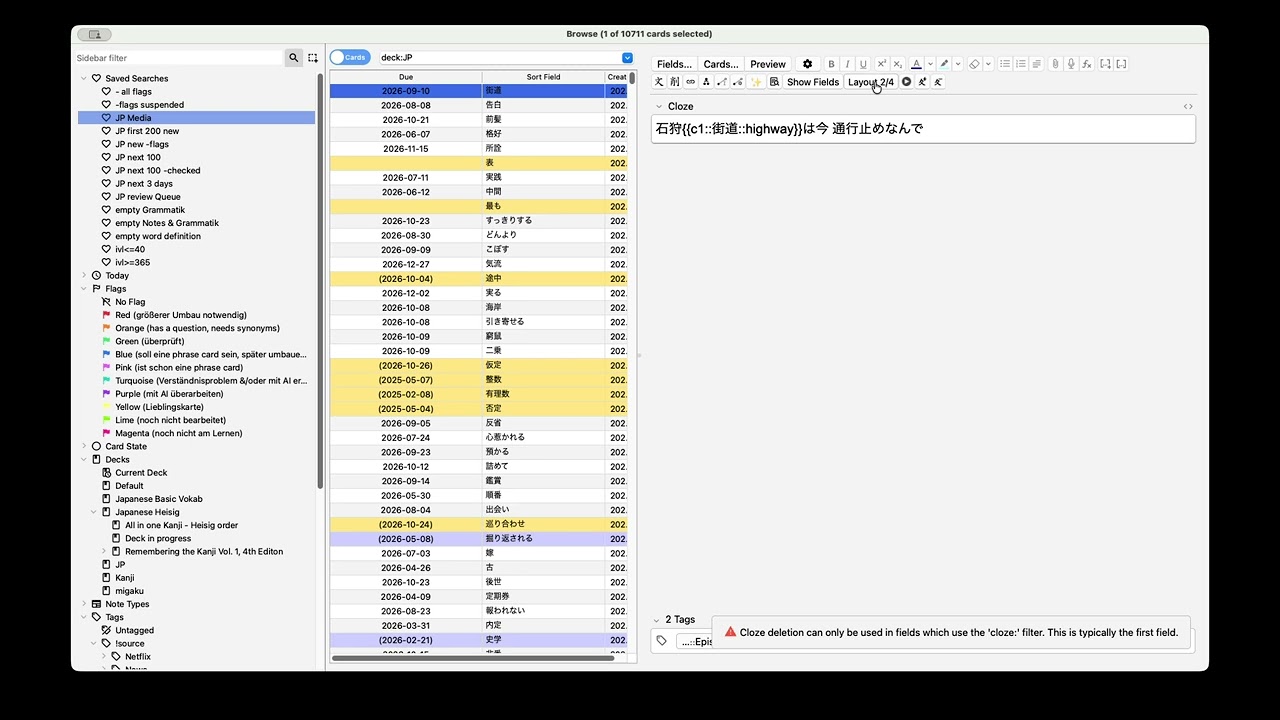
Hides non-relevant note fields in the Browser editor based on note type layouts, with a toggle to show all fields and a layout editor for field visibility and order.
AI-generated summary; may contain mistakes.

note-management

Open on AnkiWeb GitHub Find alternatives

AnkiWeb

Votes
0 (πŸ‘ 0 Β· πŸ‘Ž 0)
Updated
2026-04-16
Anki versions
25.09.2~
License
MIT (from the license file in the package)
Virus scan
No ClamAV match A match does not prove malware. No match does not prove that the code is safe.
Languages
Python, OCaml, Shell, JSON, Ignore List, YAML
Description language
en

Maintenance

stale

  • Last update or commit: 2026-04-16 (199 days before the snapshot).
  • Commits in the last year: 55.
  • Issues: 0 open, 0 closed.
  • Pull requests: 0 open, 0 merged.

Will it work on my Anki?

Version branches
Min AnkiMax AnkiUpdated
25.0925.09.2+2026-04-16
History across monthly snapshots

Loading…

Similar addons

Sidebar table

Moves the browser's card/note table into the sidebar to maximize the editor area, toggled by menu or configurable shortcut, and optionally minimizes the tags editor.

note-managementshortcutsappearancebeta

5 votes 57% approval πŸ‘ 5 Β· πŸ‘Ž 0 ⭐ 0 Anki 2.1.66~ Updated 2023-04-22
Grid Fields has 1 fork β†’

Displays the note editor in multiple columns using automatic, manual, or custom grid-area layouts, with shortcuts to toggle modes and temporarily widen a field.

note-managementshortcutsappearance

11 votes 52% approval πŸ‘ 9 Β· πŸ‘Ž 2 ⭐ 1 Anki 2.1.43~ Updated 2021-04-09
Quick Clipboard Copy has 1 fork β†’

Automatically copies a configured field from the selected note to the clipboard in the card browser, based on note type settings.

note-management

2 votes 9% approval πŸ‘ 1 Β· πŸ‘Ž 1 ⭐ 2 Anki 2.1.30~ Updated 2020-08-17

Description

Editor Focus Fields

Buy Me a Coffee GitHub moritzvitt

Editor Focus Fields is an Anki add-on for the Browser editor that hides non-relevant note fields based on note type configuration. It is intended for editing workflows where only a subset of fields should stay visible.

What It Does

  • hides non-selected fields for the current note type
  • adds a toggle for temporarily showing all fields
  • provides a layout editor for field visibility and field order
  • generates sensible defaults for note types that have not been configured yet

Typical Uses

  • reduce clutter while editing large note types
  • create focused layouts for different workflows
  • keep recurring field orders consistent inside the Browser editor

Installation

Install the add-on from AnkiWeb if a release is available, or install it manually from a packaged .ankiaddon file.

Related Add-ons

If you want a more polished and consistent look across my add-ons, you can also install my Global Styling add-on. It lets you apply a shared design on top of supported add-ons without changing their functionality.

Links

  • Demo video: https://youtu.be/6XNraKFZiZc
  • Technical details: ARCHITECTURE.md

Docs

Release Workflow

Run ./scripts/release.sh to validate the add-on and build a clean editor_focus_mode.ankiaddon package for AnkiWeb upload. The script also prints the latest tag, the top changelog entry, and the remaining manual release steps.

If you use VS Code, run the Prepare release task for the same workflow.

README

Editor Focus Mode

An Anki add-on for the Browser editor that hides non-relevant note fields based on note type configuration.

What It Does

  • shows only the configured subset of fields for a note type
  • adds a toggle button to temporarily show all fields
  • lets the user hide non-allowed fields again on the next click
  • adds a layout button that opens a layout editor for the current note type
  • lets you rename layouts, choose which fields should be hidden per layout, and reorder fields per layout
  • works out of the box for unconfigured note types by generating defaults from field order

Demo

β–Ά Watch the demo video on YouTube

Show Only Specific Fields demo video

The thumbnail above links to the demo video.

Main Files

Help Wanted

The main hard parts are:

  • Anki editor lifecycle timing
  • reliable toggle behavior across note reloads
  • keeping the DOM selectors robust across Anki versions

Docs

Release Workflow

Run ./scripts/release.sh to validate the add-on and build a clean editor_focus_mode.ankiaddon package for AnkiWeb upload. The script also prints the latest tag, the top changelog entry, and the remaining manual release steps.

If you use VS Code, run the Prepare release task for the same workflow.