No Distractions Full Screen: Clean review interface + Tablet/Touch support

AnkiWeb addon 1049863218

Copies of this addon: No Distractions Full Screen: Clean review interface (WORKING!)

Provides a distraction-free full-screen review interface by hiding menu bars, overlaying adjustable, draggable, touch-friendly answer buttons, and hiding the idle cursor, with customizable settings.
AI-generated summary; may contain mistakes.

review-flowshortcutsappearanceobsolete

Open on AnkiWeb GitHub Find alternatives

AnkiWeb

Votes
141 (πŸ‘ 131 Β· πŸ‘Ž 10)
Updated
2020-08-13
Anki versions
<=2.1.45
License
MIT (from the license file in the package)
Virus scan
No ClamAV match A match does not prove malware. No match does not prove that the code is safe.
Languages
JavaScript, Python, SCSS, JSON, CSS, HTML
Description language
en

Maintenance

abandoned

  • Last update or commit: 2023-03-09 (1333 days before the snapshot).
  • Commits in the last year: 0.
  • Issues: 19 open, 24 closed.
  • Pull requests: 1 open, 3 merged.
  • Median first response: 7 hours (28 answered issues and pull requests).
  • Outside pull requests: 0% of 1 merged.

Will it work on my Anki?

Version branches
Min AnkiMax AnkiUpdated
2.1.92.1.452020-08-13
History across monthly snapshots

Loading…

Similar addons

Review Scratchpad: Type & Draw

Adds a resizable scratchpad to the review screen for typing or drawing answers, with pen pressure support, a clear button, night mode, and automatic clearing on each new card.

review-flowshortcutsquiz

1 votes 21% approval πŸ‘ 1 Β· πŸ‘Ž 0 Anki 2.1.66~ Updated 2026-10-07
Minimalistic Drawing Panel

Adds a lightweight drawing and handwriting scratchpad to card review, supporting mouse, touch, stylus and pen input, colours, thickness levels, erasers, Surface Pen erasing, and auto-clearing between cards.

review-flow

2 votes 34% approval πŸ‘ 2 Β· πŸ‘Ž 0 ⭐ 0 Anki 25.07~ Updated 2026-07-02
Anki Zoom fork

Enables zooming in Anki via keyboard shortcuts, Ctrl+scroll, and trackpad pinch gestures, with configurable zoom levels and an optional percentage tooltip.

shortcutsappearanceaccessibilityfork-or-reupload

203 votes 51% approval πŸ‘ 118 Β· πŸ‘Ž 85 ⭐ 7 Anki <=2.1.49 Updated 2020-04-04

Description

***Known errors with NDFS and Anki v2.1.46+. Will update in the near future (no time currently)*** Eliminates everything unnecessary during reviews giving you maximum usable screen space and a clean, adjustable interface that supports touch. TL;DR: On Windows/Linux: Press F11 for fullscreen On Mac: Press green maximize button (upper left corner) for fullscreen Features: - Hides all menu bars including bottom bar ("More, Edit") and both top bars ("File, Edit..." and "Decks, Add..."). - Superimposes answer buttons over cards, with adjustable opacity. Becomes opaque on mouse-over. - Draggable answer buttons that support touch. Enable with right click menu option or hotkey. - No Distractions Answer Bar: Minimalistic reimagining of answer bar with animated answer confirmations - No Distractions works in resizable windows as well. Can set to always be on top. - For Windows: This is a menu option toggle | For Macs: This is the default behavior. To enter full screen mode, maximize the window - Hides mouse cursor if idle. - Auto-toggle No Distractions mode when starting/leaving reviews - Highly customizable: Common settings can be changed in menu options (View -> ND Full Screen). Further settings, including ND Answer Bar appearance can be changed through menu options. Detailed descriptions are within. - Highly compatible: Supports wide range of addons (tested list in notes section below), Win/Mac/Linux, hardware/software rendering modes and legacy clients (tested on 2.1.9 and higher). - Plays well with my other add-on, Anki Zoom (make use of that extra space!) Is NOT compatible with Zoom 2.1. In Action: With No Distractions Answer Bar Enabled: Drag Functionality (with King of Buttons Addon): Notes: - Mac and Windows/Linux menu options differ slightly; Entering full screen mode on Mac is done via maximizing the window instead of a menu toggle - Automatically switches colors for normal/night mode with support for Night Mode Addon - In Fullscreen mode, moving the mouse to the bottom of the screen will unhide answer buttons (if hidden). - Supports most card layouts; cards are dynamically padded so that superimposed answer buttons do not obscure the bottom of cards when scrolled down - No Distractions Answer Bar uses a custom layout and may not play well with other addons. Feel free to report issues, and I will try my best, but widespread compatibility may not be possible. - Tested compatibility with v2.1.9, v2.1.13, v2.1.15, v2.1.20, v2.1.22, v2.1.28, v2.1.29, Large and Colorful Buttons, Night Mode, Anki Zoom, Speed Focus Mode, Anki Habitica, Fill the blanks, Edit field during review, Directly Review, King of Buttons, Dancing Baloney, Progress Bar, Refocus card, Advanced Review Bottom Bar - Please report issues here: Github. Changelog: - 8/13/2020 v4.1.8: Improved Mac auto-toggle max/min detection, added text to menu explaining new Mac toggle behavior - 8/12/2020 v4.1.7: Changed toggle behavior on Macs to use inbuilt window maximize button with new auto-toggle setting. Menu layout changed to be more compact/clear, Toggle option added to right click menu, bug fixes (display offset bug on v2.1.28, screen change listener bug) - 4/26/2020 v4.1.6: Overlay on unlocked answer bar is more obvious and displays assigned hotkey - 4/25/2020 v4.1.5: Bug Fixes: Cursor now remains hidden if cursor_idle_timer is set to 0, more consistent window states when toggling on Macs, using certain menu actions no longer improperly overrides custom config - 4/20/2020 v4.1.4: Fixed bug where answer buttons would show behind image occlusion - 4/19/2020 v4.1.3: Improved compatibility with answer button addons including Advanced Review Bottom Bar and Minimal Big Flat Buttons (<- note will be buggy if trying to zoom) - 3/31/2020 v4.1.2: Fixed bug where setFocus was not applying to main screen. Added Zoom 2.1 to incompatible list due to bugs. Please use Anki Zoom instead - 3/30/2020 v4.1.1: Added multilingual support for ND Answer Bar - 3/29/2020 v4.1: Added menu option to change ND Answer Bar CSS variables via inbuilt text editor. Settings should persist through updates. Changed appearance of unlocked buttons to better convey they are disabled in that state. Improved Night Mode Addon compatibility - 3/28/2020 v4.0.2: Cleaned up layout and animations of ND Answer Bar. Changed ND Answer Bar colors. Added user adjustable css settings in ND_answerbar_settings.css file - 3/28/2020 v4.0: - Added No Distractions Answer Bar with animated confirmation - Added Normal/Night automatic color switching with support for Night Mode Addon - Reviewer rewritten to be one unified webpage with iFrames. Offers better performance and much better compatibility. Now supports software rendering, and plays better with other addons. Answer iFrames have zoom compensation so remains fixed in size and space on zoom. - Cursor hide logic rewritten to be python based - 3/16/2020 v3.2.8: Fixed bug on Windows where taskbar would not hide under certain resolutions/UI scale factors (big thanks to posnum for report) - 3/15/2020 v3.2.7: Added config option to force fullscreen on top for Windows machines (helps resolve persistent taskbar issues). Auto-toggle state tracking improved for compatibility with addons that manipulate states - 3/11/2020 v3.2.6: Added auto-toggle option - will trigger when entering reviews and when finishing reviews, going to the deck screen or syncing - 3/9/2020 v3.2.5: Added option to use old fullscreen renderer for Windows users having issues with the new one. Added "Advanced Settings" menu option that directly links to the config. Config text made easier to read - 3/8/2020 v3.2.4: Fixed bug where fullscreen would always show on top - 3/8/2020 v3.2.3: Fixed flickering with Speed Focus Mode addon and other graphical issues (including context menu not showing) in fullscreen mode on Windows machines (big thanks to Cupbox for testing). All values in config now are effective immediately - 3/5/2020 v3.2.2: Fixed bug where toggling full screen mode in certain review conditions would change current card. Will also retain answer bar position when Anki automatically refreshes screen every 100 consecutive reviews - 3/1/2020 v3.2.1: Fixed error on linux machines - 2/29/2020 v3.2: Scrolling over answer buttons now scrolls cards, can be changed in config. Refactored code with minor performance improvements. Added manifest file. Bug fixes: more consistent answer button opacity transitions while changing cards and dragging - 2/28/2020 v3.1.2: Bug fixes: improved compatibility with other addons, answer buttons no longer briefly shift to origin after a new card, adjusted render sequence/delay to cause less flickering - 2/27/2020 v3.0: - Added draggable answer buttons (uses interact.js) - Rewrote bottom widget (again) to allow better interaction with cards (previously inputs would not register in bottom of screen) - Added subtle fade animation to non-opaque answer buttons - Added user-configurable delay when redrawing widgets to reduce flicker/artifacts (see config for more info) - Added new config and renamed fullscreen hotkey in config - Fixed bug with where always-on-top toggle would not reset - Added warning popup for software rendering - 2/20/2020 v2.3.5: Rewrote cursor hide method to be more robust (now supports {type} cards) - 2/10/2020 v2.3.4: Added remappable hotkey to config. Bug fixes (adding cards now reveals cursor - thanks for bug submission) - 2/10/2020 v2.3.3: Removed limitation of full screen only in review. Added border color config option - 2/10/2020 v2.3.2: Performance improvements - 2/9/2020: v2.3: Added windowed mode. Added dynamic padding to bottom of cards. Rewrote display widget - 2/9/2020: v2.2.2: Added idle mouse hide feature. Added user-adjustable config. Bug fixes (now behaves properly when burying/suspending cards in full screen) - 2/4/2020: v2.1.1: Fixed bug where you could not exit full screen after finishing review - now automatically exits - 2/2/2020: v2.1: Added customizable answer button opacity - 2/1/2020: v2.0: Now hides bottom bar with floating answer buttons Big thanks to lovac42 for toolbar package, glutanimate's Toggle Full Screen Extended, Full Screen Toggle, HTML Window Source and AnkiWebView Inspector

README

No Distractions Full Screen

To install, please visit the addon page

Eliminates everything unnecessary during reviews giving you maximum usable screen space and a clean, adjustable interface that supports touch.

TL;DR:
Press F11 for fullscreen or use menu option (View -> Full Screen).

Features:

  • Hides all menu bars including bottom bar ("More, Edit") and both top bars ("File, Edit..." and "Decks, Add...").
  • Superimposes answer buttons over cards, with adjustable opacity. Becomes opaque on mouse-over.
  • Draggable answer buttons that support touch. Enable with right click menu option or hotkey.
  • No Distractions Answer Bar: Minimalistic reimagining of answer bar with animated answer confirmations
  • No Distractions works in resizable windows as well. Can set to always be on top.
    • For Windows: This is a menu option toggle | For Macs: This is the default behavior. To enter full screen mode, maximize the window
  • Hides mouse cursor if idle.
  • Auto-toggle No Distractions mode when starting/leaving reviews
  • Highly customizable: Common settings can be changed in menu options (View -> Full Screen). Further settings, including ND Answer Bar appearance can be changed through the Advanced Settings menu option. Detailed descriptions are within.
  • Highly compatible: Supports wide range of addons (tested list in notes section below), Win/Mac/Linux, hardware/software rendering modes and legacy clients (tested on 2.1.9 and higher).
  • Plays well with my other add-on, Anki Zoom (make use of that extra space!) Is NOT compatible with Zoom 2.1.

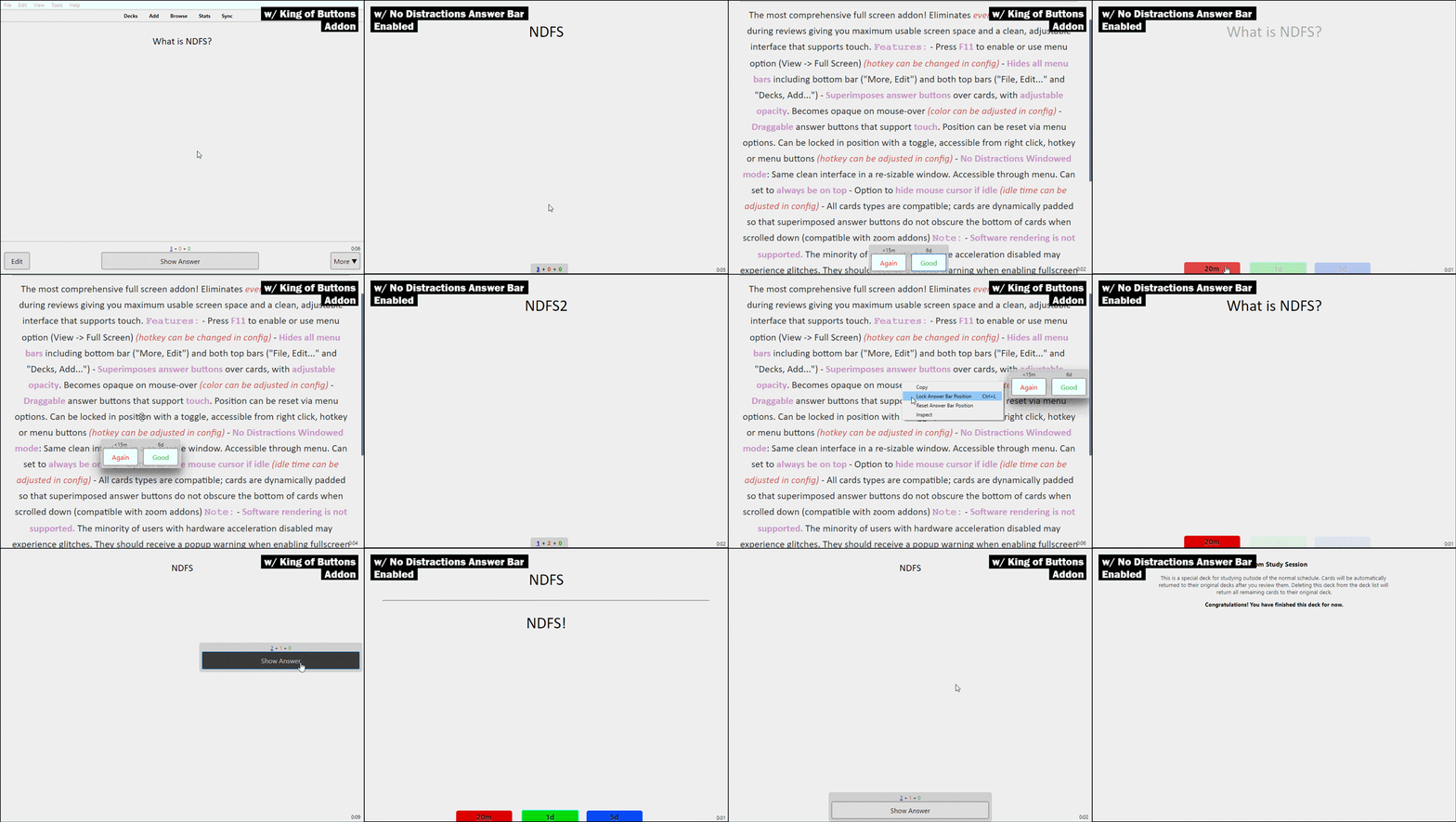
In Action:

Notes:

Changelog:

  • 8/12/2020 v4.1.7: Menu layout changed to be more compact/clear, Toggle option added to right click menu, Auto-toggle option added for inbuilt fullscreen mode on Macs, bug fixes (display offset bug on v2.1.28, screen change listener bug)
  • 4/26/2020 v4.1.6: Overlay on unlocked answer bar is more obvious and displays assigned hotkey
  • 4/25/2020 v4.1.5: Bug Fixes: Cursor now remains hidden if cursor_idle_timer is set to 0, more consistent window states when toggling on Macs, using certain menu actions no longer improperly overrides custom config
  • 4/20/2020 v4.1.4: Fixed bug where answer buttons would show behind image occlusion
  • 4/19/2020 v4.1.3: Improved compatibility with answer button addons including Advanced Review Bottom Bar and Minimal Big Flat Buttons (<- note will be buggy if trying to zoom)
  • 3/31/2020 v4.1.2: Fixed bug where setFocus was not applying to main screen. Added Zoom 2.1 to incompatible list due to bugs. Please use Anki Zoom instead
  • 3/30/2020 v4.1.1: Added multilingual support for ND Answer Bar
  • 3/29/2020 v4.1: Added menu option to change ND Answer Bar CSS variables via inbuilt text editor. Settings should persist through updates. Changed appearance of unlocked buttons to better convey they are disabled in that state. Improved Night Mode Addon compatibility
  • 3/28/2020 v4.0.2: Cleaned up layout and animations of ND Answer Bar. Changed ND Answer Bar colors. Added user adjustable css settings in ND_answerbar_settings.css file
  • 3/28/2020 v4.0:
    • Added No Distractions Answer Bar with animated confirmation
    • Added Normal/Night automatic color switching with support for Night Mode Addon
    • Reviewer rewritten to be one unified webpage with iFrames. Offers better performance and much better compatibility. Now supports software rendering, and plays better with other addons. Answer iFrames have zoom compensation so remains fixed in size and space on zoom.
    • Cursor hide logic rewritten to be python based
  • 3/16/2020 v3.2.8: Fixed bug on Windows where taskbar would not hide under certain resolutions/UI scale factors (big thanks to posnum for report)
  • 3/15/2020 v3.2.7: Added config option to force fullscreen on top for Windows machines (helps resolve persistent taskbar issues). Auto-toggle state tracking improved for compatibility with addons that manipulate states
  • 3/11/2020 v3.2.6: Added auto-toggle option - will trigger when entering reviews and when finishing reviews, going to the deck screen or syncing
  • 3/9/2020 v3.2.5: Added option to use old fullscreen renderer for Windows users having issues with the new one. Added "Advanced Settings" menu option that directly links to the config. Config text made easier to read
  • 3/8/2020 v3.2.4: Fixed bug where fullscreen would always show on top
  • 3/8/2020 v3.2.3: Fixed flickering with Speed Focus Mode addon and other graphical issues (including context menu not showing) in fullscreen mode on Windows machines (big thanks to Cupbox for testing). All values in config now are effective immediately
  • 3/5/2020 v3.2.2: Fixed bug where toggling full screen mode in certain review conditions would change current card. Will also retain answer bar position when Anki automatically refreshes screen every 100 consecutive reviews
  • 3/1/2020 v3.2.1: Fixed error on linux machines
  • 2/29/2020 v3.2: Scrolling over answer buttons now scrolls cards, can be changed in config. Refactored code with minor performance improvements. Added manifest file. Bug fixes: more consistent answer button opacity transitions while changing cards and dragging
  • 2/28/2020 v3.1.2: Bug fixes: improved compatibility with other addons, answer buttons no longer briefly shift to origin after a new card, adjusted render sequence/delay to cause less flickering
  • 2/27/2020 v3.0:
    • Added draggable answer buttons (uses interact.js)
    • Rewrote bottom widget (again) to allow better interaction with cards (previously inputs would not register in bottom of screen)
    • Added subtle fade animation to non-opaque answer buttons
    • Added user-configurable delay when redrawing widgets to reduce flicker/artifacts (see config for more info)
    • Added new config and renamed fullscreen hotkey in config
    • Fixed bug with where always-on-top toggle would not reset
    • Added warning popup for software rendering
  • 2/20/2020 v2.3.5: Rewrote cursor hide method to be more robust (now supports {type} cards)
  • 2/10/2020 v2.3.4: Added remappable hotkey to config. Bug fixes (adding cards now reveals cursor - thanks for bug submission)
  • 2/10/2020 v2.3.3: Removed limitation of full screen only in review. Added border color config option
  • 2/10/2020 v2.3.2: Performance improvements
  • 2/9/2020: v2.3: Added windowed mode. Added dynamic padding to bottom of cards. Rewrote display widget
  • 2/9/2020: v2.2.2: Added idle mouse hide feature. Added user-adjustable config. Bug fixes (now behaves properly when burying/suspending cards in full screen)
  • 2/4/2020: v2.1.1: Fixed bug where you could not exit full screen after finishing review - now automatically exits
  • 2/2/2020: v2.1: Added customizable answer button opacity
  • 2/1/2020: v2.0: Now hides bottom bar with floating answer buttons

Big thanks to lovac42 for toolbar package, glutanimate's Toggle Full Screen Extended, Full Screen Toggle, HTML Window Source and AnkiWebView Inspector