Field History

AnkiWeb addon 1247884413

1 other version of this addon exists. Compare versions ↓

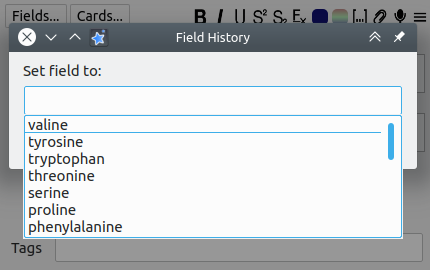
Adds hotkeys to the Add Notes dialog for copying tags and fields from the last note in the same deck, plus a searchable history of recently used field values.
AI-generated summary; may contain mistakes.

card-creationnote-managementshortcuts

Open on AnkiWeb GitHub Find alternatives

AnkiWeb

Votes
25 (πŸ‘ 21 Β· πŸ‘Ž 4)
Updated
2019-01-08
Anki versions
unknown
License
AGPL-3.0 (from the GitHub repository)
Virus scan
No ClamAV match A match does not prove malware. No match does not prove that the code is safe.
Languages
Python, JSON
Description language
en

Maintenance

abandoned

  • Last update or commit: 2024-04-07 (938 days before the snapshot).
  • The GitHub repo is shared with 13 other addons; its commits, issues and releases are not specific to this one.
  • Commits in the last year: 0.
  • Issues: 62 open, 27 closed.
  • Pull requests: 16 open, 26 merged.
  • Median first response: 84 hours (85 answered issues and pull requests).
  • Outside pull requests: 72% of 36 merged.
  • Forks that may still be maintained: "Field History Updated" (1590825981).

GitHub

Repository
glutanimate/anki-addons-misc Β· more by glutanimate
Same repository
Search and Replace Tags, Let it Snow!, Quick Field Navigation, Create Filtered Deck from the Browser, Open 'Added Today' from Reviewer, True Retention by Card Maturity, Customize Editor Stylesheet, Insert Randomized Lists (multiple choice), Tag Entry Enhancements, Refocus Card when Reviewing (2.1) and 3 more
Stars
⭐ 183 · forks 56 · open issues 78 (for the whole repository)
Last commit
2022-12-24
License
AGPL-3.0
Languages
Python, Shell, HTML, Makefile
Tests
0

Will it work on my Anki?

Version branches
Min AnkiMax AnkiUpdated
2.1.0–2019-01-08
History across monthly snapshots

Loading…

Compare versions

The original addon and its forks. The best value in each column is in bold.

VersionWorks on Anki 26.09.3MaintenanceLast activity VotesApprovalGitHub starsNotes
Field History this addon original unknown abandoned 7 Apr 2024 πŸ‘ 21 Β· πŸ‘Ž 4 65% 183
↳ Field History Updated (AI-detected; may be wrong) likely abandoned 2 Dec 2022 πŸ‘ 1 Β· πŸ‘Ž 1 9% 0

Forks can add features or work in a different way. Read the description before you change to another version. Fork detection is incomplete, so other versions can exist.

Similar addons

Field History Updated fork

Improves the Add Notes dialog with hotkeys to copy fields from the last note in the same deck and a searchable window listing previous values for the current field, with configurable hotkeys and fields.

card-creationshortcutsfork-or-reupload

2 votes 9% approval πŸ‘ 1 Β· πŸ‘Ž 1 ⭐ 0 Anki 2.1.54~ Updated 2022-12-02
Open 'Added Today' from Reviewer

Adds a History-menu entry to the Add notes dialog that opens the Browser on the 'Added Today' view, with cards ordered by creation time, and includes a hotkey.

searchshortcuts

6 votes 61% approval πŸ‘ 6 Β· πŸ‘Ž 0 ⭐ 183 Updated 2019-02-22
Clear all fields

Adds add-dialog commands to clear all fields or fields and tags, undo the clearing, and remove field stickiness, with configurable hotkeys and button icons.

note-managementshortcuts

11 votes 62% approval πŸ‘ 10 Β· πŸ‘Ž 1 Anki 2.1.55~ Updated 2023-12-23
Quick Template Copy fork

Copies pre-formatted information from selected Anki Browser notes using customizable per-note-type templates, hotkeys, tag placeholders, and escaped HTML for Word/Excel compatibility.

exportformattingshortcutsfork-or-reupload

1 votes 21% approval πŸ‘ 1 Β· πŸ‘Ž 0 ⭐ 0 Anki 2.1.1~ Updated 2026-08-12
No-Sync Note Converter

Converts Anki notes between types without triggering a full sync, offering field mapping, presets, review-history preservation, deck/tag retention, browser and reviewer conversion, and one-step undo.

schedulingnote-managementcard-templatescloze

1 votes 21% approval πŸ‘ 1 Β· πŸ‘Ž 0 ⭐ 1 Anki 2.1.1~ Updated 2026-09-02

Description

Improves Anki's Add Notes dialog with the following features:
  • hotkeys that copy over tags and fields of the last note in the same deck
  • a searchable history window that provides a list of last used values for the current field
USAGE Ctrl + Alt + H (Win/Linux) or Cmd + O (macOS) – Invoke history window Alt+Z – Copy over current field from last note Alt+Shift+Z – Copy over a a number of user-defined fields (see below) Ctrl + Alt + Shift + Z (Win/Linux) or Cmd + Alt + Shift + Z (macOS) – Copy over all fields CONFIGURATION Settings that may be customized include hotkey assignments and the list of selectively restored fields. Anki 2.1: Head to Tools β†’ Add-ons, select the add-on in the list, and then click Config. Anki 2.0: Go to Tools β†’ Add-ons, highlight the add-on in the list, and then click on Edit to update the config values at the top of the source code. CHANGELOG 2019-01-08 – Anki 2.1 support + smaller improvements and bug fixes. Thanks to @zjosua for his help! 2017-05-25 – Change history window hotkey on macOS to avoid key conflicts (thanks to Rene) 2017-05-13 – Preserve chronological order of suggestions SUPPORT Please do not report issues or bugs in the review section below. I don't get notified about your reviews, and even if I see them in time it's hard to strike up a proper troubleshooting conversation on here. Instead, please report all issues you encounter either by creating a bug report on GitHub or by posting a new thread on the Anki add-on support forums while mentioning the add-on's name in your title. Thank you! CREDITS AND LICENSE Copyright (c) 2016-2019 Glutanimate Licensed under the GNU AGPL v3. The code for this add-on is available on GitHub. MORE RESOURCES Make sure to check out my socials for the latest add-on updates and news: @Glutanimate | / Glutanimate Want to hire me to work on add-on for you? Get in touch at ankiglutanimate [Ξ±t] gmail .com SUPPORT MY WORK Writing, supporting, and maintaining Anki add-ons like these takes a lot of time and effort. If Field History has been a valuable asset in your studies, please consider using one of the buttons below to support my efforts by buying me a coffee, or by pledging your support on Patreon. Each and every contribution is greatly appreciated and will help me maintain and improve Field History as time goes by!              Pro-tip: Lots of exclusive add-ons and other goodies await on my Patreon page. Make sure to check them out!

README

Miscellaneous Anki Add-ons

This repository contains most of the smaller Anki add-ons I have written over the years. For more information on each add-on please take a look at the comments in the respective source file, or at its AnkiWeb description.

Generic Installation Instructions

Installation from AnkiWeb

Most add-ons in this repository have been published on AnkiWeb and may be comfortably installed via Anki's own add-on management system. To correlate each source file with its listing on AnkiWeb please refer to the add-on titles in their AnkiWeb descriptions.

Manual Installation

  1. Open Anki's add-on folder by navigating to Tools -> Add-ons -> Open add-ons folder from Anki's main screen

  2. Download a copy of the full repository zip archive

  3. Locate the add-ons you want to install in the src/ directory

  4. Copy the add-on files to Anki's add-on directory

    • in case of Anki 2.0: For each of the add-ons, copy all files its folder aside from __init__.py into the top-most level of Anki's add-on directory (e.g. for reviewer_auto_rate_hotkey you would only copy reviewer_auto_rate_hotkey.py)
    • in case of Anki 2.1: For each of the add-ons, copy the entire add-on folder into the top-most level of Anki's add-on directory (e.g. for reviewer_auto_rate_hotkey you would copy the entire reviewer_auto_rate_hotkey folder). Note: Not all add-ons in this repository have been transitioned to Anki 2.1, yet. To learn more about the compatibility status of each add-on please see here.
  5. Restart Anki to see the changes

Naming Scheme

The source file naming describes which part of Anki each add-on interacts with. As such, the names do not always correspond with their listings on AnkiWeb.

Add-on file names also have an impact on their loading order. Files with a leading special character are designed to be imported after most other add-ons have been loaded, as they might interact with them.

Credits

Some of the add-ons found in this repository were either adopted from earlier works by other authors or simply constitute re-uploads of add-ons that disappeared from AnkiWeb, with no original code repository to be found. I have tried to document the development history of each of these add-ons in their source code header, but more detailed information may also be found here.

License

Most of the add-ons in this repository are licensed under the same license as Anki, the GNU AGPL, version 3 or later. Please check the source code comments for more details on the licensing of each add-on.

Other Anki-related Projects

Make sure to also check out my larger Anki projects: