Memory Forest: a forest and heatmap that grow with your reviews

AnkiWeb addon 1255432496

Grows a forest and study heatmap from your Anki review history, with trees reflecting learning and memory, plus streaks and upcoming reviews.
AI-generated summary; may contain mistakes.

statisticsprogress-trackinggamificationappearancepaidmobile-compatible

Open on AnkiWeb GitHub Find alternatives

AnkiWeb

Votes
84 (👍 83 · 👎 1)
Updated
2026-10-31
Anki versions
26.09.3~
License
MIT (from the GitHub repository)
Virus scan
No ClamAV match A match does not prove malware. No match does not prove that the code is safe.
Languages
JSON, Python, JavaScript, CSS
Description language
en

Maintenance

active

  • Last update or commit: 2026-10-31 (1 days before the snapshot).
  • Test files: 54.
  • GitHub Actions workflows: 1.
  • Commits in the last year: 235.
  • Issues: 10 open, 3 closed.
  • Pull requests: 0 open, 0 merged.
  • Median first response: 16 hours (6 answered issues and pull requests).
  • Outside pull requests: 0% of 1 merged.

Will it work on my Anki?

Version branches
Min AnkiMax AnkiUpdated
2.1.4526.09.3+2026-10-31
History across monthly snapshots

Loading…

Similar addons

Study Time & Efficiency Tracker

Automatically tracks study sessions and displays daily, deck, and historical review-time statistics with efficiency estimates, integrating with Review Heatmap (required) and offering customizable panels.

statisticstimerappearance

2 votes 34% approval 👍 2 · 👎 0 Anki 2.1.1~ Updated 2026-10-20
StreakGuard

Enforces a daily card minimum by blocking Anki from closing until met, while tracking streaks via a customizable heatmap and generating shareable 1080×1080 stats images.

exportstatisticsprogress-trackinggamification

7 votes 65% approval 👍 7 · 👎 0 Anki 2.1.1~ Updated 2026-04-03
Studylitics - Advanced Anki Analytics Dashboard

Provides a detailed analytics dashboard for Anki review history, including heatmaps, retention, consistency, efficiency scores, trends, session and lapse analysis, and time-range filters.

statistics

1 votes 21% approval 👍 1 · 👎 0 Anki 2.1.1~ Updated 2026-04-01

Description

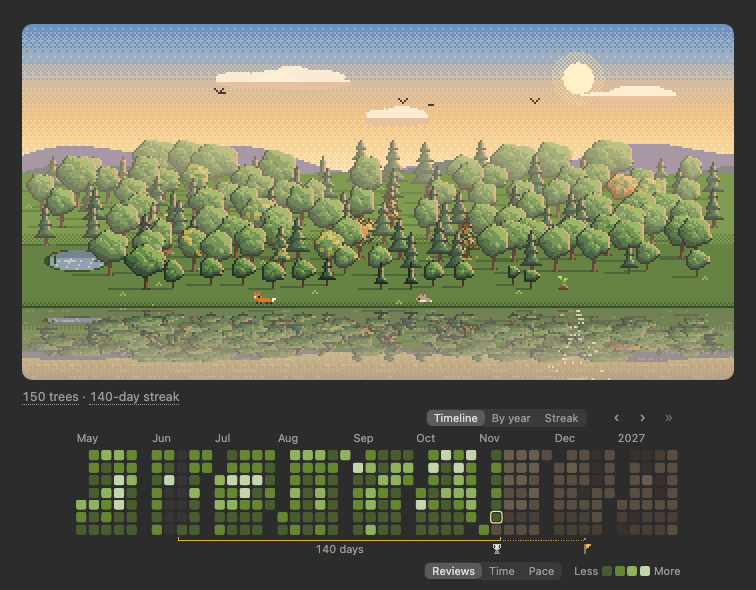
A forest and a study heatmap that grow from your Anki study history. Every day you learn new cards plants a tree below your deck list, and the heatmap under it shows the days you studied, your streak and the reviews ahead. There is nothing to click and nothing to manage: just study, and watch it grow.

The forest by the lake at golden hour, with its study heatmap under it: days studied in green, a silver streak trophy, a goal flag, an exam marker, and cards coming due in brown
 
How the forest grows
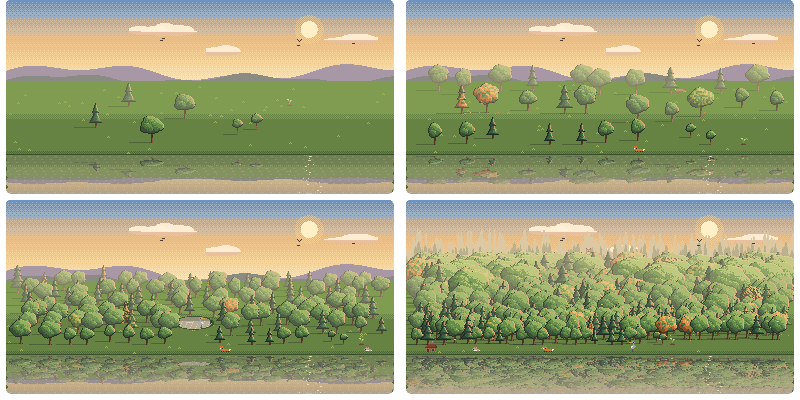
The same forest after a week, a month, four months and four years
After a week, a month, four months and four years.
 

A tree starts as a seedling and grows as you come to know its day's cards: within a few weeks it is a young tree, and the days you know best keep growing for years, into ancient giants. If you start forgetting a day's cards, its tree gets a few yellow leaves, and they turn green again once you relearn them. Trees never die. Days when you only review don't plant a tree, but they keep the ones you have healthy.

So the forest is a picture of what you know: its size is how much you have learned, and its colour is how well you remember it. Point at a tree to see its day and how well you remember it. Take a week off and a pond appears where the missing days would be. Keep studying and animals move in, and after a year a little cabin appears at the edge of the woods.

 
Your study heatmap

Your study days, streaks and upcoming reviews, in your scenery's colours. Hover for details; click a day to open its cards.

  • Views: a rolling timeline, a full year, or your whole streak at once.
  • Pick days: Shift-click or Ctrl/Cmd-click days to light up their trees.
  • Reviews, time or pace: shade days by review count, study time or seconds per answer.
  • Per deck: each deck has its own heatmap and streak.
  • Fair streaks: days with nothing due don't break your streak.
  • Rest days: choose a 5- or 6-day study week.
  • Trophies: medals for your three longest streaks, and a flag for your next goal.
  • Milestones: see when each animal joined your forest.
  • Important days: right-click to mark exams, trips and other dates.
  • Week start: Monday, Sunday, Saturday or your system's setting.
  • Your look: customize its colours and style in the Heatmap tab.
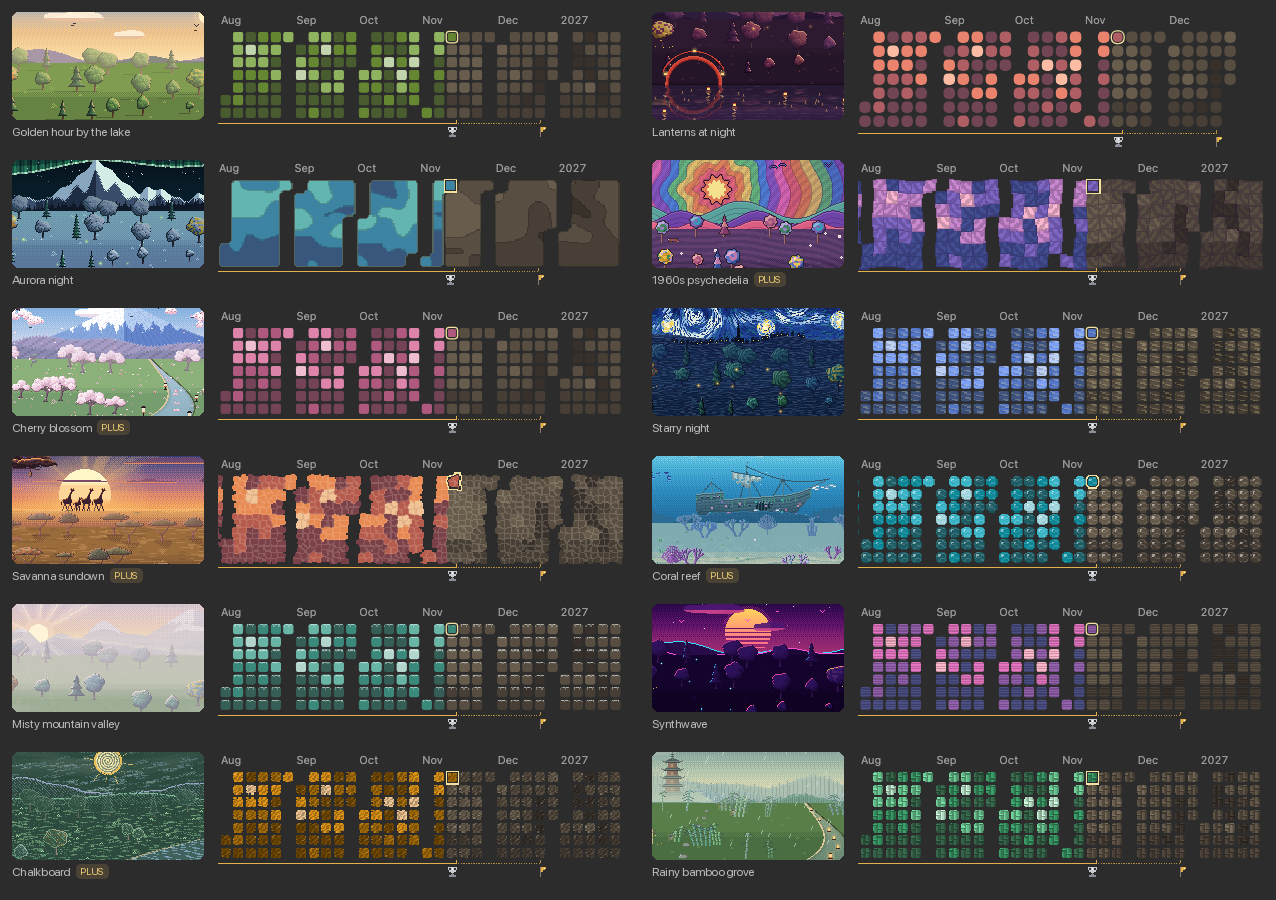
The same heatmap in five sceneries: green by the lake, blue brushstrokes in Starry night, round tiles in Lanterns, blue contours in Aurora night, and violet to pink scanlines in Synthwave
 
Pick your scenery
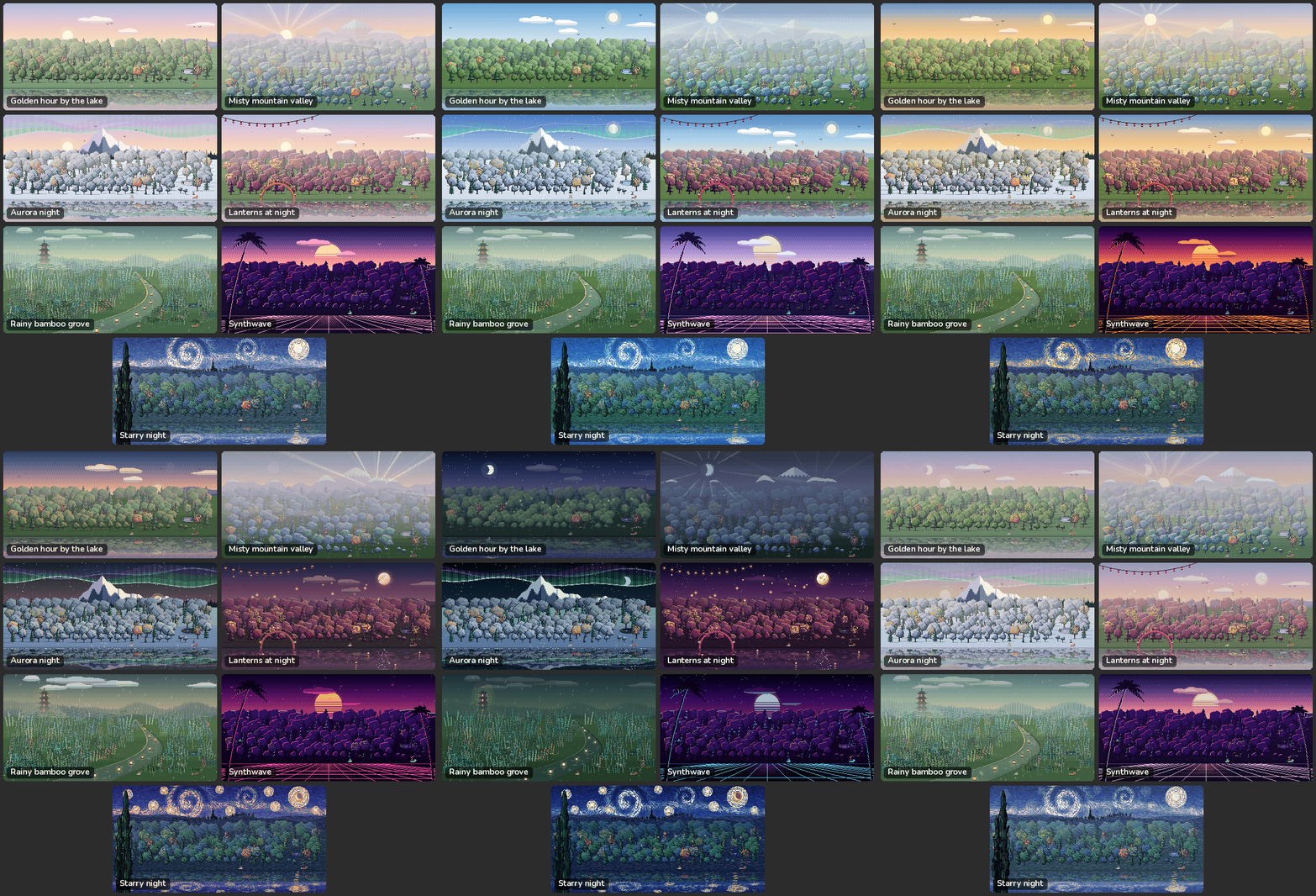
The free sceneries, animated: Golden hour by the lake, Misty mountain valley, Aurora night, Lanterns at night, Rainy bamboo grove, Synthwave and Starry night
 
New in Memory Forest Plus
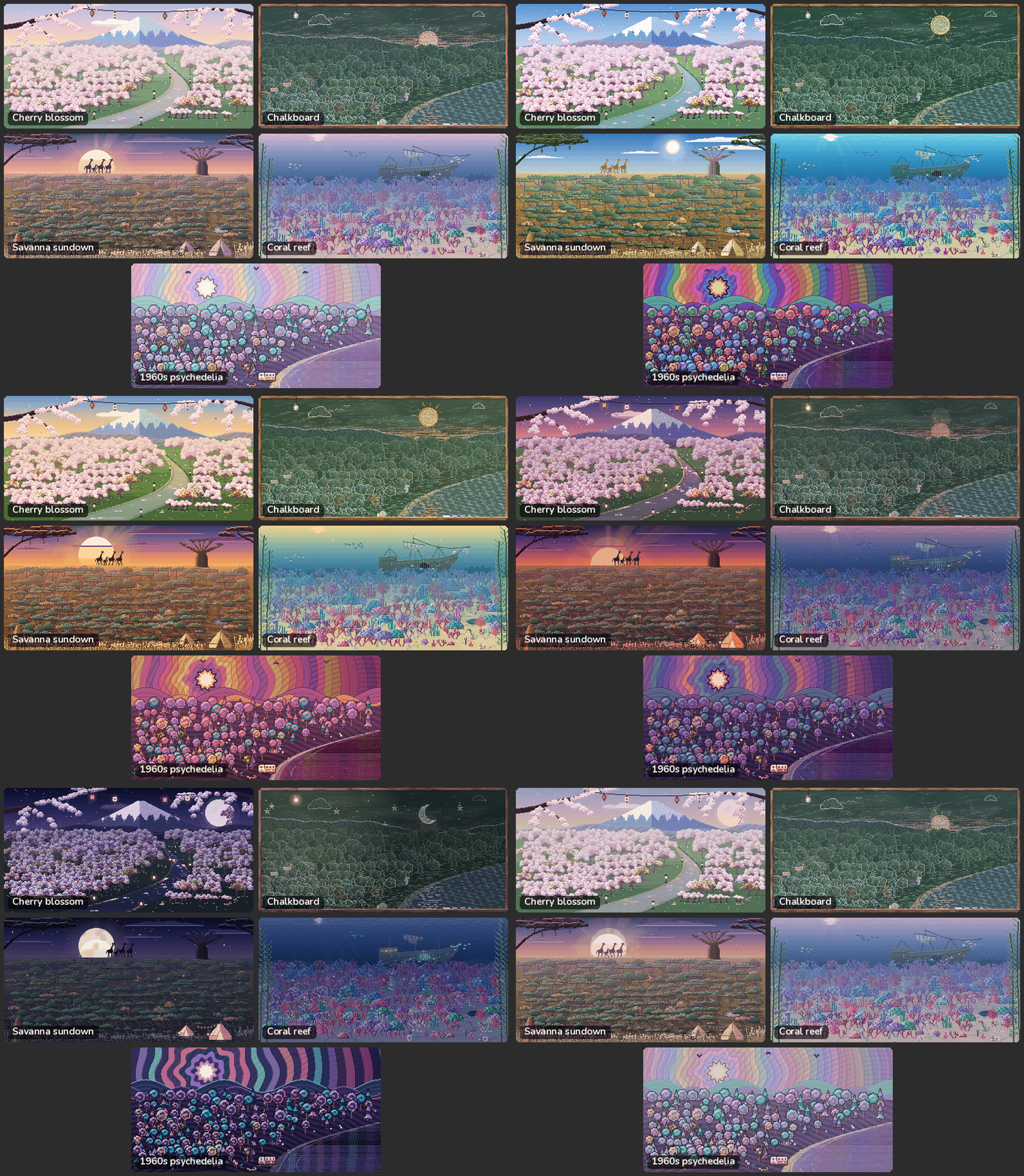
The Memory Forest Plus sceneries, animated: Cherry blossom, Chalkboard, Savanna sundown, Coral reef and 1960s psychedelia

These arrive in Memory Forest Plus first, and come to this version later on. Join on Patreon to get them now.

 
How you study

The forest notices how you study, not just what you learn. Good days leave something behind for you to find. Whether bad habits leave a mark too is up to you: pick a Nature on the Forest tab of the settings.

The three Natures, animated: a calm forest with a pond where days were missed, a forest on fire, and an asteroid on its way down
  • Peaceful (the default): only the good things. Days away cost you nothing.
  • Wild: bad habits leave marks until you fix them. Miss two days in a row and smoke rises from the forest as a warning; miss a third and a fire breaks out, spreading while you stay away. A weekend off is fine. Seven days of study put it out.
  • Merciless: a single day without reviews brings down an asteroid on the whole forest, and a new one grows from there. Bad habits leave their marks too.

Change your mind at any time: switch back and your forest is just as it was.

 
Layout
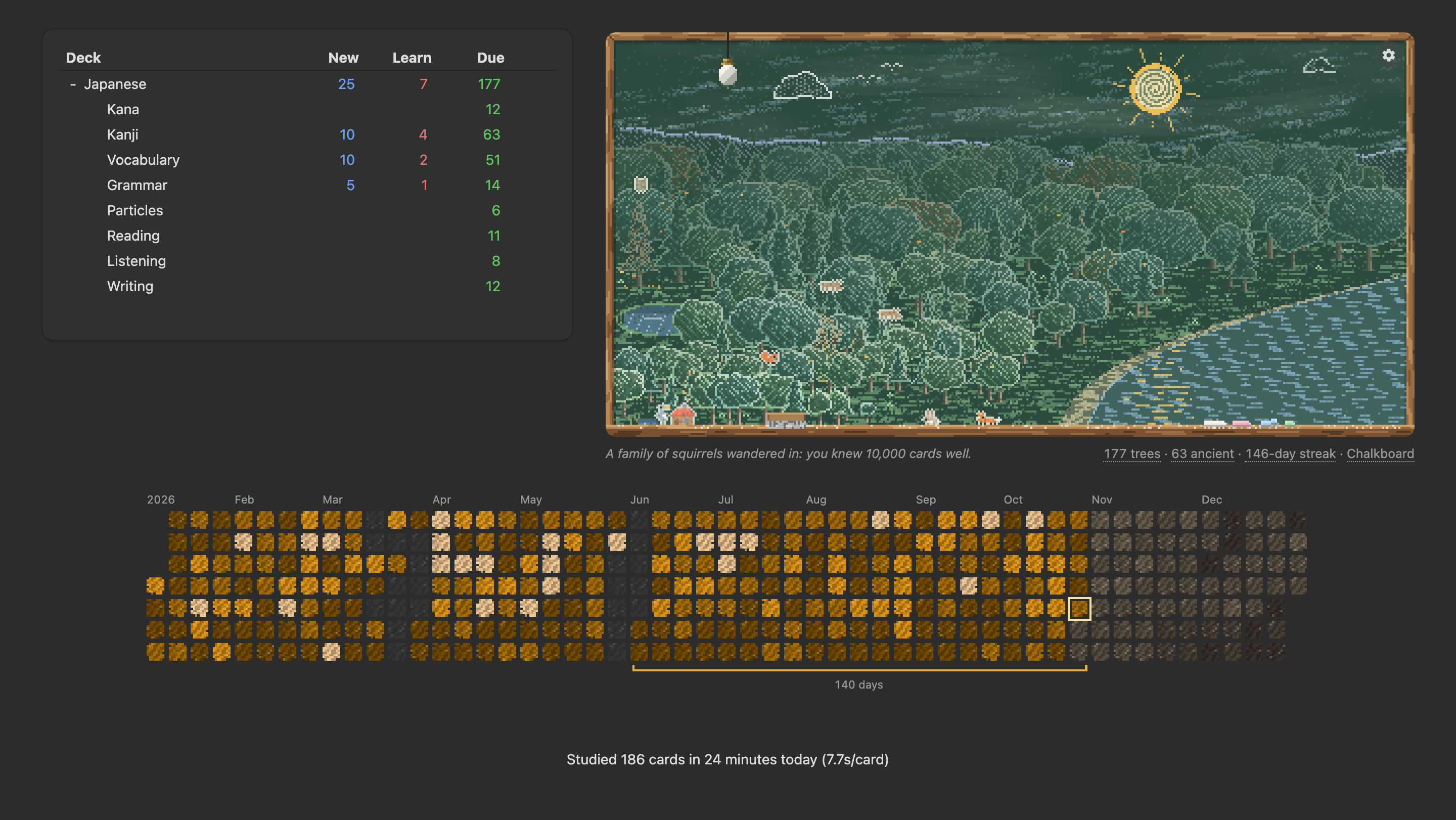
A Japanese deck list with a chalkboard forest beside it on the right, and the study heatmap across the full width below

Choose where the forest and the heatmap sit on the Forest tab of the settings.

 
On your phone
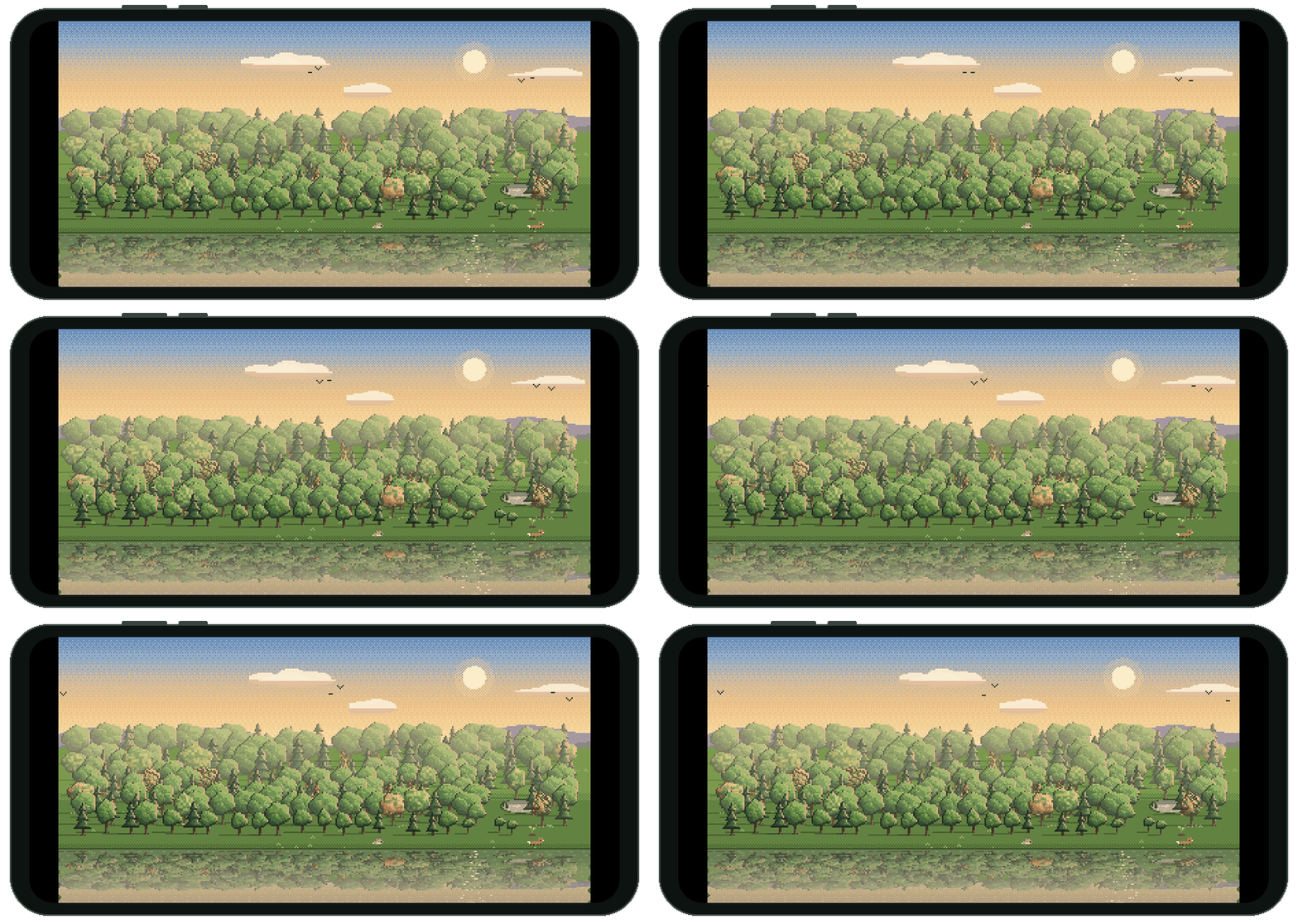
The forest filling a phone screen, turned sideways, animated

Turn on "Show my forest on my phone" on the Forest tab. After your next sync, a Memory Forest deck appears in AnkiDroid: open it to see your forest, with your study heatmap under it. Your computer draws this copy, so it updates whenever Anki syncs there.

 
Compatibility and privacy
  • Anki 2.1.45 or later, on a computer (Windows, macOS, Linux). AnkiDroid can show a copy of your forest that your computer sends it (see On your phone).
  • Using Onigiri? It hides the forest until you add it to its grid: here's how.
  • Everything is computed on your computer from your own review history. The only thing that leaves it is your city's name, and only if you turn on the real weather: it is sent to Photon (OpenStreetMap, free, no account) to find the place, and its coordinates to MET Norway (free, no account) for the forecast. The copy of your forest for your phone goes through your own AnkiWeb sync, like any card.
What's new
1.5.0
New
  • Memory Forest now speaks your Anki's language: German, Spanish, French, Brazilian Portuguese, Japanese, Chinese, Arabic and Hebrew, with right-to-left layouts for Arabic and Hebrew; pick another on the About tab.
Improved
  • The Streak view and the forest's layouts got a polish, and the Streak view now fits in an Onigiri tile.
  • Selecting heatmap days is easier to find and works from the keyboard too.
  • The settings now fit on smaller screens, like 1280×720.
  • Frozen ponds now take on the colours of dusk and night.
Fixed
  • Your forest on your phone no longer gets cut off in landscape full screen, and says more plainly when it last synced.
  • No more "tried to update its config" warnings where Anki can't save the add-on's settings, like on NixOS.
Also new in Memory Forest Plus: Savanna sundown, Coral reef and 1960s psychedelia.
1.4.0
New
  • Starry night is now in the free edition.
  • Put the forest and heatmap beside or above your deck list (Forest tab).
  • A Streak view shows your whole streak at once.
  • Select heatmap days with Shift-click or Ctrl/Cmd-click to light up their trees.
  • Misty mountain valley and Rainy bamboo grove now have their own heatmap tiles.
  • Surprise me daily can skip sceneries you'd rather not see.
  • A start date can now keep your earlier trees (Decks tab).
Improved
  • Every scenery got a polish: sunlit lakes, rain on the water, drifting mist and more.
  • The heatmap follows the time of day, and its width can be set.
  • Nature's levels now show what they do, in a short animation.
  • Empty heatmap days now match the scenery's tiles.
Fixed
  • Fixed a blank widget in Onigiri.
Also new in Memory Forest Plus: Chalkboard and a new seaside landscape.
1.3.0
This update is all about seeing your study day by day, in a heatmap under your forest.
New
  • A study heatmap under your forest, and on your phone: the days you studied in your scenery's colours, your streak, and the cards due ahead.
  • A new landmark: the Pagoda, a temple in the mist.
  • Your forest and heatmap now also show on a finished deck (Forest tab, "On finished decks too" turns it off).
Improved
  • Synthwave, Lanterns at night and the Rainy bamboo grove have been repainted.
  • The forest now uses about 45% less CPU on average, and up to 75% less in some sceneries.
1.2.0
Improved
  • Clearer settings: Scenery, Forest and Decks tabs, and they now fit smaller laptop screens.
  • Choose your scenery right on the Scenery tab, from moving previews of each one.
  • "Animate the forest" is now On, Off, or Follow system, which keeps the forest still when your system is set to reduce motion.
  • The settings reopen on the tab you last used until you quit Anki, and Cancel now also undoes Restore defaults.
  • Live weather now comes from MET Norway, and your city can be typed in its own language, like 東京.
  • The add-on now works in Anki 2.1.45 and later.
  • New sceneries and features now announce themselves, and the About tab shows what's new.
  • A tree's tooltip now says when a leech's crow leaves: once the card is mature again.
Fixed
  • A deck's own forest now reacts to how you study, just like your main forest, and on Peaceful it no longer shows the signs of bad habits.
  • The settings look right again in Anki 2.1.50, and the forest shows again in the versions of Anki made for older computers.
  • Unticking "Show my forest on my phone" now stays unticked after a sync from your phone.
  • A start date now begins the forest afresh: days before it no longer bring ancient-tree news, animals or Nature's marks.
  • The start date now follows Anki's day, which begins at its rollover hour.
1.1.0
New
  • Your forest on your phone, in AnkiDroid (turn it on in the General tab).
  • The forest notices how you study: good days and bad habits leave their marks.
  • Nature, a new setting on the General tab: choose how much the forest holds you to account for days away, from Peaceful to Wild to Merciless.
  • New animals to look forward to, years into your forest.
  • A new History tab: see how many trees each deck grows, leave decks out of the forest, or start it from a date.
  • New sceneries, and Memory Forest Plus on Patreon, where they arrive first.
  • Choose where the forest shows: on the main screen, on deck screens, or both (Fine-tuning tab).
Improved
  • A tidier General tab, and a new scenery picker that shows each scenery as a picture.
  • Trees now stand on their own for up to two years before joining the deep forest at the back.
  • Rivers now wind through the middle of the forest.
  • Suspended cards keep their trees.
  • The forest uses about 25% less memory, and opening the settings no longer leaks memory.
  • The forest uses less CPU.
  • The add-on is packed about 27% smaller.
Fixed
  • A pond now appears after one week away instead of two.
  • The forest no longer looks wrong after an update.
  • Aurora night's mountains no longer vanish behind a very big forest.
  • Ponds stay on the ground and no longer overlap.
  • The settings cog no longer grows a border on hover.
1.0.0
  • First release.
Support
If you enjoy Memory Forest, please give it a thumbs up and share it with friends who study with Anki. It is what helps other people find it.
 
New sceneries keep coming. Want each one first? Join on Patreon for Memory Forest Plus, and every scenery comes to this version later on.
 
Feedback
Found a bug or have an idea? Open an issue on GitHub. The source code is on GitHub, under the MIT license.

README

Memory Forest

A forest and a study heatmap that grow from your Anki study history. Every day you learn new cards plants a tree below your deck list, and the heatmap under it shows the days you studied, your streak and the reviews ahead. There is nothing to click and nothing to manage: just study, and watch it grow.

The forest by the lake at golden hour, with its study heatmap under it: days studied in green, a silver streak trophy, a goal flag, an exam marker, and cards coming due in brown

Get it on AnkiWeb · add-on code 1255432496

How the forest grows

The same forest after a week, a month, four months and four years
After a week, a month, four months and four years.

A tree starts as a seedling and grows as you come to know its day's cards, and the days you know best keep growing for years, into ancient giants. Forget some of a day's cards and its tree gets a few yellow leaves, which turn green again once you relearn them. Trees never die. Days when you only review don't plant a tree, but they keep the ones you have healthy.

So its size is how much you have learned, and its colour is how well you remember it. Point at a tree to see its day. Take a week off and a pond appears where the missing days would be; keep studying and animals move in, and after a year a little cabin appears at the edge of the woods.

Your study heatmap

Your study days, streaks and upcoming reviews, in your scenery's colours. Hover for details; click a day to open its cards.

  • Views: a rolling timeline, a full year, or your whole streak at once.
  • Select days: Shift-click or Ctrl/Cmd-click days to light up their trees, then click one to open all their cards.
  • Reviews, time or pace: shade days by review count, study time or seconds per answer.
  • Per deck: each deck has its own heatmap and streak.
  • Fair streaks: days with nothing due don't break your streak; or choose a 5- or 6-day study week.
  • Trophies: medals for your three longest streaks, and a flag for your next goal.
  • Milestones and important days: see when each animal joined, and right-click to mark exams and trips.
  • Your look: its colours and style in the Heatmap tab, and a week that starts on Monday, Sunday, Saturday or your system's setting.

The same heatmap in five sceneries: green by the lake, blue brushstrokes in Starry night, round tiles in Lanterns, blue contours in Aurora night, and violet to pink scanlines in Synthwave

Pick your scenery

The free sceneries, animated: Golden hour by the lake, Misty mountain valley, Aurora night, Lanterns at night, Rainy bamboo grove, Synthwave and Starry night

New in Memory Forest Plus

The Memory Forest Plus sceneries, animated: Cherry blossom, Chalkboard, Savanna sundown, Coral reef and 1960s psychedelia

These arrive in Memory Forest Plus first, and come to this version later on. Join on Patreon to get them now.

How you study

Good days leave something behind for you to find. Whether bad habits leave a mark too is up to you: pick a Nature on the Forest tab of the settings.

The three Natures, animated: a calm forest with a pond where days were missed, a forest on fire, and an asteroid on its way down

  • Peaceful (the default): only the good things. Days away cost you nothing.
  • Wild: bad habits leave marks until you fix them. Miss two days in a row and smoke rises as a warning; miss a third and a fire spreads while you stay away. A weekend off is fine. Seven days of study put it out.
  • Merciless: a single day without reviews brings down an asteroid on the whole forest, and a new one grows from there. Bad habits leave their marks too.

Switch back at any time and your forest is just as it was.

Layout

A Japanese deck list with a chalkboard forest beside it on the right, and the study heatmap across the full width below

Choose where the forest and the heatmap sit on the Forest tab of the settings.

On your phone

The forest filling a phone screen, turned sideways, animated

Turn on "Show my forest on my phone" on the Forest tab. After your next sync, a Memory Forest deck in AnkiDroid shows your forest and heatmap. Your computer draws this copy, so it updates whenever Anki syncs there.

Compatibility and privacy

  • Anki 2.1.45 or later, on a computer (Windows, macOS, Linux). AnkiDroid can show a copy of your forest that your computer sends it (see On your phone).
  • Using Onigiri? It hides the forest until you add it to its grid: here's how.
  • Everything is computed on your computer from your own review history. The only thing that leaves it is your city's name, and only if you turn on the real weather: it is sent to Photon (OpenStreetMap, free, no account) to find the place, and its coordinates to MET Norway (free, no account) for the forecast. The copy of your forest for your phone goes through your own AnkiWeb sync, like any card.

Languages

Memory Forest follows your Anki's language, or the one you pick on the About tab: German, Spanish, French, Brazilian Portuguese, Japanese, Chinese (Simplified), Arabic and Hebrew, right to left where the language reads so. The translations were made with AI and no native speaker has read them yet, so they're probably bad in places: if something reads wrong in your language, please tell me.

Support and feedback

If you enjoy Memory Forest, please give it a thumbs up on AnkiWeb and share it with friends who study with Anki. Want each new scenery first? Join on Patreon for Memory Forest Plus.

Found a bug or have an idea? Open an issue.

License and development

MIT. Developing it yourself? See DEVELOPMENT.md.