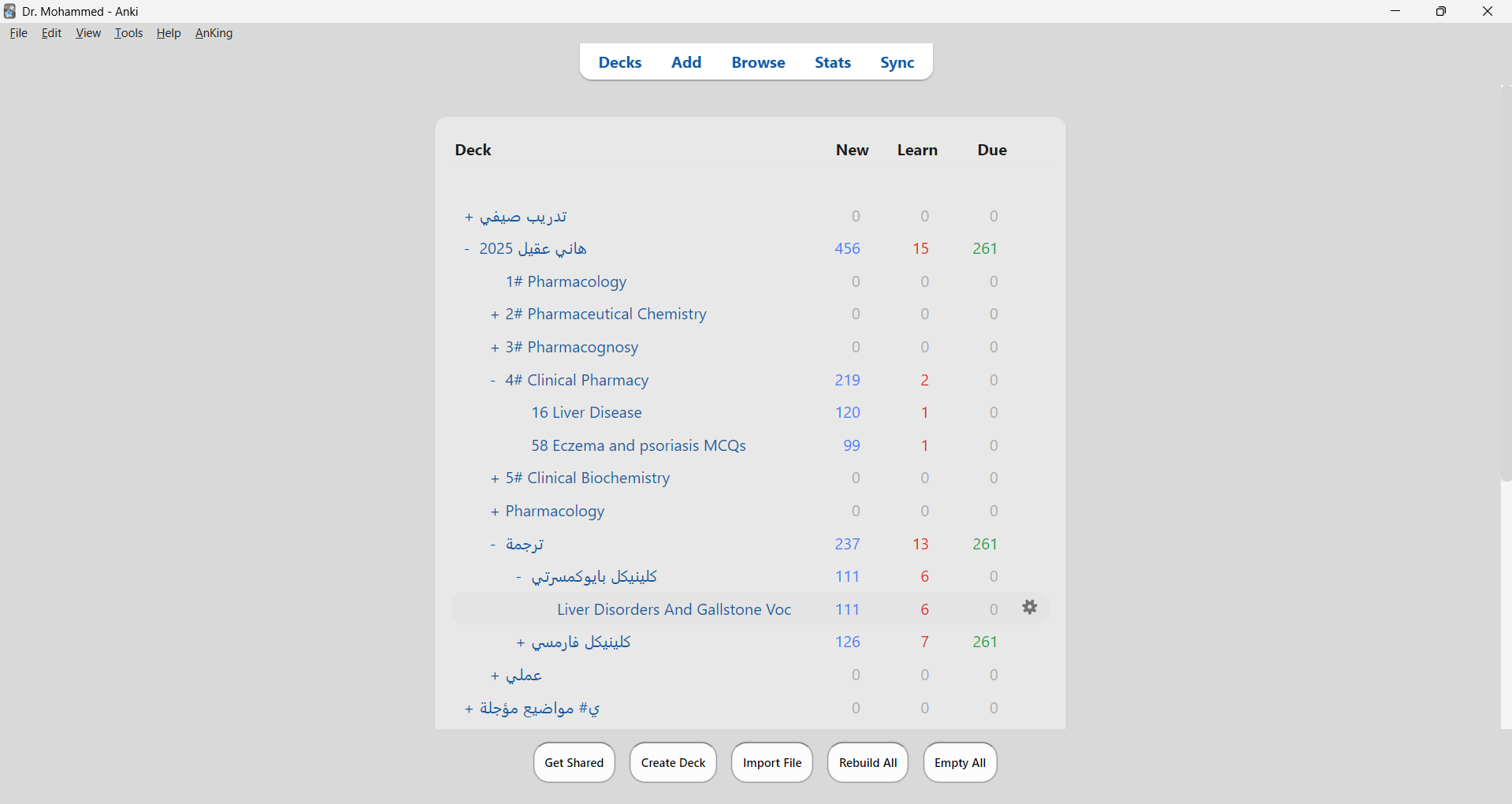
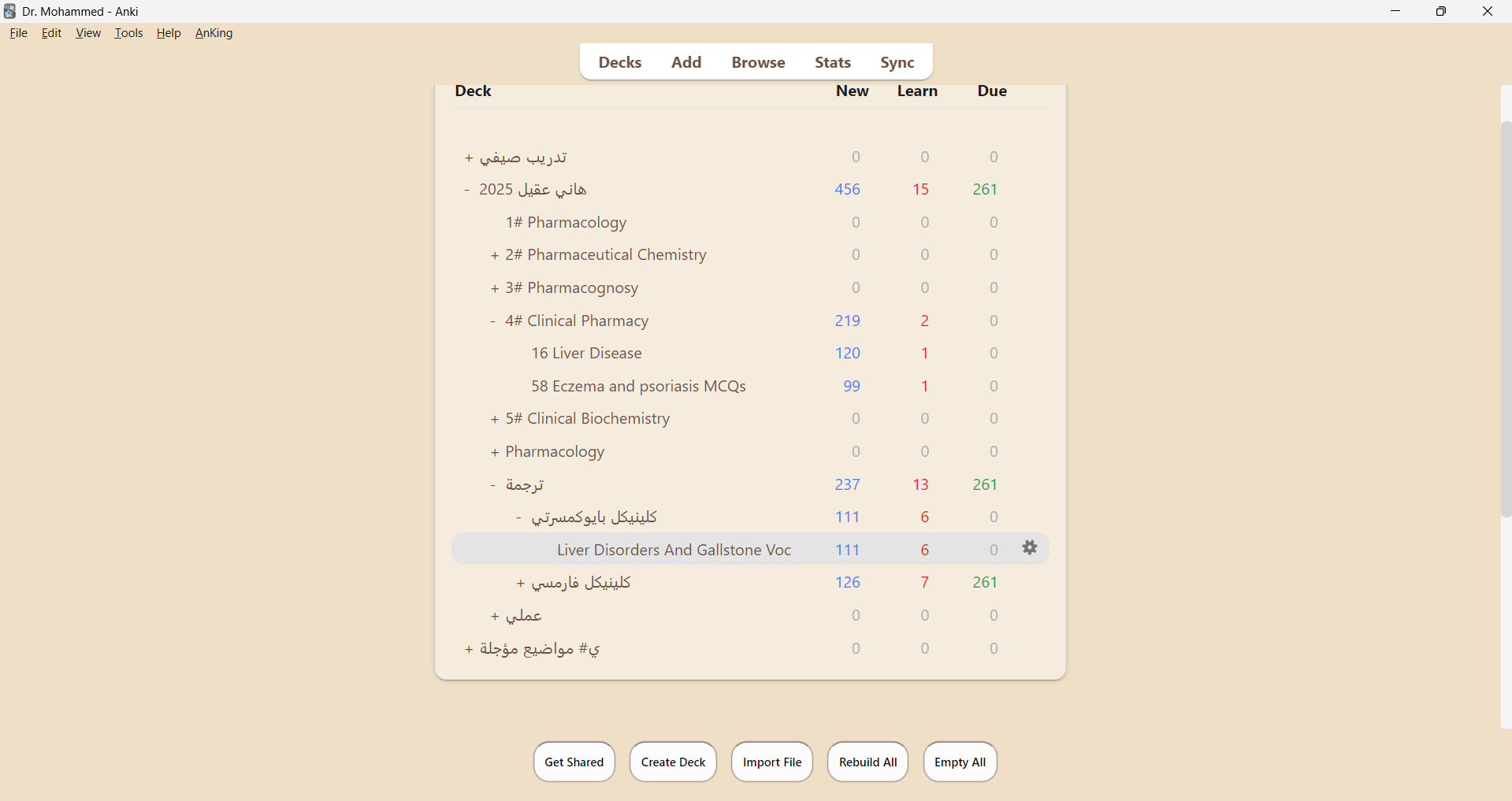
AnkiThemeTwin — Sepia, Gray & Soft Dark Themes (Eye Comfort, Word Read style)

AnkiWeb addon 1256951397

Provides eye-comfort Sepia, Gray, dark, and accessibility themes with customizable fonts, colors, scheduling, per-deck settings, and keyboard shortcuts across Anki's interface.
AI-generated summary; may contain mistakes.

shortcutsappearanceaccessibility

Open on AnkiWeb GitHub Forum topic Find alternatives

AnkiWeb

Votes
2 (👍 2 · 👎 0)
Updated
2025-09-15
Anki versions
2.1.55~
License
Not found (this does not mean that the addon has no license)
Virus scan
No ClamAV match A match does not prove malware. No match does not prove that the code is safe.
Languages
Python, JSON
Description language
en

Maintenance

stale

  • Last update or commit: 2026-04-10 (205 days before the snapshot).
  • GitHub Actions workflows: 2.
  • Commits in the last year: 62.
  • Issues: 0 open, 0 closed.
  • Pull requests: 0 open, 17 merged.

Will it work on my Anki?

Version branches
Min AnkiMax AnkiUpdated
2.1.55+2025-09-15
History across monthly snapshots

Loading…

Similar addons

WikiLookup

Looks up selected card text in Wikipedia via a customizable keyboard shortcut, showing popup definitions and images with configurable language, dark theme, and flip-only triggering.

shortcutsappearancedictionarybeta

13 votes 67% approval 👍 12 · 👎 1 Anki 2.1.63~ Updated 2023-05-20
The Frameless Addon

Replaces Anki's system title bar with a modern header or sidebar, integrating menus and window controls while preserving resizing, snapping, and theme-aware styling.

appearance

1 votes 21% approval 👍 1 · 👎 0 Anki 2.1.1~ Updated 2026-10-24
new ⏳⏪ Memoria Rewind - Spotify Wrapped by Anki

Transforms Anki review history into 11 animated, Spotify-Wrapped-style slides summarizing retention, streaks, learner persona, deck themes, star and nemesis cards, with an AI-written shareable narrative.

aistatistics

1 votes 21% approval 👍 1 · 👎 0 Anki 2.1.1~ Updated 2026-06-10
Anki-redesign has 1 fork →

Gives Anki 2.1 a lightweight, customizable look across most views and windows via CSS and Qt CSS theming, with configurable colors, fonts, and multiple themes.

appearance
147 votes 80% approval 👍 127 · 👎 20 ⭐ 65 Anki 2.1.57~ Updated 2023-02-04

Description

AnkiThemeTwin — Sepia, Gray & Soft Dark Themes

Bring Word-like Sepia and Gray themes + custom Soft Dark styles to Anki!
7 themes optimized for eye comfort, anti-glare, and strong font readability.

Features

  • Sepia: Word, Paper, Special Anti-Glare
  • Gray: Word, Paper
  • Dark: Warm Soft, Neutral Soft
  • High contrast fonts (WCAG compliant)
  • Quick theme switching: Tools → Theme: AnkiThemeTwin
  • About dialog with GitHub link

Screenshots

Sepia Special
Gray Paper
Dark Warm Soft

Links

README

AnkiThemeTwin

✨ AnkiThemeTwin brings eye-comfort themes with advanced customization to Anki — featuring 13+ built-in themes, custom theme creator, accessibility options, and intelligent theme scheduling.


🎨 Features

Themes

  • 7 Eye-Comfort Light Themes:

    • Sepia (Word-like)
    • Sepia (Paper)
    • Sepia (Special • Dr. Mohammed)
    • Gray (Word-like)
    • Gray (Paper)
    • Blue Light (Evening)
    • Olive Green (Natural)
  • 6 Accessibility Themes:

    • High Contrast Light - Maximum contrast for visual impairments
    • High Contrast Dark - Dark mode with high contrast
    • Dyslexia Friendly - Optimized for dyslexic readers
    • Deuteranopia Support - Color blindness optimized (red-green)
    • Protanopia Support - Color blindness optimized (red-green variant)
    • Tritanopia Support - Color blindness optimized (blue-yellow)
  • Unlimited Custom Themes: Create your own themes with the visual color picker

Customization Features

  • Custom Theme Creator — Visual color picker for all theme elements
  • Theme Presets — Save and load favorite theme + font combinations
  • Theme Preview Gallery — See all themes before applying
  • Import/Export Themes — Share themes as JSON files
  • Advanced Font Settings:
    • Font family selection
    • Font size: 8-32px with slider or 7 presets (12, 14, 16, 18, 20, 22, 24px)
    • Line height adjustment (100-300%)
    • Letter spacing control (-5px to +10px)

Intelligent Features

  • Scheduled Theme Switching — Auto-switch themes based on time of day (morning, afternoon, evening, night)
  • Per-Deck Themes — Set different themes for different decks
  • Study Session Modes — Optimize display for Focus, Speed, or Detail modes
  • Keyboard Shortcuts with enhanced visual feedback:
    • Ctrl+Shift+1-7: Quick theme switching
    • Ctrl+Shift+=: Increase font size
    • Ctrl+Shift+-: Decrease font size
  • Animation Settings — Configurable theme transition effects
  • Quick Settings Panel — Combined controls for theme, font, and study mode
  • Configuration Backup & Restore — Export/import settings with versioning
  • Usage Statistics — Track your theme usage patterns

Visual Enhancements

  • Smooth Animations — CSS transitions on all interactive elements
  • Enhanced Depth — Card shadows and layered effects
  • Button Effects — Press animations and elevation changes
  • Advanced Focus Indicators — Multi-layer shadows and glow effects
  • Gradient Overlays — Modern gradients on buttons, scrollbars, and headers
  • Background Patterns — 5 optional patterns (None, Subtle, Dots, Grid, Lines)
  • Improved Typography — Heading accents and better text hierarchy
  • Modal Animations — Fade-in effects and entrance transitions

Comprehensive Styling

  • All Anki Pages: Card reviewer, editor fields, deck browser, card browser
  • Buttons & Menus: Enhanced with hover states and focus indicators
  • Tables & Lists: Styled headers and alternating row colors
  • Input Fields: Custom focus indicators and borders
  • Scrollbars: Gradient design with hover effects
  • Context-Aware CSS: Optimized styling for each Anki page type

Quality of Life

  • Instant Updates — Changes apply immediately to all open views
  • WCAG AA Compliant — All themes pass accessibility contrast guidelines
  • Easy Switching — Access via Tools → Theme: AnkiThemeTwin
  • About Dialog — Project details and GitHub link

📸 Screenshots

Sepia Special Gray Paper Blue Light

(Screenshots live in /images in this repo.)


📥 Installation

Option A — from AnkiWeb (recommended)

  • AnkiWeb page: https://ankiweb.net/shared/info/1256951397
  • Add-on ID: 1256951397
    Open Anki → Tools → Add-ons → Get Add-ons… → paste the ID → Install.

Option B — manual file

  1. Download the latest .ankiaddon from Releases.
  2. In Anki: Tools → Add-ons → Install from File… and choose the file.
  3. Restart Anki.

⚙️ Requirements

  • Anki 2.1.55+ (Qt6/PyQt6). Older Qt5 builds are not supported.

🚀 Quick Start Guide

Basic Usage

  1. Install the add-on
  2. Open Tools → Theme: AnkiThemeTwin
  3. Select a theme from the menu
  4. Use keyboard shortcuts for quick switching:
    • Ctrl+Shift+1 through Ctrl+Shift+7 for main themes
    • Ctrl+Shift+= to increase font size
    • Ctrl+Shift+- to decrease font size

Advanced Features

Custom Theme Creator

  1. Go to Tools → Theme: AnkiThemeTwin → Create Custom Theme...
  2. Pick colors for each element using the color pickers
  3. Save your theme with a custom name
  4. Your theme will appear in the main menu

Theme Presets

  1. Configure your perfect theme + font size combination
  2. Go to Manage Presets...
  3. Save current settings as a preset
  4. Quick-load presets anytime

Scheduled Theme Switching

  1. Open Scheduled Theme Switching...
  2. Enable the feature
  3. Set times and themes for morning, afternoon, evening, and night
  4. Themes will auto-switch based on the time

Per-Deck Themes

  1. Open Per-Deck Themes...
  2. Enter deck name and select theme
  3. Theme will auto-apply when reviewing that deck

Theme Preview

  1. Open Theme Preview Gallery...
  2. Browse all themes with visual previews
  3. Click "Apply This Theme" to instantly switch

♿ Accessibility Features

For Visual Impairments

  • High Contrast Light/Dark: Maximum contrast ratios (WCAG AAA compliant)
  • Adjustable Font Sizes: 8-32px range with preset options
  • Custom Letter Spacing: Improve readability with adjustable spacing

For Dyslexia

  • Dyslexia Friendly Theme: Yellow background proven to reduce reading difficulty
  • Increased Line Height: Adjustable up to 300%
  • Custom Font Support: Use OpenDyslexic or other specialized fonts

For Color Blindness

  • Deuteranopia Support: Optimized for red-green color blindness
  • Protanopia Support: Alternative red-green optimization
  • Tritanopia Support: Optimized for blue-yellow color blindness

All accessibility themes maintain high contrast and readability while accommodating specific visual needs.


🎯 Theme Recommendations

By Environment

  • Bright sunlight / Outdoor: Gray (Paper) or Sepia (Paper) — darker backgrounds reduce glare
  • Office / Indoor lighting: Sepia (Word-like), Gray (Word-like), or Sepia (Special)
  • Evening / Low light: Blue Light (reduces eye strain)
  • Extended study sessions: Sepia (Special), Olive Green — warm, natural tones reduce fatigue

By Device

  • LCD screens: Any theme works well
  • High-brightness displays: Sepia or Gray themes to reduce eye strain
  • E-ink displays: Gray (Word-like) or Gray (Paper) for best readability

By Preference

  • Warm tones: Sepia (Word/Paper/Special), Olive Green
  • Cool tones: Gray (Word/Paper), Blue Light
  • Maximum contrast: Gray (Paper)
  • Soft on eyes: Sepia (Special), Blue Light

Font Size Recommendations

  • 14px: For larger screens (24"+) or users who prefer more content per page
  • 16px: Default, optimal for most users and screen sizes
  • 18px: Better for extended reading sessions or smaller text in cards
  • 20px: For accessibility, visual impairment, or users who prefer larger text

🧰 Troubleshooting

  • Colors didn’t change? Restart Anki, and ensure no other theming add-on overrides styles.
  • You can switch any time from Tools → Theme: AnkiThemeTwin.
  • Problems or feature requests? Open an issue on GitHub (link below).

🔗 Links

  • AnkiWeb: https://ankiweb.net/shared/info/1256951397
  • GitHub Repository: https://github.com/MohammedTsmu/AnkiThemeTwin
  • Issues (support): https://github.com/MohammedTsmu/AnkiThemeTwin/issues

📝 Author

Developed with 💻 + ☕ by Dr. Mohammed.
Feedback, issues, and contributions are welcome on GitHub.


📚 References

  • Anki add-on hooks (CSS injection via webview_will_set_content)
    https://addon-docs.ankiweb.net/hooks-and-filters.html
  • Packaging & sharing add-ons (.ankiaddon zip format)
    https://addon-docs.ankiweb.net/sharing.html
  • Installing add-ons from Anki (Get Add-ons / Install from file)
    https://docs.ankiweb.net/addons.html
  • Qt Style Sheets (QSS) for widget theming
    https://doc.qt.io/qt-6/stylesheet.html
  • WCAG 2.1 contrast guidance (readability)
    https://www.w3.org/WAI/WCAG21/Understanding/contrast-minimum.html
  • Word Immersive Reader (background/page color)
    https://support.microsoft.com/en-us/office/use-immersive-reader-in-word-a857949f-c91e-4c97-977c-a4efcaf9b3c1