Anki-redesign
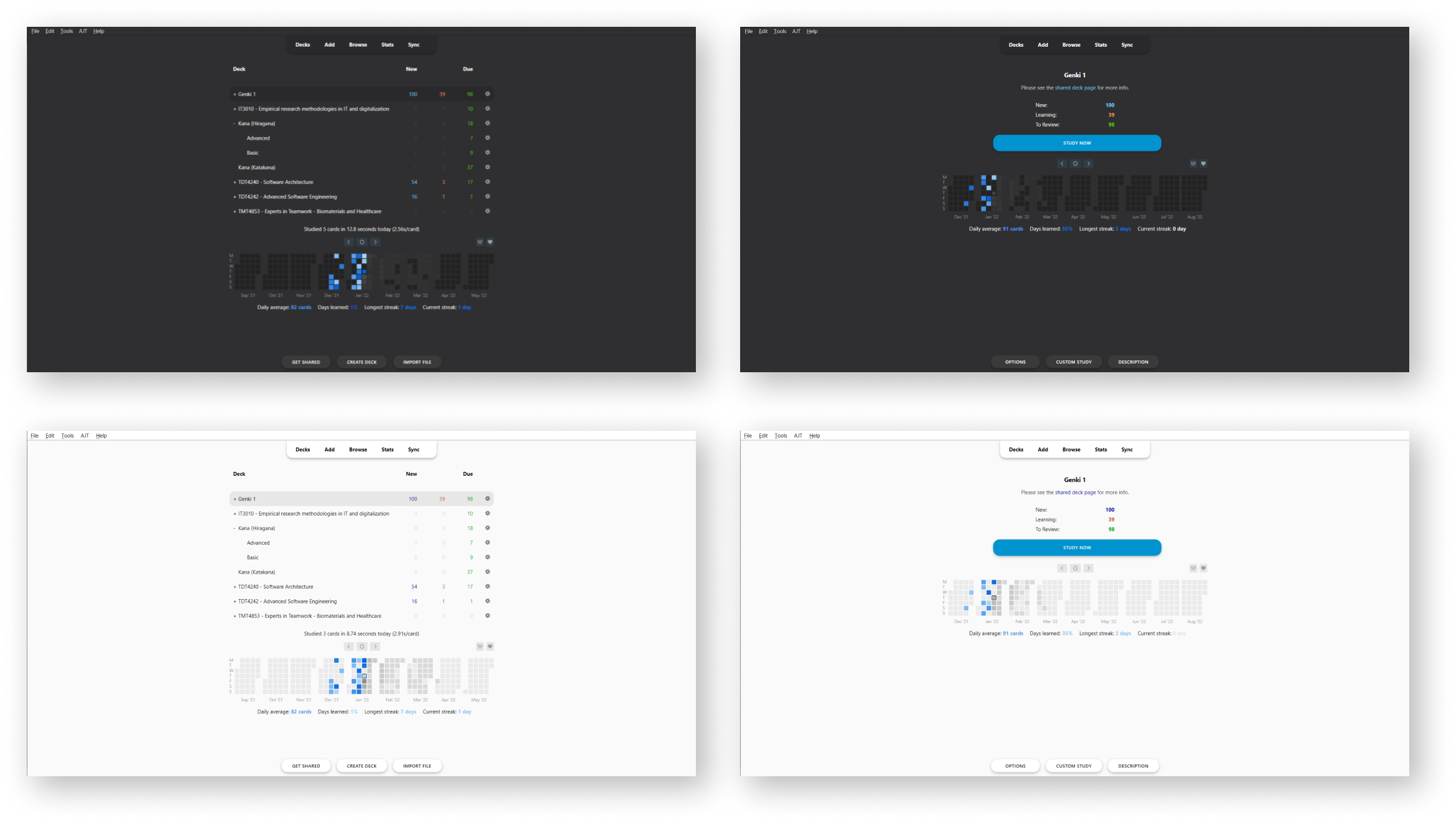
A new lightweight look for Anki compatible with most (if not all) versions of Anki 2.1.X running QT5 and QT6. - Specifically tested on Anki 2.1.49
Note: This add-on uses hooks and doesn't overwrite the original Anki code views that much, meaning that most add-ons should properly work with Anki-redesign enabled. However, if there is any add-on found to not be working properly, feel free to make an issue and I'll try to add support for it!
(List of tested addons and manual fixes for them to work can be seen on the project github wiki.)
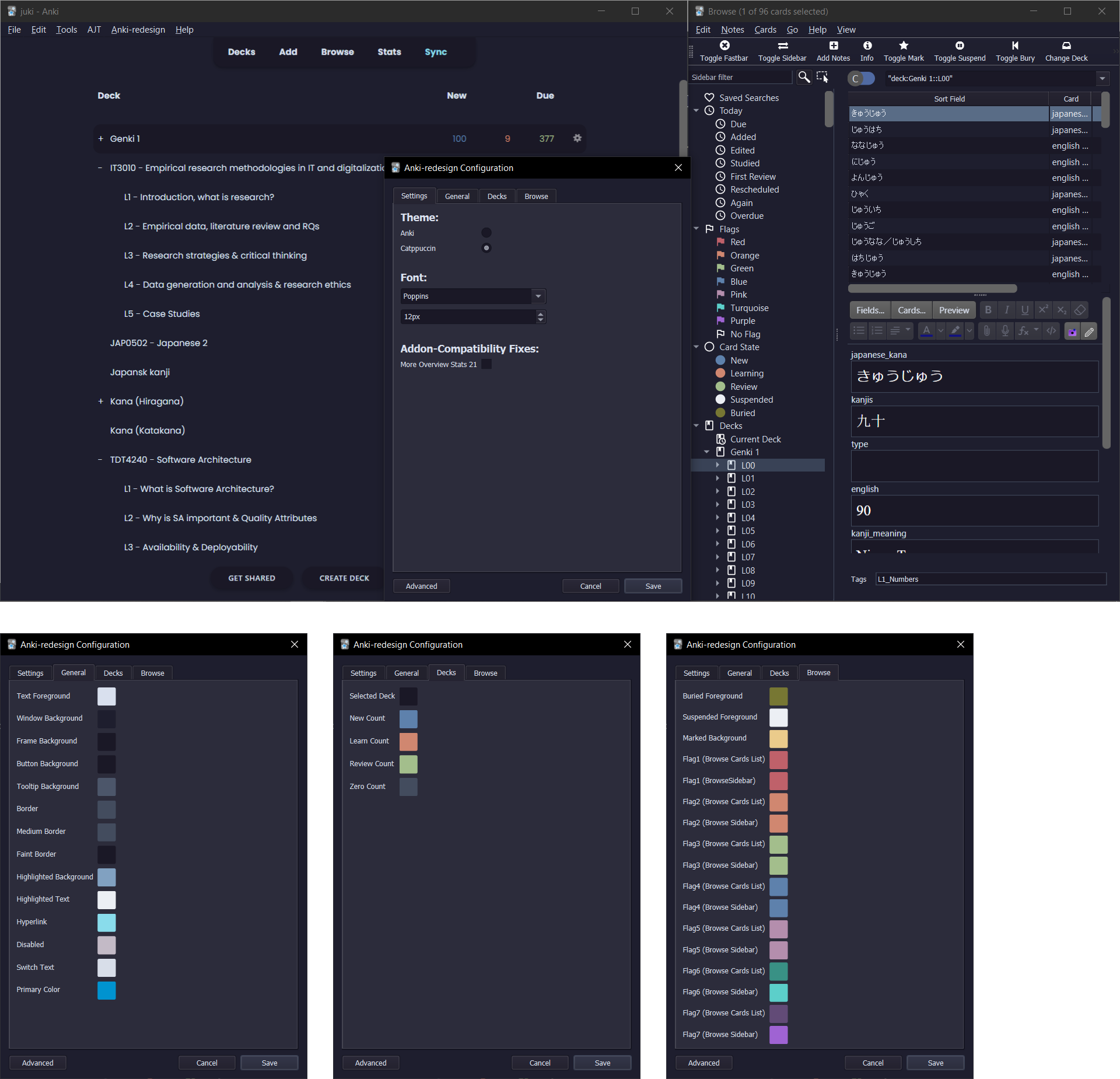
Note2: This addon also works as a theming addon as it enables the possibility of user customization on almost all Anki views/windows through the injection of CSS and QT CSS on the different components. The adding of custom styling can be done by copying over the css files from ./files to ./user_files and then editing the styling there. Primary color of button focus, link color, as well as the font, can be changed in the addon config.
Note3: If the addon is not updating try open anki while holding shift to turn off all addons, then update and restart. :)
Manually tested on the following Anki versions:
- 2.1.57
- 2.1.56
- 2.1.54
- 2.1.50
- 2.1.49
- 2.1.26
- 2.1.22
(Planned) Updates / todos (as of 04.02.2023):
- [x] Recheck "Advanced Review Button" add-on compatibility
- [x] Recheck "Full screen" add-on compatibility
- [x] Re-add windows dark titlebar
- [ ] Add a public theme sharing site where users can upload their themes and possibly have them preinstalled alongside the add-on
- [x] Add styling support for Anki 2.1.57
- [x] Fix themes to support Anki version post UI changes
Guide:
- Download the Add-on from AnkiWeb
- there will be an Anki-redesign menu at the top. Click the config submenu to open the Anki-redesign Configuration dialog.
- Customize Anki as you like, see the readme image
- The colors will update after clicking "Save", however to make sure everything is updated, do a restart after customizing.
Credits:
The concept of this add-on was inspired by the following add-on and designs:
Changelog:
- 04-02-2023: Anki 2.1.57 is now compatible along with lots of add-on compatibility and bug fixes. The themes are also styled as it should (some colors might be out of place still) (v0.1.9)
- 01-02-2023: Anki 2.1.56 is now compatible, some themes are however still not correctly styled as it should (v0.1.8)
- 28-10-2022: Adds language translation, fix for Contanki, and some more Catpuccin themes (v0.1.7)
- 10-10-2022: Adds fix for NDFS compatibility fix and community translation support (v0.1.6)
- 22-08-2022: Adds refactored theming engine, adding sync, clone and delete of themes more easily, along with some bugfixes. Anki-redesign preferences is also moved to the Tools menubar (v0.1.5)
- 26-07-2022: Automatic dark/light mode switch on themes is now correctly implemented, hopefully Mac toolbar bug is also fixed (v0.1.4)
- 03-07-2022: Anki 2.1.54 is now compatible, also added addon compatibility for ARBb alongside auto dark/light mode switch on themes (v0.1.3)
- 18-04-2022: Anki 2.1.50 is now compatible, also added some minor visual fixes for legacy versions (v0.1.2)
- 14-04-2022: Adds minor bugfix for showInfo function (v0.1.1)
- 13-04-2022: Adds major update adding dialog configuration and QT theming as well as some bugfixes and code cleanup (v0.1.0)
- 31-01-2022: Adds minor bugfixes and some code cleanup (v0.0.8)
- 30-01-2022: Adds customized font support, dark titlebar for windows on dark mode, more minor styling fixes (v0.0.7)
- 25-01-2022: Adds typo and error bugfixes, code cleanup update (v0.0.6)
- 24-01-2022: Adds full user customization styling through the folder user_files. User theming is now possible! (v0.0.5)
- 21-01-2022: Adds a very small update, removes unfinished styling on AddCard window (v0.0.4)
- 20-01-2022: Adds styling edits, timer and styling bugfixes, add-on now compatible with legacy versions (v0.0.3)
- 14-01-2022: Adds second update, more styling fixes (v0.0.2)
- 07-01-2022: Styling on Overview and DeckBrowser update (v0.0.1)
- 04-01-2022: Initial Release
 A new lightweight look for Anki compatible with most (if not all) versions of Anki 2.1.X running QT5 and QT6. - Specifically tested on Anki 2.1.54
Note: This add-on uses hooks and doesn't overwrite the original Anki code views that much, meaning that most add-ons should properly work with Anki-redesign enabled. However, if there is any add-on found to not be working properly, feel free to make an issue and I'll try to add support for it!
(List of tested addons and manual fixes for them to work can be seen on the project github wiki.)
Note2: This addon also works as a theming addon as it enables the possibility of user customization on almost all Anki views/windows through the injection of CSS and QT CSS on the different components. The adding of custom styling can be done by copying over the css files from `./files` to `./user_files` and then editing the styling there. Primary color of button focus, link color, as well as the font, can be changed in the addon config.
Note3: If the addon is not updating try open anki while holding shift to turn off all addons, then update and restart. :)
Manually tested and working on the following Anki versions:
- 2.1.57
- 2.1.56
- 2.1.54
- 2.1.50
- 2.1.49
- 2.1.26
- 2.1.22
(Planned) Updates / todos (as of 04.02.2023):
- [x] Recheck "Advanced Review Button" add-on compatibility
- [x] Recheck "Full screen" add-on compatibility
- [x] Re-add windows dark titlebar
- [ ] Add a public theme sharing site where users can upload their themes and possibly have them preinstalled alongside the add-on
- [x] Add styling support and fix themes for Anki 2.1.57
 Guide:
1. Download the Add-on here (code:

