Anki DESIGN

AnkiWeb addon 1809063985

Redesigns Anki's deck list, reviewer, sidebar, Add, Browse, Stats and Preferences with a cleaner look, searchable navigation, heatmap, stats and customizable themes, all individually toggleable.
AI-generated summary; may contain mistakes.

review-flowstatisticsprogress-trackingdeck-managementappearance

Open on AnkiWeb GitHub Find alternatives

AnkiWeb

Votes
12 (πŸ‘ 10 Β· πŸ‘Ž 2)
Updated
2026-09-13
Anki versions
25.09.4~
License
MIT (from the license file in the package)
Virus scan
No ClamAV match A match does not prove malware. No match does not prove that the code is safe.
Languages
Python, CSS, JavaScript, JSON
Description language
en

Maintenance

active

  • Last update or commit: 2026-09-13 (49 days before the snapshot).
  • GitHub Actions workflows: 1.
  • Commits in the last year: 42.
  • Issues: 3 open, 3 closed.
  • Pull requests: 0 open, 39 merged.
  • Median first response: 859 hours (3 answered issues and pull requests).
  • Outside pull requests: 0% of 1 merged.

GitHub

Repository
noahlloyd/anki-design Β· more by noahlloyd
Stars
⭐ 22 · forks 3 · open issues 3
Last commit
2026-09-13
License
MIT
Languages
Python, CSS, JavaScript, Makefile, Shell
Tests
0

Will it work on my Anki?

Version branches
Min AnkiMax AnkiUpdated
25.0925.09.4+2026-09-13
History across monthly snapshots

Loading…

Similar addons

The Widget Addon

Transforms Anki's home screen into a customizable study dashboard with 34+ coordinated light/dark scenes, drag-and-drop widgets, progress stats, a review calendar heatmap, and countdown timers.

statisticsprogress-trackingappearance

1 votes 21% approval πŸ‘ 1 Β· πŸ‘Ž 0 Anki 2.1.1~ Updated 2026-10-29
Awesome Dashboard

Replaces Anki's deck and review screens with a customizable widget dashboard featuring activity heatmaps, Pomodoro timer, habit tracking, exam countdowns, Quizlet-style study modes, card previews, six themes, and four languages.

review-flowstatisticsprogress-trackingtimerquiz

5 votes 57% approval πŸ‘ 5 Β· πŸ‘Ž 0 ⭐ 2 Anki 26.09.2~ Updated 2026-10-04
Anki Redesign+

Modernizes Anki's major screens with a cleaner interface, offering preset themes, quick switching from the Tools menu, typography controls, and an advanced editor for deeper customization.

appearance

5 votes 57% approval πŸ‘ 5 Β· πŸ‘Ž 0 ⭐ 1 Anki 25.09.2~ Updated 2026-03-12

Description

Anki Design gives Anki a calmer, cleaner look. It redesigns the deck list, the reviewer, the Add window, Browse, Stats and Preferences. Everything it changes can be turned off in its settings.
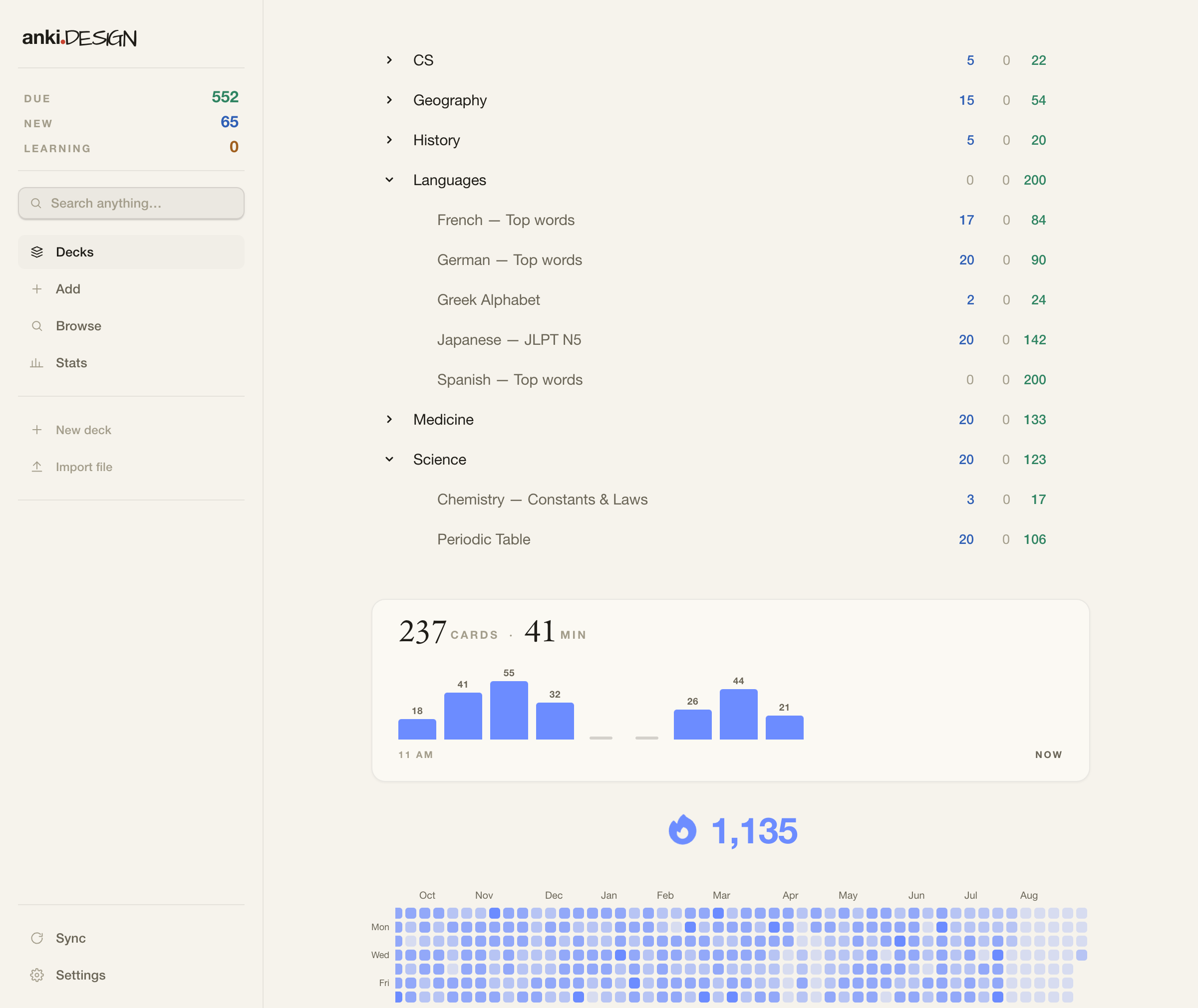
Deck list
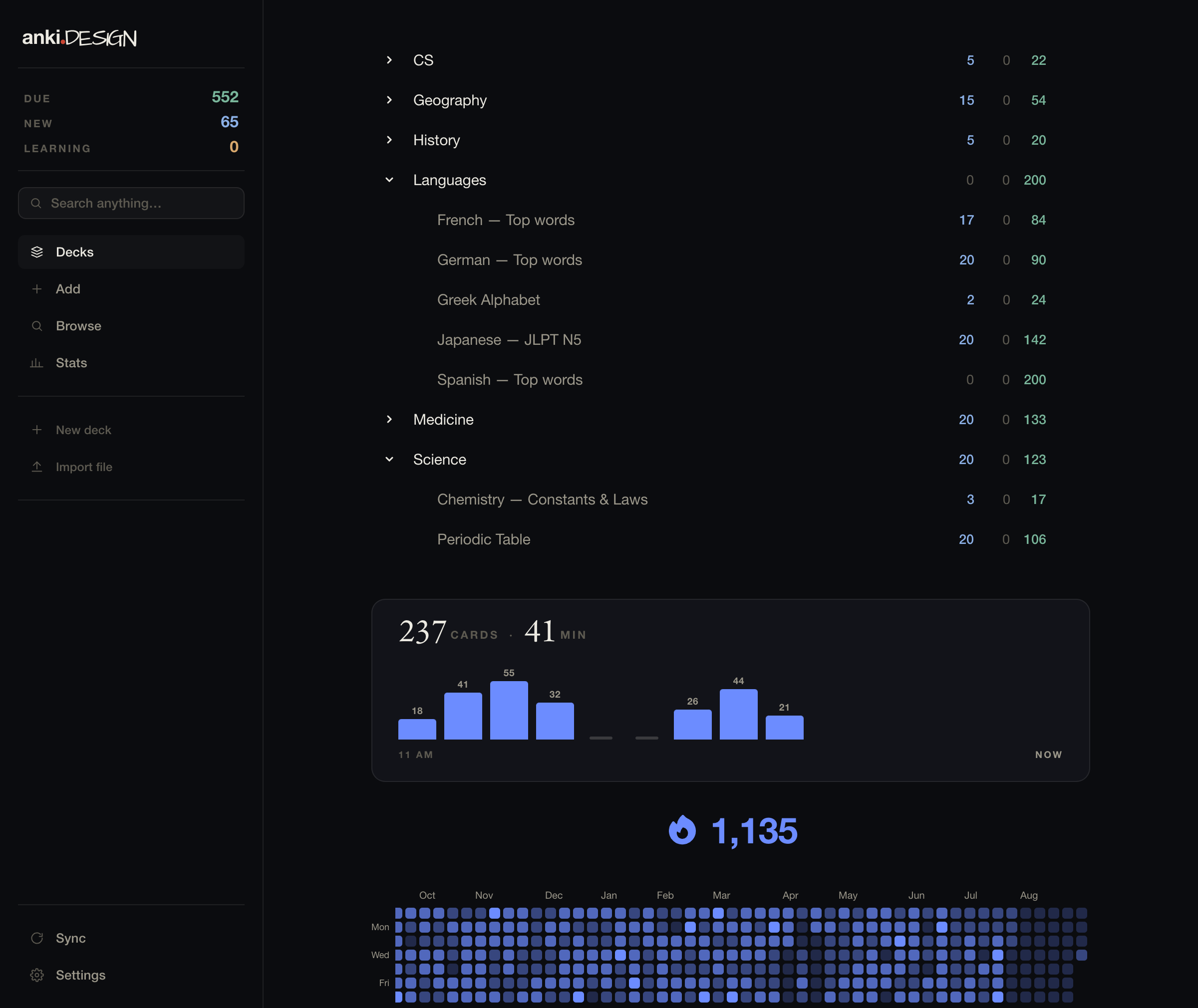
A plain list of your decks with collapsible sub-decks. They open the way you left them, using the same collapse state Anki syncs. Below the list you see what you studied today (cards, minutes and a chart per hour), your streak, and a review heatmap.

Moving decks
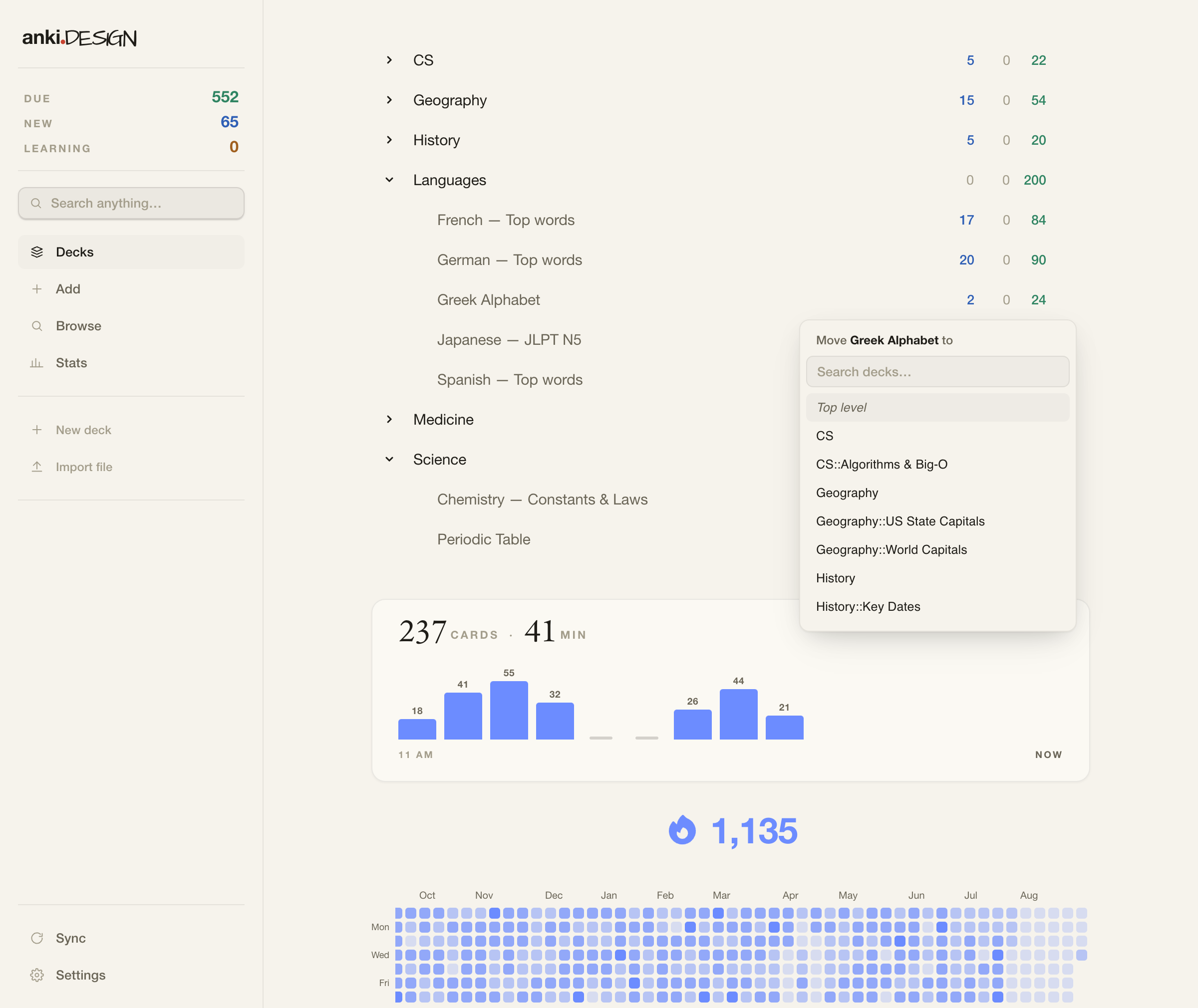
Drag a deck onto another deck to nest it. Drop it on the top-level zone to un-nest it. Or open the deck's gear menu and pick "Move to…" to choose from a list.
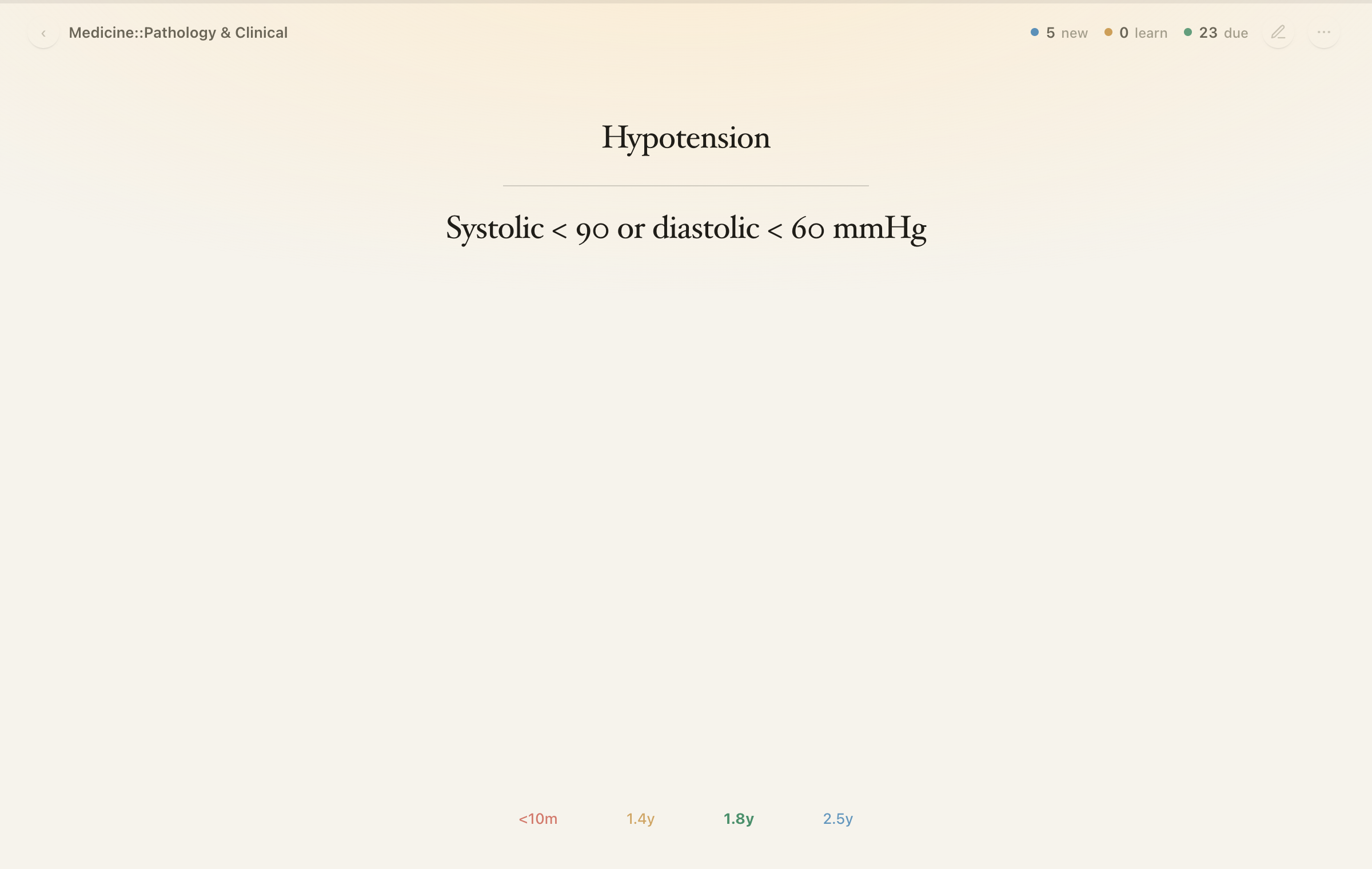
Reviewer
A focused reading column. The deck name and the queue counts sit in a small header. Under the answer you see the next interval for each button. Click the card to show the answer. A thin progress bar runs along the top. Press E to edit the card in place.
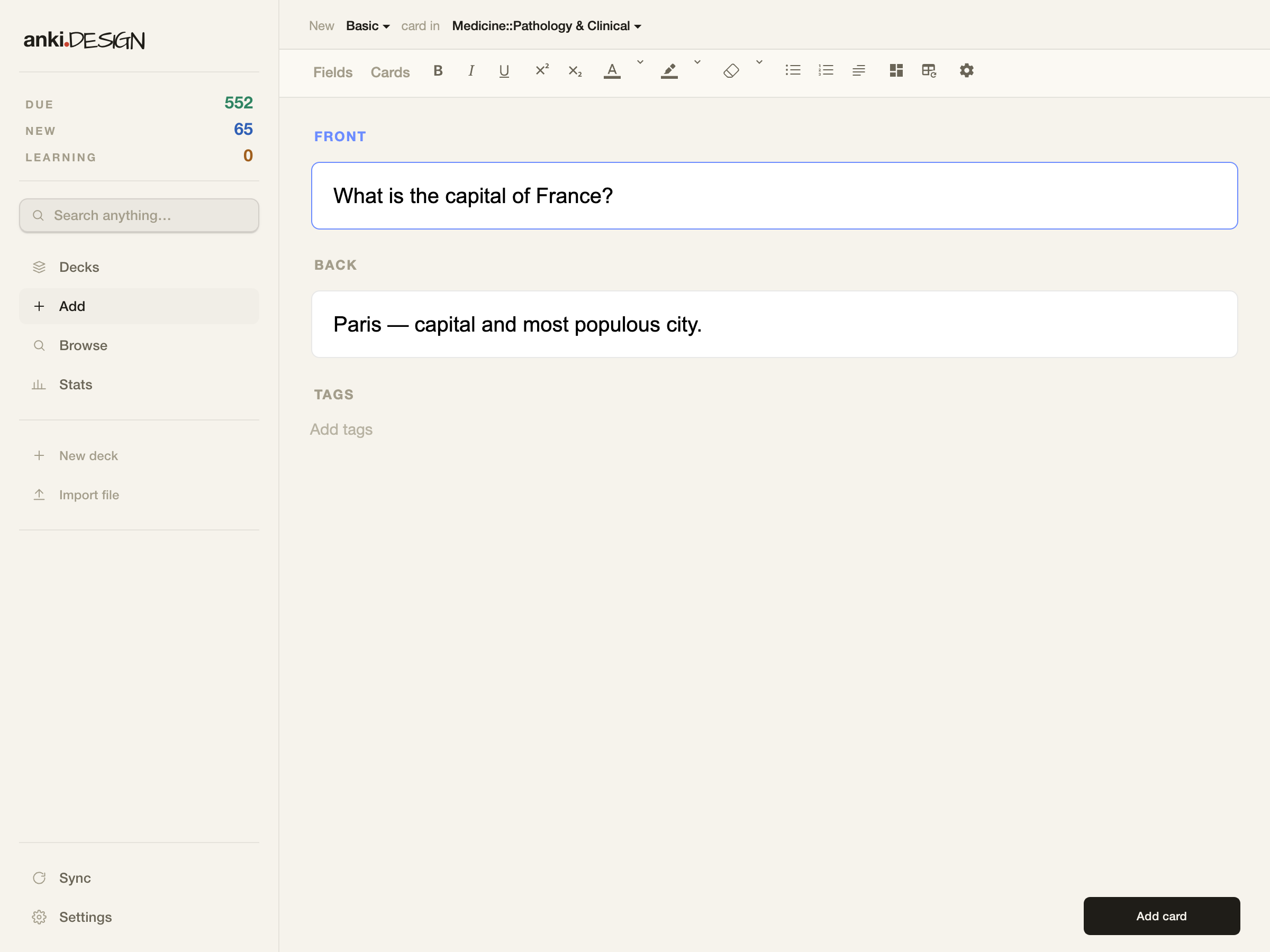
Sidebar
Decks, Add, Browse, Stats, sync and settings on the left. Cmd+K (Ctrl+K on Windows and Linux) opens a search box that finds decks, cards, tags and actions. Add, Browse, Stats and Preferences open inside the main window.
Settings
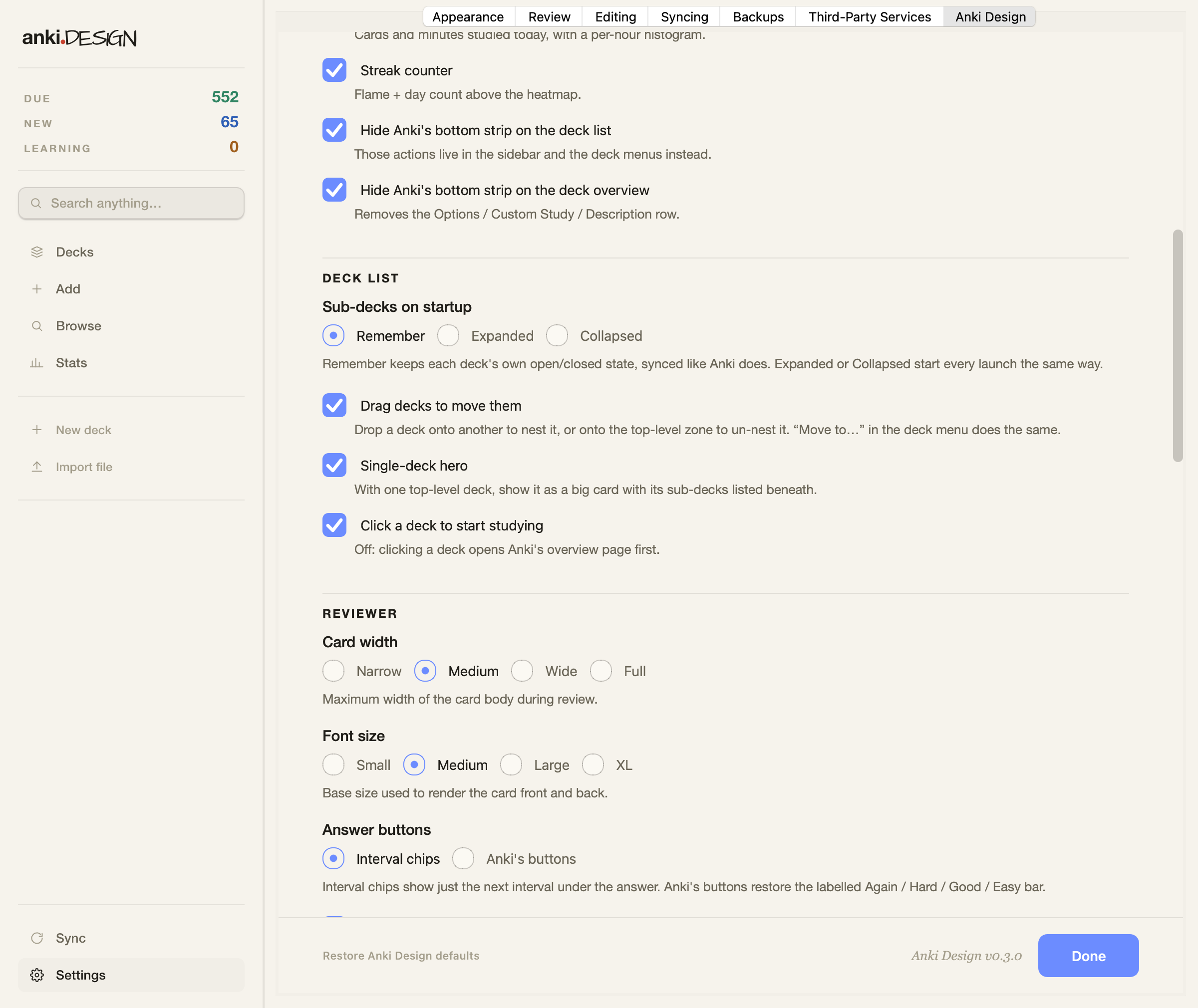
Open Tools > Anki Design Settings. You can pick the theme (system, light or dark), the accent colour, the page background (paper, white, black or any colour), the density and the fonts. Sub-decks on startup can be remembered, expanded or collapsed. In the reviewer you can keep your own note type styling and switch back to Anki's answer buttons. The sidebar, the search box, the inline windows, the today panel, the heatmap and the rest of the changes each have their own switch.
Requirements
Anki 25.09 or newer. Older versions will refuse to install it. It replaces Onigiri, Review Heatmap and the Progress Bar add-on, so disable those first. No network access, nothing bundled.

Links
Website: anki.design
Source and issues: github.com/NoahLloyd/anki-design
Changelog: CHANGELOG.md

New in 0.3.1
Anki's keyboard shortcuts work inside Browse again (Ctrl+J, Ctrl+D, Ctrl+Shift+G, the flag keys and the rest). Esc goes back to the deck list from the reviewer, and closes Browse, Stats or Preferences. Ctrl+, opens the settings and Ctrl+Shift+P opens the search box, both of which had stopped working.

New in 0.3.0
Sub-decks keep their collapsed state. Drag and drop, or "Move to…", for moving decks. Sub-decks are listed under the single-deck view. Background colour options. Keep your own card styling. Anki's classic answer buttons. A switch for every feature.

Free and open source (MIT).

README

Anki Design

A from-scratch Anki UI redesign add-on. One cohesive thing you control, replacing Onigiri + a separate progress bar + a separate heatmap.

Home: https://anki.design Β· AnkiWeb: https://ankiweb.net/shared/info/1809063985

Requires Anki 25.09 or newer (min_point_version: 250900). Older versions refuse to install it rather than half-working.

How it works

Anki renders the deck list, overview, and reviewer as Chromium web views. Anki Design injects web/theme.css into them via the webview_will_set_content hook, sets --rf-accent from config in <head>, renders the heatmap server-side in __init__.py (from the revlog table) and appends it to the deck browser, and drives a small reviewer progress-bar widget from Python.

No network calls, no bundled binaries β€” keeps AnkiWeb review trivial.

Internal CSS/JS identifiers use the rf- prefix and __reforgeProgress bridge. That's a stable internal namespace, deliberately not renamed with the product, so a rebrand never risks breaking style/JS wiring.

Layout

Path Purpose
__init__.py hooks, masthead + heatmap generation, progress, config
web/theme.css the deck-homepage "study ledger" redesign
web/heatmap.css / .js heatmap styling; scroll-to-newest + tooltip
web/toolbar.css top toolbar redesign (flat full-width header)
web/reviewer.css / .js progress bar
config.json / config.md user-facing settings + their help text (every feature has a switch)
colors.py hex helpers shared by the web injection and the Qt palettes
manifest.json name, version, conflicts with rival add-ons
build.py / Makefile produce dist/anki-design.ankiaddon
web/logo.css / web/fonts/ the "anki.DESIGN" wordmark lockup

Settings

Everything opinionated can be switched off from Tools β†’ Anki Design Settings… (or the sidebar's Settings row); defaults are the current behaviour. Highlights:

  • Deck list β€” sub-decks on startup (Remember / Expanded / Collapsed; Remember uses Anki's own synced collapse flag), drag-to-move, the single-deck hero, click-to-study vs. Anki's overview page.
  • Reviewer β€” card width / font size, Style card content (off keeps your note type's CSS untouched), interval chips vs. Anki's answer buttons, click-to-reveal, press feedback, in-place editing, progress bar.
  • Windows β€” command palette, inline Add / Browse / Stats / Preferences, the redesigned Add window, the finished-deck page, quiet sync.
  • Appearance β€” theme, accent, background (Paper / White / custom and Ink / Black / custom), density, fonts.

Moving decks: drag a row onto another deck to nest it, drop it on the top-level zone to un-nest it, or use Move to… in the deck's gear menu. See config.md for the raw keys.

Dev loop

Each git worktree gets a fully isolated Anki: its own base directory, its own addons21/ (so no add-on conflicts), and a unique single-instance key β€” so multiple worktrees' Ankis run simultaneously.

Per worktree, once:

make dev        # symlink this worktree into its isolated base + hot-reload
make run        # launch THIS worktree's Anki (runs alongside the others)

Then:

  1. Edit web/*.css, web/*.js, or the heatmap HTML.
  2. It reloads live β€” no Anki restart. CSS updates in place with no flicker; the visible screen re-renders for JS / heatmap changes.
  3. Editing __init__.py (Python logic / hooks) still needs a restart of that instance β€” Anki imports add-on Python once at startup.

Real data (optional):

make seed       # copy your real collection into this worktree's base

make run on a fresh base starts with an empty collection (fine for theme/CSS work; the heatmap is empty). make seed rsyncs your real Anki2/ collection in (media + add-ons excluded, so it stays light). Do not sync a seeded instance β€” it shares your AnkiWeb account and syncing a copied collection can push unwanted merges upstream.

Showcase data (no real collection involved):

make demo                       # launch the default (full) variant
make demo VARIANT=single        # or VARIANT=three / VARIANT=full
make demo-rebuild VARIANT=full  # rebuild a variant's cache (slow, one-time)
make demo-stop                  # quit the current variant's demo Anki

make demo runs against a separate anki-design-demo-<variant> base under Anki2-dev/. Three variants are defined in scripts/seed_demo.py:

  • single β€” one Spanish deck (~450 cards, ~200 due today).
  • three β€” Spanish + Japanese N5 + Med pathology (~420 cards, ~190 due).
  • full β€” all 17 decks (~1100 cards, ~440 due). Default.

Each variant has a golden cache at ~/Library/Caches/anki-design-demo/<variant>/ that's shared across worktrees β€” seed once anywhere, launch instantly everywhere. make demo restores from cache in ~1s; if no cache exists yet it falls through to demo-rebuild automatically. Re-run demo-rebuild only after you change scripts/seed_demo.py and want the cache regenerated.

Cleanup:

  • make demo-clean β€” drop a variant's live base (keeps the cache).
  • make demo-clean-cache β€” drop a variant's cache.
  • make demo-clean-all β€” nuke every variant's cache + base.

Your real Anki2/ collection is never opened by any of these β€” the seeder refuses any target inside your real base.

How parallelism works:

  • make run launches Anki's bundled venv binary directly with -b <isolated base> and a per-worktree USER env. Anki keys its single-instance lock on the username, so a unique USER lets instances coexist; open -a Anki would only refocus the running one.
  • Bases live in ~/Library/Application Support/Anki2-dev/<NAME> and persist between runs (profile/settings stick).

Other targets:

  • make undev β€” remove this worktree's symlink + .devmode (keeps the base).
  • make clean-base β€” delete this worktree's isolated base entirely.
  • A watcher thread (web/ mtimes, ~0.5s poll, stdlib only) runs only when .devmode is present; make build / .gitignore exclude .devmode, so shipped installs never start it.
  • make dev NAME=foo / make run ANKI=/path/to/.venv/bin/anki override the addon name / Anki binary.

Building for AnkiWeb

make build      # -> dist/anki-design.ankiaddon

The .ankiaddon is a zip with files at the root; __pycache__, meta.json, .git, and dev tooling are excluded automatically.

Submitting to AnkiWeb

  1. Log in to https://ankiweb.net with your sync account.
  2. Go to the shared add-ons area and choose to upload a new add-on.
  3. Fill in title, tags, description, and a support page URL (the GitHub repo / issues link is fine).
  4. Upload dist/anki-design.ankiaddon.
  5. The first upload creates the listing and assigns a numeric ID β€” that becomes the install code and the installed folder name. Anki Design already resolves its own folder at runtime, so this is safe.
  6. Later releases: bump human_version in manifest.json, update CHANGELOG.md, make build, re-upload to the same listing.

Before the first submission

  • Confirm the minimum Anki version you want to support and add min_point_version to manifest.json. Find the current number from Anki's debug console: from anki.utils import point_version; point_version().
  • Sanity-check on at least one older supported Anki version.

License

MIT β€” see LICENSE.

Roadmap

  • Theme the remaining Qt chrome (menus, native dialogs) via Qt stylesheets.
  • Interactive heatmap (click a day to see that day's reviews).
  • Support for Anki versions before 25.09.