AnkiGit

AnkiWeb addon 1384407975

Exports each Anki note as a Markdown file in a local Git repository, enabling snapshots, selective import, diff previews, conflict resolution, and automatic syncing.
AI-generated summary; may contain mistakes.

importexportsync-integrationbackup-maintenance

Open on AnkiWeb GitHub Find alternatives

AnkiWeb

Votes
1 (๐Ÿ‘ 1 ยท ๐Ÿ‘Ž 0)
Updated
2026-05-28
Anki versions
25.09.2~
License
AGPL-3.0 (from the GitHub repository)
Virus scan
No ClamAV match A match does not prove malware. No match does not prove that the code is safe.
Languages
Python, JSON
Description language
en

Maintenance

active

  • Last update or commit: 2026-10-17 (15 days before the snapshot).
  • Test files: 15.
  • GitHub Actions workflows: 1.
  • Commits in the last year: 82.
  • Issues are turned off.
  • Pull requests: 0 open, 1 merged.
  • Median first response: 1 hour (1 answered issues and pull requests).
  • Outside pull requests: 100% of 1 merged.

Will it work on my Anki?

Version branches
Min AnkiMax AnkiUpdated
25.09.2+2026-05-28
History across monthly snapshots

Loadingโ€ฆ

Similar addons

Anki Markdown Notes

Imports and exports Markdown notes as Anki cards, converting Q/A entries into basic or reversed cards and mapping folders to decks.

card-creationimportexport

1 votes 0% approval ๐Ÿ‘ 0 ยท ๐Ÿ‘Ž 1 โญ 38 Anki 2.1.41~ Updated 2021-03-14
๐•พ Export Deck Guide as Text (for LLMs)

Exports non-empty deck descriptions, with full deck paths and Markdown/HTML format markers, to the clipboard or a UTF-8 file for inspection and LLM context.

export

2 votes 34% approval ๐Ÿ‘ 2 ยท ๐Ÿ‘Ž 0 โญ 3 Anki 26.09~ Updated 2026-08-28

Description

AnkiGit provides Git-based version control for your Anki collections. Export your collection to a human-readable Git repo, track every change, collaborate on decks, and roll back to any point in history.

How It Works

AnkiGit exports every note as a standalone Markdown file inside a local Git repository. Snapshots happen on demand or automatically on close โ€” each commit records the full state of your collection in human-readable form.

Features

  • Export โ€” snapshot your collection to a Git repo (one Markdown file per note)
  • Incremental export โ€” only re-export changed notes since the last snapshot
  • Import โ€” apply changes from your Git repo back into Anki
  • Selective import โ€” pick individual notes and notetypes via checkboxes
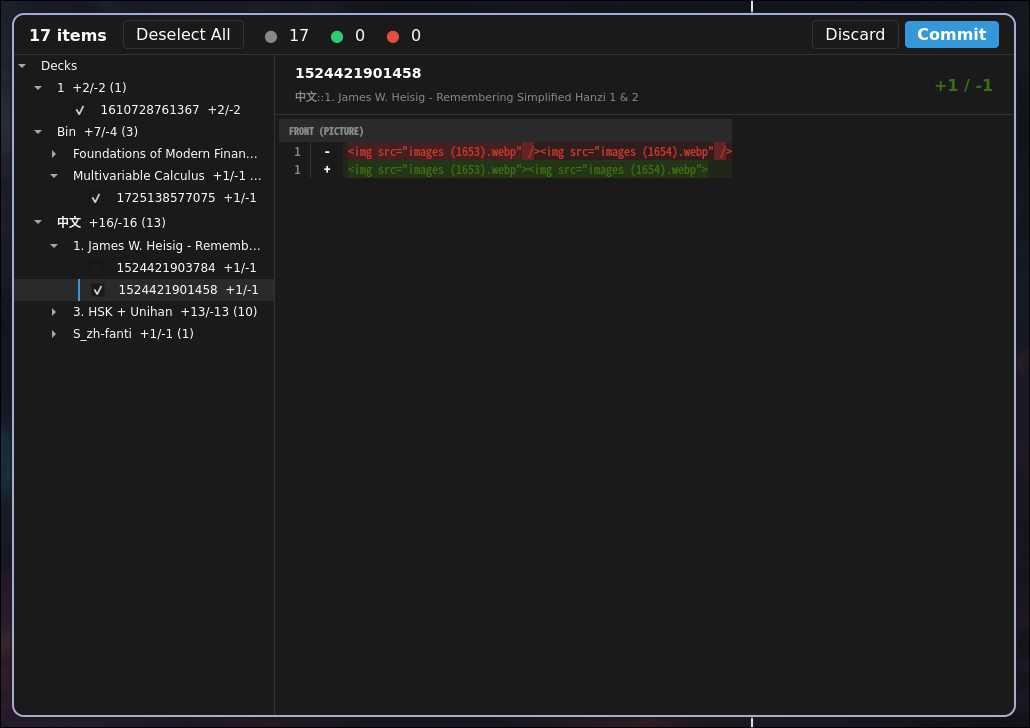
  • Diff preview โ€” git-style diff viewer before export/import
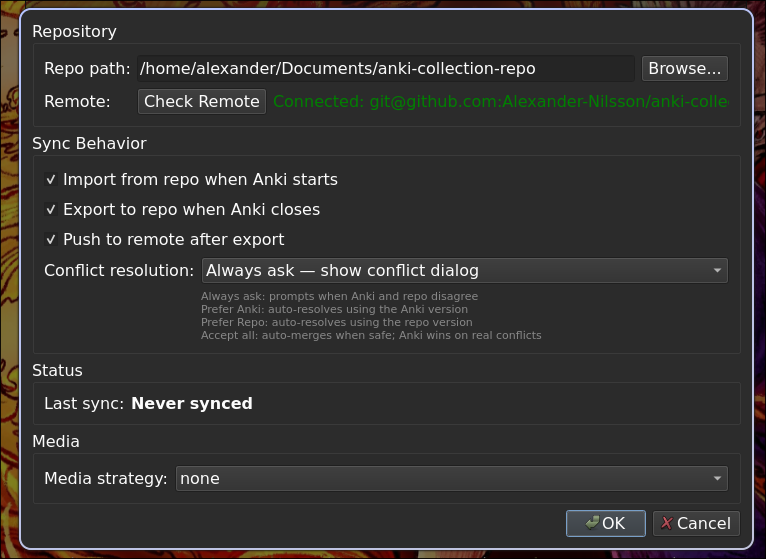
  • Conflict resolution โ€” three-way merge detection with a Qt dialog and auto-resolve modes
  • Notetype tracking โ€” clean YAML export with CSS separated into its own file
  • Auto-import on startup โ€” automatically check for repo changes when Anki opens
  • Auto-snapshot on close โ€” snapshot changes when Anki closes
  • Remote push โ€” auto-push to GitHub/GitLab after snapshot

Example Note Format

Each note becomes decks/<DeckName>/<nid>.md:

# Note
guid: dc6H$t-~MK
notetype: iKnow! Sentences
### Tags
languages
japanese
jp-sentences
jp-transportation
## Expression
้ง…ใ‹ใ‚‰ใฏใ‚ฟใ‚ฏใ‚ทใƒผใซ<b>ไน—ใฃใฆ</b>ใใ ใ•ใ„ใ€‚
## Meaning
Please take a taxi from the station.
ไน—ใ‚‹ -- ride, take
## Reading
ใˆใ ใ‹ใ‚‰ใฏ ใŸใใ—ใƒผ ใซ <b>ใฎใฃใฆ</b> ใใ ใ•ใ„
## Audio
[sound:e3c984736d8b1c2bdc467f2a1c98659a.mp3]
## Image_URI
<img src="e2d8a60b59f2be8ebcbffafa165c7a0d.jpg">
## iKnowID
sentence:247153
## iKnowType
sentence

Quick Install

Anki Code: 1384407975

Source Code | AGPL-3.0

README

AnkiGit โ€” Git Version Control for Anki

AnkiGit is an Anki addon that provides Git-based version control for your Anki collections. Export your collection to a human-readable Git repo, track every change, collaborate on decks, and roll back to any point in history.

Quick Install

Install directly from AnkiWeb:

Anki Code: 1384407975

Or browse at https://ankiweb.net/shared/info/1384407975

From source (development)

git clone <repo-url>
ln -s "$(pwd)/anki_git" ~/.local/share/Anki2/addons21/anki_git

How It Works

AnkiGit exports every note in your collection as a standalone Markdown file inside a Git repository. Snapshots happen on demand or automatically on close โ€” each commit records the full state of your collection in human-readable form.

Example Note Format

Each note becomes decks/<DeckName>/<nid>.md:

# Note
guid: dc6H$t-~MK
notetype: iKnow! Sentences

### Tags
languages
japanese
jp-sentences
jp-transportation

## Expression
้ง…ใ‹ใ‚‰ใฏใ‚ฟใ‚ฏใ‚ทใƒผใซ<b>ไน—ใฃใฆ</b>ใใ ใ•ใ„ใ€‚

## Meaning
Please take a taxi from the station.
ไน—ใ‚‹ -- ride, take

## Reading
ใˆใ ใ‹ใ‚‰ใฏ ใŸใใ—ใƒผ ใซ <b>ใฎใฃใฆ</b> ใใ ใ•ใ„

## Audio
[sound:e3c984736d8b1c2bdc467f2a1c98659a.mp3]

## Image_URI
<img src="e2d8a60b59f2be8ebcbffafa165c7a0d.jpg">

## iKnowID
sentence:247153

## iKnowType
sentence

Notetypes are stored as YAML under notetypes/<Name>/ with CSS separated into style.css.

Screenshots

Diff Preview Settings
Diff UI Config UI

Features

  • Export โ€” snapshot your collection to a Git repo (one Markdown file per note)
  • Incremental export โ€” only re-export changed notes since the last snapshot
  • Import โ€” apply changes from your Git repo back into Anki
  • Selective import โ€” pick individual notes and notetypes to import via checkboxes
  • Diff preview โ€” git-style diff viewer before export/import
  • Conflict resolution โ€” three-way merge detection with a Qt dialog and auto-resolve modes
  • Notetype tracking โ€” clean YAML export with CSS separated into its own file
  • Auto-import on startup โ€” automatically check for repo changes when Anki opens
  • Auto-snapshot on close โ€” snapshot changes when Anki closes
  • Remote push โ€” auto-push to GitHub/GitLab after snapshot
  • Progress feedback โ€” animated progress bar with step-by-step status during operations

Development

uv sync                           # create venv + install deps
uv run pytest tests/ -m "not integration"   # engine-layer tests only
uv run pytest tests/              # all tests (needs anki/aqt)
uv run ruff check anki_git/ tests/           # lint
uvx ty check .          # type check
python3 build.py all              # creates .ankiaddon in build/

The build bundles GitPython (and its dependencies) into the add-on's vendor/ folder, so the add-on must be installed from the built .ankiaddon; a plain copy of anki_git/ will not have its dependencies. vendor/ is gitignored.

Architecture

See docs/architecture.md for the full architecture overview, module dependency graph, core flow diagrams, and sequence diagrams.

License

AGPL-3.0-only