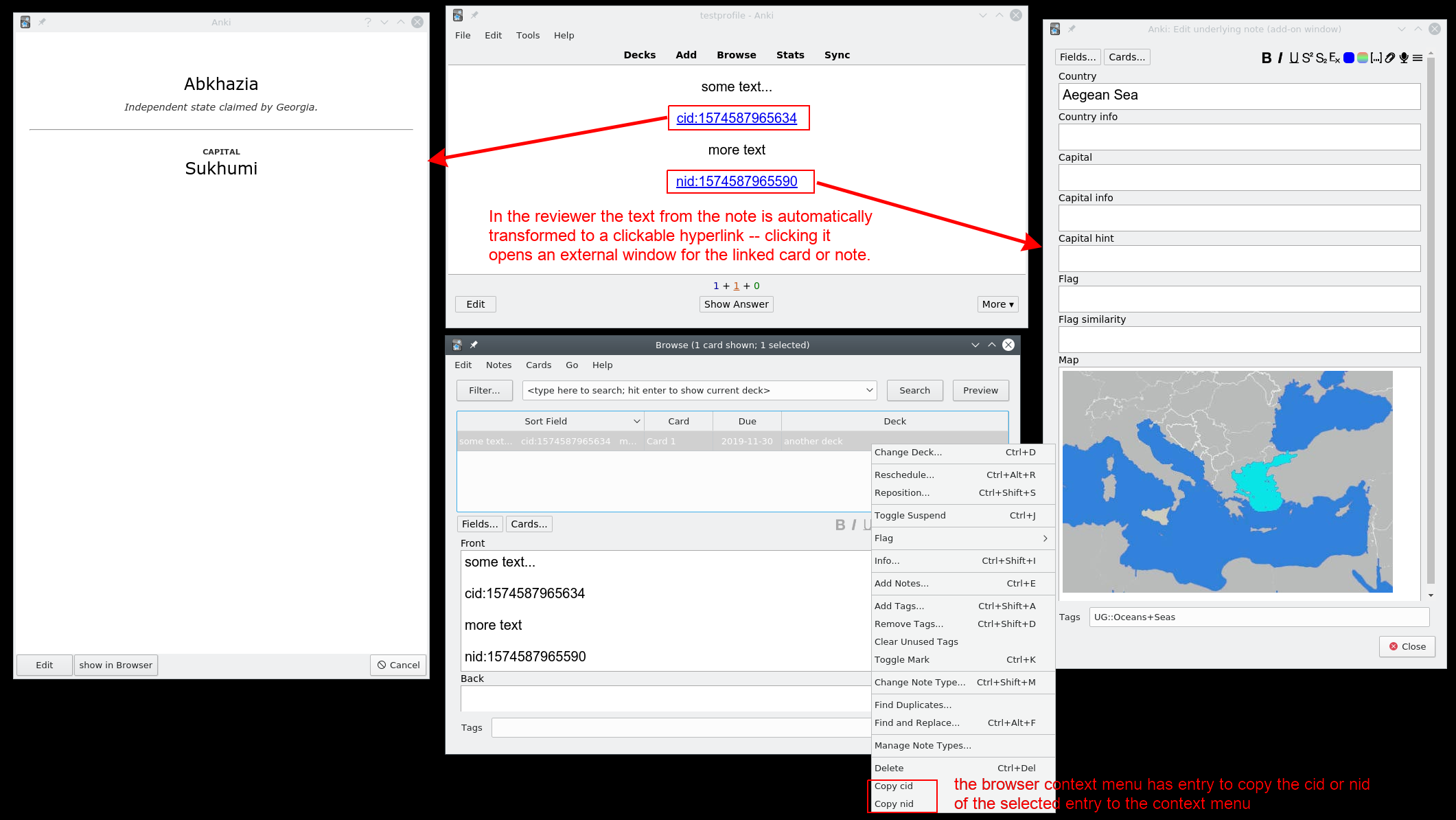
This add-on allows you to quickly open other cards or notes in a new window:
When you add cidd1234567890123 (card id) or nidd1234567890123 (note id) to a card or template this add-ons transforms the text in the reviewer/previewer to a clickable hyperlink to open them in a new window.
When you select cidd1234567890123, nidd1234567890123, etc. you have also entries in the context menu to open the new window, for details see here.
This add-on also adds an entry to the browser table context menu to copy the card id (cid) or note id (nid).
You can adjust the config of this add-on. It's only tested with the nidd/cidd prefixes.
Use this at your own risk.
For details about cids/nids see e.g. the end of this section from the manual.

Alternatives/Similar add-ons
Since 2021 there's hjp-linkmaster: 🧷 思维导图. mind graph. roaming reviewer, bilinker. This add-on was inspired by my add-on but contains much more functionality. I haven't really used it for multiple reasons: My add-on fits my needs better, it's simpler so that it's simpler to use and it should be easier to adjust to newer Anki versions (in 2023-02-25 cloc counts of python lines: ~1800 for my add-on and ~32000 for hjp-link).
Since 2024-02 there's Anki Note Linker which offers some additinal features. I haven't used it.
There's the similar add-on Links between notes, cards, to open browser and previewer by the great add-on creator Arthur Milchior. Our add-ons are slightly different, e.g. Arthur's add-on allows to store search terms in such hyperlinks. On the other hand in Arthur's add-on these links disappear in older Anki versions in Microsoft Windows when you copy and paste from one field to another, see here. In 2023-02 there haven't been updates in over two years and it seems to be partially broken since mid 2021.
In 2017 glutanimate had an add-on named internal references for the old Anki 2.0. He never updated it to Anki 2.1. Only about four years later someone else loaded up a version at https://ankiweb.net/shared/info/323026909 which in 2023 seems to have some problems based on the one negative review. This add-on stored the links between notes as hyperlinks that are not readable for the average user. So if you used this add-on for 2.0 you were in a bad situation: You'd either have to pay someone to update it to 2.1 or lose your links. With my ugly solution where you see the nids/cids you can - once I've stopped updating this add-on etc. - always just copy and paste them into a browser. So there's less lock-in effect in my view.
Maybe Modified reviewer context menu search with browser search, maybe with Browser Maximize/Hide Table/Editor. For details see here.
The add-on Pop-up Dictionary might also be relevant.
Compatibility, Limitations
mobile, ankimobile, ankidroid, ankiweb
Add-ons only work on Windows, Mac, Linux.
So on mobile you need a different solution. I use an Android phone and Ankidroid. In 2019 I added some javascript to my back template that attaches all linked cards/notes at the bottom of my note on mobile, see here. In 2021 I no longer use this workaround for mobile so I don't know if it still works.
The review view (webview) can't access your database. It can only read media from your collection.media folder. This add-on adds an option to the main menu to export all linked cards/notes to the media folder so that my js function can read them from there.
This solution for Ankidroid uses iframes and won't work on ankiweb and probably doesn't work on ankimobile. You would have to adjust the solution your back template for these platforms and who knows how well this will work in the long run ...
config key: "transform quoted for these notetypes"
You can add note type (model) names or ids into this list. My add-on transforms entries like nidd1234567890123 into clickable hyperlinks in the reviewer and previewer. If in your card template you have a field in some javascript code using backticks like "var myfield = {{fieldname}}" this transformation from a simple string like nidd1234567890123 to a clickable hyperlink only works if you add your note type to this config key. Limitation: For these note types the transformation in fields that are not surrounded by backticks in your card template no longer works.
Versions
- 2025-07-06 fix for Anki 25.02+ (clicking in editor)
- 2023-10-28 preliminary fix for 23.10
- 2023-03-20 .55+ only: backlinks: main window, tools - add backlinks to all notes; context menu entries for editor, reviewer, previewer if the backlinks field is not empty; shortcut to open first link
- 2022-10-14 fix bug in context menu for editor, add config key "transform quoted for these notetypes" (based on an idea by git9527) (21.45+ only)
- 2022-10-08 fix crash that only occurs with Anki 2.1.50 or newer and only on MacOS when closing custom note dialog; add option to open linked notes with the built-in browser, rename a config setting to make its meaning more clear.
- 2022-08-16 try to prevent some browser error messages, also show copy nid option in context menu in browser for Anki 2.1.45+ (2.1.45+ only)
- 2022-07-13 option to copy nidd/cidd from context menu in reviewer and previewer (.45+ only)
- 2021-12-08 fix for anki 2.1.50/qt6
- 2020-12-13 fix export for newer versions 2
- 2020-12-12 fix export for windows
- 2020-12-11 fix export for newer versions
- 2020-10-16/17 remove editor context menu entries to copy nid/cid from some windows where they would lead to errors.
- 2020-07-29 fix for 2.1.29
- 2020-07-07 don't open another preview twice from the previewer
- 2020-06-15 in the config you can set browser shortcuts to copy the nid/cid, off by default
- 2020-05-27 fix for advanced browser add-on
- 2020-05-26 option to copy nid/cid from all editor, add config.schema.json
- 2020-05-24 double click to open from editor
- 2020-05-20 update for 2.1.24+
- 2020-03-03
- 2019-12-03
- 2019-11-30 initial release
Bugs, Feedback, etc.
Please do not use reviews for bug reports or support requests. I don't get notified of your reviews, and properly troubleshooting an issue through them is nearly impossible (formatting is limited and I can't reply multiple times). If you find a bug let me know in the official anki support forum, on github. Maybe I'll have an idea ...