Update 20240411:
1: Support delay some time to auto scrolling pages for question card and answer card.You can change these times in the config file
2: Modify the field of page number from only page-begin number to page-begin and page-end two numbers, just like string "1---9" means auto scroll will scroll from page 1 to page 9.(need change scroll-mode to scrollVertical in the config)
3: Modify the note template's anwer side: {{Front}} change to {{FrontSide}} for answer side also invoke pdfviwer's setpage api.
Update 20240405:
1: Use https://ankiweb.net/shared/info/1837105369 Converter Of Book To Hierarchical Anki Deck https://ankiweb.net/shared/info/1837105369 https://github.com/DenisRyazantsev/cobthad
https://github.com/DenisRyazantsev/cobthad
Denis Ryazantsev's idea and codes to import pdf with heading as subdecks and add notes to every subdeck.
the image like this: https://raw.githubusercontent.com/DenisRyazantsev/cobthad/main/resources/hierarchical-deck-example.png
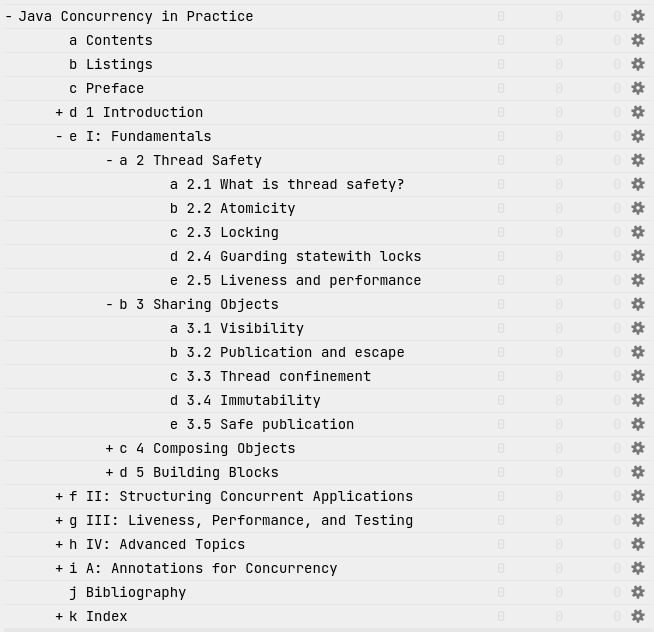
2: Pdf import mode add a subdeck mode: it can split a book into several sub decks.
3: Support delaying some time to autoscrolling mode for after you see upper part of the page.
4: Support config pdfviwer's scrollMode to scrollPage for fix autoscroll only in one page.
the config.json like this:
{
"#scale_type_values#":"auto page-actual page-fit page-width 0.5 0.75 1 1.25 1.5 1.75 2 3 4",
"scale_type":"page-width",
"scroll_enable":1,
"scroll_delay":10,
"scroll_ivl":30,
"scroll_step":1,
"#scroll_mode_values#":"scrollPage scrollVertical scrollHorizontal scrollWrapped",
"scroll_mode":"scrollPage"
}
Update 20231223:
1: Using Docking Windows to show PDF file and also can view with a standalone window.
2: Using the latest version of pdf.js module.
3: Using config.json to config tow new feature of the pdf views:
a: Support config the pdf viewer's scale type.
b: Support config the pdf viewer into auto scrolling mode. you can config the speed of scrolling.
the config.json like this:
{
"#scale_type_values#":"auto page-actual page-fit page-width 0.5 0.75 1 1.25 1.5 1.75 2 3 4",
"scale_type":"page-width",
"scroll_enable":0,
"scroll_ivl":30,
"scroll_step":1
}
4: Support new type version of years.
Update 20210914:
1: Fix the bug for create self-defined models, this bug causes the add-on can't supprt 2.1.4x and it now should can use.
Import a pdf file as a new deck with page number cards. You can view the pdf's page through the new pdf webwiew windows also can note some words one the card through "Edit Field During Review" this add-on; I think this could help us to learn a pdf book by another way.
thans for these addons:
https://ankiweb.net/shared/info/319501851 "pdf viewer"
https://ankiweb.net/shared/info/1531997860 "Media Import"
https://ankiweb.net/shared/info/1020366288 "Edit Field During Review"