Review Timer - Countdown timer with auto-answer

AnkiWeb addon 1473497346

Displays a configurable, color-coded countdown timer during reviews that can be paused or resumed by clicking and optionally auto-reveals the answer when time expires.
AI-generated summary; may contain mistakes.

review-flowtimer

Open on AnkiWeb GitHub Find alternatives

AnkiWeb

Votes
5 (๐Ÿ‘ 5 ยท ๐Ÿ‘Ž 0)
Updated
2026-02-03
Anki versions
2.1.5~
License
MIT (from the GitHub repository)
Virus scan
No ClamAV match A match does not prove malware. No match does not prove that the code is safe.
Languages
Python, JSON, Ignore List
Description language
en

Maintenance

stale

  • Last update or commit: 2026-02-03 (271 days before the snapshot).
  • Commits in the last year: 2.
  • Issues: 0 open, 0 closed.
  • Pull requests: 0 open, 0 merged.

Will it work on my Anki?

Version branches
Min AnkiMax AnkiUpdated
2.1.12.1.5+2026-02-03
History across monthly snapshots

Loadingโ€ฆ

Similar addons

Pomodoro Bar

Times Pomodoro study sessions with fillable progress and review-counter bars, color-coded answer segments, optional rest periods, pause/resume, notices, and configurable goals, colors, and screen controls.

review-flowprogress-trackingtimer

1 votes 21% approval ๐Ÿ‘ 1 ยท ๐Ÿ‘Ž 0 โญ 0 Anki 2.1.1~ Updated 2026-10-06
Adaptive Speed Focus Mode

Auto-reveals each card's answer after a per-card delay computed from visible word count and difficulty, never grading, with pause and calibration options.

fsrsreview-flowtimerfork-or-reupload

4 votes 51% approval ๐Ÿ‘ 4 ยท ๐Ÿ‘Ž 0 โญ 1 Anki 2.1.1~ Updated 2026-10-15
Anki FlowState

Adds countdown pressure bars with color warnings, shake and miss overlays, auto-flips cards on timeout, supports deck-specific limits, blur-to-reveal focus, and multilingual settings.

review-flowtimerdeck-managementappearance

7 votes 65% approval ๐Ÿ‘ 7 ยท ๐Ÿ‘Ž 0 Anki 2.1.66~ Updated 2026-03-11

Description

A countdown timer that helps you maintain a steady review pace.

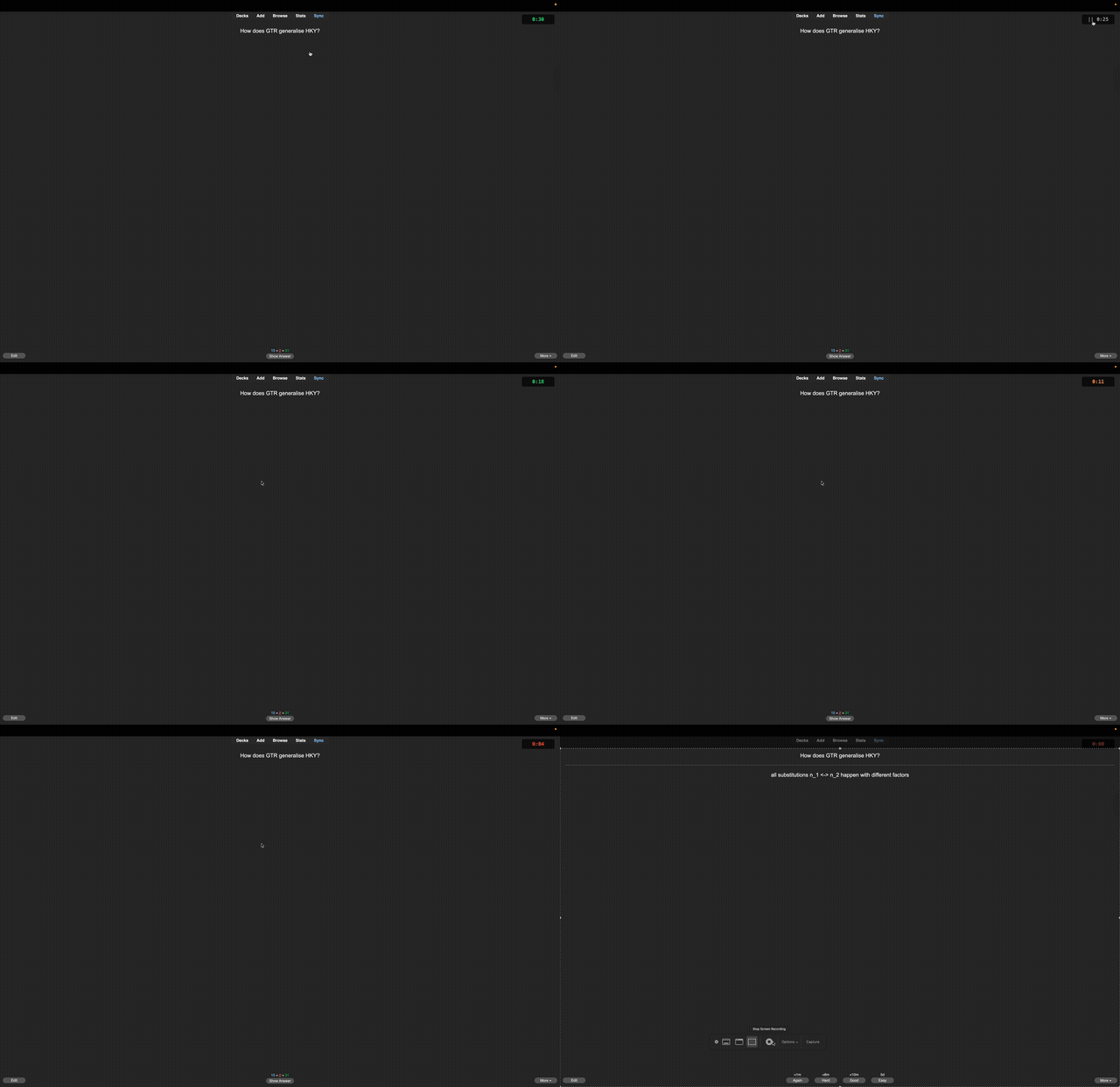
Demo

Features

  • Displays a countdown timer in the top-right corner during reviews
  • Color-coded urgency: green โ†’ yellow โ†’ red as time runs out
  • Click the timer to pause/resume
  • Optionally auto-reveals the answer when time expires
  • Fully configurable via Tools โ†’ Add-ons โ†’ Config

Configuration

| Option | Default | Description |
|--------|---------|-------------|
| timer_duration_seconds | 30 | Countdown duration in seconds |
| auto_show_answer | true | Automatically show answer when timer expires |
| show_pause_indicator | true | Display "||" when paused |

Source

GitHub

README

Anki Review Timer

A countdown timer add-on for Anki that helps you maintain a steady review pace.

Anki 2.1.50+ License: MIT

Features

  • Displays a countdown timer in the top-right corner during reviews
  • Color-coded urgency: green (plenty of time) โ†’ yellow (hurry up) โ†’ red (almost out)
  • Click the timer to pause/resume
  • Optionally auto-reveals the answer when time runs out
  • Fully configurable via Anki's add-on settings

Demo

Review Timer Demo

Installation

From AnkiWeb (Recommended)

  1. Open Anki
  2. Go to Tools โ†’ Add-ons โ†’ Get Add-ons...
  3. Enter the code: 1473497346
  4. Restart Anki

Manual Installation

  1. Download the latest release or clone this repository
  2. Copy the files to your Anki add-ons folder:
    • macOS: ~/Library/Application Support/Anki2/addons21/anki-review-timer/
    • Windows: %APPDATA%\Anki2\addons21\anki-review-timer\
    • Linux: ~/.local/share/Anki2/addons21/anki-review-timer/
  3. Restart Anki

Configuration

Go to Tools โ†’ Add-ons, select "Review Timer", and click Config.

Option Default Description
timer_duration_seconds 30 Countdown duration in seconds
auto_show_answer true Automatically show answer when timer expires
show_pause_indicator true Display "

Usage

  • The timer starts automatically when a card's question is shown
  • Click the timer to pause/resume
  • Timer stops when the answer is revealed
  • Timer resets for each new card

License

MIT License - see LICENSE for details.

Contributing

Contributions are welcome! Please feel free to submit a Pull Request.