Puppy Reinforcement

AnkiWeb addon 1722658993

2 other versions of this addon exist. Compare versions ↓

Encourages review streaks by intermittently showing cute puppies and customizable encouragement messages during card reviews, with configurable frequency, duration, position, tooltip, colors, and custom images.
AI-generated summary; may contain mistakes.

gamificationmotivation

Open on AnkiWeb GitHub Forum topic Find alternatives

AnkiWeb

Votes
142 (πŸ‘ 128 Β· πŸ‘Ž 14)
Updated
2023-11-16
Anki versions
23.10.1~
License
AGPL-3.0 (from the license file in the package)
Virus scan
No ClamAV match A match does not prove malware. No match does not prove that the code is safe.
Languages
Python, JSON
Description language
en

Maintenance

abandoned

  • Last update or commit: 2024-03-09 (967 days before the snapshot).
  • Commits in the last year: 0.
  • Issues: 12 open, 11 closed.
  • Pull requests: 5 open, 2 merged.
  • Median first response: 568 hours (20 answered issues and pull requests).
  • Outside pull requests: 67% of 3 merged.
  • Forks that may still be maintained: "Ankitty" (1319623242), "Puppy Reinforcement for Sanika" (1554117377).

Will it work on my Anki?

Version branches
Min AnkiMax AnkiUpdated
2.1.02.1.482020-03-02
2.1.4923.10.1+2023-11-16
History across monthly snapshots

Loading…

Compare versions

The original addon and its forks. The best value in each column is in bold.

VersionWorks on Anki 26.09.3MaintenanceLast activity VotesApprovalGitHub starsNotes
Puppy Reinforcement this addon original likely abandoned 9 Mar 2024 πŸ‘ 128 Β· πŸ‘Ž 14 84% 17
↳ Ankitty likely abandoned 6 Jul 2024 πŸ‘ 15 Β· πŸ‘Ž 0 80% 2
↳ Puppy Reinforcement for Sanika likely abandoned 1 Mar 2021 πŸ‘ 0 Β· πŸ‘Ž 1 0% 0

Forks can add features or work in a different way. Read the description before you change to another version. Fork detection is incomplete, so other versions can exist.

Similar addons

Ankitty fork

Displays cute kitten images intermittently during reviews as positive reinforcement for streaks, with customizable messages, images, frequency, position, and appearance, and optional kittens when adding cards.

gamificationmotivationfork-or-reupload

15 votes 80% approval πŸ‘ 15 Β· πŸ‘Ž 0 ⭐ 2 Anki 24.06.3~ Updated 2024-07-06
Batch Editing has 1 fork β†’

Adds a card browser menu item for batch-adding information or media to a field and batch-replacing field contents across selected notes.

note-management

197 votes 95% approval πŸ‘ 193 Β· πŸ‘Ž 4 ⭐ 19 Anki 23.10~ Updated 2023-10-26

Description


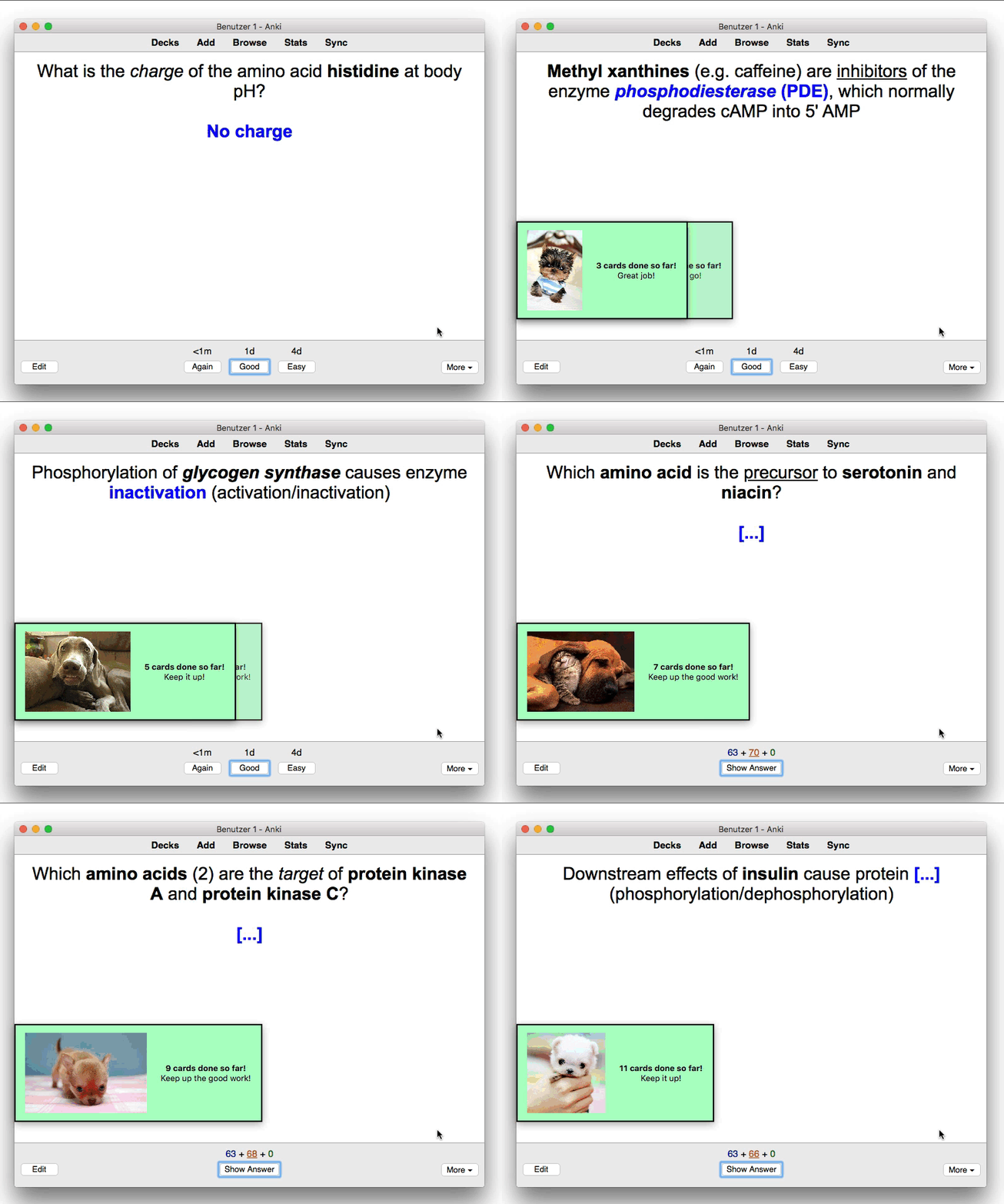
Uses intermittent reinforcement with cute puppies to encourage card review streaks.
Usage

The following video is a bit outdated, but it does go over the use and configuration of Puppy Reinforcement (including a number of other add-ons that help gamify Anki):

YouTube: Anki add-on guide: Gamify Your Reviews

Features

  • The puppies are spread intermittently through your reviews. By default they will appear around every 10 cards (some take longer than others). You can customize this by editing the add-on.
  • Customizable encouragement messages that change based on the card tally
  • You can add your own images (see below!)
  • Super customizable in all respects you can imagine (frequency, duration, tooltip size, position, color, etc.)

Changelog

Version 1.1.1 – 2023-11-16

Fixed

  • Fixed a compatibility issue with Anki 2.1.49

Version 1.1.0 – 2023-11-14

Added

  • Added support for Anki 23.10+
  • The tooltip position is now fully customizable, both horizontally and vertically (thanks to eotini23 on Patreon for the idea!)
  • Add option to disable tooltips while reviewing cards (thanks to Jamie on Patreon for the idea!)
  • Add option to reset the counter once a new day starts (thanks to p4nix on Patreon for the idea!)

Fixed

  • Suppress warning on unclosed windows

Changed

  • Rewrote notification/tooltip module from scratch, paving the way for the new features listed above, and many more to come!

You can view all past releases here.

Configuration

You can customize Puppy Reinforcement by heading to Tools β†’ Add-ons , selecting Puppy Reinforcement, and then clicking on Config. Please note that you might have to restart Anki for some of the options to apply.

Adding custom images

You can add your own images to the add-on by heading to Tools β†’ Add-ons, select "Puppy Reinforcement", and then click on "View Files". A file manager window should pop up and in the list of files and folders you should see a "user_files" folder. Please place your custom images into that folder and then restart Anki. You should now be able to see your custom images (alongside the default images) during your reviews.

If you want to completely disable the default images you can do so by heading to Tools β†’ Add-ons, select "Puppy Reinforcement", and then click on "Config". In the configuration window, find the "disable_default_images" option and set it to "true". Then restart Anki.

Please note that only files placed in the "user_files" directory will persist across add-on updates. If you modify the default "images" directory which is next to it, your changes will be overwritten the next time you update Puppy Reinforcement.

Enabling puppies for adding cards

You can enable the add-on for adding cards by heading to the add-on's configuration window (under Tools β†’ Add-ons β†’ Puppy Reinforcement β†’ Config"), and then changing "count_adding" from "false" to "true". The changes will apply after restarting Anki.

Help and Support

Please do not use reviews for bug reports or support requests. I don't get notified of your reviews, and properly troubleshooting an issue through them is nearly impossible. Instead, please either use the issue tracker (preferred), add-on support forums, or just message me at ankiglutanimate@gmail.com. Constructive feedback and suggestions are always welcome!

Credits And License

Copyright Β© 2015 mbertolacci Copyright Β© 2016-2023 Aristotelis P. (Glutanimate)

With code contributions from: zjosua

This add-on is based on Show Cute Dogs by Michael Bertolacci. All credit for the original idea goes to him!

Licensed under the GNU AGPLv3, extended by a number of additional terms. This program is distributed in the hope that it will be useful, but WITHOUT ANY WARRANTY. For more information on the license please see the LICENSE file accompanying this add-on. The source code is available on GitHub icon GitHub. Pull requests and other contributions are welcome!

More Resources

Make sure to check out my socials for the latest add-on updates and news: Twitter bird@Glutanimate | YouTube playbutton / Glutanimate Want to hire me to work on add-on for you? Get in touch at Email icon ankiglutanimate@gmail.com

Support My Work

If you like Puppy Reinforcement, please give it a thumbs up and share it with your friends, so that more people can enjoy it!

A kind request: Writing, supporting, and maintaining Anki add-ons like these takes a lot of time and effort. If Puppy Reinforcement has been a valuable asset in your studies, please consider using one of the buttons below to support my efforts by pledging your support on Patreon. Each and every contribution is greatly appreciated and will help me maintain and improve Puppy Reinforcement as time goes by!


Pro-tip: Lots of exclusive add-ons and other goodies await on my Patreon page. Make sure to check them out!

README

Puppy Reinforcement for Anki


Everything's better with puppies!

An add-on for the spaced-repetition flashcard app Anki that encourages learners with pictures of cute puppies, following the principles of intermittent positive reinforcement.

Table of Contents

Video

A quick demo of the add-on (alongside other similar add-ons related to gamification):

YouTube: Anki add-on guide: Gamify Your Reviews

Installation

AnkiWeb

The easiest way to install Puppy Reinforcement is through AnkiWeb.

Manual installation

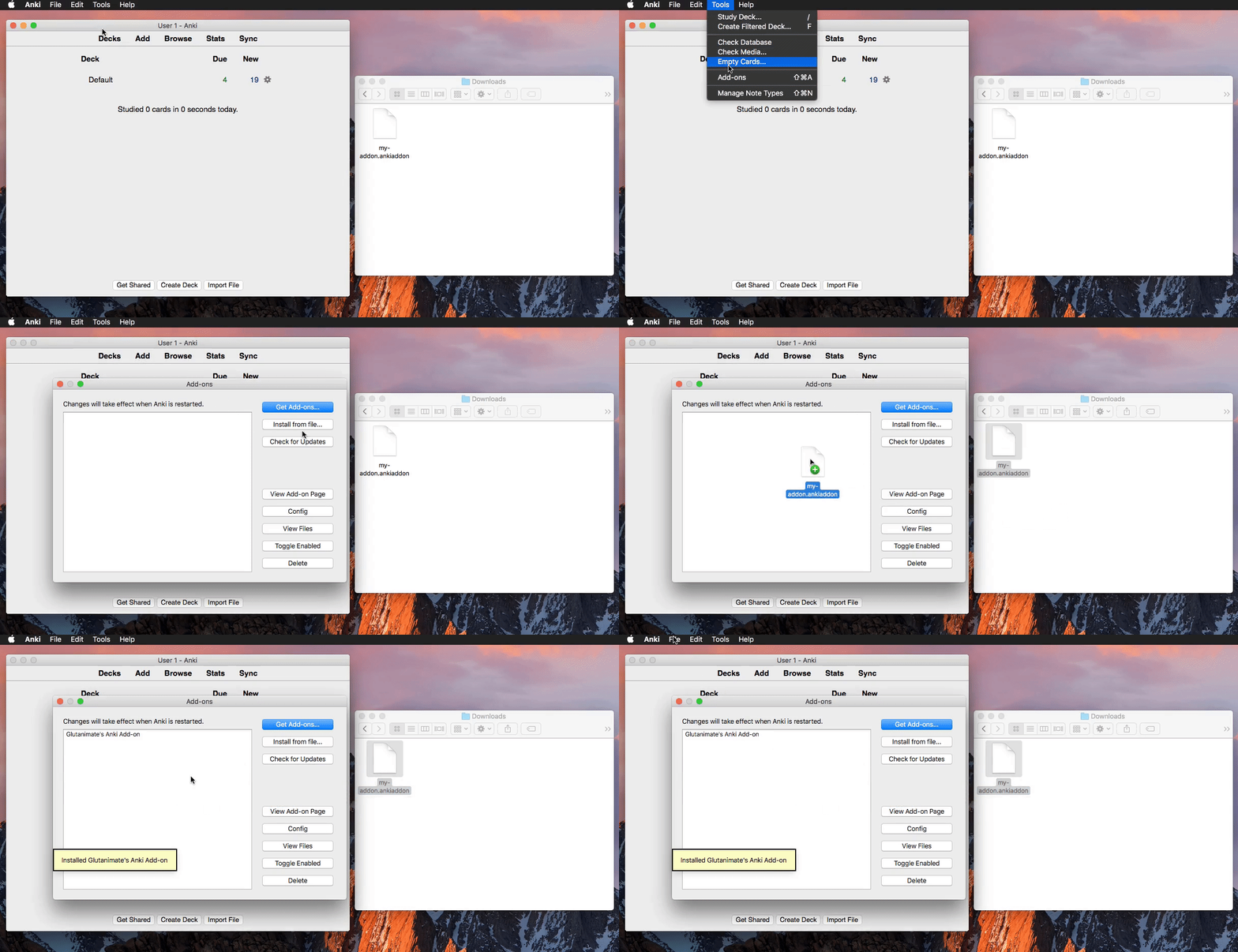
  1. Download the latest .ankiaddon file from the releases tab (you might need to click on Assets below the description to reveal the download links)
  2. Open the folder where your downloads are located and double-click on the downloaded .ankiaddon file.
  3. Follow the installation prompt and restart Anki if it asks you to
Alternate option
  1. Download the latest .ankiaddon package from the releases tab (you might need to click on Assets below the description to reveal the download links)
  2. From Anki's main window, head to Tools β†’ Add-ons
  3. Drag-and-drop the .ankiaddon package onto the add-ons list
  4. Restart Anki

Video summary:

Documentation

For further information on the use of this add-on please check out the description text for AnkiWeb.

Building

With Anki add-on builder installed:

git clone https://github.com/glutanimate/puppy-reinforcement.git
cd puppy-reinforcement
aab build

For more information on the build process please refer to aab's documentation.

Contributing

Contributions are welcome! Please review the contribution guidelines on how to:

  • Report issues
  • File pull requests
  • Support the project as a non-developer

License and Credits

Puppy Reinforcement is Copyright Β© 2016-2023 Aristotelis P. (Glutanimate)

With code contributions from: @zjosua (thanks!)

Puppy Reinforcement is free and open-source software. The add-on code that runs within Anki is released under the GNU AGPLv3 license, extended by a number of additional terms. For more information please see the LICENSE file that accompanied this program.

Please note that this program uses the Libaddon library which comes with its own additional terms extending the GNU AGPLv3 license. You may only copy, distribute, or modify the present compilation of this program with Libaddon under the combined licensing terms specified by both licenses.

This program is distributed in the hope that it will be useful, but WITHOUT ANY WARRANTY.


The continued development of this add-on is made possible
thanks to my Patreon supporters. You guys rock ❀️ !