Copy Selection Field

AnkiWeb addon 1726946295

Copies a chosen field from all selected notes in the browse window via ctrl+shift+c or menus, with configurable separator and optional HTML stripping.
AI-generated summary; may contain mistakes.

exportnote-managementshortcuts

Open on AnkiWeb GitHub Find alternatives

AnkiWeb

Votes
1 (πŸ‘ 0 Β· πŸ‘Ž 1)
Updated
2022-01-16
Anki versions
unknown
License
GPL-3.0 (from the GitHub repository)
Virus scan
No ClamAV match A match does not prove malware. No match does not prove that the code is safe.
Languages
Python, JSON
Description language
en

Maintenance

abandoned

  • Last update or commit: 2022-01-16 (1750 days before the snapshot).
  • Commits in the last year: 0.
  • Issues: 1 open, 0 closed.
  • Pull requests: 0 open, 0 merged.

Will it work on my Anki?

Version branches
Min AnkiMax AnkiUpdated
2.1.0–2022-01-16
History across monthly snapshots

Loading…

Similar addons

Duplicate selected cards (Browser)

Duplicates selected cards from the browser into a chosen deck via right-click, with options to keep the original, copy revision history, and use a Ctrl+Shift+Z shortcut.

note-managementshortcuts

10 votes 72% approval πŸ‘ 10 Β· πŸ‘Ž 0 Anki 25.07.5~ Updated 2026-03-09
Field History Updated fork

Improves the Add Notes dialog with hotkeys to copy fields from the last note in the same deck and a searchable window listing previous values for the current field, with configurable hotkeys and fields.

card-creationshortcutsfork-or-reupload

2 votes 9% approval πŸ‘ 1 Β· πŸ‘Ž 1 ⭐ 0 Anki 2.1.54~ Updated 2022-12-02
Ankify

Turns clipboard text into Anki flashcards using a chosen AI provider directly in the Add window, with review, regeneration, note-type mapping, and specialization options.

card-creationaishortcutscloze

1 votes 21% approval πŸ‘ 1 Β· πŸ‘Ž 0 ⭐ 0 Anki 2.1.1~ Updated 2026-10-27
AnkiBulk

Bulk-adds many notes at once via an editable table or YAML text view, exporting to the clipboard for LLMs or spreadsheets, using existing notes as context.

card-creationnote-management

2 votes 44% approval πŸ‘ 3 Β· πŸ‘Ž 0 ⭐ 0 Anki 26.05~ Updated 2026-08-05
Quick Image Search

Adds a Search Images button to the Browse editor toolbar that opens a Google image search for a configurable note field, with domain and shortcut settings.

card-creationshortcuts
1 votes 21% approval πŸ‘ 1 Β· πŸ‘Ž 0 ⭐ 0 Anki 26.09.3~ Updated 2026-10-24

Description

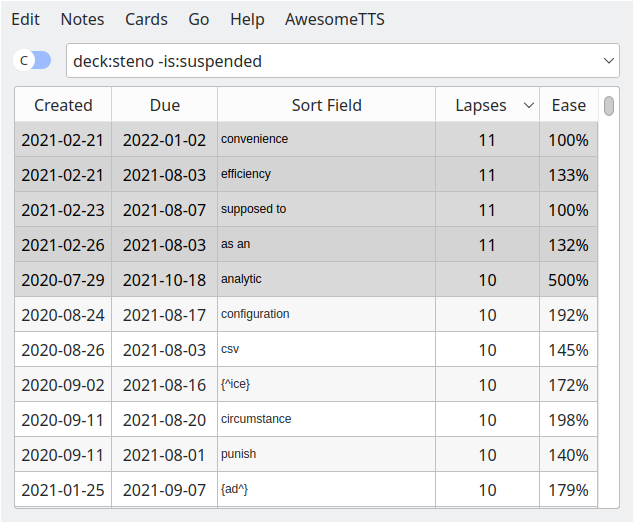
An Anki add-on for copying all the fields of a selection in the browse window. Github: https://github.com/antistic/anki-copy-selection-field Example with the default options will paste the following: analytic convenience efficiency supposed to as an ⚠️ Output might not be in the same order as on the browse window (#1) Usage
  1. Open the browse window
  2. Make a selection
  3. Press ctrl+shift+c, or choose from the "Notes" menu (also available in the right click context menu)
  4. Paste the text wherever you want
Options
  • field_index (default: 0). The index of the field you want to copy. The first field is number 0
  • separator (default: "\n") What goes in between each note
  • strip_html (default: true) Whether or not to strip html tags

README

Anki copy selection field

An Anki add-on for copying all the fields of a selection in the browse window.

Addon URL: https://ankiweb.net/shared/info/1726946295

Addon Code: 1726946295

Example

image

with the default options will paste the following:

analytic
convenience
efficiency
supposed to
as an

⚠️ Output might not be in the same order as on the browse window (#1)

Usage

  1. Open the browse window
  2. Make a selection
  3. Press ctrl+shift+c, or choose from the "Notes" menu (also available in the right click context menu)
  4. Paste the text wherever you want

Options

Option Default Value Description
field_index 0 (int) The index of the field you want to copy. The first field is number 0
separator "\n" (string) What goes in between each note
strip_html true (bool) Whether or not to strip html tags (e.g. <div>, <strong>)