Pace Estimator
An Anki add-on that measures how fast you actually answer cards and turns that
into an honest estimate of how long today's workload will take.

Why the estimate differs from other add-ons
Most speed add-ons multiply "cards due" by one average seconds-per-card. Four
things make that wrong, and Pace Estimator fixes all four:
- A new card is not one answer. With learning steps it is two, three or
more. Pace Estimator measures your real answers-per-new-card from your review
history rather than assuming.
- Card types differ enormously. A mature review might take 5 seconds and a
brand-new card 20. Speeds are measured separately for learning, young,
mature and relearning cards, then weighted by what you actually have due.
- You will fail some reviews. Cards graded Again come back within the same
session. Your real Again-rate and relearning cost are folded in.
- A total is a sum of averages, not of typical cards. Card times are
right-skewed: most are quick and a few are slow, so the median sits well
below the mean. Multiplying the median by a card count underestimates every
session, so speeds are means. The median is still shown, labelled "typical",
and is never multiplied by anything.
What the design is based on
The choices above were settled by walk-forward backtesting against a real
collection: for each day, speeds were built from the preceding days only and
used to predict that day's total time, with no access to the day being
predicted. Across 60-75 such days:
| Estimator |
Bias |
Average error |
| Mean, per card type, 14-day window |
+3.8% |
25.3% |
| Mean, single figure for all cards |
+5.4% |
27.4% |
| Trimmed mean |
-17.3% |
31.0% |
| Median |
-43.3% |
45.4% |
The median underestimates by more than 40%: on that collection the slowest 10%
of cards account for 38% of all time spent, and the median throws that tail
away. Per-card-type means beat one overall mean by about two points, and a
14-day window beats 30 or 90 days, because it tracks your current pace.
Card-level features changed the error by less than a point, which is noise at
this sample size, so they are off by default -- but they are implemented
and switchable. A variance decomposition explains why they do not help much: of
the variation in how long a card takes, which card type it is explains 0.3%,
which day it falls on explains 10%, and the remaining 90% is card-to-card
noise that averages out over a session. Your pace swings about ±39% from day to
day, and no property of a card can predict that; it is expressed as the ETA's
upper bound instead.
Everything here is a setting
None of the above is hard-coded. Under Speed & accuracy:
- Estimates built from -- average (the only unbiased choice for a total),
average ignoring your slowest 10%, or median if you want it despite the bias.
- Also split speeds by -- ease factor and/or interval, on top of card type.
A split is only used once it has 20 samples of its own; below that it falls
back to the card type, so a rare combination cannot swing the estimate. The
splits are worth looking at even when they barely move the total: on the test
collection a hard young card took 18.9s against 13.7s for a normal one.
- Window length, minimum sample, idle cutoff, answer cap, whether to count full
learning steps, whether to allow for lapses, and whether to separate card
types at all.
Under Home screen, Show speed as picks whether the panel leads with the
average, the typical (median) card, or the average with the typical underneath.
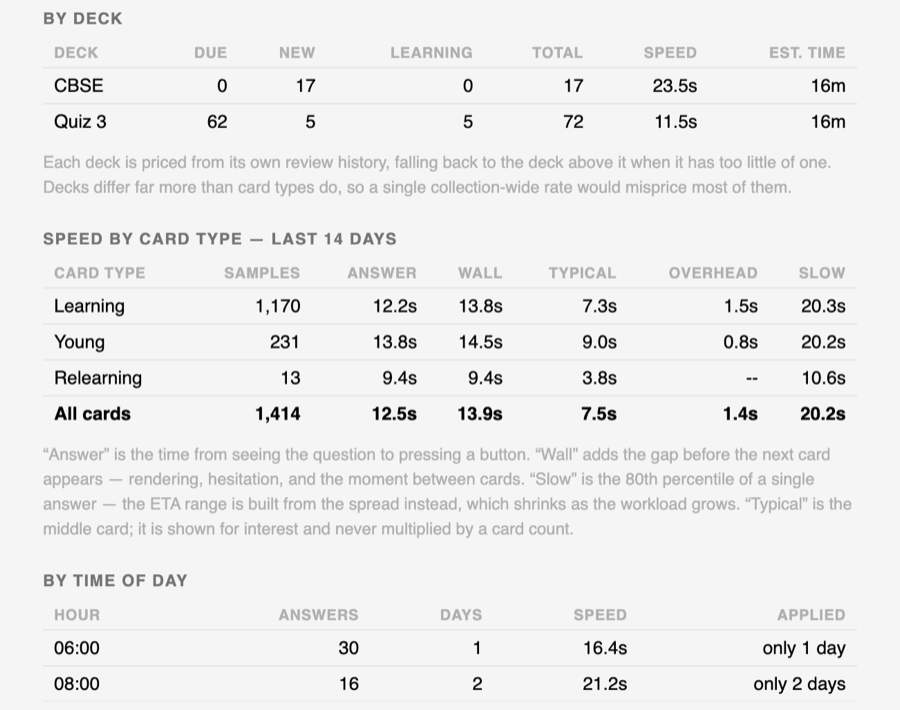
Decks are not interchangeable
This is the largest effect in the whole model, and the one worth understanding.
On the collection this was built against, second-level decks ranged from 8.3
seconds a card to 28.7 -- a 3.4x spread. A vocabulary deck and an
image-heavy one are simply not the same activity. Which deck a card is in
explains 8.7% of the variation in how long it takes; which card type it is
explains 0.3%.
So every deck is priced from its own review history. A deck with too little
history of its own falls back to its parent deck, and only then to the whole
selection, so a brand-new subdeck inside a well-established tree is still
priced sensibly. Predicting a single deck's study time improves from 30.8% to
28.5% average error, but the real difference shows up in the numbers a person
actually looks at:
100 cards due in "A Frequency Dictionary of Spanish"
   priced from that deck   15m
   one collection-wide rate 26m

100 cards due in "Ankidrone Foundation V7"
   priced from that deck   47m
   one collection-wide rate 26m
A single blended rate gives the same answer for both, and is wrong by a factor
of three in opposite directions.
When several decks are in scope, each is priced separately and the results are
combined -- variances add, so the combined range is tighter than the sum of the
individual ranges rather than assuming every deck runs slow at once.
Time of day
Hourly averages are the most misleading statistic in this whole add-on. On the
test collection the slowest hour looked 85% worse than the fastest -- but
comparing hours only against other hours of the same day, which removes "that
was simply a slow day", collapses that spread to about 10%. The apparent hour
effect is mostly a record of which days you happened to study in which hours.
Splitting a history into 24 buckets also leaves each one thin, and the pattern
is not stable: correlation between the first and second halves of one history
was only +0.31.
So the estimate does adjust for the clock, but carefully. An hour must have
been studied on at least five separate days before it may move anything, and
its measured difference is then scaled back in proportion to how much data
supports it. Backtested:
| Hour adjustment |
Bias |
Average error |
| Ignored entirely |
+1.7% |
26.7% |
| Applied, no day requirement |
+2.0% |
28.3% |
| Applied, five-day requirement |
+0.8% |
26.2% |
Without the guard it makes estimates worse than ignoring the clock. With it,
it helps a little and roughly halves the bias. Tools ▸ Pace Estimator lists
every hour, how many answers and how many separate days it rests on, and
whether it qualified.
Cards already part-way through learning are counted by the answers they still
owe (cards.left), not as one card each, and every count comes from Anki's own
scheduler, so per-deck limits are respected.
Two speeds
- Answer speed — question shown until you press a button (
revlog.time).
- Wall-clock speed — the same, plus the gap before the next card appears:
rendering, your pause before flipping, the moment between cards.
Wall-clock is the default because it is what actually happens. Gaps longer than
the idle cutoff (60s by default) count as breaks and are excluded, so walking
away mid-session doesn't wreck your averages. Gaps are measured across the whole
review stream, not per deck, so interleaving decks stays accurate.
What it shows
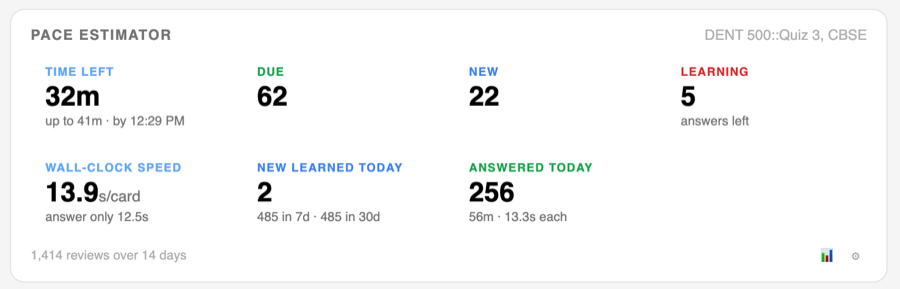
- Time remaining, as a range, with the clock time you finish at
- Due / new / learning counts for the decks you pick
- Answer and wall-clock speed, optionally broken down by card type
- New cards learned today, this week, this month
- Answers and time spent today
Every block can be turned off and reordered. Surfaces: the deck list, a deck's
study screen, the top toolbar, a heads-up display while reviewing, and a
detailed window at Tools ▸ Pace Estimator….
Per-card time goal
Off by default. Switched on, it ships as the least intrusive thing that still
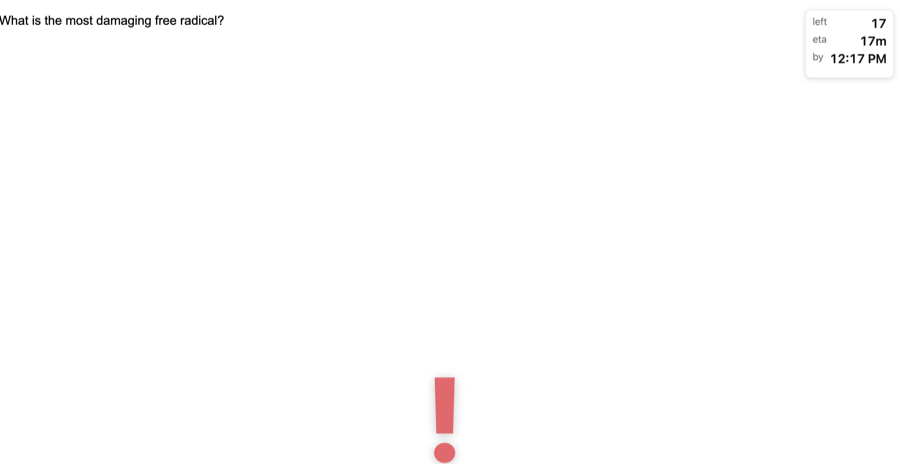
helps: no timer on screen at all, the clock running quietly, and a large symbol
at the bottom of the screen once a card has run over its time — while the
question is still showing, which is the point at which the useful response is
to stop struggling and turn the card over. Move it to the answer side if you
would rather not be nudged mid-recall.
Set a target seconds-per-card, globally or per deck on the Decks tab. The timer
and the out-of-time warning are independent, so you can also have:
- a running timer that turns red when you go over,
- a large symbol over the lower half of the card and no timer at all, so nothing
distracts you until you are actually out of time,
- or both.
The question and the answer are treated as separate phases, so Clock runs
picks between one clock for the whole card, a clock that stops when you reveal
the answer, one that only starts once you do, or a separate clock with its own
allowance for the answer. Warn me on is independent of it: you can time the
whole card but only be warned once the answer is showing.
The warning fires at exactly the time you set — there is no early warning stage.
Everything is drawn by the add-on, so it works on every note type without
editing a single card template. Preview it here on the settings tab runs the
whole thing on the current screen with a shortened goal, so you can check a
setting without sitting through a real card.
Feedback
Bugs, ideas and questions are all welcome:
If a figure looks wrong, check first whether it is scoped to the decks you have
selected rather than your whole collection; that accounts for most surprises.
Installing
In Anki: Tools ▸ Add-ons ▸ Get Add-ons, and paste this code:
1873683060
Then restart Anki. The add-on's page is at https://ankiweb.net/shared/info/1873683060.
From a file — download the .ankiaddon and use Tools ▸ Add-ons ▸ Install
from file. Requires Anki 23.10 or later; developed and tested against 26.8.
Publishing
See PUBLISHING.md. ./build.sh runs the tests, strips __pycache__ and
meta.json, and writes dist/pace_estimator.ankiaddon with the files at the top
level of the archive, which is what AnkiWeb requires.
Development
python -m pytest tests
The suite includes tests/test_reviewer_js.py, which runs the injected reviewer
script under Node against a stub DOM and a fake clock, so the per-card timer is
checked second by second rather than by eye. Those tests skip if Node is absent.
pace_estimator/src/stats.py holds all the arithmetic and imports nothing from
Anki, so the numbers are testable without launching the app.
Shortcuts are recorded with a purpose-built widget rather than Qt's
QKeySequenceEdit: click it, press the combination, and it is taken the moment
you release every key, with an ✕ to clear it. Escape cancels, Backspace clears.
Turn on Troubleshooting ▸ Write a debug log in the settings to get
pace_estimator_debug.log in your add-ons folder, or read the in-memory tail with
Show recent activity…. Every hook the add-on registers is wrapped so a
failure is logged rather than breaking the screen it is attached to.