Bible Memorizer

AnkiWeb addon 2012700632

Imports scripture verses as notes with multiple cards and lets you recite passages from memory, revealing verses at detail levels matching their learning state.
AI-generated summary; may contain mistakes.

card-creationreview-flowcard-templates

Open on AnkiWeb GitHub Find alternatives

AnkiWeb

Votes
24 (πŸ‘ 23 Β· πŸ‘Ž 1)
Updated
2026-05-18
Anki versions
25.09.4~
License
GPL-3.0 (from the GitHub repository)
Virus scan
No ClamAV match A match does not prove malware. No match does not prove that the code is safe.
Languages
Python, JSON
Description language
en

Maintenance

active

  • Last update or commit: 2026-05-18 (167 days before the snapshot).
  • Test files: 1.
  • Commits in the last year: 13.
  • Issues: 2 open, 7 closed.
  • Pull requests: 1 open, 0 merged.
  • Median first response: 22 hours (9 answered issues and pull requests).

GitHub

Repository
zefanja/bible-memorizer Β· more by zefanja
Stars
⭐ 3 · forks 2 · open issues 3
Last commit
2026-05-18
License
GPL-3.0
Languages
JavaScript, Python, CSS, HTML
Tests
1

Will it work on my Anki?

Version branches
Min AnkiMax AnkiUpdated
25.0725.09.4+2026-05-18
History across monthly snapshots

Loading…

Similar addons

Quizify Tool

Renders Markdown in Anki cards as interactive question typesβ€”fill-in-the-blank, multiple choice, reveal, annotations, collapsible/tabbed blocks, recitation, audio, code and mathβ€”with editor tools and bulk Markdown import.

review-flowformattingcard-templatesclozequizmobile-compatible

2 votes 34% approval πŸ‘ 2 Β· πŸ‘Ž 0 ⭐ 171 Anki 2.1.1~ Updated 2025-02-16
MnemoMaker: Language Learning Accelerator

Automatically creates formatted vocabulary flashcards with Cambridge Dictionary definitions, examples, translations, pronunciation, and AI-generated mnemonics in multiple language pairs.

card-creationaidictionary

6 votes 19% approval πŸ‘ 3 Β· πŸ‘Ž 3 ⭐ 2 Anki 25.02.5~ Updated 2025-08-15
Simple Multiple Choice by Denis

Converts Anki cards into interactive multiple-choice quizzes with up to five options, optional shuffling and explanations, colour-coded selected-answer feedback, image support, and customizable settings.

card-templatesquizmobile-compatible

31 votes 71% approval πŸ‘ 27 Β· πŸ‘Ž 4 Anki 25.02.4~ Updated 2026-09-29

Description

Anki add-on focused on Bible memorisation

You can also use the web version of this plugin: https://app.biblez.de

Tutorial

  1. Install this add-on.
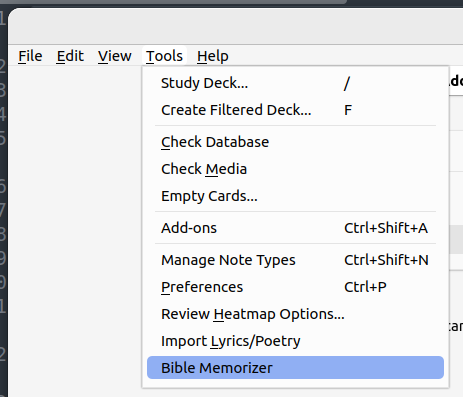
  2. Open Bible Memorizer (Tools β†’ Bible Memorizer)
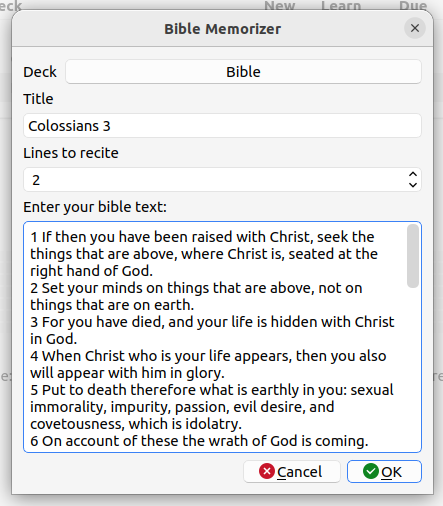
  3. Copy your scripture into the text box. Each new line is a new note. It is best to add a line break after each verse (one verse per line) or to break the verse into several parts (one part per line). You should include the verse number at the beginning of each new verse.
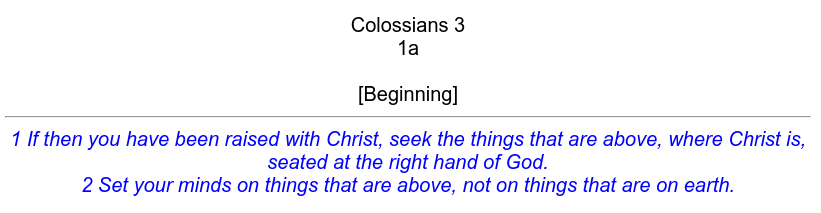
  4. For every note there are three cards (or four if you checked the box "Create Table").
Further Notes
  • 1 verse = all lines until a there is a new verse number at the beginning of a line.
  • If you don't use verse numbers at all, you are limited to 26 "verses", because there are not more letters in the alphabet :)
  • "Table Cards" are only created if you have more then 4 verses. They are not created by default.
Screenshots

Tools β†’ Bible Memorizer

image

Import

image

Card 1

image

Card 2

image

Recite Chapter

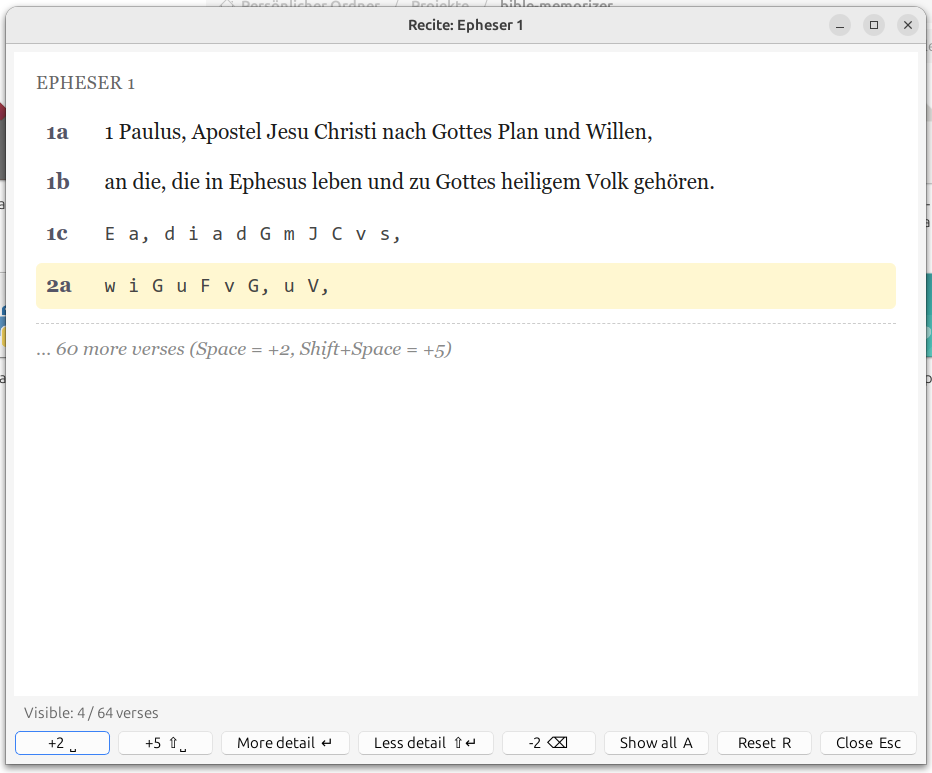
The Recite Chapter feature lets you recite a whole passage from memory β€” without touching your card schedule.

How to use

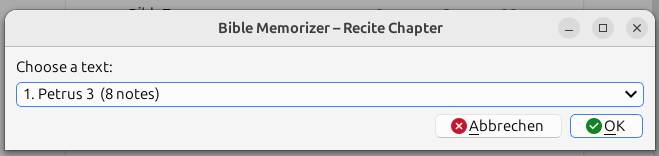
  1. Open the dialog via Tools β†’ Recite Text.
  2. Choose the passage you want to recite from the dropdown.
  3. Verses are revealed one by one. Each verse is shown at a detail level that matches its current learning state:
    • Verse number only β€” mature cards (interval β‰₯ 21 days)
    • First letters β€” young review cards
    • Last letters β€” new / learning / relearning cards
    • Full text β€” fully revealed
Keyboard shortcuts
  • Space / β†’ | Reveal next verse (+2)
  • Shift+Space / Shift+β†’ | Reveal next verses (+5)
  • Enter | Show more detail for the last visible verse
  • Shift+Enter | Show less detail for the last visible verse
  • Backspace / ← | Hide last verse
  • A | Show all verses (full text)
  • R | Reset to initial state
  • Esc | Close
You can also click any verse directly to reveal one more level of detail for that verse.

Screenshots

Tools β†’ Recite Text

image

Recite dialog

image

Known Issues

If you used and installed this add-on before April 2025 you may have some empty cards. You can remove them with Tools β†’ Empty Cards.

README

bible-memorizer

Anki add-on focused on Bible memorisation

Tutorial

  1. Install this add-on.
  2. Open Bible Memorizer (Tools β†’ Bible Memorizer)
  3. Copy your scripture into the text box. Each new line is a new note. It is best to add a line break after each verse (one verse per line) or to break the verse into several parts (one part per line). You should include the verse number at the beginning of each new verse.
  4. For every note there are three cards (or four if you checked the box "Create Table").

Further Notes

  • 1 verse = all lines until a there is a new verse number at the beginning of a line.
  • If you don't use verse numbers at all, you are limited to 26 "verses", because there are not more letters in the alphabet :)
  • "Table Cards" are only created if you have more then 4 verses. They are not created by default.

Screenshots

Tools β†’ Bible Memorizer

image

Import

image

Card 1

image

Card 2

image

Recite Chapter

The Recite Chapter feature lets you recite a whole passage from memory β€” without touching your card schedule.

How to use

  1. Open the dialog via Tools β†’ Recite Text.
  2. Choose the passage you want to recite from the dropdown.
  3. Verses are revealed one by one. Each verse is shown at a detail level that matches its current learning state:
    • Verse number only β€” mature cards (interval β‰₯ 21 days)
    • First letters β€” young review cards
    • Last letters β€” new / learning / relearning cards
    • Full text β€” fully revealed

Keyboard shortcuts

Key Action
Space / β†’ Reveal next verse (+2)
Shift+Space / Shift+β†’ Reveal next verses (+5)
Enter Show more detail for the last visible verse
Shift+Enter Show less detail for the last visible verse
Backspace / ← Hide last verse
A Show all verses (full text)
R Reset to initial state
Esc Close

You can also click any verse directly to reveal one more level of detail for that verse.

Screenshots

Tools β†’ Recite Text

image

Recite dialog

image

Known Issues

If you used and installed this add-on before April 2025 you may have some empty cards. You can remove them with Tools β†’ Empty Cards.