Generates flashcard decks from notes, explains highlighted card text, auto-fills answers, creates single cards, and chats with a citation-backed medical AI inside Anki.
Explains topics, chats about study material, and generates basic, cloze, image-occlusion, and audio cards from notes, documents, and images, with free local text-to-speech.
Reads Markdown and text notes to generate accurate Basic and Cloze Anki flashcards locally via Ollama, with duplicate detection, auto-tagging, custom prompts and an English/Italian interface.
Adds a reviewer panel that critiques, explains, rewrites and creates Anki cards via your own AI API key, plus offline comments, highlights, heatmaps and deck tools.
Automatically fills French flashcard fields—translations, grammar, gender, plurals, pronunciation, and Google TTS audio—using an offline lexical database and two custom note types.
Generates tagged Anki decks from medical learning objectives and in-class PDFs using a structured prompt, outputting basic and cloze flashcards as JSON.
A free AI study tool for medical students, doctors, and healthcare professionals. Generate full decks from your notes, explain anything on your cards, auto-fill card answers, and chat with OpenEvidence AI — all without leaving Anki.
Anki Copilot adds AI superpowers to Anki. Generate full decks from your notes, get instant explanations on what you're studying, auto-fill card answers, and ask any medical question.
Free for the healthcare community. No subscriptions, no limits.
Real Citations: Answers link to peer-reviewed sources like JAMA and PubMed.
Works Inside Anki: Everything happens in the side panel or editor. No tab-switching.
(Requires internet connection)
1. Create a Whole Deck
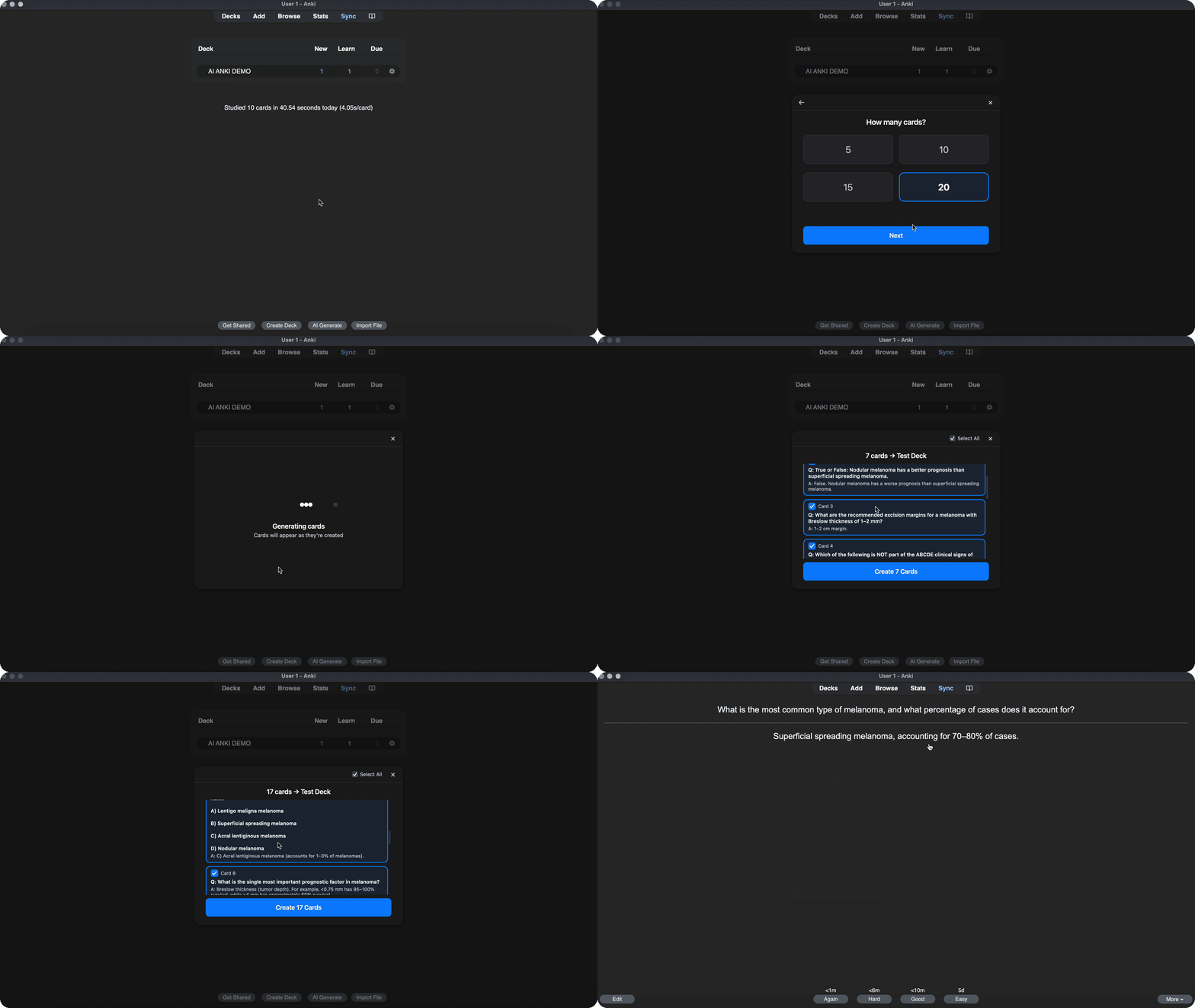
Paste your notes or describe a topic. Anki Copilot generates a full deck of flashcards in seconds.
2. Explain Anything
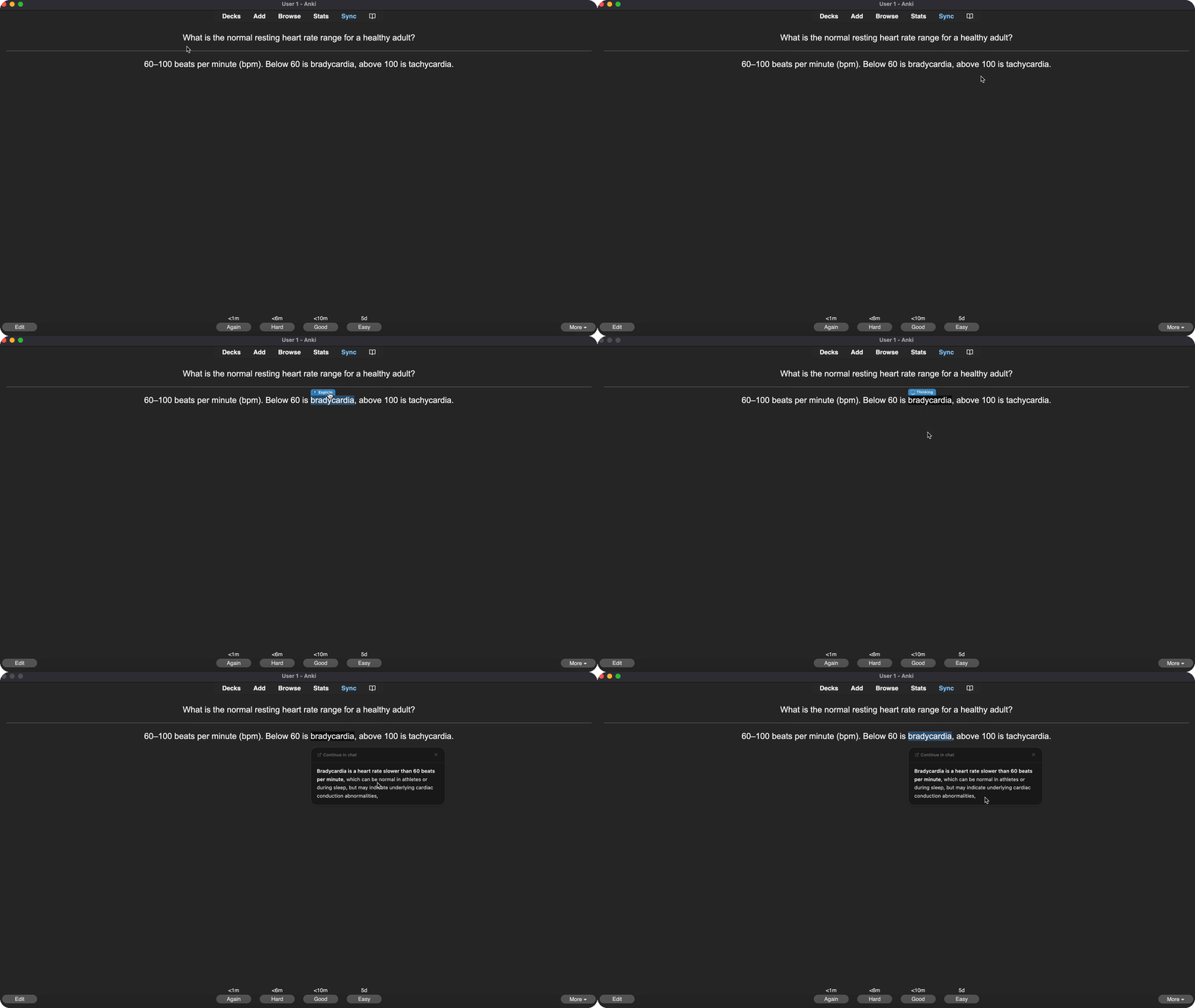
Highlight any word or phrase on a flashcard and click the floating Explain bubble. Get an instant 2-sentence breakdown right on the card, without opening the side panel.
3. Auto-Fill Card Answers
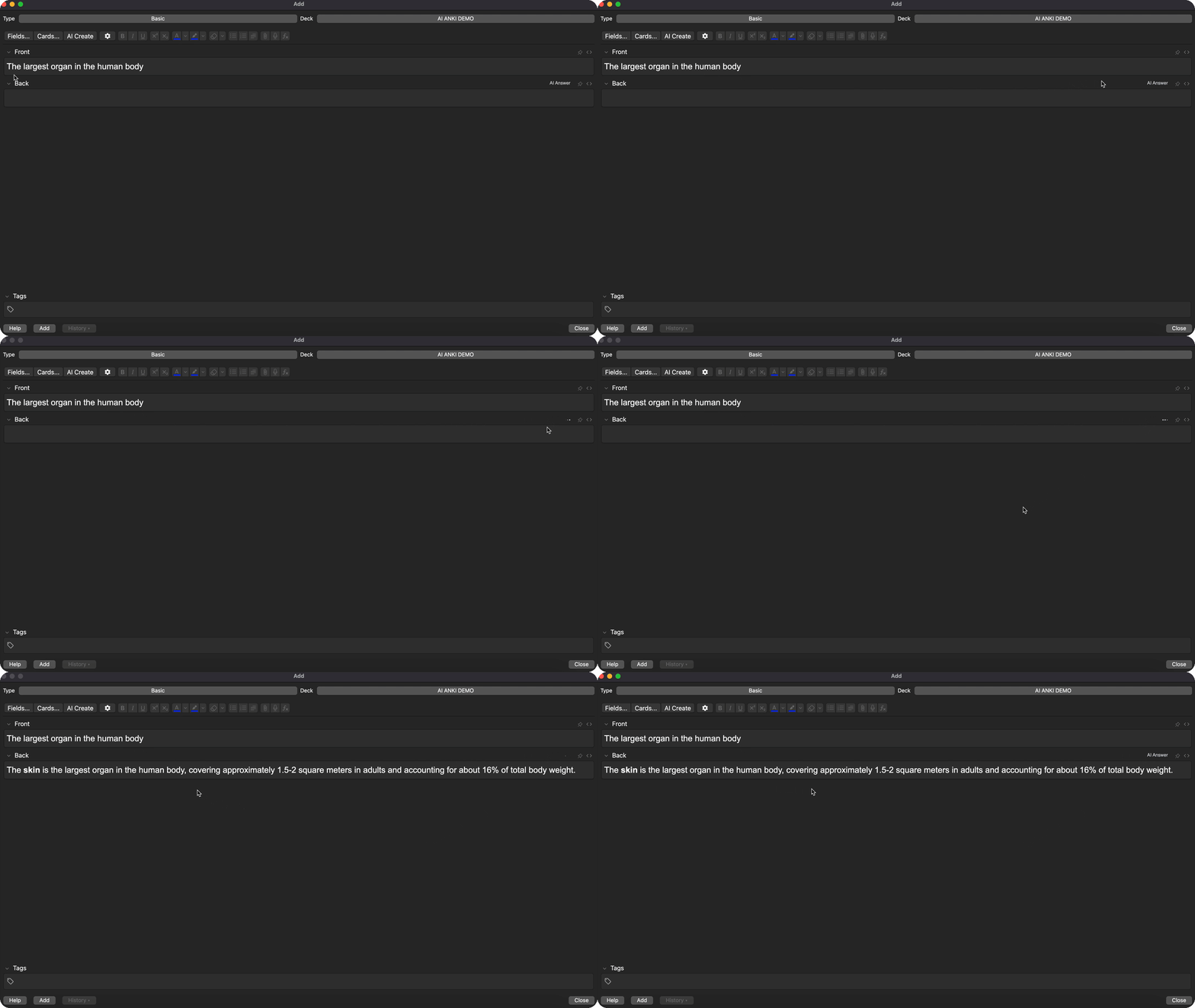
Type the front of a new card, click AI Answer, and the back gets filled in automatically with a concise, accurate answer.
4. Sidebar Chat
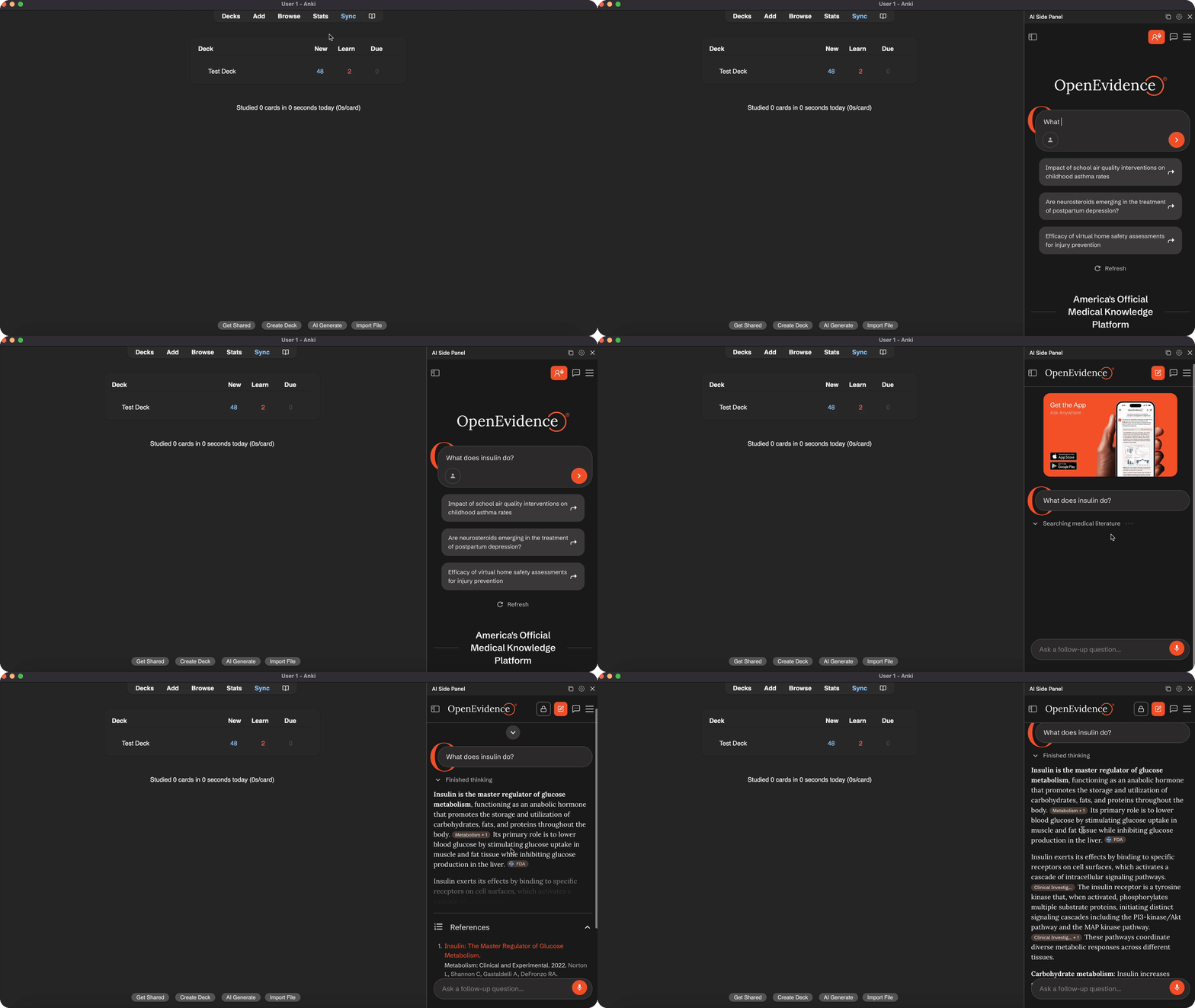
Click the 📖 book icon to open the side panel. Ask any medical question and get a detailed answer with direct links to the primary literature.
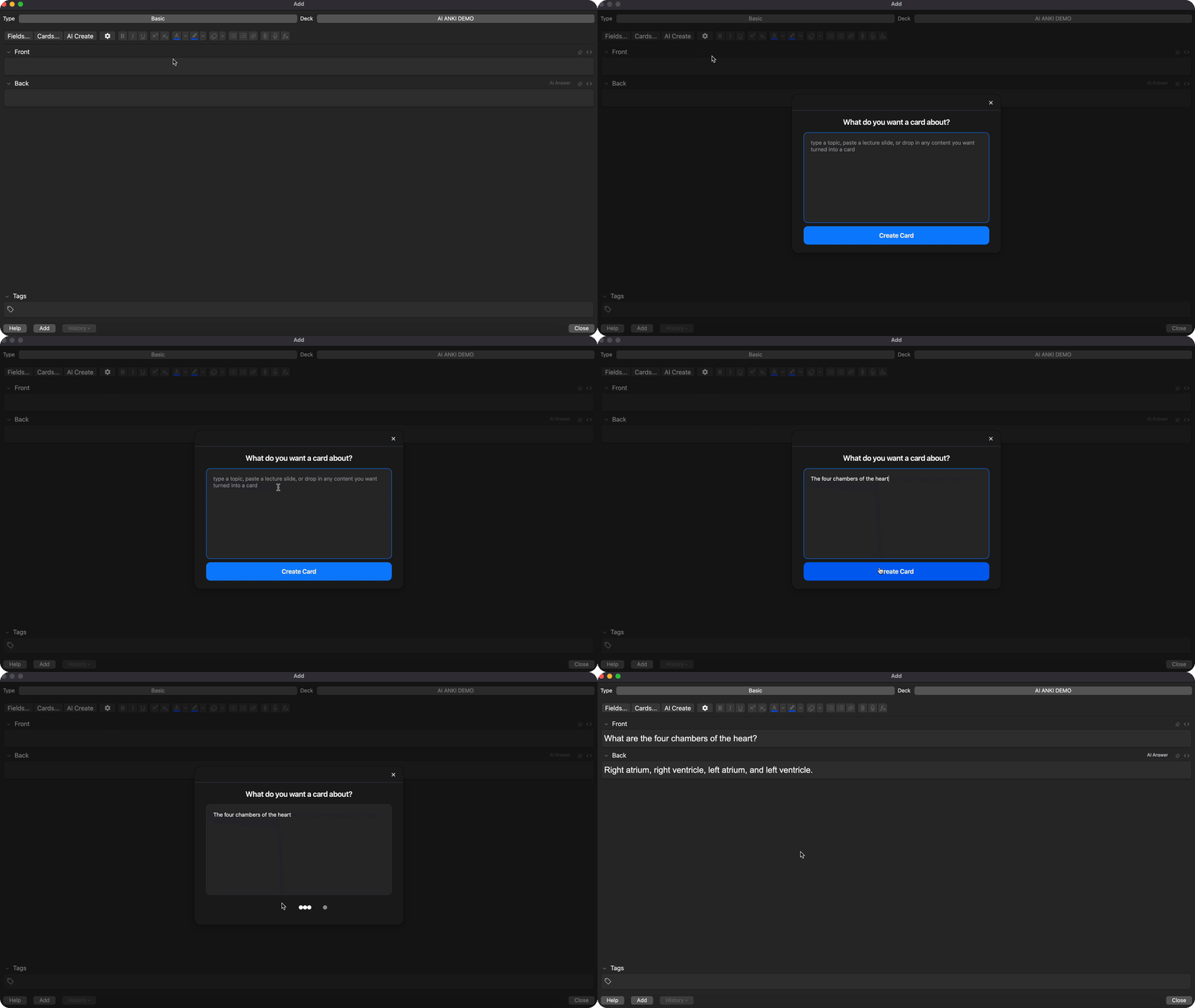
5. Make a Single Card
Open the Add Cards dialog, click AI Create, and paste any content. Get a clean Front/Back flashcard in seconds.
Open Anki.
Go to Tools > Add-ons > Get Add-ons.
Paste the code: 1314683963
Restart Anki.
Click the 📖 Book Icon in the toolbar to start studying.
Privacy: This add-on collects anonymous usage analytics (platform, features used, IP for rate limiting). No personal data or card content is accessed.
License: Proprietary. Free to install and use, but the source code may not be copied, modified, or redistributed without permission. See LICENSE.txt.
README
Anki Copilot
A 100% free AI study tool for medical students, doctors, and healthcare professionals.
Powered by OpenEvidence AI for evidence-based answers.
Overview
Anki Copilot adds AI superpowers to Anki. Generate full decks from your notes, get instant explanations on what you're studying, auto-fill card answers, and chat with a medical AI — all without leaving Anki.
Free for the healthcare community. No subscriptions, no limits.
Real Citations: Answers link to peer-reviewed sources like JAMA and PubMed.
Works Inside Anki: Everything happens in the side panel or editor. No tab-switching.
(Requires internet connection)
Features
1. Create a Whole Deck
Paste your notes or describe a topic. Anki Copilot generates a full deck of flashcards in seconds — review them, pick the ones you like, and save them with one click.
2. Explain Anything
Highlight any word or phrase on a flashcard and click the floating Explain bubble. Get an instant 2-sentence breakdown right on the card, without opening the side panel.
3. Auto-Fill Card Answers
Type the front of a new card, click AI Answer, and the back gets filled in automatically with a concise, accurate answer. Great for building decks fast.
4. Sidebar Chat
Click the book icon to open the side panel. Ask any medical question and get a detailed answer with direct links to the primary literature.
5. Make a Single Card
Open the Add Cards dialog, click AI Create, and paste any content. Get a clean Front/Back flashcard in seconds — perfect for one-off additions while you study.
Installation
Open Anki.
Go to Tools > Add-ons > Get Add-ons.
Paste the code: 1314683963
Restart Anki.
Click the Book Icon in the toolbar to start studying.