NEXORA is an editing tool for the Anki cards you already have.
It adds a panel beside the reviewer. It reads the card in front of you and tells you what is wrong with it, the mechanism underneath the fact, or what it gets confused with. When a card needs rewriting, it shows you a diff you approve before one word reaches your collection.
Three things to know before you install
- NEXORA is free, and it runs on an API key of your own. There is no subscription and nothing to buy. You create a free NEXORA account inside the add-on, then paste in a key from Anthropic, OpenAI or Google. That provider bills you directly for what you use, at their published rate, with nothing added on top. Any one of the three works: ask for something set to a model you have no key for and NEXORA answers on a model you do have. Set the model to Auto and NEXORA chooses for each job: a small, inexpensive model for quick checks and everyday questions, and a stronger one for correcting, rebuilding and writing cards.
- It sends card text to the model provider you chose. When you press a button or ask a question, the text of the card you are on goes from your computer to your provider, and the answer streams back. It does not pass through NEXORA. Nothing is sent while you are simply reviewing, and your collection is never uploaded.
- It is not medical advice. It works on flashcards and it can be confidently wrong. It does not diagnose, treat or advise anyone, and it is no substitute for a textbook, a guideline or a qualified clinician.
What the NEXORA account is for
It is free and needs no card. It exists because the prompts, which are the part of NEXORA we wrote, are loaded from our server rather than shipped inside the add-on. Signing in is what lets NEXORA fetch them.
Our server never receives your card text in this edition. What reaches it is your sign-in, a request for the prompts, and, if you leave the switch on, which button you pressed and whether you found the answer useful, with the answer itself reduced to a one-way hash. There is a setting to turn that off.
Asking about a card
These read the card and answer. Nothing is written to your collection.
- Critique: what is actually wrong with this card, judged as a card rather than as a sentence. It applies SuperMemo's rules for card formulation, so you get “this is three facts in one card” rather than “consider revising”.
- Explain: the mechanism underneath the fact.
- Confusables: what this card gets mixed up with, and how to tell them apart, with a comparison table you can drop straight onto the card.
- Ask: a question about the card in front of you.
The last ten answers for each card are kept on your own computer, so coming back to a card next month shows what it said before rather than spending your provider's tokens on it again. They are never sent anywhere, and there is a switch to turn it off and a button to delete them.
Changing a card, with your approval every time
- Rewrite: shown as a diff. Nothing is saved until you accept it.
- Problem cards: finds the cards that have cost you the most reviews and stuck the least, from your own review history, with what is wrong with each. Finding them is local. Tick the ones you want rewritten and they are done one after another, with a panel that shows progress and lets you stop at any time. A card that fails is skipped, not the whole run.
- Write new cards: paste a passage and get cloze cards from it, in your own deck's style, reviewed before anything is added. Each card is checked for answers that can be guessed from two options, give themselves away, or break the cloze, and flagged cards can be sent back once to be rewritten.
- Tables: build a table in the editor, or restyle one that is already there, matching the way your deck already sets them.
- Protect from AnkiHub: mark the fields you have rewritten so the next AnkiHub sync does not undo your work. One button on the card, or a whole selection at once.
- Pronounce: uses the text-to-speech voices already installed on your computer. No audio is created and no person's voice is imitated.
While you review, on your own computer
These use no API key and send nothing anywhere.
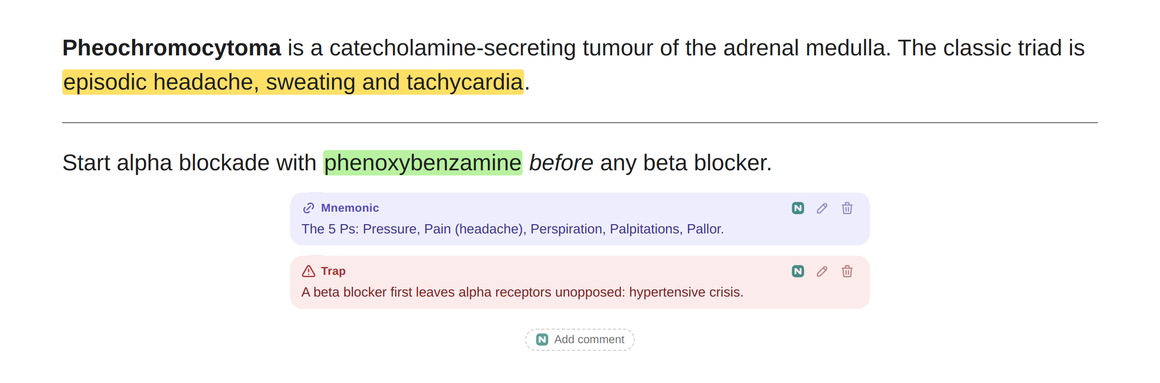
- Card comments: leave your own hint, explanation, mnemonic or trap on a card as a small coloured note, shown before the answer, after it, or both. Hints on the front stay blurred until you click them. You choose where the notes sit, their size and their colours, or float them anywhere on the screen. Comments are saved on this computer only and do not sync to other devices.
- Highlights: select words on a card and highlight them in one of four colours. They are never written into the note, so an AnkiHub update cannot remove them.
- Hide images: right-click an image during review and hide it on that card, or on every card that uses the same image. The card closes up around it, and a small “Image hidden · show” line brings it back with one click. The note is never changed, so AnkiHub updates are unaffected.
- Fold fields: right-click inside a field such as Extra or Lecture Notes and fold it into a single line on that card and its other cloze cards. Click the line to read it; it stays folded next time until you unfold it for good. The note is never changed.
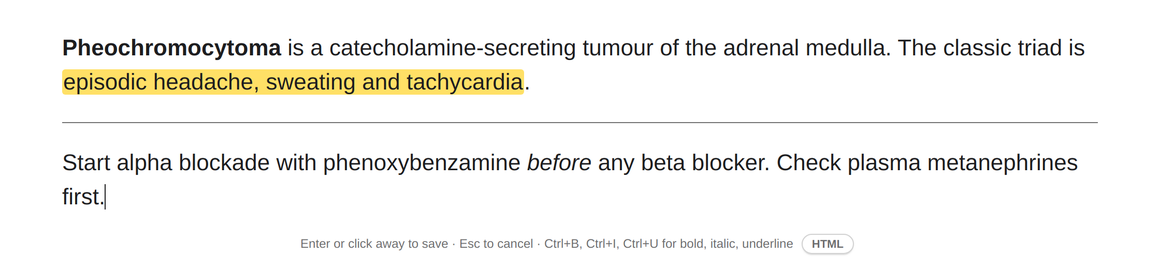
- Edit during review: Ctrl+click a field on the card to fix a word without leaving review. Only the text, bold, italic and underline can change. Images, cloze markers and the rest of the field's HTML are locked, so an edit cannot break anything else in the field, and Ctrl+Z undoes it. It works on fields your note type shows with
{{edit:...}}, which AnKing cards already do. It replaces the Edit Field During Review add-on, so turn that one off if you use it.
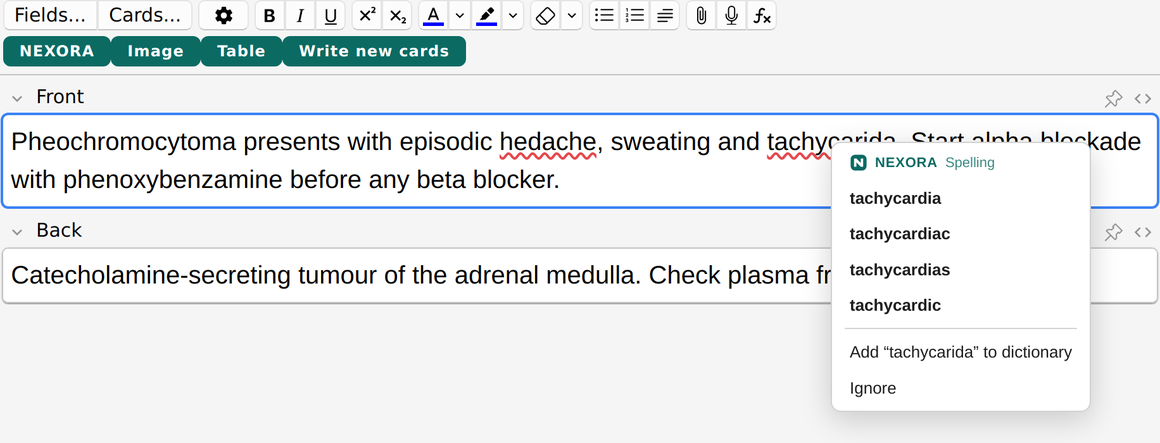
- Spell check: a red line under a word that is spelled wrong, in Anki's editor, while you edit during review, and in NEXORA's own text boxes. It knows about 75,000 medical terms, drug names and eponyms as well as everyday English, takes British and American spelling as equally correct, and leaves acronyms, doses and words like mRNA alone. Right-click an underlined word for suggestions, or to add it to your own dictionary, which stays on this computer. In Anki's editor and during review it needs Anki 23.10 or later.
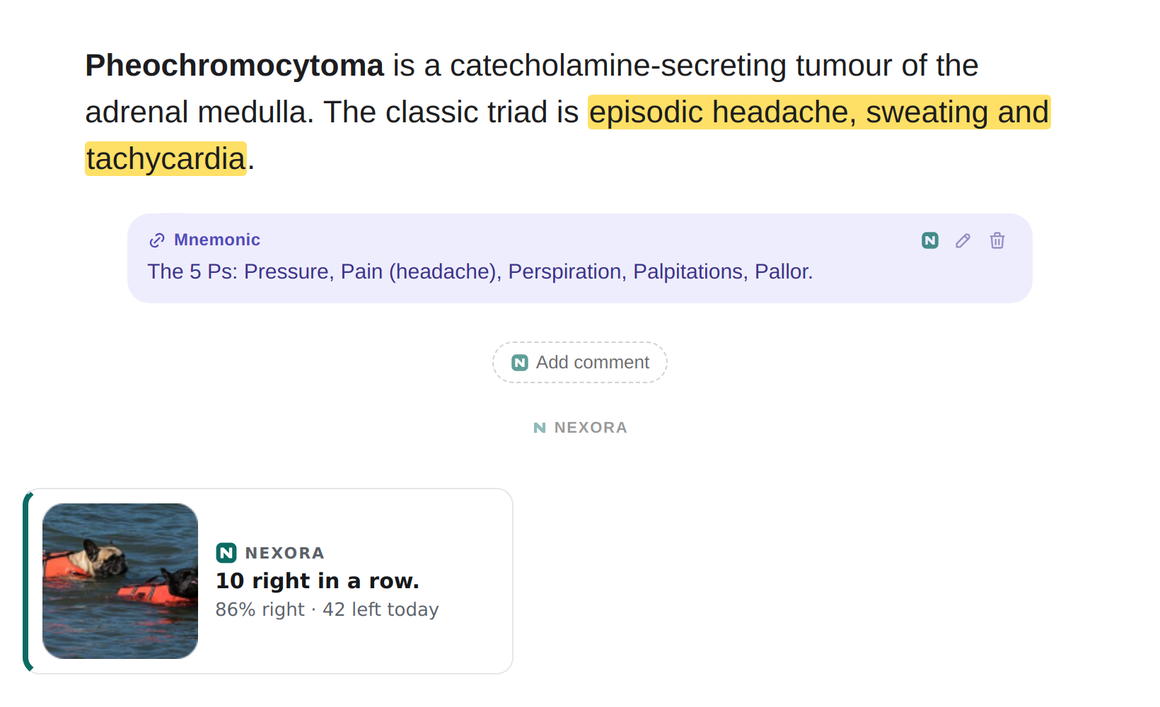
- Study buddy: a small popup when something happens in a session, such as ten right in a row, halfway through the day or the last card due, with your real progress beside a photo of a cat, a dog or your own pet. You choose how often it appears, what it shows and how it looks, or switch it off. Pet photos you add stay on your computer.
Works offline, and never leaves your computer
These read your collection locally. They use no API key at all and work without an account.
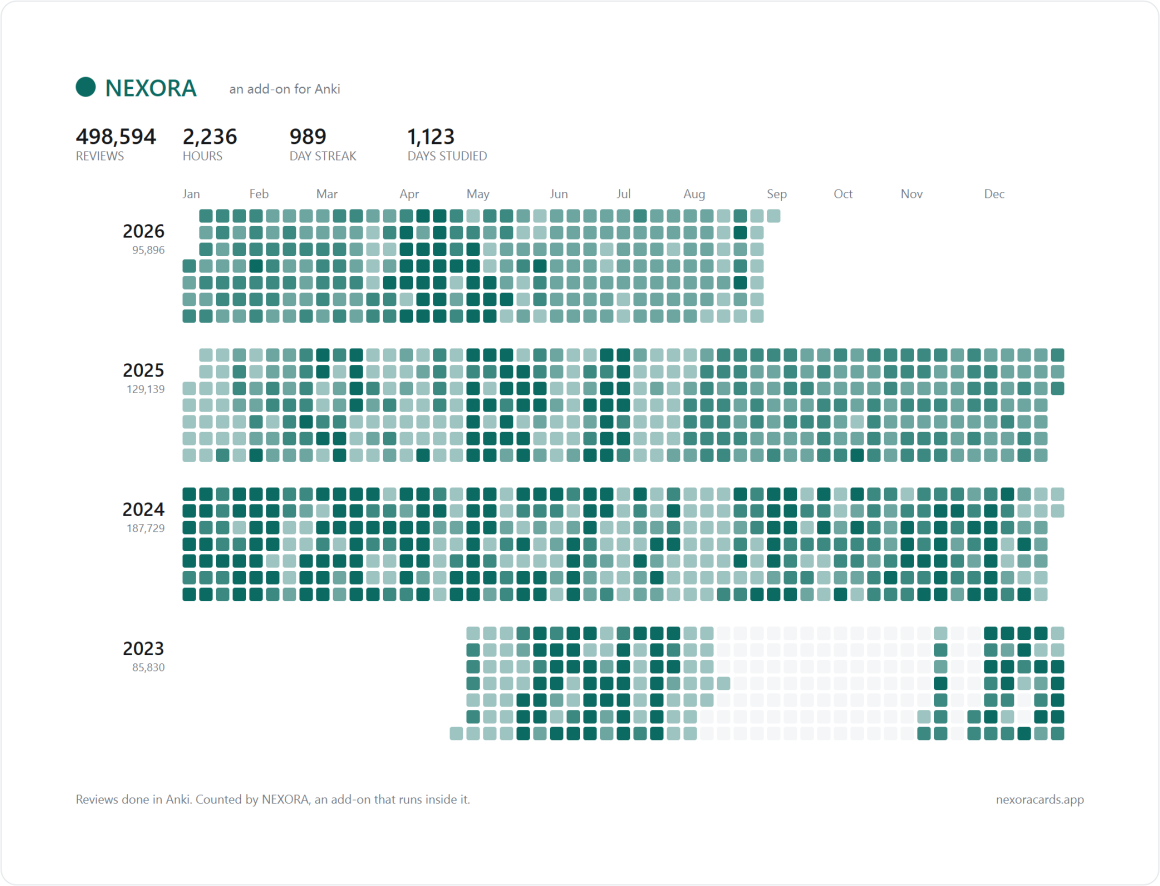
- Review heatmap: a year of your reviews on the deck list and on every deck, one row per year, click a day to open that day's cards.
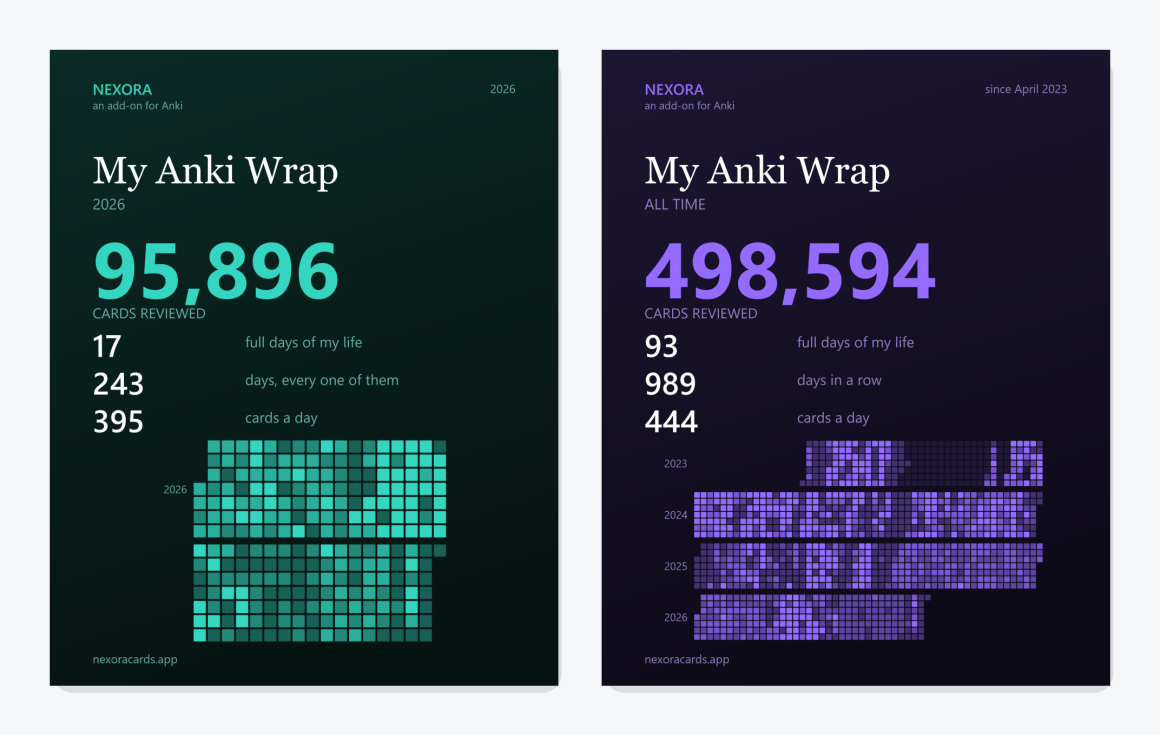
- My Anki Wrap: a poster of what you actually did, over a session, a week, a year or all of it. Saved or copied, in post or story shape.
- Deck make-up: what a deck is actually made of, on the screen you get when you click into it.
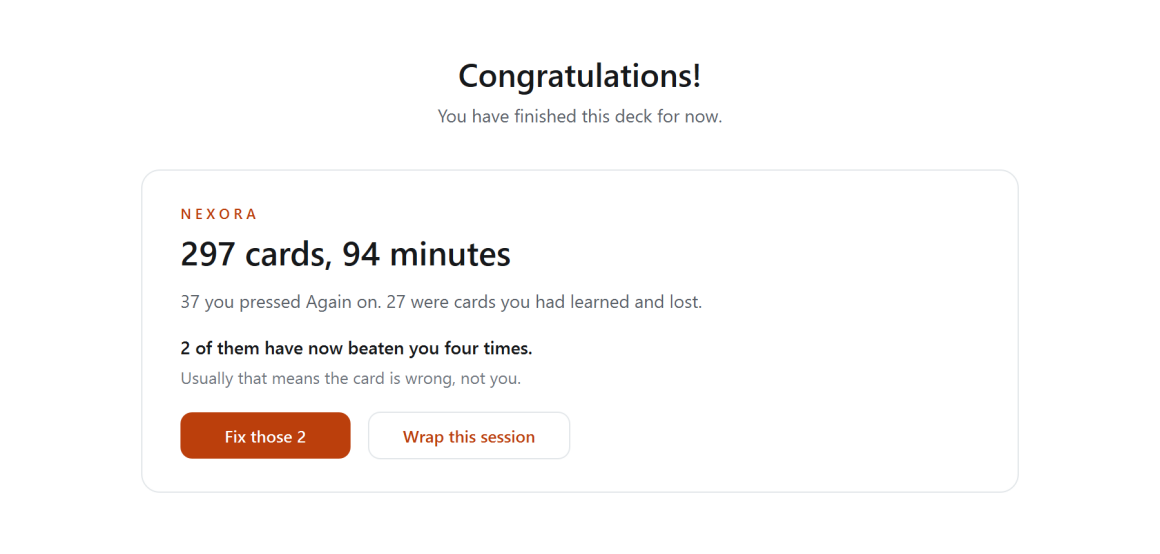
- Session recap: what you just did, on the congratulations screen, leading with the cards you had learned and then lost.
- Study these: a button in Browse that turns the current search or only the selected cards into a filtered deck: everything, due only, due and new, or due, new and learning. It opens Anki's own filtered deck window, so you still choose the limit, the name and whether to reschedule.
- Delete filtered decks: one button on the deck list removes every filtered deck and sends its cards back to the decks they came from. No cards are deleted.
- Build subtags into decks: right-click a tag in Browse and turn its subtags into a deck tree. Your tags are not changed.
- Merge subdecks: the same move in reverse, from the deck list: collapse a deck tree back into one deck.
- Neighbours: what else in your collection already covers this card, searched on your own machine.
Who it is for
People with large, densely written collections in a technical subject. It was built with medical students, residents and doctors in mind, but nothing in it is specific to medicine.
What you need
- Anki 2.1.50 or later, desktop, on Windows, macOS or Linux. Spell check in Anki's editor needs Anki 23.10 or later; on older versions it stays out of the way and everything else works.
- An internet connection when you ask it something. Reviewing works offline exactly as it always did.
- A NEXORA account, free, which you create inside the add-on.
- An API key of your own, from Anthropic, OpenAI or Google. One is enough. Creating one takes a few minutes and every provider lets you cap what the key is allowed to spend.
Searching your collection by meaning is the one feature that needs a particular kind of key, because Anthropic does not offer embeddings. OpenAI, Google or Voyage will do it. Everything else works on any of the three.
Privacy
Licence
GNU Affero General Public License, version 3 or later. The add-on ships as complete, readable Python: nothing minified, nothing obfuscated, no build step to reproduce. LICENSE and COPYRIGHT.md sit beside it. The NEXORA service it connects to is a separate program and is not covered by that licence.
The cat and dog photos in the study buddy are public domain, from Wikimedia Commons. Each one is listed with its source and author in images/CREDITS.md.
The spell checker's word lists come from pyspellchecker (MIT licence), SCOWL (a permissive licence) and a list of English medical terms built on OpenMedSpel and MTH-Med-Spel-Chek (GPL version 3). Each licence ships with the add-on in spelling/ and is named in COPYRIGHT.md.
Independent
NEXORA is not affiliated with, endorsed by or supported by the makers of Anki or AnkiWeb, or by any school, publisher or testing body.
Support

