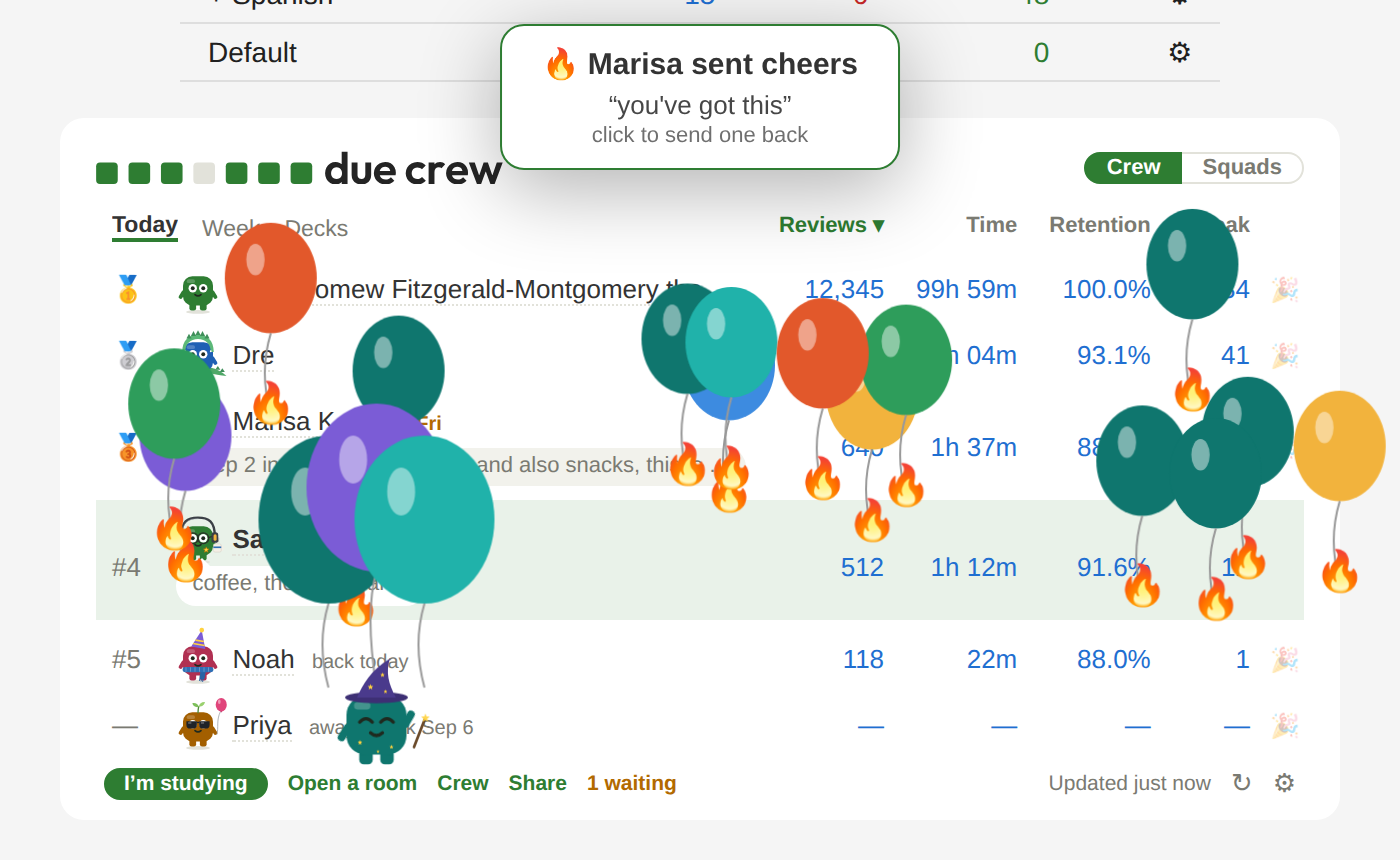
Your friends' studying next to yours, on Anki's Decks screen.

Studying for a big exam is more fun with friends! Due Crew puts your crew on
Anki's Decks screen: who's studied today, who's studying now, how far
each of you has gotten. Above them is your own day: what's due, what
your plans open, your to-dos. You only see people you've added, and they
see you once they add you back. Your cards never leave your computer.
Your crew
Cheers. Point at a friend's name, tap 🎉 Cheer, and a little show
lands on their Decks screen, a different one each time, with your note.
Or draw them something: your Pip holds it up, and it stays pinned beside
their board.
Study rooms. 25-minute rounds with your crew, the timer in Anki's top
bar, breaks together. Each of you sits in the room as your own Pip, in
your own colour. Rain, a fire, waves or brown noise if you like.

- Stuck on a card? Ask your crew. Anyone who has it down can send a
tip, which shows next time the card comes up.
- Good-luck cards. Leave a line the night before a friend's exam.
- Profiles. Half a year of a friend's studying, and your days in a
row together.
- Shared decks. The decks you have in common, side by side.
- Status, exam and away dates, just-show-up mode, six accent colours,
and your board and log on duecrew.com.
Squads and bingo
A squad is a group with a code: a class, a study group, the people in
your year. Every Monday it gets a new 3×3 card of studying squares: an
early start, twenty minutes without a break, a day with nothing left
due, new cards three days in a row. Most need more than one of you, and
the middle unlocks when enough of you do something together. Three in a
row is bingo. Under the squad, the week adds up: "23 study days between
5 of you".

Your day
Above the board is yours.
- Today is what's due, what your plans open, ticking itself as you
review, and your own to-dos. Type "every mon" and one comes back
each week.
- Upcoming is the next two weeks, and Later whatever has no day
yet.
- QBank QIDs: after a practice block, paste the IDs of the questions
you missed. Unsuspend their cards, or study them now.
- Fifteen? One click in Anki's top bar starts fifteen minutes of
study, your plans' decks first. At the end: take five, go again, or stop there. Your crew
sees you're studying. Not started by your usual time? Today nudges you.
- Insights, for any deck: your reviews for the next six weeks,
counted from your own reviews, and what stopping new cards before your
exam would do (one click to stop, one to start again); the cards Anki
won't show you before your exam; the leeches Anki stopped showing you,
one button each to bring them back; what isn't sticking yet; and a map
of what you know, by topic or by the week you started it. It's worked
out in your Anki and never sent; copy the map as a picture or as text
if you want to share it.
- Your year. From 1 December, your year in Anki as a short story,
made on your computer from your own reviews. Tools → Due Crew → Your
year… has any year Anki remembers.
Pip, the square from the logo, keeps you company: heads down in a
fifteen, breathing with you on a break, a hop when the day's done, a wave
when you're back. It keeps still with Reduce motion on, and Settings
turns it off.
Study plans
Plan a class's or a crew's studying, in Anki (Tools → Due Crew → Plans →
New plan…) or on a calendar at duecrew.com: pick chapters from a deck, set
a pace, mark the exam, and share the code. Everyone following gets that
day's cards each morning. Behind? Catch up or Push my dates back.

- Your week. You › Plans shows the plan's seven days; click one for
its assignments. Following two plans? Switch between them by name.
- Your plans… in Anki: the plan's weeks and dates beside your deck,
Insights (the workload week by week, how much of the deck it covers),
and its settings. An author's changes wait under the plan until sent.
- Each morning, in Anki. Cards open in Anki on your computer, after
its sync; sync again and your phone has them. Studying on your phone
first? Your plans… › Settings › More › Open early.
- Hold back. A deck with every card showing? Follow holds the later
dates back until their day.
- Study a date, or a quiz. Each date has Study: its cards in one
deck, a cram before class. Three days before a quiz, Study for it
puts every date that preps for it in one deck, the shakiest first.
- Your own pace. Follow a plan with its cards opening When I'm
ready: Up next opens the next date, first in Anki's line of new
cards, or opens it by itself once you've seen most of the last one.
Your pace and when it gets you to the end show underneath.
- Draft it with your own AI. Tools → Due Crew → Plans → Export cards
for my AI, then the plan's AI prompt (Plan the dates, or Tag by objective)
(the format). Your cards stay on your
computer.
- Plan tags. A plan can put its own tags on your notes
(
DueCrew::Block_1::Lecture_12), so a lecture's cards are one click
away in Browse. Its authors make them in Anki or on duecrew.com.
- A plan's squad. See who showed up today, ask and answer questions,
and play bingo with everyone on the plan.
- Plans can have co-authors (each says yes first), notes for followers
on a video or a card, go in your calendar app, and be shared in the
library.
In Anki's browser
Right-click a card, or a tag in the sidebar:
- Why isn't it showing? Suspended, buried, past today's new-card
limit, not due till Friday: each in Anki's own words, with Anki's own
fix, one Undo away.
- Open its cards / open these. Unsuspends a tag's cards, or the
ones you picked, first in line for new cards. Leeches stay suspended.
- Show on my plan finds the date a card belongs to, and Tag for a
plan is for a plan's authors.
Share
Share your day, week, year or all time as a picture, made in Anki. Pip
hops across your week. Pick which numbers show, then copy or save it. It
goes only where you paste it.
Install
Tools → Add-ons → Get Add-ons, code 2035408484. Needs Anki 2.1.55 or
newer. Restart Anki after installing.
Get started
- Click Start with your email on the Decks screen and type in the
code we send you. No password.
- Paste an invite, or a class, squad or plan code, on the welcome
screen. Or copy your invite and send it to a friend.
- Someone added you? Click Add back.
Privacy
Your stats go only to people you've added and squads you join. Choose
what you share in Settings → Privacy, or pause at any time. Anyone else
sees your name and emoji, nothing more. Card text never leaves your
computer: a crewmate sees a card's text only if they have the same card,
and a plan holds card and note IDs, which each follower's Anki looks up
in its own copy. Insights, your topic map, your year and your progress
on each bingo square stay on your computer. Your email is used to sign you in.
Your own to-dos are kept with your settings, so every computer has them;
only you see them. If you write in, Sam, who runs Due Crew, can look up
your account, your squads and who's on your crew list to fix problems;
never how you study, and each look is logged. Feedback you send goes to
Sam with your name. Deleting your account deletes your data. Accounts
with no activity for 12 months (24 when paused) are deleted with
everything in them; opening Anki with Due Crew on, or signing in at
duecrew.com, counts. The add-on and server are on
GitHub.
Development
Plain Python and Anki hooks, no build step. The server is a Cloudflare
Worker in worker/, duecrew.com is site/. Tests:
python3 tests/test_due_crew.py, and npx vitest run in worker/. See
tests/README.md.
License
The add-on is MIT. The server and site (worker/, site/) are
PolyForm Shield 1.0.0.
Copyright (c) 2026 SC.
Name, logo and Pip. The licenses above cover Due Crew's code, not its
name or look. "Due Crew", the Seven days logo, and Pip (its name and how it
looks) are trademarks of SC and aren't part of either license;
from 17 October 2026 the logo's and Pip's artwork is all rights reserved
too (LICENSE lists the files). You're welcome to build on the code, but
give your version its own name, logo and characters so no one mistakes it
for Due Crew. You can always say what it's based on ("based on Due Crew").