Inline CSS Cleanup
Remove inline <style>…</style> blocks from selected note fields and move the CSS
into collection.media/_extracted_css.css, with selector-level deduplication.
This is useful when large HTML fields (e.g., Yomitan/JP mining glossaries)
embed repeated CSS, bloating collection.anki2 and pushing you over AnkiWeb
size limits.
What It Does
- Strips inline
<style>…</style> blocks from configured fields
- Extracts CSS and deduplicates by selector (first occurrence wins)
- Writes the CSS to
collection.media/_extracted_css.css
- Inserts a small
<style>@import ...</style> into the field to load the CSS
- Optionally extracts repeated
style="..." attributes into CSS classes
- Optionally extracts embedded
data:image/...;base64,... image sources to media files
- Optionally rewrites old Yomitan media references to existing same-content media files
Install
Option A — AnkiWeb code:
- In Anki: Tools → Add-ons → Get Add-ons…
- Enter the code
465508076
- Restart Anki
Option B — GitHub Release:
- Download
inline-css-cleanup.ankiaddon from the latest
GitHub Release
- In Anki: Tools → Add-ons → Install from file…
- Select the downloaded
.ankiaddon file and restart Anki
Option C — Build from source:
- Download the source code
- Run
./package.sh to build inline-css-cleanup.ankiaddon
- In Anki: Tools → Add-ons → Install from file…
- Select the
.ankiaddon file and restart Anki
Release
GitHub Actions builds the add-on on pull requests, pushes to main, manual
runs, and tags matching v*.
To publish a release:
- Create and push a tag such as
v0.2.0
- The workflow builds
dist/inline-css-cleanup.ankiaddon
- The tag run creates or updates the GitHub Release asset automatically
Usage
- Tools → Inline CSS Cleanup
- Choose whether to process all decks or select specific decks
- Add the target note types in Target note types
- Pick a note type in Fields for and select the fields to clean
- Adjust inline-style extraction options if needed
- Click Run Cleanup
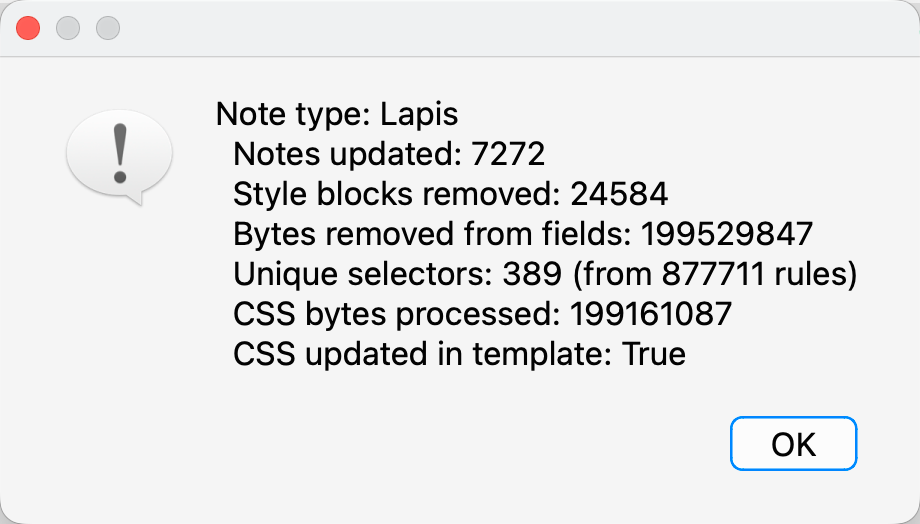
- Review the summary in the window
- Run Check Database to shrink the collection file after cleanup
To fix duplicate media references created by old Yomitan versions, use the same
deck, note type, and field selectors, then click Fix Yomitan Media Refs. This
uses Anki's media database checksums to point yomitan_dictionary_media_* and
yomitan_audio_* references at an existing same-content file. It does not create,
delete, move, or scan media files.
Use Save Defaults to persist the current deck, note type, field, and cleanup
options to the add-on config.
Example Screenshot

Configuration
See config.md for detailed configuration.
Quick defaults (from config.json):
{
  "decks": [],
  "note_types": ["Lapis"],
  "fields": ["Glossary", "MainDefinition"],
  "fields_by_note_type": {
    "Lapis": ["Glossary", "MainDefinition"]
  },
  "confirm_before_run": true,
  "extract_inline_styles": false,
  "extract_data_image_sources": false,
  "inline_style_min_length": 80,
  "inline_style_min_ratio": 0.05
}
Notes & Safety
- The add-on does not modify template Styling (useful if your Styling is auto-generated).
- Re-running is safe and idempotent: it will not duplicate imports or rules.
- Consider backing up your collection before the first run.
- Extracted inline styles are emitted with
!important to better preserve appearance.
- Inline style extraction thresholds are based on the number of notes containing inline styles.
- Extracted data images are stored as
hoshi_dict_<sha1>.<ext> media files,
matching Hoshi Reader's AnkiConnect dictionary media naming.
- Extracted CSS is stored in
collection.media/_extracted_css.css and also mirrored to user_files/extracted_css.css (easier to find).
- Yomitan media repair only rewrites note field references. Use Anki's Check Media if you want to review unreferenced duplicate files afterward.
License
AGPL-3.0-or-later