Voice Review
Review your Anki cards hands-free. Voice Review reads each card's front out
loud, listens to your spoken answer, and when you say "done" it shows the back
and grades you automatically with Google's Gemini AI.
The loop for every card:
front is read aloud → you say the answer → you say "done" → the back is
revealed → the AI grades what you said → the matching button (Again / Hard /
Good / Easy) is pressed for you.
Your microphone is processed on your own computer. Only the audio of your spoken
answer and the card's back are sent to Google for grading.

Requirements
- Windows. Voice Review uses the built-in Windows voice and Windows speech
components, so it does not work on Mac or Linux yet.
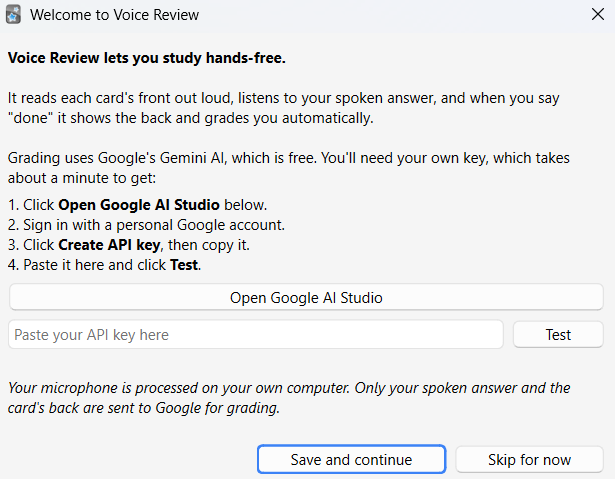
- A free Google Gemini API key. The add-on walks you through getting one the
first time it runs. It takes about a minute.
- A microphone.
Installing
Install it from AnkiWeb: https://ankiweb.net/shared/info/499865194
In Anki, go to Tools → Add-ons → Get Add-ons and paste the code 499865194.
The first time it starts, it downloads about 60 MB of speech files (this happens
once, and the files survive future updates). Then a welcome window helps you set
up your free Gemini key.
Using it
Just start reviewing. Voice Review reads the front, then listens. Say your
answer, then say "done", and it handles the rest.
- Ctrl+M turns voice mode on or off during review.
- Tools → Voice Review Settings opens the options.
Settings
Everything is in Tools → Voice Review Settings:
- The word that finishes your answer (default "done").
- How many seconds to show the grade before it is pressed.
- Whether the front is read aloud, and which voice and speed.
- Your API key, with a Test button to confirm it works.
- Whether to send your answer audio to the AI (best accuracy) or keep it fully
on your computer.
Privacy
Speech recognition of the trigger word runs locally on your computer. When you
finish an answer, the audio of that answer plus the card's back are sent to
Google's Gemini API for grading. Nothing else is uploaded. On Google's free
tier, submitted content may be used by Google to improve their products; you can
turn off sending audio in the settings to keep it fully local (grading then
relies on the local transcript, which is less accurate).
Uninstalling
Voice Review loads native speech libraries while Anki runs, and Windows will not
delete files that are in use. To remove it cleanly:
- Close Anki.
- Start Anki while holding the Shift key (this starts with add-ons off).
- Go to Tools → Add-ons, select Voice Review, and click Delete.
How it works
- Reading the front aloud uses the Windows speech engine (SAPI).
- Detecting "done" runs a small offline speech model (Vosk) on your machine,
so your voice does not leave the computer for this step.
- Grading sends your answer (as audio) and the card's back to Google Gemini,
which returns one of Again / Hard / Good / Easy with a short reason.
Building from source
scripts/build_addon.py builds the installable voice_review.ankiaddon.scripts/build_assets.py builds the anki_tts_assets.zip (the speech library
and model) that is hosted on the GitHub release and downloaded on first run.
License
MIT. See LICENSE.