Guitarist

AnkiWeb addon 573666321

Generates guitar chord study notes with SVG fretboard diagrams, fingerings, and offline synthesized or sample-bank strum audio, batch chord input, and two review cards per chord.
AI-generated summary; may contain mistakes.

card-creationcard-templates

Open on AnkiWeb GitHub Find alternatives

AnkiWeb

Votes
0 (👍 0 · 👎 0)
Updated
2026-09-10
Anki versions
26.09.3~
License
MIT (from the license file in the package)
Virus scan
No ClamAV match A match does not prove malware. No match does not prove that the code is safe.
Languages
Python, JSON
Description language
en

Maintenance

active

  • Last update or commit: 2026-10-18 (14 days before the snapshot).
  • Test files: 5.
  • Commits in the last year: 15.
  • Issues: 1 open, 0 closed.
  • Pull requests: 0 open, 4 merged.
  • Median first response: 141 hours (1 answered issues and pull requests).

Will it work on my Anki?

Version branches
Min AnkiMax AnkiUpdated
24.06.226.09.3+2026-09-10
History across monthly snapshots

Loading…

Similar addons

AnkiAI-ImageAddon

Automatically attaches images and GIFs to Anki vocabulary cards, classifying words into 14 groups, reranking candidate images with CLIP, and verifying them through Vision QC before insertion.

card-creationaibeta

1 votes 0% approval 👍 0 · 👎 1 ⭐ 0 Anki 25.09.3~ Updated 2026-08-23

Description

Guitarist

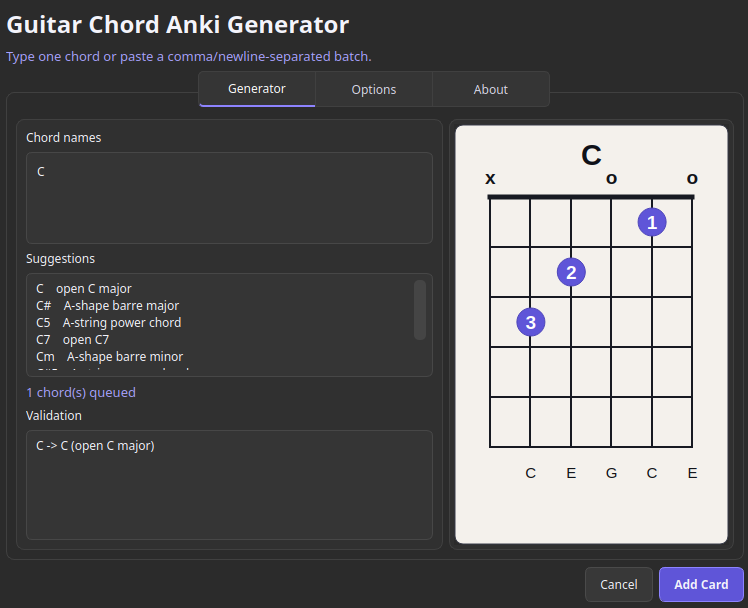
Guitarist is an Anki add-on for creating guitar chord study cards. Enter a single chord or paste a batch, preview the voicings, and generate complete Anki notes with fretboard diagrams, fingerings, and realistic strummed audio.

Guitarist chord generator

Features

  • Generate multiple guitar chords at once
  • Common open and movable E/A-shape voicings
  • Clear SVG fretboard diagrams
  • Chord fingering information
  • Realistic offline guitar audio synthesis
  • Fast, Medium, and Slow strum speeds
  • Separate note-by-note study playback
  • Two review cards for every generated chord
  • Configurable destination deck
  • Optional external WAV sample-bank support
  • Works entirely locally without external services

Supported Chords

  • Major
  • Minor
  • Dominant seventh
  • Major seventh
  • Minor seventh
  • Suspended fourth
  • Power chords

Examples:

C, Am, F#, Bb7, Gmaj7, Em7, Dsus4, A5

How to Use

  1. Install the add-on and restart Anki.
  2. Select Tools > Guitarist Chord Generator.
  3. Enter one chord or paste a comma- or line-separated list.
  4. Preview the generated voicings.
  5. Select your deck and preferred strum speed.
  6. Click Add Card.

Guitarist creates and maintains its own Guitarist Chord note type. Advanced settings can be changed from Anki's add-on configuration screen.

Compatibility

Tested with Anki 24.06.2 and, on Linux, Anki 26.09.3.

If you encounter a problem on another Anki version, please open an issue and include your Anki version and any error message.

Source Code and Support

Source code, releases, and issue tracker:

https://github.com/mdrmono/guitarist

Guitarist is open-source software released under the MIT License.

README

Guitarist

Guitarist is an Anki add-on for generating guitar chord study notes. Type one chord or paste a batch, then create Anki notes with fretboard diagrams, fingerings, generated strum audio, and two review cards.

Guitarist chord generator

Features

  • Tools menu chord generator dialog.
  • Editor toolbar entry point.
  • Batch chord input with validation and preview navigation.
  • Built-in common chord voicings for standard tuning.
  • Offline SVG fretboard diagrams.
  • Offline physical-model WAV synthesis for realistic strummed chord audio.
  • Optional external 44.1 kHz WAV sample banks for recorded strummed chord audio.
  • Selectable primary strum speed plus a separate note-by-note slow recording.
  • Speed-specific custom playback icons on generated Anki cards.
  • Configurable destination deck and managed Guitarist Chord note type.

Supported Chords

Major, minor, dominant seventh, major seventh, minor seventh, suspended fourth, and power chords are supported with common open voicings and movable E/A-shape voicings.

Examples:

C, Am, F#, Bb7, Gmaj7, Dsus4

Installation

Guitarist has been tested with Anki 24.06.2 and, on Linux, Anki 26.09.3. The v0.2.0 release package installed on Anki 26.09.3, opened the chord generator, and created a chord note.

Install using either method:

  • AnkiWeb: In Anki, select Tools > Add-ons > Get Add-ons, enter code 573666321, and confirm the installation.
  • Release file: Download the .ankiaddon file from the latest GitHub release. In Anki, select Tools > Add-ons > Install from file, choose the downloaded file, and confirm the installation.

Restart Anki, then select Tools > Guitarist Chord Generator.

If installation fails, include the exact error message, your operating system, Anki version, and whether you used the AnkiWeb code or release file when reporting it in a GitHub issue.

Enter one chord or paste a comma- or line-separated batch, preview the generated voicings, and choose Add Card. The Options tab lets you select the destination deck and control what happens to the input after notes are created. Advanced defaults, including the managed note type name, are documented in config.md. External recordings are not bundled; configure sampleBankPath to use a local sample bank and leave it blank to use Guitarist's built-in synthesizer.

Development

Run the tests:

python3 -m unittest

Install the working tree into Anki:

scripts/install_dev.sh

Restart Anki after copying files into addons21.

Build the distributable add-on package:

scripts/build_addon.sh

The package is written to dist/ with its version read from pyproject.toml.

For faster Python-only iteration, start Anki with the development reload action:

GUITARIST_DEV_RELOAD=1 anki

This adds Tools > Reload Guitarist Add-on, which reloads the add-on modules and opens a fresh generator dialog. Restart Anki for hook registration, startup, or already-constructed Qt widget changes that do not refresh cleanly.

License

Guitarist is available under the MIT License.