Cards GPT (Simple)
A minimal Anki add-on: pick input/output fields, choose text / image / audio, run from the browser. No prompts map, no DAG, no subscription — just your OpenAI API key.
Requires Anki 2.1 (Qt6) and an OpenAI API key (usage is billed by OpenAI).
Screenshots
Text — fill a field from another (e.g. term → definition):

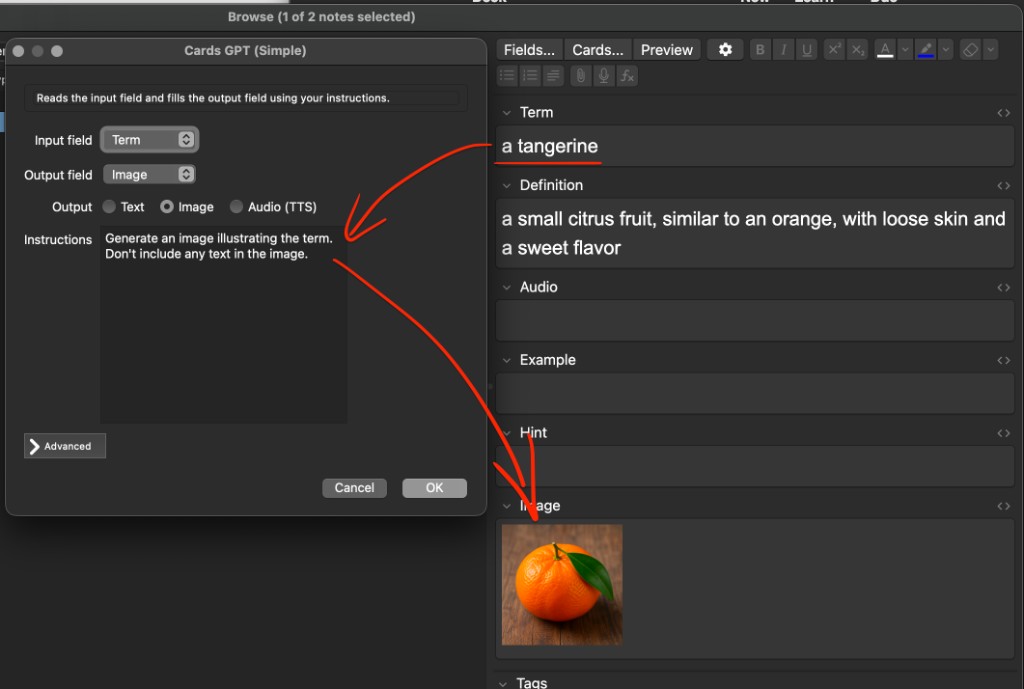
Image — generate an illustration into a field:

Install (AnkiWeb) — recommended
- In Anki: Tools → Add-ons → Get Add-ons…
- Paste the add-on code:
____________ (fill in after your AnkiWeb listing is approved)
- Restart Anki.
- Set your API key: Tools → Add-ons → Cards GPT (Simple) → Config, or Advanced in Process cards with GPT…
Manual install (GitHub)
No build step. Copy the add-on folder into Anki’s add-ons directory.
- Tools → Add-ons → View Files in Anki (opens the
addons21 folder). Go up one level if you land inside another add-on.
- Clone or download this repo:
git clone https://github.com/bchkv/cards-gpt-minimal.git
- Copy the project into
addons21 as its own folder (folder name can be anything; e.g. cards_gpt_simple):
cp -R cards-gpt-minimal \
  "$HOME/Library/Application Support/Anki2/addons21/cards_gpt_simple"
On Windows, use %APPDATA%\Anki2\addons21\. On Linux, ~/.local/share/Anki2/addons21/.
- Restart Anki. Set your API key in Config or Advanced (see above).
Developers: use ln -s instead of cp -R if you want Anki to load your git checkout directly.
Package for AnkiWeb (maintainers)
From the repo root:
chmod +x scripts/package.sh
./scripts/package.sh
This writes dist/cards-gpt-simple-<version>.ankiaddon (flat zip, no top-level folder, no __pycache__). Upload that file at ankiweb.net/shared/addons. Listing copy for the upload form is in ankiweb.md.
Use
Browse → right-click → Process cards with GPT…
- Input and output fields
- Output type (Text / Image / Audio)
- Instructions (what to generate)
- Advanced — API key, chat/image models, TTS voice, system prompt
Output types
| Mode |
Result |
| Text |
AI text in the output field |
| Image |
<img src="…"> in the output field |
| Audio |
[sound:….mp3] from the input text |