I'm aware that this add-on is not working for Anki 2.1.49. Unfortunately Anki 2.1.49 does not run on my system,yet (Ubuntu). As long as I cannot run Anki, I'll not be able to fix the bug.
Feel free to help me out, fix it and send me the new code (Github).
General
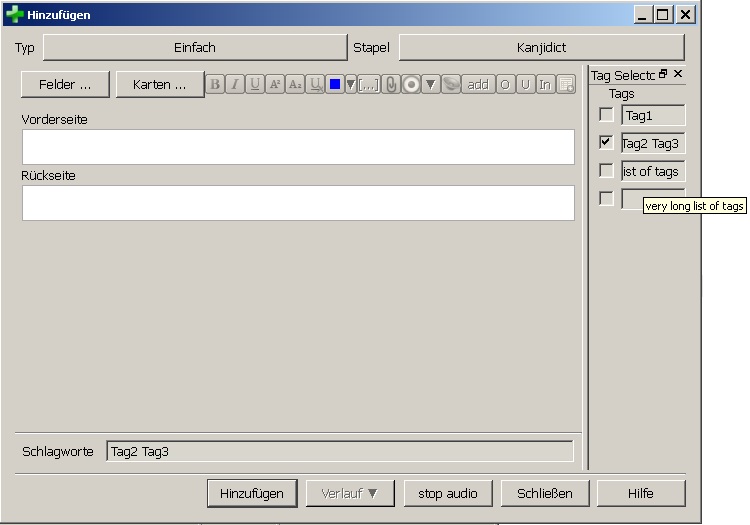
This add-on adds a bar on the right side of the Add-Cards-Dialog, inside the Browser and the edit cards dialog. (see picture)
You can use it for quick-selecting tags without the need to write them down everytime you need them.
Here's a short video that show's its functionality
Anki TagSelector V2 introduction
on youtube
Feel free to leave a comment/suggestion/bug report under the Youtube video. I appreciate every feedback!
Known bugs and workaround
-
"gShareDataAmongDecks" should be called gShareDataAmongProfiles. There is no way of using different tags for different decks.
-
TagSelector cannot be enabled inside the browser anymore.<br>
Workaround: "the tag selector can be used easily for editing already existing cards if you make a filtered deck, toggle off the rescheduling option and start 'reviewing' the deck. This way you can see the cards and edit them WITH the tag selector; while you're not changing any statistics or scheduling of the cards." (props @ Amber Schelfhout )
bug reports / suggestions / comments
I don't get any notification if someone writes a comment here. So please report bugs/contact me here:
On Github (best)
or on Youtube
History
Features in version 24.06.3.1
- Fixed, so it would work in this Anki version
- Re-introduced TagSelector for the Notes browser and note edit dialog
Github source for version 24.06.3.1
Features in V2.4:
- Fixed bug: In Anki 2.1.46, Anki showed an error message at the start of Anki.
- Removed Feature: TagSelector cannot be enabled inside the browser anymore. Reason (technical): Anki removed the
_onRowChanged function of Browser, which I used to reload the TagSelector. This can be fixed, but I don't have the time to do so. Feel free to fix this issue properly and send me the code :)
Features in V2.3:
- Fixed bug: Closing "Add Cards" dialog with Escape leaves a broken window open
- Fixed bug: TagSelector gets gradually bigger with each opening of "Add Cards" dialog.
- New Feature: clearing saved data is possible through menu: Tools -> Tag Selector -> clear saved data
Features in V2.2:
- Tooltips will be shown, if the cursor is over a tag field