For an overview of this add-on check out this TheAnKing video: Anki: How to Find Cards and Tags in the Browser. These also explain how to use two part shortcuts like Ctrl+t,d (on Mac Cmd+...)
# compatibility with recent Anki versions
The default shortcuts of this add-on break the built-in Latex-Shortcuts in 2.1.45 and some later versions. Everything works as expected in more recent versions such as Anki 23.10 from October 2023. So either update Anki or change the shortcuts of this add-on in the add-on config and restart Anki, for details see here.
The custom shortcut suggested by TheAnKing in his video about this add-on (Ctrl+6) no longer works in newer Anki versions because Anki introduced a new built-in shortcut (for the flag Turquoise) that uses Ctrl+6. If you've used the Anking's suggested shortcut you'll have to change the add-on config and restart Anki.
The functionality offered by the shortcut "editor: show filterdialog to add single tag" (default was "Ctrl+t, a") has been built into anki since Anki versions 2.1.50 from 2022-04-09. So this functionality was removed from the add-on for Anki versions 2.1.50 or later.
# known incompatibilies with other add-ons
Customize Keyboard Shortcuts seems to break the shortcut in 2024-01. You can still use the context menu. For further conflicts (some from years ago) see the end of this description.
# Compatibility with other add-ons
There are over 1000 add-ons. Many problems of add-ons are caused by conflicts between two addons. I can't test all combinations. I just the test with the add-ons I use. If my add-on does not work as expected disable all other add-ons and restart Anki. If my add-on works after restarting the problem is an add-on conflict. As the official troubleshooting guide (that you should know by heart if you use multiple add-ons) suggests find out which add-on exactly is causing the conflict, : "Remove any add-ons you don't need, and disable half of the others. If the problem continues, try the other half. Repeat the process until you've figured out which add-on is causing the problem. Then please" report which add-on conflicts with which functionality of my add-on. A report that just says "I have these 70 add-ons and your add-on does not work" is useless to me.
A common problem is shortcut conflicts. There are many add-ons that set shortcuts for the editor. If two add-ons set the same shortcut the shortcut doesn't work at all. To avoid such conflicts I deliberately used an unusual default shortcuts for the editor ("Ctrl+t,d"). You can adjust it in the config and use easier to type combinations. If the shortcut does not work you can use the context menu to open my dialog. (and you can also use shift+f10 in windows to open the context menu from the keyboard).
for older anki versions from 2020: The subtag matching from glutanimate's Bettertags only works if (a) bettertags is loaded before this add-on. E.g. rename the bettertags add-on folder to 1135507716 and (b) if you have adjusted the config of my add-on so that "basic_but_quick" is "false".
 note: to get completions in the extra dialog you need to adjust the add-on settings. This is not recommended, see the explanations on the right side of the add-on config window.
# features
Anki 2.1.50 from 2022-04-09 has a much improved tag area at the bottom of the editor. This add-on might no longer be needed.
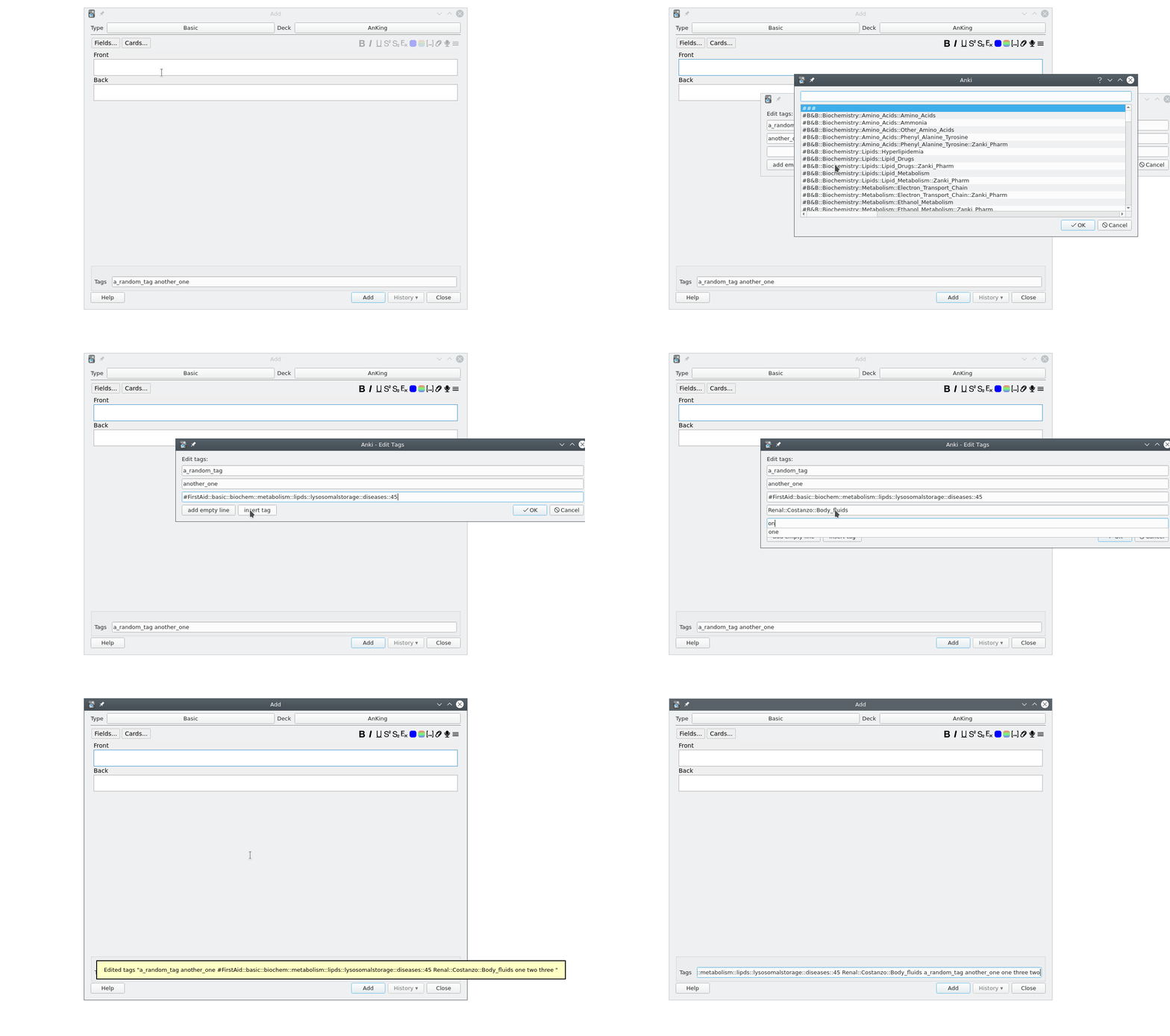
This add-on offers an extended tag editing/adding dialog that shows one tag per line, see the screencast below. You can open it from the context menu of the editor or by shortcut. You can set different shortcuts for the reviewer (default: "p") and the Add/EditCurrent/Browser window (default: "Ctrl+t, d" (mnemonic: tag-dialog)). This dialog is especially useful if you have multiple long (hierarchical) tags like this one taken from a popular shared deck for med students:
#B&B::Endocrinology::Adrenals::Congenital_Adrenal_Hyperplasia #FirstAid::endo::path::adrenal::cah #Pathoma::15_Endocrine::15.10-15.11-Adrenal_Cortex_&_Adrenal_Medulla Endocrine::Pathology
In older Anki versions from before 2022-09 on a small notebook screen the width of the window is too small so that parts of the content is hidden so that I have to put the cursor into the tag line and then go left/right. It's also not immediately clear where a new tag starts - the separating space is lost in a wall of text. That's why I prefer an extra dialog:
# acknowledgements
/u/BlueGreenMagick improved the handling of non-latin characters. This add-on is based on an idea by /u/AnKingMed who also helped with testing.
# Versions
- 2023-11-12 fix basic_but_quick: false (in 2.1.50+)
- 2023-06-04 fix a bug I introduced in the version from yesterday
- 2023-06-03 fix changes not saved in dialog for 12+ tags when using shortcut (thanks @DoctorToBeIn23/AnKingTeam for the bug report)
- 2022-03-13 handle notes with so many tags that the tag dialog is bigger than the screen - use simple dialog that allows scrolling in this case.
- 2021-12-06 update older versions to same newer
- 2021-12-05 fix for 2.1.50
- 2021-05-19 adjust for fastbar compatibility
- 2021-05-09 make add-on work with "one card per note" modes in Anki, misc changes collected over the last year, including a commit by ryerrabelli
- 2020-06-30 new default shortcuts, bug fix for prior release, misc enhancements like Ctrl+N/Ctrl+P to go through lines.
- 2020-06-06 (only for 2.120 or later): by default the completers are removed from the dialog to make the add-on much quicker. You can re-enable them by setting the new config key "basic_but_quick" to false.
- 2020-04-27 small improvement for filter dialog
- 2020-03-24 removed code for the night-mode add-on
- 2020-02-20 better support for non-latin characters
- 2020-01-22 better support for the night-mode add-on by BlueGreenMagick
- 2020-01-13 initial release
# bugs
Please do not use reviews for bug reports or support requests. I don't get notified of your reviews, and properly troubleshooting an issue through them is nearly impossible (formatting is limited and I can't reply multiple times). If you find a bug let me know in the official anki support forum, or on github.
# compatibility with Speed Focus Mode
If you use the add-on Speed Focus Mode (auto-alert, auto-reveal, auto-fail) there's this problem: If you open my tag add/edit window the speed focus mode continues counting the seconds in the reviewer window and rates and so on.
Workaround: In the reviewer you could press “e” to go to the edit current window. This should stop “Speed Focus Mode”. Then you can use the editor shortcut of my add-on “Ctrl+t,d” (or whatever you have configured) to open the tag dialog. After closing this dialog use “Esc” to close the edit current dialog. So you just need two additional shortcuts.
All add-on versions for 15-19, 20-49, and 50+ were identical in 2023-06-02 (these branches exist for historical reasons and can't be removed).