Anking Tables

AnkiWeb addon 854267140

Formats selected fields' tables with header rows and columns and provides a GUI toolbar for editing, table-tag checks, resetting edits and finding similar tables.
AI-generated summary; may contain mistakes.

note-managementsearchformatting

Open on AnkiWeb GitHub Find alternatives

AnkiWeb

Votes
4 (πŸ‘ 2 Β· πŸ‘Ž 2)
Updated
2024-05-20
Anki versions
2.1.1~
License
Not found (this does not mean that the addon has no license)
Virus scan
No ClamAV match A match does not prove malware. No match does not prove that the code is safe.
Languages
Python, JSON
Description language
en

Maintenance

active

  • Last update or commit: 2026-05-11 (174 days before the snapshot).
  • Commits in the last year: 0.
  • Issues: 5 open, 0 closed.
  • Pull requests: 2 open, 6 merged.
  • Median first response: 3963 hours (2 answered issues and pull requests).
  • Outside pull requests: 100% of 1 merged.

Will it work on my Anki?

Version branches
Min AnkiMax AnkiUpdated
2.1.1+2024-05-20
History across monthly snapshots

Loading…

Similar addons

Table generator

Adds a toolbar button for inserting customizable HTML tables into cards, with configurable rows, columns, header rows, three style presets, adaptive colors, and no HTML editing required.

formattingmobile-compatible

2 votes 34% approval πŸ‘ 2 Β· πŸ‘Ž 0 Anki 2.1.1~ Updated 2026-05-27
Add Table has 1 fork β†’

Inserts customizable HTML tables through a dialog or keyboard shortcut, or converts selected pipe-delimited markdown-like text into a table; it does not edit existing tables.

formattingshortcutsfork-or-reupload

144 votes 93% approval πŸ‘ 140 Β· πŸ‘Ž 4 ⭐ 7 Anki 2.1.65~ Updated 2023-06-18
AnkiBulk

Bulk-adds many notes at once via an editable table or YAML text view, exporting to the clipboard for LLMs or spreadsheets, using existing notes as context.

card-creationnote-management

2 votes 44% approval πŸ‘ 3 Β· πŸ‘Ž 0 ⭐ 0 Anki 26.05~ Updated 2026-08-05

Description

Convert tables into proper format to submit to the Anking Step Deck

How to Use

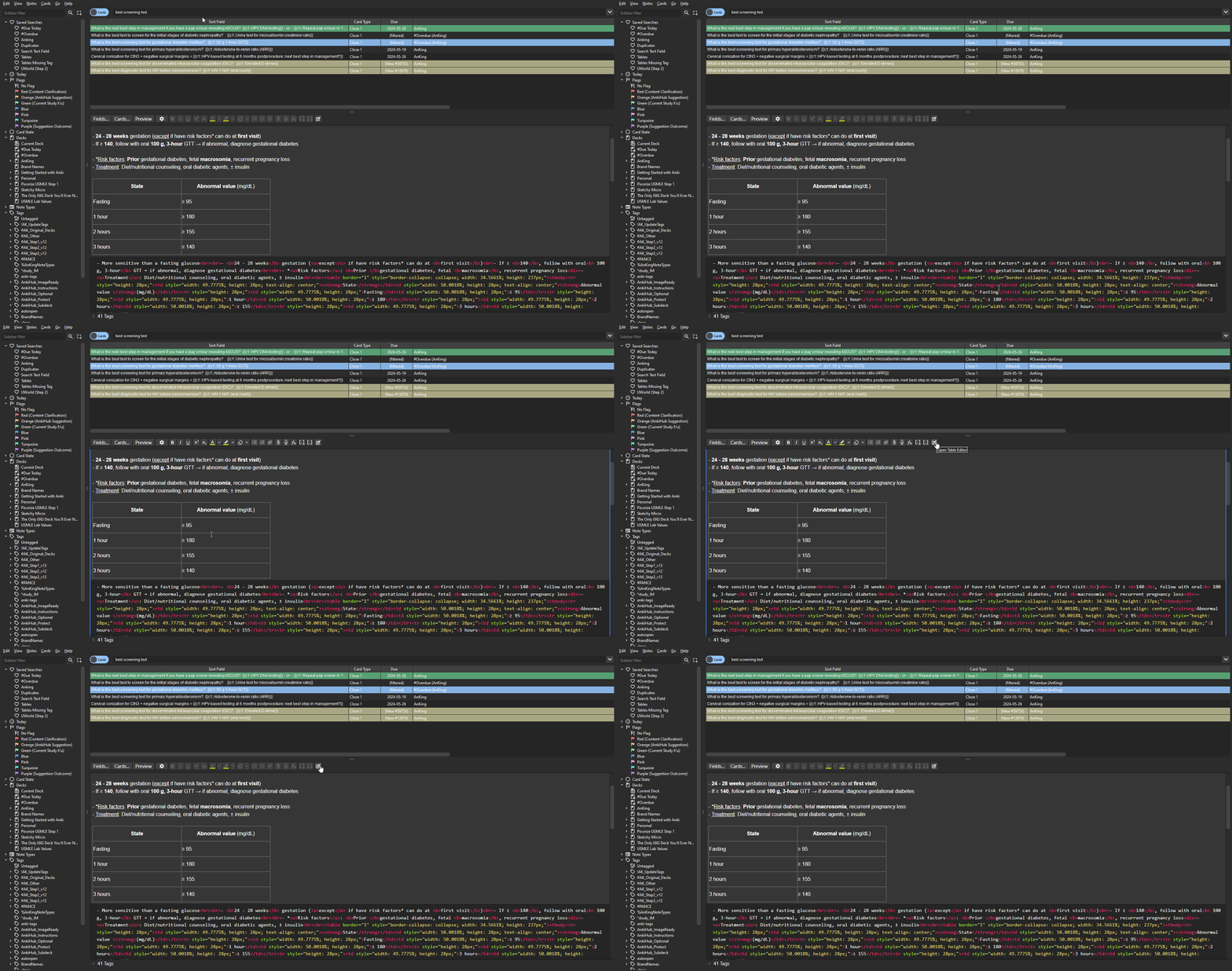
  • Select a field with a table in it (you do not need to place the cursor within the table anywhere in the field works)
  • Click the edit button (square with a pencil)
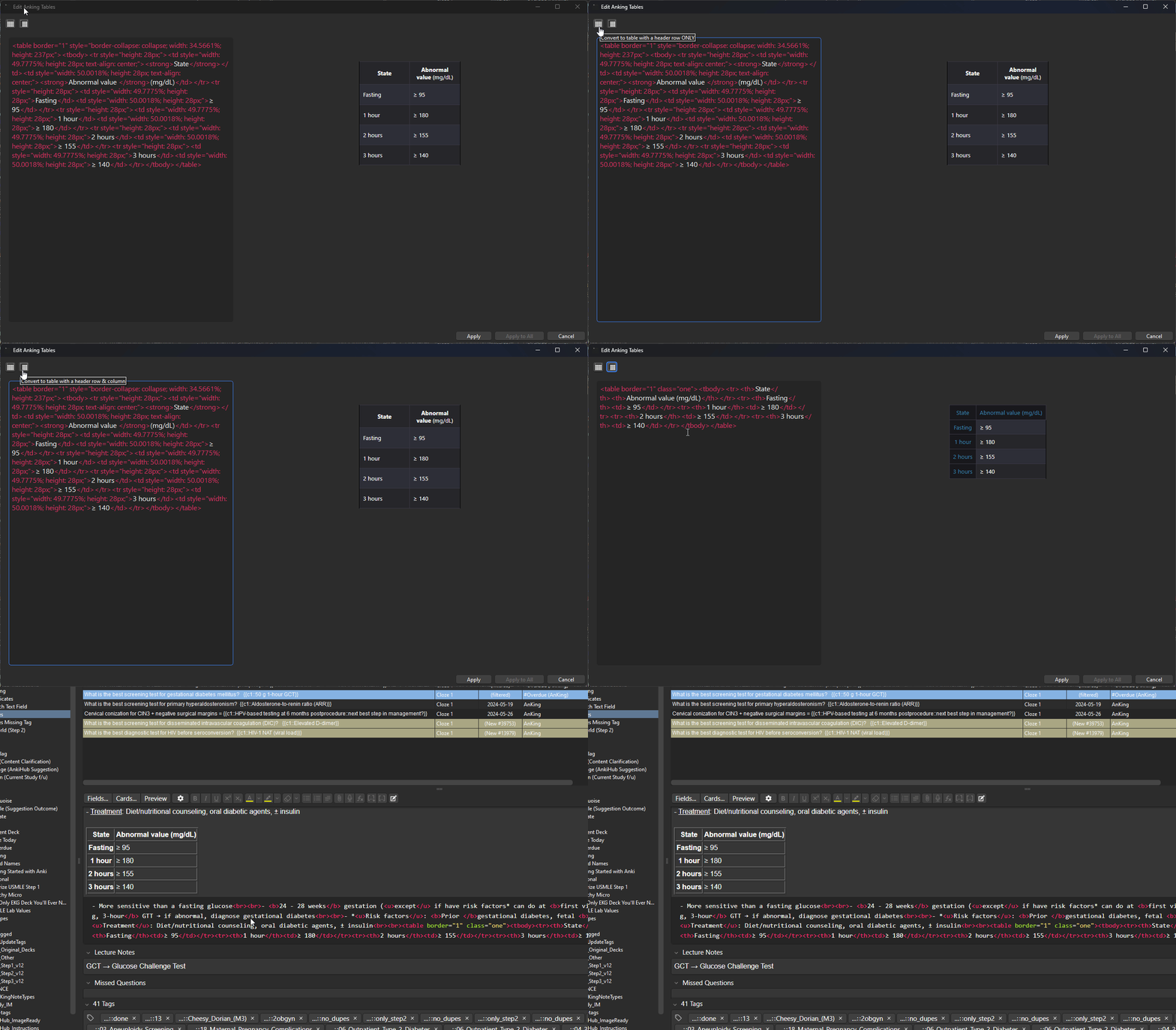
    • Click the Header Row Button to format only the top row as a header
    • Click the Header Row+Column Button to format both the top row and the first column as headers
    • Click apply and the table in your selected note will be updated

Support

If you encounter any issues or have suggestions for improvements, please submit an issue on the GitHub repository here

Convert table with header row and column

click edit button tutorial

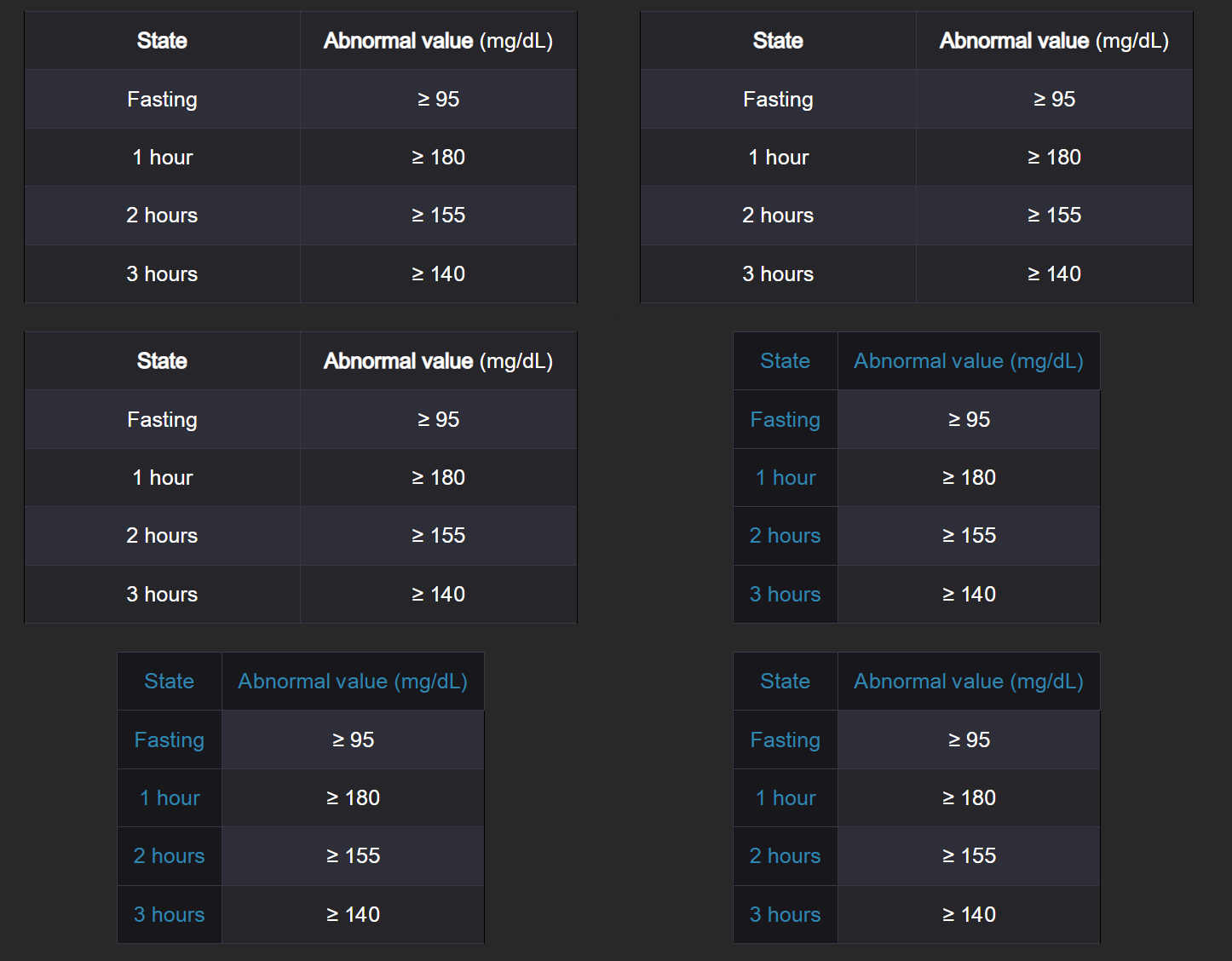
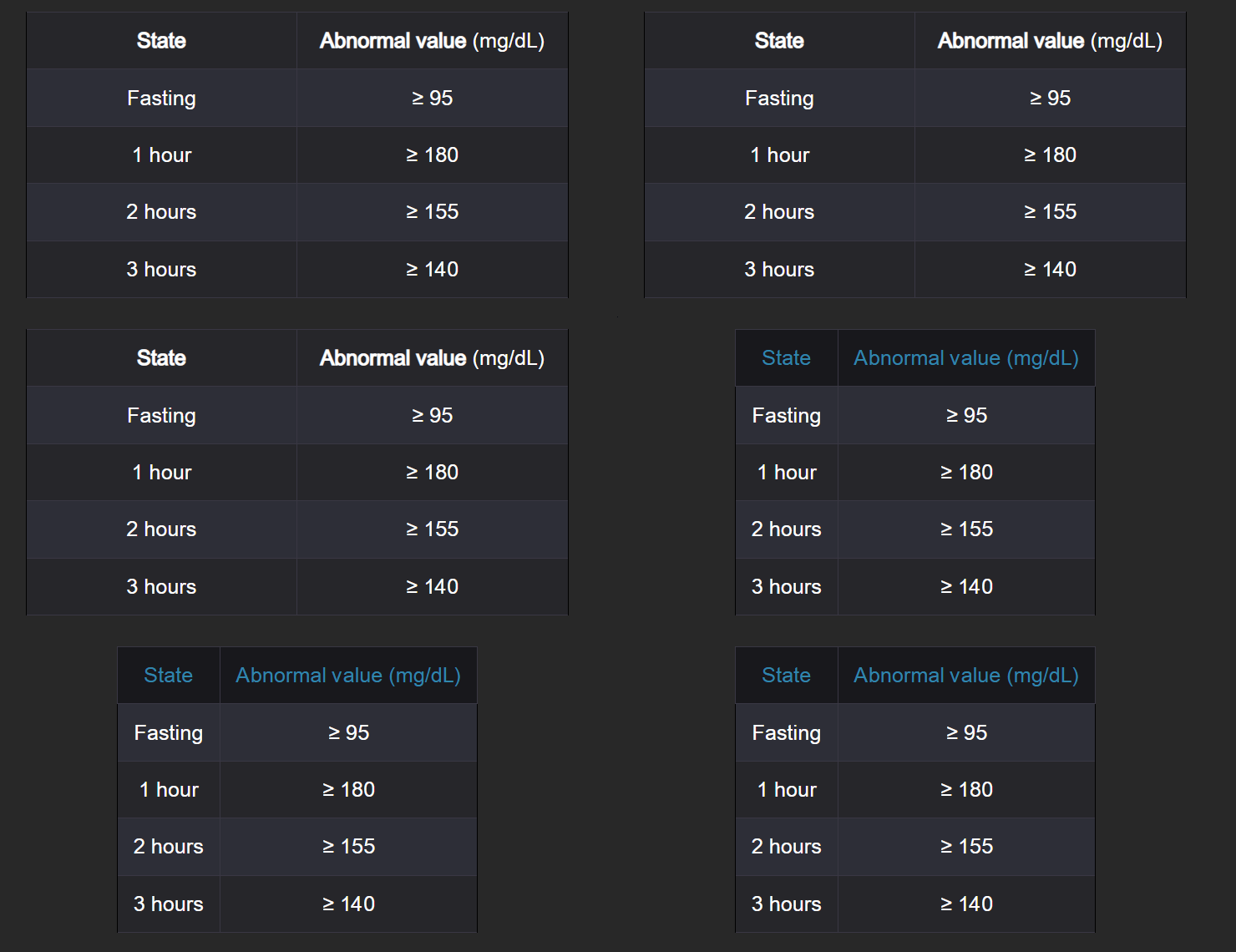
Results

header_column header_only

Roadmap (in no specific order)

Any help with these would be greatly appreciated!

  • [x] Add GUI
  • [x] Add support for checking if proper table tags are applied
    • [x] Add support for adding/updating table tags
  • [ ] PRIORITY: Add support to update all cards with table being edited
    • See this issue for more details and to lend your support
  • [x] Add additional table formatting options to toolbar (e.g. bold, italic, underline, etc.)
    • [ ] Add support for editing directly within the table and not directly within HTML
  • [ ] Colorize each HTML tag differently
  • [ ] Add support for multiple tables in a single field
  • [x] Add reset button to undo all edits from current session
  • [ ] Add support for adding new tables/adding rows and columns to existing tables
    • [ ] Add support for table formatting (e.g. merging cells)
  • [ ] Prevent multiple windows from opening
    • See this issue for more details and to lend your support
  • [x] Add button to search for cards that contain the same table based on keywords (i.e. same table but slightly different wording or formatting)

README

Convert tables into proper format to submit to the Anking Step Deck

Roadmap (in no specific order)

Any help with these would be greatly appreciated!

  • [x] Add GUI
  • [x] Add support for checking if proper table tags are applied
    • [x] Add support for adding/updating table tags
  • [ ] PRIORITY: Add support to update all cards with table being edited
    • See this issue for more details and to lend your support
  • [x] Add additional table formatting options to toolbar (e.g. bold, italic, underline, etc.)
    • [ ] Add support for editing directly within the table and not directly within HTML
  • [ ] Colorize each HTML tag differently
  • [ ] Add support for multiple tables in a single field
  • [x] Add reset button to undo all edits from current session
  • [ ] Add support for adding new tables/adding rows and columns to existing tables
    • [ ] Add support for table formatting (e.g. merging cells)
  • [ ] Prevent multiple windows from opening
    • See this issue for more details and to lend your support
  • [x] Add button to search for cards that contain the same table based on keywords (i.e. same table but slightly different wording or formatting)

How to Use

  • Select a field with a table in it (you do not need to place the cursor within the table anywhere in the field works)
  • Click the edit button (square with a pencil)
    • Click the Header Row Button to format only the top row as a header
    • Click the Header Row+Column Button to format both the top row and the first column as headers
    • Click apply and the table in your selected note will be updated

Support

If you encounter any issues or have suggestions for improvements, please submit an issue on the GitHub repository here

Convert table with header row and column

click edit button tutorial

Results

header_column header_only