Editor Highlighter
This add-on allows you to highlights any specified terms/patterns in the editor and (optionally) review/preview screen.
The default config highlights clozes in blue.
See Tools > Add-ons > Config for configuration.

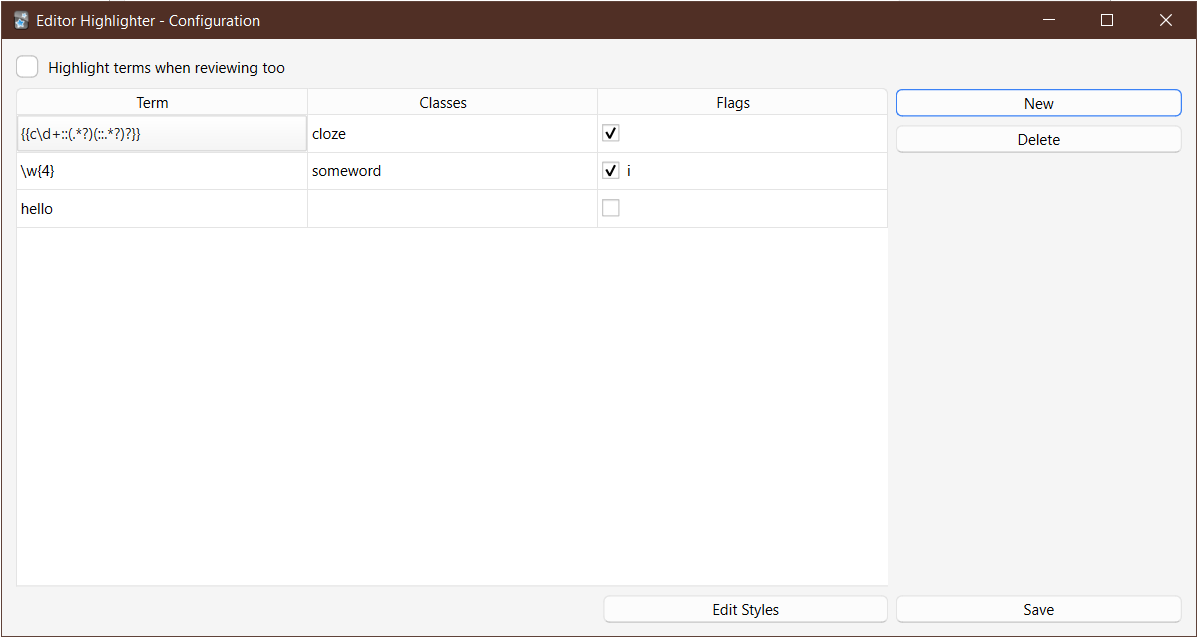
You can add new terms via the New button, delete the selected row via Delete, and edit terms by double clicking on them.
By default, the add-on highlights terms in blue, but you specify a different color or even different styles such as bold, italic and underline, by clicking on Edit Styles, which will open a CSS file.
You can also give different terms different styles by specifying custom CSS classes under the Classes column.
If you're technical enough, you can also tell the add-on to treat terms as regex patterns by checking in the checkbox under the Flags column. Here you can also specify flags such as i to match text in a case-insensitive manner.
By default, the add-on only highlights terms in the editor, but you can change it by checking the Highlight terms when reviewing too option. Note that this will only work if you opened the note at least once in the editor. This might be changed in the future.
Known Issues
- Sometimes the cursor jumps around to the previous word or the beginning of the field while the add-on highlights terms as they're typed.
Changelog
See CHANGELOG.md for a list of changes.
Download
You can download the add-on from AnkiWeb: 1521279388
Support & feature requests
Please post any questions, bug reports, or feature requests in the support page or the issue tracker.
If you want priority support for your feature/help request, I'm available for hire.
You can get in touch from the aforementioned pages, via email or on Fiverr.
Support me
Consider supporting me if you like my work:



I'm also available for freelance add-on development on Fiverr:

 You can add new terms via the New button, delete the selected row via Delete, and edit terms by double clicking on them.
By default, the add-on highlights terms in blue, but you specify a different color or even different styles such as bold, italic and underline, by clicking on Edit Styles, which will open a CSS file.
You can also give different terms different styles by specifying custom CSS classes under the Classes column.
If you're technical enough, you can also tell the add-on to treat terms as regex patterns by checking in the checkbox under the Flags column. Here you can also specify flags such as